Honda CR-V (2022 year). Manual in english - page 33
 

  Index      Manuals     Honda CR-V (2022 year). Manual in english


Search            copyright infringement  


Content      ..     31      32      33      34     ..


Honda CR-V (2022 year). Manual in english - page 33


526

uu

When Driving

u

Shifting

Driving

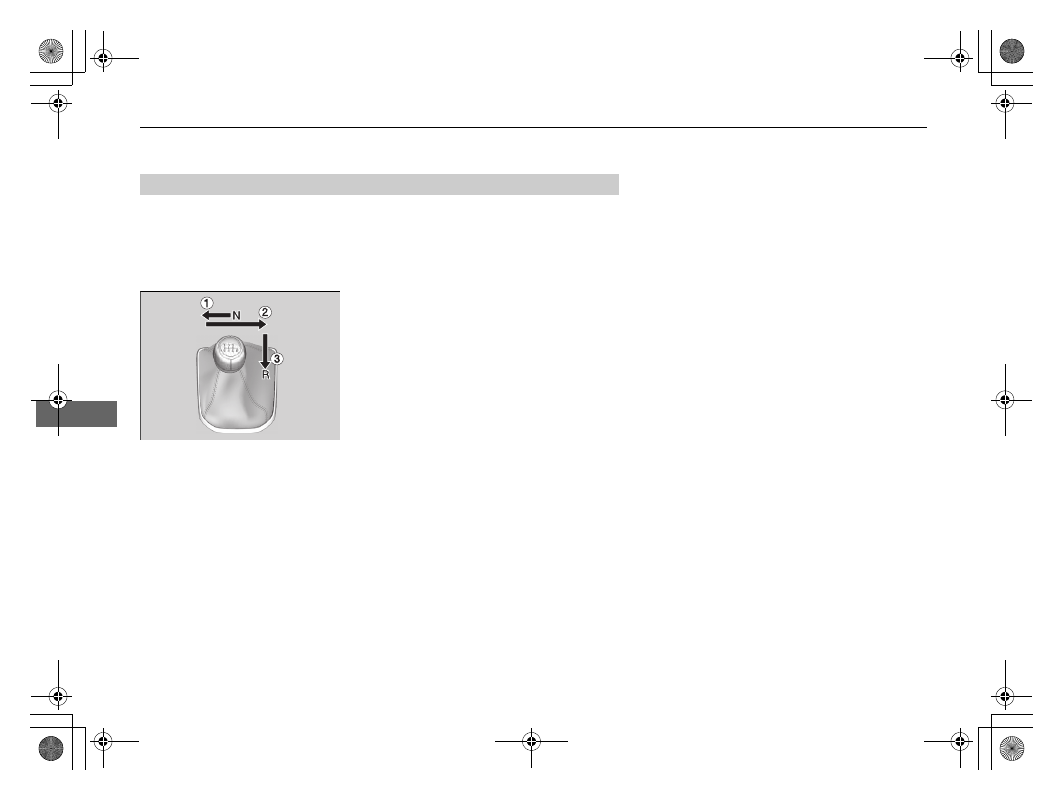
The manual transmission has a lockout mechanism that stops you from accidentally 
shifting into 

(

R

 from a forward gear while the vehicle is moving above a certain 

speed.

If you cannot shift to 

(

R

 when the vehicle is stopped, do the following:

1.

Depress the clutch pedal, move the shift 
lever all the way to the left, and shift to 

(

R

.

2.

If you still cannot shift into 

(

R

, apply the 

parking brake, and turn the ignition switch 
to ACCESSORY 

(

q

 or LOCK 

(

0

*1

.

3.

Depress the clutch pedal and shift into 

(

R

.

4.

Keep depressing the clutch pedal and start 
the engine.

Have the vehicle checked by a dealer if you 
have to go through this procedure repeatedly.

*1: Models with the keyless access system have an 

ENGINE START/STOP

 button instead of an 

ignition switch.

Reverse Lockout

527

uu

When Driving

u

ECON Mode

Driving

ECON Mode

The 

ECON

 button turns the ECON mode on and off.

The ECON mode helps you to improve your fuel economy by adjusting the 
performance of the engine, transmission, and climate control system.

1

ECON Mode

While in ECON mode, the climate control system has 
greater temperature fluctuations.

528

uu

When Driving

u

Auto Idle Stop

Driving

Auto Idle Stop

To help maximise fuel economy, the engine automatically stops when the vehicle 
comes to a stop, depending on environmental and vehicle operating conditions. The 
indicator (green) comes on at this time. The engine then restarts once the vehicle is 
about to move again, depending on environmental and vehicle conditions, and the 
indicator (green) goes off.

2

The Engine Automatically Restarts When:

 P. 531

The environmental and vehicle conditions that 
impact Auto Idle Stop system operation are 
varied.

2

Auto Idle Stop Activates When:

 P. 530

If the driver’s door is opened while the 
indicator (green) is on, a buzzer sounds to 
notify you that Auto Idle Stop function is in 
operation.

A message associated with Auto Idle Stop 
appears on the driver information interface.

2

Indicators

 P. 98

2

Customized Features

 P. 157, 408

Manual transmission models

1

Auto Idle Stop

The 12-volt battery installed in this vehicle is 
specifically designed for a model with Auto Idle Stop.
Using a 12-volt battery other than this specified type 
may shorten the 12-volt battery life, and prevent 
Auto Idle Stop from activating. If you need to replace 
the 12-volt battery, make sure to select the specified 
type. Ask a dealer for more details.

2

Specifications

 P. 768

The duration of the Auto Idle Stop operation:

Increases

 in the ECON mode, compared to when 

the ECON mode is off, with climate control in use.

2

ECON Mode

 P. 527

Auto Idle Stop 
Indicator (Green)

Continued

529

uu

When Driving

u

Auto Idle Stop

Driving

To turn the Auto Idle Stop system off, press 
this button. The Auto Idle Stop system stops.

u

Auto Idle Stop system will stop and the 
indicator (amber) will come on.

The Auto Idle Stop system is turned on every 
time you start the engine, even if you turned it 
off the last time you drove the vehicle.

Auto Idle Stop System ON/OFF

1

Auto Idle Stop System ON/OFF

If you turn off the Auto Idle Stop system while it is 
activated, the engine will restart.

Auto Idle Stop 
Indicator (Amber)

uu

When Driving

u

Auto Idle Stop

530

Driving

After the vehicle moves forward, stopping with the brake, the clutch pedal fully 
depressed, the shift lever in 

(

N

, and then the clutch pedal is released.

u

To restart the engine automatically, depress the clutch pedal.

Auto Idle Stop does not activate when:

The Auto Idle Stop 

OFF

 button is pressed.

The driver’s seat belt is not fastened.

The engine coolant temperature is low or high.

The vehicle comes to a stop again before the vehicle speed reaches 3 km/h (2 
mph) after the engine starts.

The shift lever is in any position except 

(

N

.

The engine is started with the bonnet open.

u

Turn off the engine. Close the bonnet before you restart the engine to activate 
Auto Idle Stop.

The battery charge is low.

The internal temperature of the battery is 5°C or less.

The climate control system is in use, and the outside temperature is below -20°C 
or over 40°C.

The climate control system is in use, and the temperature is set to 

Hi

 or 

Lo

.

 is on (the indicator on).

Auto Idle Stop may not activate when:

The steering wheel is operated.

The fan speed is high.

The climate control system is in use, and there is a significant difference between 
the set temperature and the actual interior temperature.

The climate control system is in use, and humidity in the interior is high.

Auto Idle Stop Activates When:

1

Auto Idle Stop Activates When:

Do not open a bonnet during idling stop. If the 
bonnet is opened, the engine will not restart 
automatically.
In this case, restart the engine with the ignition 
switch or the 

ENGINE START/STOP

 button.

2

Starting the Engine

 P. 510, 513

Pressing the 

ENGINE START/STOP

 button changes 

the power mode to ACCESSORY even while Auto Idle 
Stop is in operation. Once in ACCESSORY, the engine 
no longer restarts automatically. Follow the standard 
procedure to start the engine.

2

Starting the Engine

 P. 513

Even if you turn the ignition switch to START 

(

e


during the Auto Idle Stop activated, the engine does 
not start.

Models with keyless access system

Models without keyless access system

531

uu

When Driving

u

Auto Idle Stop

Driving

The clutch pedal is depressed.

The engine automatically restarts even if the clutch pedal is not depressed 
with the transmission in 

(

N

 when:

The Auto Idle Stop 

OFF

 button is pressed.

The steering wheel is operated.

Your vehicle is moved.

The brake pedal is released slightly during a stop.

The battery charge becomes low.

Fully depress the clutch pedal.

u

The engine automatically restarts.

The Engine Automatically Restarts When:

When Indicator Light (Green) Blinks in Auto Idle Stop

1

The Engine Automatically Restarts When:

If you are using an electronic device during Auto Idle 
Stop, the device may temporarily be turned off when 
the engine restarts.

The engine does not restart automatically when there 
is a problem in the system. Follow the normal 
procedure to start the engine.

2

Starting the Engine

 P. 510, 513

During Auto Idle Stop, the engine does not restart 
automatically if:

The driver’s seat belt is unlatched. To keep Auto 
Idle Stop activated, fasten your seat belt 
immediately.

The transmission is put into a position other than 

(

N

. Put the transmission into 

(

N

.

2

Driver Information Interface Warning 
and Information Messages

 P. 122

When the system stops operating, follow the normal 
procedure to start the engine.

2

Starting the Engine

 P. 510, 513

1

When Indicator Light (Green) Blinks in Auto Idle Stop

The indicator starts blinking rapidly under the 
following conditions:

 is touched.

When the climate control system is in use and 
moisture builds up inside the vehicle.

When the climate control system is in use and the 
difference between the set temperature and the 
actual temperature inside the vehicle becomes 
significant.

532

uu

When Driving

u

Adjustable Speed Limiter

Driving

Adjustable Speed Limiter

This system enables you to set a maximum speed that cannot be exceeded even if 
you are depressing the accelerator pedal.
The vehicle speed limit can be set from about 30 km/h (18 mph) to about 250 km/h 
(156 mph).

1

Adjustable Speed Limiter

The adjustable speed limiter may not hold the set 
speed limit when driving downhill. If this occurs, slow 
down by depressing the brake pedal.

When not using the adjustable speed limiter:
Turn off the adjustable speed limiter by pressing the 

MAIN

 button.

You cannot use the adjustable speed limiter and the 
adaptive cruise control (ACC)

*

/adaptive cruise control 

(ACC) with LSF

*

 or intelligent speed limiter at the 

same time.

When the engine speed slows down, try to 
downshift.

3

WARNING

Adjustable Speed Limiter has limitations.
It is always your responsibility to adjust the 
vehicle speed to obey the actual speed 
limit, and safely operate the vehicle.

3

WARNING

Do not depress the accelerator pedal more 
than necessary.
Maintain an appropriate accelerator pedal 
position depending on the vehicle speed.

Manual transmission models

Press the 

MAIN

 button 

on the steering wheel

The indicator is on in 
the instrument panel

Adjustable speed limiter is 
ready to use.

If a different indicator comes on, 
press the 

LIM

 button to switch to 

the adjustable speed limiter.

How to use

* Not available on all models

Continued

533

uu

When Driving

u

Adjustable Speed Limiter

Driving

Take your foot off the accelerator pedal and press the 

–/SET

 button when you 

reach the desired speed. 
The moment you release the 

–/SET

 button, the speed limit is fixed, and the 

adjustable speed limiter is set. The speed limit is displayed.

You can set the previously set speed limit by pressing the 

RES/+

 button.

To Set the Speed Limit

1

To Set the Speed Limit

If you set the speed limit while travelling at less than 
30 km/h (18 mph), the speed limit is set to 30 km/h 
(18 mph).

The beeper sounds and the displayed speed limit 
blinks if the vehicle speed exceeds the limit by 3 km/h 
(2 mph) or more on a steep descent.

The adjustable speed limiter is set to the current 
speed if it is higher than the previously set speed limit 
when you press the 

RES/+

 button.

You can switch the displayed set speed 
measurements between km/h and mph on the driver 
information interface.

2

Speedometer

 P. 146

2

Customized Features

 P. 157, 408

On when the 
adjustable speed 
limiter is set

Press and release

−/SET

 Button

RES/+

 Button

uu

When Driving

u

Adjustable Speed Limiter

534

Driving

Increase or decrease the speed limit by using the 

RES/+

 or 

–/SET

 buttons on the 

steering wheel.

Each time you press the button, the speed limit increases or decreases by 1 km/h 
or 1 mph accordingly.

If you keep the button pressed, the speed limit increases or decreases in 
increments of 10 km/h or 10 mph every 0.5 second until system limit is reached.

The vehicle may accelerate or decelerate until the set speed is reached.

The speed limit can be exceeded by depressing the accelerator pedal completely.

u

The displayed limit speed blinks.

u

The beeper sounds once the speed limit has been exceeded.

To Adjust the Speed Limit

Exceeding the Speed Limit Temporarily

To decrease speed

To increase speed

1

Exceeding the Speed Limit Temporarily

The beeper sounds when the vehicle speed goes 
higher than the set speed limit with the accelerator 
pedal depressed completely.

The adjustable speed limiter resumes working once 
the vehicle speed goes lower than the set speed limit.

535

uu

When Driving

u

Adjustable Speed Limiter

Driving

To cancel the adjustable speed limiter, do any 
of the following:

Press the 

CANCEL

 button.

Press the 

MAIN

 button.

Press the 

LIM

 button.

To Cancel

1

To Cancel

The adjustable speed limiter changes into adaptive 
cruise control (ACC)

*

/adaptive cruise control (ACC) 

with LSF

*

 or intelligent speed limiter if the 

LIM

 button 

is pressed.

If there is a problem with the system when you are 
using the adjustable speed limiter, the beeper sounds 
and 

OFF

 comes on. The adjustable speed limiter will 

be turned off.

CANCEL

 Button

MAIN

 Button

LIM

 Button

* Not available on all models

536

uu

When Driving

u

Intelligent Speed Limiter

Driving

Intelligent Speed Limiter

Automatically sets the speed limit that the traffic sign recognition system detects. 
And the speed limit cannot be exceeded even if you are depressing the accelerator 
pedal. If you fully depress the accelerator the speed limit can be exceeded.

2

Traffic Sign Recognition System

 P. 615

1

Intelligent Speed Limiter

Depending on the amount of depression of the 
accelerator pedal, the vehicle will accelerate until it 
reaches the speed identified by the traffic sign 
recognition system.

3

WARNING

Intelligent Speed Limiter has limitations. 
The Intelligent Speed Limiter may set itself 
to a speed above or below the actual speed 
limit, or may not work, particularly where 
the traffic sign recognition system does not 
operate correctly or where a road has no 
speed limit signs. It is always your 
responsibility to adjust the speed to obey 
the actual speed limit and to safely operate 
the vehicle.

Continued

537

uu

When Driving

u

Intelligent Speed Limiter

Driving

1

Intelligent Speed Limiter

The system is designed to detect signs that follow the 
Vienna Convention standards. Not all signs may be 
detected, but any signs posted on roadsides should 
not be ignored. The system does not work on the 
designated traffic signs of all the countries you travel, 
nor in all situations.

2

Traffic Sign Recognition System

 P. 615

If the intelligent speed limiter is set to the wrong 
speed limit, try one of the following:
To cancel

Press the 

CANCEL

 button.

Press the 

MAIN

 button.

Press the 

LIM

 button.

To exceed the speed limit temporarily

Depress the accelerator pedal fully.

The intelligent speed limiter may not hold the set 
speed limit when driving downhill. If this occurs, slow 
down by depressing the brake pedal.

When not using the intelligent speed limiter, turn off 
the intelligent speed limiter by pressing the 

MAIN


button.

You cannot use the intelligent speed limiter and 
adaptive cruise control (ACC)

*

/adaptive cruise control 

(ACC) with LSF

*

 or adjustable speed limiter at the 

same time.

How to use

The indicator is on in 
the instrument panel

Intelligent speed limiter is 
ready to use.

Press the 

MAIN

 button 

on the steering wheel

If a different indicator comes on, 
press the 

LIM

 button to change it to 

the intelligent speed limiter.

* Not available on all models

uu

When Driving

u

Intelligent Speed Limiter

538

Driving

The moment you release the 

–/SET

 button or 

RES/+

 button, the intelligent speed 

limiter is set to the speed limit that the traffic sign recognition system detects. The 
speed limit is displayed.

To Set the Speed Limit

1

Intelligent Speed Limiter

When the engine speed slows down, try to 
downshift.

Do not use the intelligent speed limiter in areas of 
different units from the display unit of the intelligent 
speed limiter.
Change the displayed measurement of the set vehicle 
speed to the same units as the driving areas.

2

Speedometer

 P. 146

2

Customized Features

 P. 157, 408

Manual transmission models

1

To Set the Speed Limit

If you set the intelligent speed limiter when the speed 
limit that the traffic sign recognition system detects is 
less than 30 km/h (20 mph), the speed limitation 
function and warning function may switch to pause.

If your vehicle speed is higher than the speed limit 
that the traffic sign recognition system detects, your 
vehicle decelerates slowly to the speed limit or less. If 
necessary, slow down by depressing the brake pedal.
And the beeper sounds and the displayed speed limit 
blinks if the vehicle speed exceeds the limit by 3 km/h 
(2 mph) or more.

On when the intelligent speed 
limiter is set to the speed limit 
that the traffic sign 
recognition system detects.

Press and release

−/SET

 Button

RES/+

 Button

Continued

539

uu

When Driving

u

Intelligent Speed Limiter

Driving

When the traffic sign recognition system detects the new speed limit sign

The intelligent speed limiter is set to the new speed limit that the traffic sign 
recognition system detects.

The speed limitation function and warning function may switch to pause 
if there is no speed limit sign in the screen of the traffic sign recognition 
system when:

The end of speed limit or other designated limit is detected.

Your vehicle enters/exits motorway or highway.

You make a turn with a turn signal at an intersection.

1

To Set the Speed Limit

The intelligent speed limiter may also switch to pause 
when the traffic sign recognition system detects only 
additional speed limit signs.

540

uu

When Driving

u

Intelligent Speed Limiter

Driving

When the traffic sign recognition system detects the speed limit sign 
while the intelligent speed limiter is paused

The speed limitation function and warning function will be resumed automatically.

When the traffic sign recognition system does not detect the speed limit 
sign for a time while the intelligent speed limiter is activated

While driving, in addition to when the traffic sign recognition system detects no 
speed limit sign, the traffic sign recognition system may display no speed limit.
But, intelligent speed limiter functions continue.

Continued

541

uu

When Driving

u

Intelligent Speed Limiter

Driving

Increase or decrease the speed limit by using the 

RES/+

 or 

–/SET

 buttons on the 

steering wheel.

Each time you press the button, the speed limit is increased or decreased by about 
1 km/h or 1 mph accordingly.

You can increase the speed limit up to +10 km/h or +5 mph on the basis of the 
speed limit that the traffic sign recognition system detects.

You can decrease the speed limit up to -10 km/h or -5 mph on the basis of the 
speed limit that the traffic sign recognition system detects.

You can accelerate until the set speed is reached. If your vehicle speed is higher 
than the speed limit that the traffic sign recognition system detects, your vehicle 
decelerates slowly to the speed limit.

The speed limit can be exceeded by depressing the accelerator pedal fully.

u

The displayed speed limit blinks.
The beeper sounds once the speed limit has been exceeded.

To Adjust the Speed Limit

1

To Adjust the Speed Limit

A negative or positive offset with respect to the 
speed limit will be reset automatically when the 
traffic sign recognition system detects a new speed 
limit sign.

You cannot decrease the speed limit to less than 30 
km/h (18 mph).

Exceeding the Speed Limit Temporarily

To decrease speed

To increase speed

1

Exceeding the Speed Limit Temporarily

The beeper sounds when the vehicle speed goes 
higher than the set speed limit with the accelerator 
pedal depressed completely.

The intelligent speed limiter resumes working once 
the vehicle speed goes lower than the set speed limit.


Content      ..     31      32      33      34     ..