Honda CR-V (2022 year). Manual in english - page 1
 

  Index      Manuals     Honda CR-V (2022 year). Manual in english


Search            copyright infringement  


Content      ..      1       2         ..


Honda CR-V (2022 year). Manual in english - page 1


11

Quick

 Referenc

e Guide

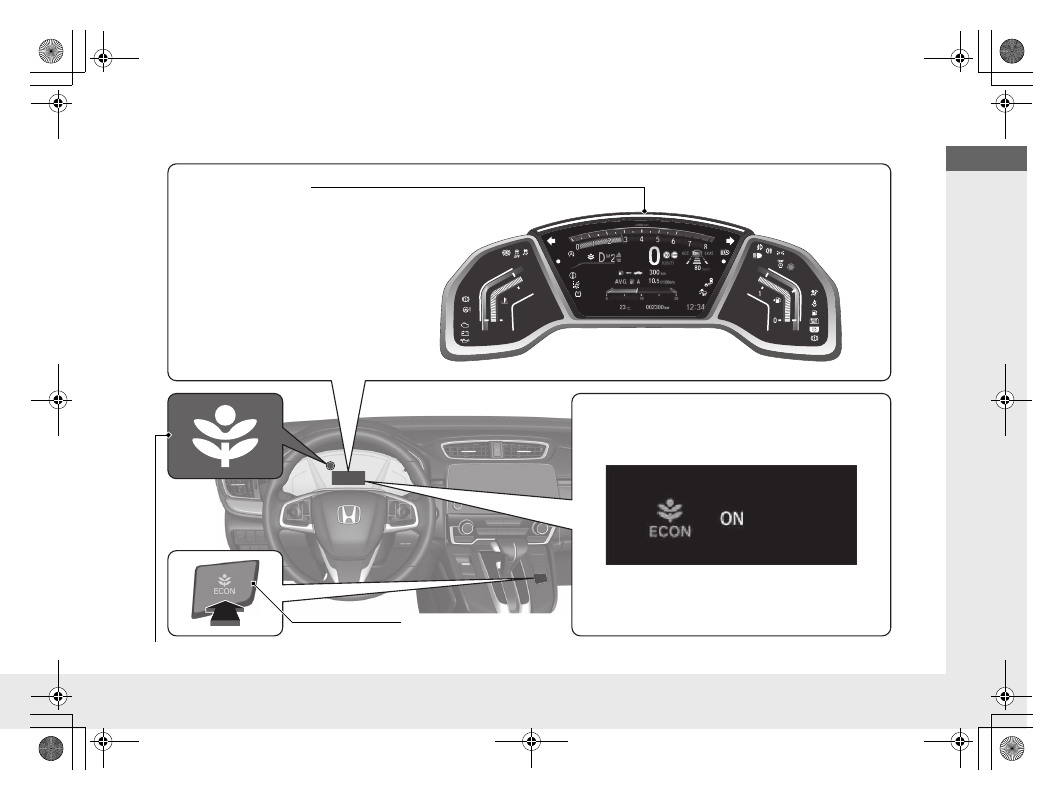
Eco Assist System

Ambient Meter

The colour of the ambient meter 
changes to green to indicate that 
the vehicle is being driven in a fuel 
efficient manner.

ECON Button 

(P527)

Helps to maximise fuel 
economy.

ECON Mode Indicator 

(P111)

Comes on when the 

ECON

 button is pressed.

The message is displayed for a few seconds 
when the ECON button is pressed.

*

 Not available on all models

12

Quick

 Referenc

e Guide

Auto Idle Stop Function

*

To improve fuel economy, the engine stops and then restarts as detailed below. When Auto Idle Stop is on, the Auto Idle Stop indicator 
(green) comes on. 

(P112)

At

Manual transmission

Engine status

Deceleration

1. Depress the brake pedal.
2. Fully depress the clutch pedal.

Stop

Continue to depress the brake pedal.

Move the shift lever to 

(

N

.

Release the clutch pedal.

Start-up

1. Depress the clutch pedal again.
2. Move the shift lever to 

(

1

.

3. Depress the accelerator pedal to 

resume driving.

On

Off

Restarting

13

Quick

 Referenc

e Guide

Safe Driving 

(P 37)

Airbags 

(P56)

Your vehicle is fitted with airbags to help to protect you and 
your passengers during a moderate-to-severe collision.

Child Safety 

(P70)

All children 12 and younger should be seated in the rear seat.

Small children should be properly restrained in a front facing child restraint system.

Infants must be properly restrained in a rear-facing child restraint system on a rear 
seat.

Exhaust Gas Hazard 

(P94)

Your vehicle emits dangerous exhaust gases that contain carbon 
monoxide. Do not run the engine in confined spaces where carbon 
monoxide gas can accumulate.

Before Driving Checklist 

(P42)

Before driving, check that the front seats, head restraints, 
steering wheel, and mirrors have been properly adjusted.

Seat Belts 

(P43)

Fasten your seat belt and sit upright well 
back in the seat.

Check that your passengers are wearing 
their seat belts correctly.

Fasten your lap belt as 
low as possible.

*

 Not available on all models

14

Quick

 Referenc

e Guide

Instrument Panel 

(P97)

Indicators 

(P98)

/Driver Information Interface 

(P147)

/Gauges 

(P146)

/

Head-Up Display

(P168)

System Indicators

Malfunction Indicator 
Lamp

Low Oil Pressure Indicator

Charging System Indicator
Anti-lock Brake System 
(

ABS

) Indicator

Vehicle Stability Assist 
(VSA) System Indicator

VSA 

OFF

 Indicator

Low Tyre Pressure/
Deflation Warning 
System Indicator

Electric Power Steering 
(EPS) System Indicator

Seat Belt Reminder Indicator

System Indicators

Parking Brake and Brake 
System Indicator (Red)

Supplemental Restraint 
System Indicator

Tachometer

Driver Information Interface

Fuel Gauge

Immobilizer System 
Indicator/Security 
System Alarm Indicator

Left-hand Drive Type

Shift Position Indicator

*

/

Transmission System Indicator

*

Low Fuel Indicator

ECON Mode Indicator

Turn Signal and Hazard 
Warning Indicators

Parking Brake and Brake 
System Indicator (Amber)

System Indicators

Automatic Brake Hold 
System Indicator

Automatic Brake Hold 
Indicator

Temperature 
Gauge

Lights Indicators

Lights On Indicator

High Beam Indicator

Front Fog Light Indicator

*

Speedometer

System Message Indicator

Adjustable Speed 
Limiter Indicator

Auto Idle Stop System 
Indicator (Amber)

*

/

Auto Idle Stop 
Indicator (Green)

*

Auto High-Beam 
Indicator

Adaptive Cruise 
Control (ACC) with 
Low Speed Follow 
(LSF)

*

 Indicator 

(Amber/Green)

Lane Keeping Assist 
System (LKAS) 
Indicator (Amber/
Green)

Collision Mitigation 
Braking System (CMBS) 
Indicator

Road Departure 
Mitigation Indicator

Immobilizer System Indicator/
Security System Alarm 
Indicator

Right-hand Drive Type

Head-Up Display

*

M

 (7-speed manual shift mode) 

Indicator/Shift Indicator

*

Blind spot information 
System Indicator

*

Rear Fog Light Indicator

Intelligent Speed 
Limiter Indicator

15

Quick

 Referenc

e Guide

Controls 

(P173)

Clock 

(P174)

The audio system receives signals from GPS 
satellites, updating the clock automatically.

Models with navigation system

a

Press and hold the 

MENU/CLOCK


button.

b

Rotate 

 to change hour, then press 

.

c

Rotate 

 to change minute, then 

press .

d

Select 

SET

, then press 

.

These indications are used to show how to 
operate the selector knob.

Rotate 

 to select.

Press 

 to enter.

Models with colour audio system

a

Select the 

 (Home) icon, then select 

Settings

.

b

Select 

Clock

, then 

Clock Adjustment

.

c

Touch the respective 

/

 icon to 

adjust the hours or minutes up or 
down.

d

Select 

OK

.

Models with Display Audio

3 4

*

 Not available on all models

16

Quick

 Referenc

e Guide

ENGINE START/STOP 
Button

*


(P215)

Press the button to change the vehicle’s 
power mode.

Turn Signals 

(P219)

Turn Signal Control Lever

Lights 

(P220)

Light Control Switches

Low Beam

High Beam

Flashing the high beams

17

Quick

 Referenc

e Guide

Wipers and Washers 

(P231)

*1 : Models with automatic intermittent wipers
*2 : Models without automatic intermittent wipers

Wiper/Washer Control Lever

MIST
OFF
AUTO

*1

: Wiper speed varies 

automatically

INT

*2

: Low speed with 

intermittent

LO

: Low speed wipe

HI

: High speed wipe

Pull toward 
you to spray 
washer fluid.

Adjustment Ring

(

-

: Low Sensitivity

*1

(

-

: Lower speed, fewer sweeps

*2

(

+

: High Sensitivity

*1

(

+

: Higher speed, more sweeps

*2

AUTO

 should always be turned 

OFF

 before 

the following situations in order to prevent 
severe damage to the wiper system:

Cleaning the windscreen

Driving through a car wash

No rain present

Models with automatic intermittent wipers

Steering Wheel 

(P241)

To adjust, pull the adjustment lever 
towards you, adjust to the desired 
position, then lock the lever back in place.

To adjust

To lock

Lever

*

 Not available on all models

18

Quick

 Referenc

e Guide

Unlocking the Front 
Doors from the Inside 

(P186)

Pull either front door inner handle to 
unlock and open it at the same time.

Tailgate 

(P189)

Use a forward and back kicking motion 
under the centre of the rear bumper to 
open or close the power tailgate while 
carrying the keyless remote.

Models with power tailgate

1 sec.

With all the doors unlocked, press the 
outer handle and lift open the tailgate.

Press the outer handle to unlock and 
open the tailgate when you have the 
keyless remote on you.

Press the power tailgate button on the 
driver’s side control panel, or press the 
remote transmitter.

Models without keyless access system

Models with keyless access system

Models with power tailgate

Outer Handle

19

Quick

 Referenc

e Guide

Power Door Mirrors 

(P243)

With the ignition switch in ON 

(

w

*1

, move 

the selector switch to 

L

 or 

R

.

Push the appropriate edge of the 
adjustment switch to adjust the mirror.

Press the folding button to fold in and 
out the door mirrors.

Selector Switch

Adjustment Switch

Folding Button

Power Windows 

(P206)

With the ignition switch in ON 

(

w

*1

, open 

and close the power windows.

If the power window lock button is in the 
off position, each passenger’s window 
can be opened and closed with its own 
switch.

If the power window lock button is in the 
on position (indicator on), each 
passenger’s window switch is disabled.

*1 : Models with the keyless access system have an 

ENGINE START/STOP

 button instead of an ignition 

switch.

Power Window Lock Button

Window switches

Indicator

20

Quick

 Referenc

e Guide

Climate Control System 

(P290)

Press the 

AUTO

 button to activate the climate control system.

Press the 

 button to turn the system on or off.

Press the 

 button to defrost the windscreen.

Air flows from 
dashboard 
vents, and 
back of the 
centre console.

Air flows from 
floor and 
dashboard 
vents, and 
back of the 
centre console.

Air flows from 
floor vents.

Air flows from 
floor and 
windscreen 
demister vents.

AUTO

 Button

Temperature Control Dial

Fan Control Dial

MODE

 Control Button

 (Windscreen Demister) Button

 (On/Off) Button

A/C

 (Air Conditioning) Button

 (Recirculation) Button

 (Fresh Air) Button

Models with colour audio system

21

Quick

 Referenc

e Guide

Models with Display Audio

Air flows from 
dashboard 
vents, and 
back of the 
centre console.

Air flows from 
floor and 
dashboard 
vents, and back 
of the centre 
console.

Air flows from 
floor vents.

Air flows from 
floor and 
windscreen 
demister vents.

 (ON/OFF) Button

AUTO

 Button

Fan Control Buttons

Driver’s side 
Temperature 
Control Dial

 (CLIMATE) Button

 (Windscreen Demister) Button

SYNC

 (Synchronization) Button

 (Recirculation) Button

Passenger’s side 
Temperature Control Dial

 (Fresh Air) Button

22

Quick

 Referenc

e Guide

Features 

(P297)

Audio Remote Controls 

(P302)

(

+

/

(

-

 Bar

Press to adjust the volume up/down. 

/

 Button

Press 

 or 

 to cycle through the audio 

mode as follows:

FM1/FM2/DAB1/DAB2/LW/MW/USB or 
iPod/

Bluetooth

®

 Audio/AUX

FM/DAB/LW/MW/USB/iPod/

Bluetooth

®

Audio/Apps/Audio Apps

ENTER

 Button

/

/

/


Button

3 4

(

+

/

(

-

 Bar

 Button

3 4

3

4

Models with colour audio system

Models with Display Audio

ENTER

 Button

When listening to a USB flash drive

a

Press 

ENTER

 to display the folder list.

b

Press 

 or 

 to select a folder.

c

Press 

ENTER

 to display a list of tracks in 

that folder.

d

Press 

 or 

 to select a track, then 

press 

ENTER

.

Models with Display Audio

3

4

3

4

When listening to an iPod

a

Press 

ENTER

 to display the iPod music 

list.

b

Press 

 or 

 to select a category.

c

Press 

ENTER

 to display a list of items in 

the category.

d

Press 

 or 

 to select an item, then 

press 

ENTER

.

u

Press 

ENTER

 and press 

 or 


repeatedly until a desired item you 
want to listen is displayed.

When listening to 

Bluetooth

®

Audio

a

Press 

ENTER

 to display the track list.

b

Press 

 or 

 to select a track, then 

press 

ENTER

.

3

4

3

4

3

4

3

4

23

Quick

 Referenc

e Guide

/

 Button

 (Display/Information) Button

Radio: Press to change the preset station.

Press and hold to select the next 
or previous strong station.

USB device:

Press to skip to the beginning of 
the next song or return to the 
beginning of the current song.
Press and hold to change a folder.

Press to change contents.

2

Driver Information 
Interface 

(P147)

24

Quick

 Referenc

e Guide

Audio System 

(P298)


(P305)

Models with colour audio system

 (Seek/Skip) Button

RADIO

 Button

 (Day/Night) Button

MEDIA

 Button

Preset Buttons (1-6)

 (Seek/Skip) Button

VOL

/

 (Volume/Power) Knob

Audio/Information Screen

 (Back) Button

TA

 Button

MENU/CLOCK

 Button

Selector Knob

 (Phone) Button

25

Quick

 Referenc

e Guide


(P331)

For navigation system operation 

()

 See the Navigation System Manual

Models with Display Audio

 (Audio) Icon

 (Back) Icon

Audio/Information Screen

 (Instrument Panel) Icon

 (Day/Night) Icon

*

VOL

/


AUDIO

 (Volume/Power Audio) 

Knob

 (Home) Icon

 (Map) Icon

*

 (Tel) Icon

*

 Not available on all models

26

Quick

 Referenc

e Guide

Driving 

(P495)

Depress the brake pedal and press the 
release button to move out of 

(

P

.

Move the shift lever without pressing the 
release button.

Press the release button to move the shift 
lever.

Manual Transmission

*


(P524)

Continuously Variable Transmission

*


(P519)

Shift to 

(

P

 and depress the brake pedal when starting the 

engine.

Park

Turn off or start the engine.
Transmission is locked.

Reverse

Used when reversing.

Neutral

Transmission is not locked.

Shifting

Release Button

Shift Lever

Paddle 
Shifter 

(

+

Paddle 
Shifter 

(

-

7-Speed Manual Shift Mode 

(P521)

Allows you to manually shift the transmission up or down without 
removing your hands from the steering wheel.

When the shift lever is in 

(

S

Pulling a paddle shifter changes the mode from continuously 
variable transmission to 7-speed manual shift mode.

The 

M

 indicator and the selected speed number are displayed in 

the shift indicator.

When the shift lever is in 

(

D

Pulling a paddle shifter temporarily changes the mode from 
continuously variable transmission to 7-speed manual shift mode. 
The selected speed number is displayed in the shift indicator.

M

 Indicator

Shift Position 
Indicator

Selected Speed 
Number

Drive

Normal driving.

7-speed manual shift mode can be used temporarily.

Drive (S)

Better acceleration

Used to increase engine braking

Used when going up or down hills

7-speed manual shift mode can be used.


Content      ..      1       2         ..


///////////////////////////////////////