Honda e (2021 year). Manual in english - page 12
 

  Index      Manuals     Honda e (2021 year). Manual in english


Search            copyright infringement  


Content      ..     10      11      12      13     ..


Honda e (2021 year). Manual in english - page 12


uu

Locking and Unlocking the Doors

u

Locking/Unlocking the Doors from the Outside

178

Co
ntrols

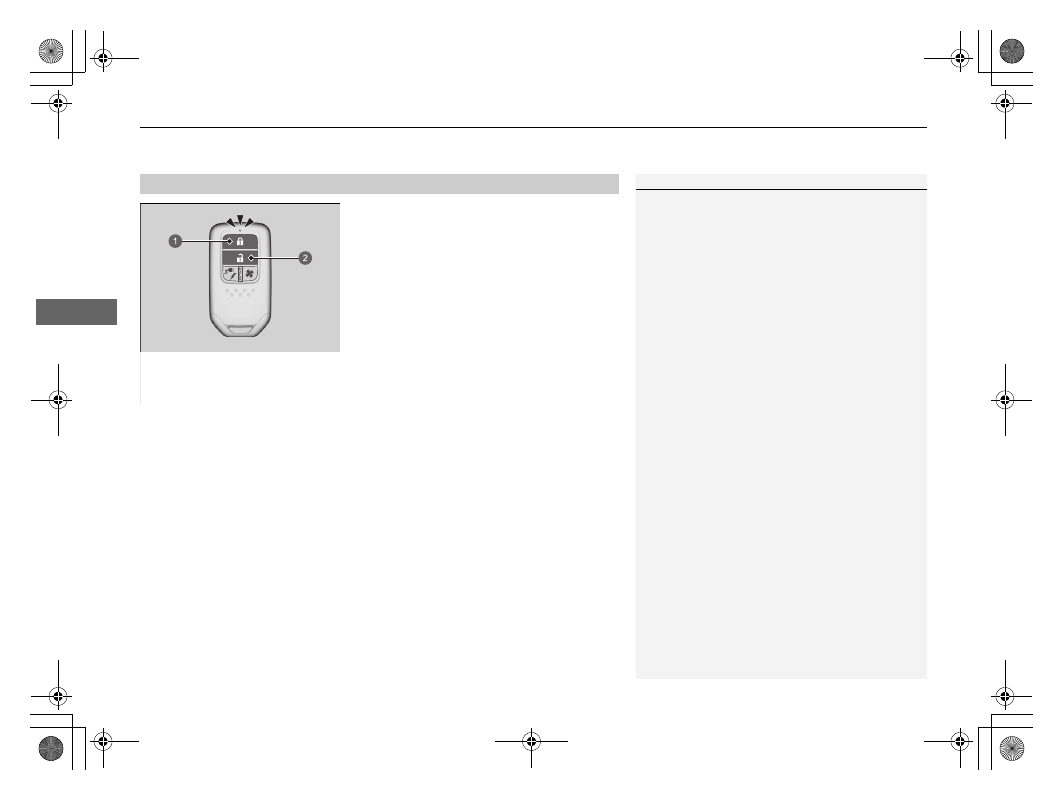
Locking the doors and tailgate

Press the lock button.

u

Some exterior lights flash three times, all 
the doors and tailgate lock, front door 
outer handles pop in, and the security 
system sets.

Unlocking the doors and tailgate

Press the unlock button.

u

Some exterior lights flash once, all the 
doors and tailgate unlock, and front door 
outer handles pop out.

Using the Remote Transmitter

1

Using the Remote Transmitter

If you do not open a door or the tailgate within 30 
seconds of unlocking the vehicle with the remote
transmitter, the doors and tailgate will automatically 
relock and the front door outer handle will 
automatically pop back in.
You can change the relock timer setting.

2

How to Customize the Vehicle Settings


P. 336

If the front door outer handles were popped in or out 
while the power mode was set to OFF, they will pop 
back in or out if the lock/unlock button on the key is 
pressed.

If the interior light switch is in the door activated 
position, the interior light comes on when you unlock 
the doors and tailgate.
No doors opened: The light fades out after 30 
seconds.
Doors and tailgate relocked: The light goes off 
immediately.

2

Interior Lights

 P. 235

You can lock or unlock doors using the remote 
transmitter only when the power mode is in VEHICLE 
OFF.

a

Lock Button

b

Unlock Button

Continued

179

uu

Locking and Unlocking the Doors

u

Locking/Unlocking the Doors from the Outside

Co
ntrols

1

Using the Remote Transmitter

You cannot lock any doors from the outside when 
the keyless remote is inside the vehicle, and the 
beeper sounds. If you want to lock a door while the 
remote is still in the vehicle, do any of the following 
four times:

Press the lock button on the keyless remote.

Touch the door lock sensor on the front door or 
press the lock button on the tailgate.

The remote transmitter uses low-power signals, so 
the operating range may vary depending on the 
surroundings.

If the distance at which the remote transmitter works 
varies, the battery is probably low.
If the LED does not come on when you press a 
button, the battery is dead.

2

Replacing the Button Battery

 P. 620

The front passenger's door outer handle will pop 
back in 30 seconds after the driver's door is closed or 
when the transmission is taken out of 

(

P

.

Right-hand Drive Type

uu

Locking and Unlocking the Doors

u

Locking/Unlocking the Doors from the Outside

180

Co
ntrols

If the lock/unlock button of the remote does not work, use the key instead.

Pull and hold the outer handle. Insert the 
built-in key into the key cylinder completely 
from below the handle and then turn it.

Locking/Unlocking the Doors Using a Key

1

Locking/Unlocking the Doors Using a Key

When you lock/unlock the driver's door with the key, 
all the other doors unlock at the same time.

If you unlock a door with the built-in key while the 
security system is activated, the alarm will go off.

a

Lock

b

Unlock

181

uu

Locking and Unlocking the Doors

u

Locking/Unlocking the Doors from the Outside

Co
ntrols

If you do not have the key on you, or if for some reason you cannot lock a door using 
the key, you can lock the door without it.

Locking the driver’s door

Push the lock tab forward 

 or push the 

master door lock switch in the lock direction 

, then pull and hold the outside door 

handle 

. Close the door, then release the 

handle.

Locking the passenger’s doors

Push the lock tab forward and close the door.

Lockout prevention system

The doors and the tailgate cannot be locked when the keyless remote is inside the 
vehicle.

Locking a Door Without Using a Key

1

Locking a Door Without Using a Key

When you lock the driver’s door, all the other doors 
and tailgate lock at the same time.

Before locking a door, make sure that the key is not 
inside the vehicle.

182

uu

Locking and Unlocking the Doors

u

Locking/Unlocking the Doors from the Inside

Co
ntrols

Locking/Unlocking the Doors from the Inside

Locking a door

Push the lock tab forward.

Unlocking a door

Pull the lock tab rearward.

Pull the front door inner handle.

u

The door unlocks and opens in one 
motion.

Using the Lock Tab

1

Using the Lock Tab

When you lock/unlock the door using the lock tab on 
the driver's door, all the other doors and the tailgate 
lock/unlock at the same time.

a

To Lock

b

To Unlock

Unlocking Using the Front Door Inner Handle

1

Unlocking Using the Front Door Inner Handle

The front door inner handles are designed to allow 
front seat occupants to open the door in one motion. 
However, this feature requires that front seat 
occupants never pull a front door inner handle while 
the vehicle is in motion.

Children should always ride in a rear seat where 
childproof door locks are provided.

2

Childproof Door Locks

 P. 184

When you open any door from inside the vehicle by 
using the inner handle, front door outer handles pop 
out.

a

Inner Handle

183

uu

Locking and Unlocking the Doors

u

Locking/Unlocking the Doors from the Inside

Co
ntrols

Press the master door lock switch in as shown 
to lock or unlock all the doors and the tailgate.

u

The front door outer handles will also 
pop in or out when the master door lock 
switch is pressed.

Using the Master Door Lock Switch

1

Using the Master Door Lock Switch

When you lock/unlock either front door using the 
master door lock switch, all the other doors and the 
tailgate lock/unlock at the same time.

a

To Lock

b

To Unlock

184

uu

Locking and Unlocking the Doors

u

Childproof Door Locks

Co
ntrols

Childproof Door Locks

The childproof door locks prevent the rear doors from being opened from the inside 
regardless of the position of the lock tab.

Slide the lever in the rear door to the lock 
position, and close the door.

When opening the door

Open the door using the outside door handle.

Setting the Childproof Door Locks

1

Childproof Door Locks

To open the door from the inside when the 
childproof door lock is on, put the lock tab in the 
unlock position, lower the rear window, put your 
hand out of the window, and pull the outside door 
handle.

a

Unlock

b

Lock

185

uu

Locking and Unlocking the Doors

u

NFC Marks

Co
ntrols

NFC Marks

These are needed to use your smartphone as a vehicle key.

If you hold an NFC-compatible device over a mark, you can lock, unlock and start the 
vehicle without a physical key.

Location

For right-hand drive types, NFC marks are located directly opposite to those on left-
hand drive types.

The N mark is a registered trademark of NFC Forum, Inc.

1

NFC Marks

The function may not work in some countries.
Ask a dealer for details.

186

Co
ntrols

Tailgate

Precautions for Opening/Closing the Tailgate

Always make sure individuals and objects are clear of the tailgate before opening or 
closing it.

Open the tailgate all the way.

u

If it is not fully opened, the tailgate may begin to close under its own weight.

Be careful when it is windy. The wind may cause the tailgate to close.

Keep the tailgate closed while driving to:

u

Avoid possible damage.

1

Precautions for Opening/Closing the Tailgate

Be careful not to hit your head on the tailgate or to 
put your hands between the tailgate and the luggage 
area when closing the tailgate.

Do not allow any passenger in the luggage space. 
They may get hurt during hard braking, a sudden 
acceleration, or a crash.

3

WARNING

Anyone caught in the path of a tailgate 
that is being opened or closed can be 
seriously injured.

Make sure that all people are clear of the 
tailgate before opening or closing it.

187

uu

Tailgate

u

Opening/Closing the Tailgate

Co
ntrols

Opening/Closing the Tailgate

When all the doors are unlocked, the tailgate 
is unlocked. Press the tailgate outer handle 
and lift open the tailgate.

If you are carrying the keyless remote, you do 
not have to unlock the tailgate before 
opening it.

To close the tailgate, grab the inner handle, 
pull the tailgate down, and push it closed 
from outside.

1

Opening/Closing the Tailgate

Do not leave the keyless remote in the vehicle 
when you get out. Carry it with you.

Even if you are not carrying the keyless remote, you 
can unlock the tailgate while someone else with 
the remote is within range.

a

Outer Handle

a

Inner Handle

188

Co
ntrols

Security System

Immobilizer System

The immobilizer system prevents a key that has not been pre-registered from 
starting the power system. Each key contains electronic transmitters that use 
electronic signals to verify the key.

Pay attention to the following when pressing the 

POWER

 button:

Do not allow objects that emit strong radio waves near the 

POWER

 button.

Make sure the key is not covered by or touching a metal object.

Do not bring a key from another vehicle’s immobilizer system near the 

POWER


button.

Do not put the key near magnetic items. Electronic device, such as televisions and 
audio systems emit strong magnetic fields. Note that even a key chain can become 
magnetic.

1

Immobilizer System

NOTICE

Leaving the key in the vehicle can result in theft or 
accidental movement of the vehicle.
Always take the key with you whenever you leave the 
vehicle unattended.

Do not alter the system or add other devices to it.
Doing so may damage the system and make your 
vehicle inoperable.

If the system repeatedly does not recognise the 
coding of your key, contact a dealer. If you have lost 
your key and cannot start your vehicle, contact a 
dealer.

Apply and hold the brake pedal before set the power 
mode to ON the first time after the 12-volt battery 
has been disconnected.

Right-hand Drive Type

189

uu

Security System

u

Security System Alarm

Continued

Co
ntrols

Security System Alarm

The security system alarm activates when the tailgate, bonnet, or doors are forcibly 
opened. The alarm does not activate if the tailgate or doors are opened with the 
remote transmitter or keyless access system.

When the security system alarm activates

The horn sounds intermittently and all the exterior lights flash.

To deactivate the security system alarm

Unlock the vehicle using the remote transmitter or keyless access system, or turn the 
power mode to ON. The system, along with the horn and flashing lights, is 
deactivated.

Setting the security system alarm

The security system alarm automatically sets when the following conditions have 
been met:

The power mode is set to VEHICLE OFF.

The bonnet is closed.

All doors and the tailgate are locked from outside with the remote transmitter or 
keyless access system.

When the security system alarm sets

The security system alarm indicator in the instrument panel blinks and the blinking 
interval changes after about 15 seconds.

To cancel the security system alarm

The security system alarm is cancelled when the vehicle is unlocked using the remote 
transmitter or keyless access system, or when the power mode is set to ON. The 
security system alarm indicator goes off at the same time.

1

Security System Alarm

Do not alter the system or add other devices to it.
Doing so may damage the system and make your 
vehicle inoperable.

The security system alarm will continue for 
approximately 5 minutes before the security system 
deactivates.
The system will go through ten 30-second cycles, 
during which the horn will sound and an emergency 
indicator will flash.
Depending on circumstances, the security system 
may continue operating for more than 5 minutes.

Do not set the security system alarm when someone 
is in the vehicle or a window is open. The system can 
accidentally activate when:

Unlocking the door with the lock tab.

Opening the bonnet with the bonnet release 
handle.

If the 12-volt battery goes dead after you have set the 
security system alarm, the security alarm may go off 
once the 12-volt battery is recharged or replaced.
If this occurs, deactivate the security system alarm by 
unlocking a door using the remote transmitter or 
keyless access system.

If you unlock a door with the built-in key while the 
security system is activated, the alarm will go off.

uu

Security System

u

Security System Alarm

190

Co
ntrols

1

Security System Alarm

The system may accidentally activate such as when:

The vehicle is parked in an automated garage.

The vehicle is being washed with highly pressurized 
water or being put through an automated car 
wash.

The vehicle is being transported by train, ferry or 
trailer.

The vehicle is subjected to heavy rain or stormy 
weather.

Ice is being removed from the vehicle.

You can use ultrasonic sensor 

OFF

 button and Tilt 

sensor 

OFF

 button not to accidentally activate the 

security system alarm.

2

Ultrasonic Sensors

*

 P. 191

2

Tilt Sensor

*

 P. 192

Models with ultrasonic sensors or tilt sensor

* Not available on all models

191

uu

Security System

u

Ultrasonic Sensors

*

Co
ntrols

Ultrasonic Sensors

*

The ultrasonic sensors activate only when the security system alarm is set. If the 
sensors detect an intruder moving around inside or entering the interior of the 
vehicle through a window, the sensor will activate the alarm.

To set the security system alarm without activating the ultrasonic sensors

You can set the security system without 
activating the ultrasonic sensor.
To turn off the ultrasonic sensor system, set 
the power mode to VEHICLE OFF by pressing 
the 

POWER

 button and then press the 

ultrasonic sensor 

OFF

 button.

u

The 

 is on in red.

To turn it on again, press the ultrasonic sensor 

OFF

 button.

Ultrasonic sensors are turned on every time 
you set the security system alarm, even if you 
turned it off the last time.

1

Ultrasonic Sensors

*

Whether the ultrasonic sensors have been activated 
or not, the security system can only be turned off by 
the remote transmitter or keyless access system, not 
the key.

It is possible to confirm whether the vehicle security 
system was activated without your knowledge. If the 
security system has been activated, the 

 will blink 

for 5 minutes after you unlock the door and disable 
the system.
If, however, you turn the power system on, the 


will stop blinking after 5 seconds.

If the ultrasonic sensor is malfunctioning or there is 
another problem, the 

 will come on for 5 minutes 

after you unlock the door and disable the system.
If, however, you turn the power system on, the 


will shut off.

The security system may accidentally activate by 
ultrasonic sensors such as when:

Someone is in the vehicle

A window is open

Accessories or clothes are hanging in the vehicle

* Not available on all models

192

uu

Security System

u

Tilt Sensor

*

Co
ntrols

Tilt Sensor

*

The tilt sensor activates only when the security system alarm is set. If someone raises 
the vehicle in an attempt to tow the vehicle or remove the wheels etc., the sensor 
will activate the alarm.

To set the security system alarm without activating the tilt sensor

You can set the security system without 
activating the tilt sensor.
To turn off the tilt sensor system, set the 
power mode to VEHICLE OFF by pressing the 

POWER

 button and then press the tilt sensor 

OFF

 button.

u

The 

 is on in red.

To turn it on again, press the tilt sensor 

OFF


button.
Tilt sensor is turned on every time you set the 
security system alarm, even if you turned it off 
the last time.

1

Tilt Sensor

*

Whether the tilt sensor has been activated or not, the 
security system can only be turned off by the remote 
transmitter or keyless access system, not the key.

It is possible to confirm whether the vehicle security 
system was activated without your knowledge. If the 
security system has been activated, the 

 will blink 

for 5 minutes after you unlock the door and disable 
the system.
If, however, you turn the power system on, the 


will stop blinking after 5 seconds.

If the tilt sensor is malfunctioning or there is another 
problem, the 

 will come on for 5 minutes after you 

unlock the door and disable the system.
If, however, you turn the power system on, the 


will shut off.

Do not set the tilt sensor when the vehicle is lifted or 
jacked up.

* Not available on all models

193

uu

Security System

u

Super Locking

*

Co
ntrols

Super Locking

*

The super locking function disables the lock tabs on all doors.

To activate the super locking function

Turn the key in the driver’s door towards the vehicle front twice within five 
seconds.

Press the lock button on the remote transmitter twice within five seconds.

Touch the door lock sensor on the door handle or press the lock button on the 
tailgate twice within five seconds.

To cancel the super locking function

Unlock the driver’s door with the remote transmitter or keyless access system.

1

Super Locking

*

If you unlock a door with the built-in key while the 
security system is activated, the alarm will go off.

3

WARNING

No one must be inside the vehicle with the 
super locking set. Persons locked in can get 
seriously sick or die from the heat built 
inside the vehicle if left in the sun.

Make sure there is no one inside the vehicle 
before setting the super locking.

* Not available on all models


Content      ..     10      11      12      13     ..