Honda Pilot (2019 year). Instruction - part 15
 

  Index      Honda     Honda Pilot - instruction 2019 year in english


Search            


Content   ..  13  14  15  16   ..


Honda Pilot (2019 year). Instruction - part 15


Continued

223

uu

Interior Lights/Interior Convenience Items

u

Interior Convenience Items

Co
ntrols

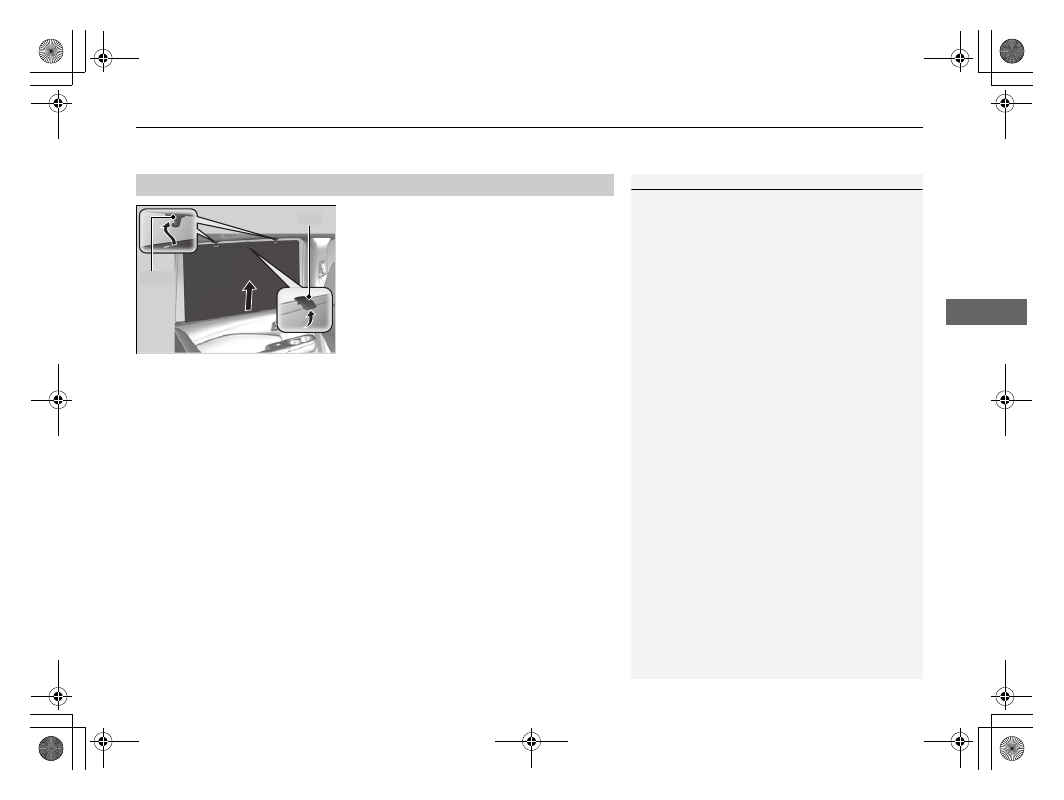
Pull the tab and roll up the sunshade all the 
way. Use the hooks to hang it.

Integrated Sunshades

*

1

Integrated Sunshades

*

Use the sunshades only when the windows are fully 
closed. Using the shade while a window is open can 
unhook and blow off the shade, hitting and hurting 
anyone sitting near the window.

Tab

Hook

* Not available on all models

uu

Interior Lights/Interior Convenience Items

u

Interior Convenience Items

224

Co
ntrols

The power mode must be in ON to use the 
seat heaters.

Press the seat heater button:
Once - The HI setting (three indicators on)
Twice - The MID setting (two indicators on)
Three times - The LO setting (one indicator on)
Four times - The OFF setting (no indicators on)

When the power mode is turned on after it is 
turned off, the previous setting of front seat 
heaters is maintained.

Front Seat Heaters

*

1

Front Seat Heaters

*

Do not use the seat heaters even in LO when the 
engine is off. Under such conditions, the battery may 
be weakened, making the engine difficult to start.

After a certain period of time, the strength setting for 
the seat heaters will automatically be reduced by one 
level at a time until the seat heater shuts off. The 
elapsed time varies according to the interior 
environment.

3

WARNING

Heat induced burns are possible when 
using seat heaters. 

Persons with a diminished ability to sense 
temperature (e.g., persons with diabetes, 
lower-limb nerve damage, or paralysis) or 
with sensitive skin should not use seat 
heaters.

* Not available on all models

Continued

225

uu

Interior Lights/Interior Convenience Items

u

Interior Convenience Items

Co
ntrols

The power mode must be in ON to use the 
seat heaters or ventilation.

Press the seat heater or the seat ventilation 
button:
Once - The HI setting (three indicators on)
Twice - The MID setting (two indicators on)
Three times - The LO setting (one indicator 
on)
Four times - The OFF setting (no indicators on)

When the power mode is turned on after it is 
turned off, the previous setting of front seat 
heaters and ventilations is maintained.

Front Seat Heaters and Seat Ventilation

*

1

Front Seat Heaters and Seat Ventilation

*

Do not use the seat heaters and the seat ventilation 
even in LO when the engine is off. Under such 
conditions, the battery may be weakened, making 
the engine difficult to start.

After a certain period of time, the strength setting for 
the seat heaters will automatically be reduced by one 
level at a time until the seat heater shuts off. The 
elapsed time varies according to the interior 
environment.

3

WARNING

Heat induced burns are possible when 
using seat heaters. 

Persons with a diminished ability to sense 
temperature (e.g., persons with diabetes, 
lower-limb nerve damage, or paralysis) or 
with sensitive skin should not use seat 
heaters.

* Not available on all models

uu

Interior Lights/Interior Convenience Items

u

Interior Convenience Items

226

Co
ntrols

The power mode must be in ON to use the 
seat heaters.

There is no heater in the rear center seating 
position.

Press the seat heater button:
Once - The HI setting (three indicators on)
Twice - The MID setting (two indicators on)
Three times - The LO setting (one indicator on)
Four times - The OFF setting (no indicators on)

Second Row Outer Seat Heaters

*

1

Second Row Outer Seat Heaters

*

Do not use the seat heaters even in LO when the 
engine is off. Under such conditions, the battery may 
be weakened, making the engine difficult to start.

After a certain period of time, the strength setting for 
the rear seat heaters will automatically be reduced by 
one level at a time until the rear seat heater shuts off. 
The elapsed time varies according to the interior 
environment.

3

WARNING

Heat induced burns are possible when 
using seat heaters.

Persons with a diminished ability to sense 
temperature (e.g., persons with diabetes, 
lower-limb nerve damage, or paralysis) or 
with sensitive skin should not use seat 
heaters.

* Not available on all models

Continued

227

uu

Interior Lights/Interior Convenience Items

u

Interior Convenience Items

Co
ntrols

The power mode must be in ON to use the 
heated steering wheel.

Press the button on the right side of the 
steering wheel.

When a comfortable temperature is reached, 
press the button again to turn it off.

The heated steering wheel is turned off every 
time you start the engine, even if you turned it 
on the last time you drove the vehicle.

Heated Steering Wheel

*

1

Heated Steering Wheel

*

Do not use the heated steering wheel continuously 
when the engine is off. Under such conditions, the 
battery may be weakened, making the engine 
difficult to start.

Indicator

Heated Steering Wheel Button

* Not available on all models

uu

Interior Lights/Interior Convenience Items

u

Interior Convenience Items

228

Co
ntrols

The tie-down anchors on the cargo area floor 
can be used to install a net for securing items.

The cargo hooks on both sides of the cargo 
area can be used to hang a light items.

Tie-down Anchors

Anchor

Anchor

Cargo Hooks

1

Cargo Hooks

Heavy objects may damage the hook. Make sure any 
items put on this hook weigh less than 6.6 lbs (3 kg).

Distribute cargo evenly on the floor of the cargo area, 
placing the heaviest items on the bottom and as far 
forward as possible.

229

uu

Interior Lights/Interior Convenience Items

u

Interior Convenience Items

Co
ntrols

Pull the handle to open the cargo floor lid.

Storing items on the lid at the bottom

This is convenient when storing a tall item.
1. Pull the handle and open the lid.
2. Pull the lid towards you until it disengages 

from the support rods.

3. Push the far end of the lid down to the 

bottom of the under-floor storage area, 
then lower the other end.

Under-floor Storage Area

1

Storing items on the lid at the bottom

The lid can be flipped over and placed in either upper 
or lower position. This allows for storage of dirty 
items, or items that may damage the carpet lining of 
the lid.

230

Co
ntrols

Heating and Cooling

*

Using Vents, Heating and A/C

MODE Control Button
Change airflow.

Floor and 
defroster 
vents

Floor vents

Dashboard 
and floor 
vents

Dashboard 
vents

Fan Control Switch
Adjusts the fan speed.

MAX A/C Button
Turns on the A/C, selects airflow from the dashboard vents, 
and switches the mode to recirculation.

A/C (Air Conditioning) Button
Press to cool the interior or dehumidify while heating.

Windshield Defroster 
Button
Turns on the A/C, selects airflow 
from the defroster vents at the 
base of the windshield, and 
switches the mode to fresh air.

Temperature Control Switch
Adjusts the interior temperature.

 (Recirculation) Button

Press the 

 button and switch the mode depending on 

environmental conditions.

Recirculation Mode (indicator on):
Recirculates air from the vehicle’s interior through the system.

Fresh Air Mode (indicator off):
Maintains outside ventilation. Keep the system in fresh air mode in 
normal situations.

 (On/Off) Button

* Not available on all models

Continued

231

uu

Heating and Cooling

*

u

Using Vents, Heating and A/C

Co
ntrols

The heater uses heat from the engine coolant 
to warm the air.
1. Adjust the fan speed using the fan control 

switch.

2. Press the mode button to select 

.

3. Adjust the temperature using the 

temperature control switch.

To rapidly warm up the interior

1. Set the fan to the maximum speed.
2. Press the mode button to select 

.

3. Set the temperature to maximum heat.
4. Press the 

 button (indicator on).

To dehumidify the interior

When used in combination with the heater, the air conditioning system makes the 
interior warm and dry and can prevent the windows from fogging up.
1. Adjust the fan speed using the fan control switch.
2. Press the A/C button to turn on the air conditioning.
3. Press the mode button to select 

.

4. Adjust the temperature using the temperature control switch.

Heating

1

Heating

When you select 

, the mode automatically 

switches to fresh air.

1

To rapidly warm up the interior

Change to fresh air mode as soon as the interior gets 
warm enough. The windows may fog up if kept in 
recirculation mode.

uu

Heating and Cooling

*

u

Using Vents, Heating and A/C

232

Co
ntrols

1. Adjust the fan speed using the fan control 

switch.

2. Press the mode button to select 

.

3. Adjust the temperature using the 

temperature control switch.

4. Press the A/C button (indicator on).

To rapidly cool down the interior

1. Set the fan to the maximum speed.
2. Set the temperature to maximum cool.
3. Press the MAX A/C button (indicator on).

Cooling

1

To rapidly cool down the interior

If the interior is very warm, you can cool it down 
more rapidly by partially opening the windows.

Continued

233

uu

Heating and Cooling

*

u

Using Vents, Heating and A/C

Co
ntrols

Pressing the 

 button turns the air 

conditioning system on and automatically 
switches the system to fresh air mode.

To rapidly defrost the windows

1. Set the fan to the maximum speed.
2. Press the 

 button.

3. Press the 

 button.

4. Set the temperature to maximum heat.

Defrosting the Windshield and Windows

1

Defrosting the Windshield and Windows

For your safety, make sure you have a clear view 
through all the windows before driving.
Do not set the temperature near the upper or lower 
limit.
When cold air hits the windshield, the outside of the 
windshield may fog up.
If the side windows fog up, adjust the vents so that 
the air hits the side windows.

1

To rapidly defrost the windows

After defrosting the windows, switch over to fresh air 
mode.
If you keep the system in recirculation mode, the 
windows may fog up from humidity. This impedes 
visibility.

234

uu

Heating and Cooling

*

u

Using Vents, Heating and A/C

Co
ntrols

Use the system when the engine is running and the heating and cooling is 
operating.
1. Press the REAR 

 (Rear On/Off) button.

2. Press the RR SETTINGS button.

u

The system switches to the rear control mode for 10 seconds. The REAR 
indicator appears on the display.

u

The system adjusts the rear heating and cooling system.

3. To turn off the rear heating and cooling system, press the REAR 

 (Rear On/

Off) button.

Using the Rear Heating and Cooling From the Front Panel

Back of the center 
console vents

Rear floor 
vents

Back of the center 
console and floor 
vents

RR SETTINGS 
Button

REAR 

 (Rear On/Off) Button

235

Continued

Co
ntrols

Climate Control System

*

Using Automatic Climate Control

The automatic climate control system maintains the interior temperature you select. 
The system also selects the proper mix of heated or cooled air that will as quickly as 
possible, raise or lower the interior temperature to your preference.

Use the system when the engine is running.
1. Press the AUTO button.
2. Adjust the interior temperature using the driver’s side or passenger’s side 

temperature control switch.

3. Press the 

 ON/OFF button to cancel.

1

Using Automatic Climate Control

If any buttons are pressed while using the climate 
control system in auto, the function of the button 
that was pressed will take priority.
The AUTO indicator will go off, but functions 
unrelated to the button that was pressed will be 
controlled automatically.

During idle-stops, air-conditioning is suspended, and 
only the blower remains active.
If you do not want air-conditioning suspended, press 
the Auto Idle Stop OFF button to cancel idle-stop.

To prevent cold air from blowing in from outside, the 
fan may operate at low speed for a while after the 
AUTO button has been pressed.

If the interior is very warm, you can cool it down 
more rapidly by partially opening the windows, 
turning the system on auto, and setting the 
temperature to low. Change the fresh mode to 
recirculation mode until the temperature cools down.

When you set the temperature to the lower or upper 
limit, Lo or Hi is displayed.

Models with Auto Idle Stop

All models

Floor and 
defroster 
vents

Floor vents

Dashboard and floor, 
and back of the 
center console vents

Dashboard and 
back of the center 
console vents

AUTO Button

Driver’s Side 
Temperature 
Control Switch

 (Recirculation) Button

Fan Control Button

A/C (Air Conditioning) 
Button

Passenger’s Side 
Temperature Control 
Switch

 (On/Off) Button

 (Windshield Defroster) 

Button

SYNC (Synchronization) Button

* Not available on all models

uu

Climate Control System

*

u

Using Automatic Climate Control

236

Co
ntrols

Switching between the recirculation and fresh air modes

Press the 

 button and switch the mode depending on environmental conditions.

Recirculation Mode (indicator on): Recirculates air from the vehicle’s interior through 
the system.
Fresh Air Mode (indicator off): Maintains outside ventilation. Keep the system in 
fresh air mode in normal situations.

Pressing the 

 button turns the air 

conditioner system on and automatically 
switches the system to fresh air mode.

Press the 

 button again to turn off, the 

system returns to the previous settings.

Defrosting the Windshield and Windows

1

Using Automatic Climate Control

Pressing the 

 ON/OFF button switches the 

climate control system between on and off. When 
turned on, the system returns to your last selection.

1

Defrosting the Windshield and Windows

For your safety, make sure you have a clear view 
through all the windows before driving.

Do not set the temperature near the upper or lower 
limit.
When cold air hits the windshield, the outside of the 
windshield may fog up.

If you press the 

 button during Auto Idle Stop, the 

engine restarts automatically.

If the side windows fog up, adjust the vents so that 
the air hits the side windows.

Models with Auto Idle Stop

237

uu

Climate Control System

*

u

Using Automatic Climate Control

Co
ntrols

To rapidly defrost the windows

1. Press the 

 button.

2. Press the 

 button.

1

To rapidly defrost the windows

After defrosting or defogging the windows, switch 
over to fresh air mode. If you keep the system in 
recirculation mode, the windows may fog up from 
humidity. This impedes visibility.

238

uu

Climate Control System

*

u

Synchronization Mode

Co
ntrols

Synchronization Mode

You can set the temperature synchronously for the driver side, front passenger side 
and rear seats in synchronization mode.

1. Press the SYNC button.

u

The system will switch to synchronization mode.

2. Adjust the temperature using driver’s side temperature control switch.

Press the SYNC button to return to synchronization mode off.

1

Synchronization Mode

When you press the 

 button, the system changes 

to synchronization mode.

When the system is in synchronization mode off, the 
temperature for the driver, front passenger, and rear 
seats can be set separately.


Content   ..  13  14  15  16   ..