Ford Bronco (2022 year). Manual in english - page 11
 

  Index      Manuals     Ford Bronco (2022 year). Manual in english


Search            copyright infringement  


Content      ..     9      10      11      12     ..


Ford Bronco (2022 year). Manual in english - page 11


BRAKE SHIFT INTERLOCK

WHAT IS BRAKE SHIFT
INTERLOCK

Brake shift interlock prevents you from
shifting out of park (P) when you have
switched the ignition on and not pressed
the brake pedal.

BRAKE SHIFT INTERLOCK
PRECAUTIONS

WARNING: 

Do not drive your

vehicle until you verify that the
stoplamps are working.

WARNING: 

When doing this

procedure, you need to take the
transmission out of park (P) which
means your vehicle can roll freely. To
avoid unwanted vehicle movement,
apply the parking brake prior to doing
this procedure. Use wheel chocks if
appropriate.

WARNING: 

If the parking brake is

fully released, but the brake warning
lamp remains illuminated, the brakes
may not be working properly. Have your
vehicle checked as soon as possible.

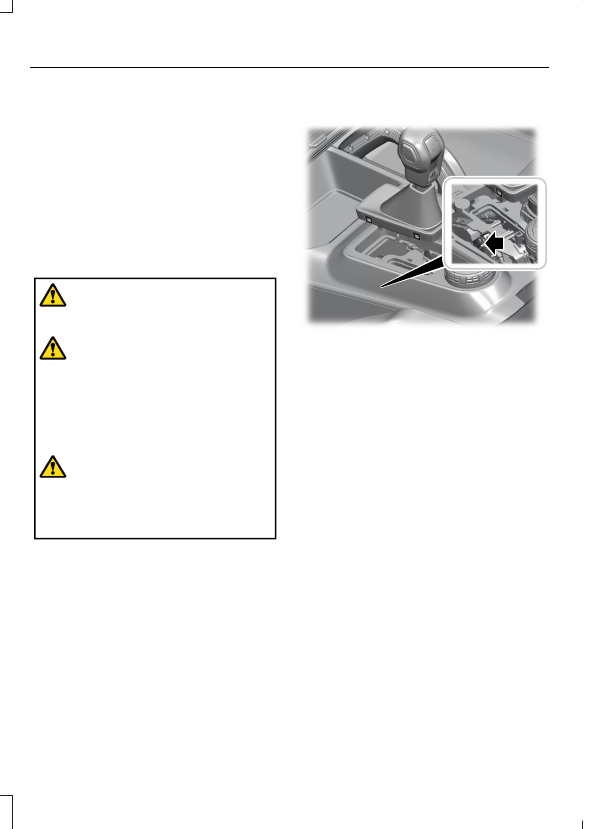
USING BRAKE SHIFT INTERLOCK

E346836

1.

Insert a screwdriver between the shifter
boot material and trim ring to access
the retainer tabs from the top panel
trim ring.

2. Lift the shifter boot upward.

3. Locate the release lever on the side of

the transmission selector lever.

4. Using a screwdriver, move the release

lever toward the front of the
transmission selector lever.

5. When holding the release lever in the

forward position, move the
transmission selector lever out of the
park (P) position and into another gear.

AUTOMATIC TRANSMISSION
AUDIBLE WARNINGS

Transmission Not In Park(P)
Audible Warning

Sounds if any of the following occur:

180

Automatic Transmission

 (If Equipped)

You switch your vehicle off before
shifting into park (P).

You open the driver door before shifting
into park (P).

You unlatch your seatbelt before
shifting into park (P) when the driver
door is removed. See 

Removable

Windows

 (page 338).

181

Automatic Transmission

 (If Equipped)

HOW DOES FOUR-WHEEL
DRIVE WORK - 4X4 WITH PART
TIME ENGAGEMENT

4x4 With Part Time Engagement

 (If

Equipped)

This system offers the driver two-wheel
drive high, four-wheel drive high, and
four-wheel drive low as available modes
of operation. When you select either
four-wheel drive high or four-wheel drive
low, the system provides mechanically
locked four-wheel drive power to both the
front and rear wheels for use in off-road or
slippery conditions such as deep snow,
sand or mud. Selecting four-wheel drive
low also provides additional gearing for
increased torque multiplication for
conditions like deep sand, steep slopes, or
pulling heavy objects.

Additionally, the system is capable of
recreational flat towing by putting the
transfer case into neutral (N).  See

Recreationally Towing Your Vehicle

(page 309).

HOW DOES FOUR-WHEEL
DRIVE WORK - ADVANCED 4X4
WITH 4A MODE

Advanced 4x4 With Automatic On
Demand Engagement

 (If Equipped)

This system monitors various vehicle
sensory inputs to provide an increased
level of performance. This system offers
the driver two-wheel drive high, four-wheel
drive auto, four-wheel drive high, and
four-wheel drive low as available modes
of operation. When you select four-wheel
drive auto, the system continuously varies
power to the front wheels for optimum
performance for all on-road conditions.
When you select either four-wheel drive

high or four-wheel drive low, the system
provides electronically locked power to the
front and rear wheels for use in off-road or
slippery conditions such as deep snow,
sand or mud. Selecting four-wheel drive
low also provides additional gearing for
increased torque multiplication for
conditions like deep sand, steep slopes, or
pulling heavy objects.

Additionally, the system is capable of
recreational flat towing by putting the
transfer case into neutral (N). See

Recreationally Towing Your Vehicle

(page 309).

FOUR-WHEEL DRIVE
PRECAUTIONS

WARNING: 

Do not become

overconfident in the ability of four-wheel
drive vehicles. Although a four-wheel
drive vehicle may accelerate better than
a two-wheel drive vehicle in low traction
situations, it won't stop any faster than
two-wheel drive vehicles. Always drive
at a safe speed.

WARNING: 

Vehicles with a higher

center of gravity (utility and four-wheel
drive vehicles) handle differently than
vehicles with a lower center of gravity
(passenger cars). Avoid sharp turns,
excessive speed and abrupt steering in
these vehicles. Failure to drive cautiously
increases the risk of losing control of your
vehicle, vehicle rollover, personal injury
and death.

182

Four-Wheel Drive

FOUR-WHEEL DRIVE
LIMITATIONS

Do not use four-wheel drive high or
four-wheel drive low mode on dry, hard
surfaced roads. Doing so can produce
excessive noise, increase tire wear and can
damage driveline components. Four-wheel
drive high or four-wheel drive low mode is
only for use on consistently slippery or
loose surfaces. Use of four-wheel drive low
mode on these surfaces could produce
some noise, such as occasional clunks, but
should not damage driveline components.

For vehicles with an electronic
shift-on-the-fly transfer case, the driveline
could become mechanically blocked when
attempting to shift out of a four-wheel
drive mode on dry, hard surfaced roads.

Note:

When your vehicle comes with the

4x4 part-time selectable engagement
transfer case and you are transitioning from
consistently loose or slippery surfaces, be
sure the four-wheel drive system is not
mechanically blocked once you are on dry,
hard surfaced roads in two-wheel drive high.

Note:

 In certain scenarios, where the

four-wheel drive system has difficulty
engaging, a 

To Engage 4x4 Slow to 3 MPH

or 

To Engage 4x4 Slow to 5 km/h

message could appear in the instrument
cluster.  You can also see this message
when engaging the four-wheel drive system
in extreme cold climates at the beginning
of the drive cycle. Once the driveline warms
up, shifting to four-wheel drive can resume
as normal.

Operating Four-Wheel Drive with
a Spare or Mismatched Tires

On four-wheel drive vehicles, the size of
the spare tire can affect the four-wheel
drive system.

If there is a significant difference between
the size of the spare tire and the remaining
tires, you could have limited four-wheel
drive functionality, added noise, discomfort
and driveline damage.

Due to normal tire wear, your spare tire is
not necessarily the same size as your
on-road tires, which makes your spare tire
a dissimilar size. Use the spare tire on a
limited basis only.

When driving with a dissimilar wheel and
tire assembly do not:

Exceed 50 mph (80 km/h) when
operating in a four-wheel drive mode.

Select a four-wheel drive mode unless
the vehicle is stationary.

Use a four-wheel drive mode on dry
pavement.

You could have limited four-wheel drive
functionality when driving with a dissimilar
wheel and tire assembly, especially when
driving in a mechanically locked four-wheel
drive mode. You can experience the
following:

Additional noise from the transfer case
or other drive components.

Difficulty shifting in and out of a
mechanically locked four-wheel drive
mode.

Driveline component damage.

Mechanical Shift Blocking

On vehicles with an electronic
shift-on-the-fly transfer case, the transfer
case distributes torque to the front wheels
by mechanically interlocking the front and
rear driveshafts together. Various external
factors can affect shifting performance of
this type of system including, but not
limited to:

Vehicle acceleration.

Dissimilar tire sizes.

High steering input.

183

Four-Wheel Drive

For vehicles with an electronic
shift-on-the-fly transfer case, when
shifting into two-wheel drive high on dry,
hard surfaced roads, we recommend that
you follow the following procedure to
reduce the likelihood of a mechanical shift
block:

1.

When driving straight, come to a
complete stop on a flat, horizontal
surface.

2. For vehicles with an automatic

transmission, shift into park (P). For
vehicles with a manual transmission,
press the clutch.

3. Select 2H and wait for the 2H LED to

become solid.

4. For vehicles with an automatic

transmission, shift into reverse (R). For
vehicles with a manual transmission,
select reverse (R) and release the
clutch. Let the vehicle roll backward up
to 3 ft (1 m) and press the brake.

5. For vehicles with an automatic

transmission, shift into drive (D). For
vehicles with a manual transmission,
press the clutch in again, select a
forward gear and release the clutch.
Let the vehicle roll forward up to 3 ft
(1 m).

If the system is mechanically blocked, one
or more of the following actions can relieve
the mechanical shift block:

Momentary acceleration.

Momentary braking.

Bringing the vehicle to a stop.

Shifting the transmission to neutral and
back to drive.

Shifting the transmission to reverse
and back to drive.

Driving the vehicle around a tight turn
at a slow speed.

SWITCHING FOUR-WHEEL
DRIVE ON AND OFF

A vehicle that comes with four-wheel drive,
when selected, has the ability to use all
four wheels to power itself. This increases
traction, which may enable you to safely
drive over terrain and road conditions that
a conventional two-wheel drive vehicle
cannot.

On some four-wheel drive models, the
initial shift from two-wheel drive to
four-wheel drive while the vehicle is
moving can cause a momentary clunk and
ratcheting sound. These sounds are normal
as the front drivetrain comes up to speed
and are not cause for concern.

SELECTING A FOUR-WHEEL
DRIVE MODE - 4X4 WITH PART
TIME ENGAGEMENT

E345849

To select a four-wheel drive mode, push
the button.

184

Four-Wheel Drive

2H - Two-wheel drive high.

4H - Four-wheel drive high. See

Four-Wheel Drive High

 (page 186).

4L - Four-wheel drive low. See

Four-Wheel Drive Low

 (page 186).

Shifting to or from Four-Wheel
Drive Low

Note:

Do not perform this operation if the

rear wheels are slipping or when applying
the accelerator pedal or when driving in a
tight turn.

Note:

Momentarily releasing the accelerator

pedal when a shift in progress message
displays can improve engagement or
disengagement performance.

1.

Bring your vehicle to a speed of 0 mph
(0 km/h).

2. For vehicles with an automatic

transmission, place in neutral (N). For
vehicles with a manual transmission,
fully depress the clutch pedal.

3. Push the 4L on the four-wheel drive

mode selector.

Note:

 A 

4x4 Shift in Progress

 message

appears in the information display indicating
the shift is in progress.  If any of the previous
shift conditions are not met, the shift should
not occur and the information display can
guide the driver through the proper shifting
procedures.

Note:

If 

Shift Delayed Drive Forward

displays in the information display, place
the transmission in a forward gear, move
your vehicle forward approximately 5 ft
(1.5 m), and shift the transmission back to
neutral (N) to allow the transfer case to
complete the range shift.

Note:

When the light is solid, the system

has achieved the desired four-wheel drive
mode. When a selected four-wheel drive
mode light is blinking, the system is
attempting to shift to that specific
four-wheel drive mode.

Note:

When you achieve recreational

towing, all lights are off and the instrument
cluster displays Neutral Tow Enabled Leave
Transmission in Neutral.

SELECTING A FOUR-WHEEL
DRIVE MODE - ADVANCED 4X4
WITH 4A MODE

E324543

To select a four-wheel drive mode, push
the button.

2H - Two-wheel drive high.

4A - Four-wheel drive Auto. See

Four-Wheel Drive Auto

 (page 186).

4H - Four-wheel drive high. See

Four-Wheel Drive High

 (page 186).

4L - Four-wheel drive low. See

Four-Wheel Drive Low

 (page 186).

Shifting to or from Four-Wheel
Drive Low

Note:

 Do not perform this operation if the

rear wheels are slipping or when applying
the accelerator pedal.

185

Four-Wheel Drive

1.

Bring your vehicle to a speed of 0 mph
(0 km/h).

2. For vehicles with an automatic

Transmission, place in neutral (N). For
vehicles with a manual transmission,
fully depress the clutch pedal.

3. Push the 4L on the four-wheel drive

mode selector.

Note:

 A 

4x4 Shift in Progress

 message

appears in the information display indicating
the shift is in progress.  If any of the previous
shift conditions are not met, the shift should
not occur and the information display can
guide the driver through the proper shifting
procedures.

Note:

If 

Shift Delayed Drive Forward

displays in the information display, place
the transmission in a forward gear, move
your vehicle forward approximately 5 ft
(1.5 m), and shift the transmission back to
neutral (N) to allow the transfer case to
complete the range shift.

Note:

When the light is solid, the system

has achieved the desired four-wheel drive
mode. When a selected four-wheel drive
mode LED is blinking, the system is
attempting to shift to that specific
four-wheel drive mode.

Note:

When all lights are blinking have your

vehicle serviced as soon as possible.

Note:

When you achieve recreational

towing, all lights are off and the instrument
cluster displays Neutral Tow Enabled Leave
Transmission in Neutral.

FOUR-WHEEL DRIVE MODES

TWO-WHEEL DRIVE HIGH

Two-wheel drive high is for general
on-road driving. Power is sent to the rear
wheels only.

Note:

Two-wheel drive high can turn on or

off based on Drive Mode selection See

G.O.A.T. Mode Control

 (page 242).

FOUR-WHEEL DRIVE AUTO

 (If

Equipped)

Four-wheel drive auto provides
electronically controlled four-wheel drive
power to both the front and rear wheels,
as required, for increased traction in varying
on-road conditions. The four-wheel drive
auto tuning varies based on selected Drive
Mode. See 

Selecting a Four-Wheel Drive

Mode

 (page 184).

Note:

Four-wheel drive auto can turn on or

off automatically based on Drive Mode
selection. See 

Selecting a Four-Wheel

Drive Mode

 (page 184).

FOUR-WHEEL DRIVE HIGH

Four-wheel drive high provides
electronically or mechanically locked
four-wheel drive power to both the front
and rear wheels for use in off-road or
winter conditions such as deep snow, sand
or mud. This mode is not for use on dry
pavement.

Note:

Four-wheel drive high can turn on or

off automatically based on Drive Mode
selection.

FOUR-WHEEL DRIVE LOW

Four-wheel drive low provides
electronically or mechanically locked
four-wheel drive power to both the front
and rear wheels for use on low traction
surfaces, but does so with additional
gearing for increased torque multiplication.
This mode is only for off-road conditions
such as deep sand, steep slopes, or pulling
heavy objects.

186

Four-Wheel Drive

Note:

Four-wheel drive low can turn on or

off automatically based on drive mode
selection.

FOUR-WHEEL DRIVE
INDICATORS

Two-wheel Drive High

E181778

Illuminates briefly when
two-wheel drive high is selected.

Four-wheel Drive Auto

 (If Equipped)

E181781

Illuminates when four-wheel
drive auto is selected.

Four-wheel Drive High

E181779

Illuminates when four-wheel
drive high is selected.

Four-wheel Drive Low

E181780

Illuminates when four-wheel
drive low is selected.

TRANSFER CASE FLUID
CAPACITY AND
SPECIFICATION

See 

Transfer Case Fluid Capacity and

Specification

 (page 413).

FOUR-WHEEL DRIVE –
TROUBLESHOOTING

FOUR-WHEEL DRIVE – WARNING
LAMPS

Illuminates when a four-wheel
drive or power train fault is
present.

Note:

When a system fault is present, the

system can typically remain in whichever
mode was selected prior to the fault
condition occurring. It does not default to
two-wheel drive in all circumstances. When
this warning is displayed, have your vehicle
serviced by an authorized dealer.

FOUR-WHEEL DRIVE – INFORMATION MESSAGES

Details

Message

Displays when the driver attempts to shift into four-

wheel drive low when traveling at too high of a speed.

For 4L slow to a stop

Displays when the driver attempts to shift into four-

wheel drive low without the transmission in neutral

(N).

For 4L Shift to N

Displays when the driver attempts to shift into four-

wheel drive low without the clutch pedal pressed.

For 4L press Clutch

Displays when the driver attempts to shift out of four-
wheel drive low when traveling at too high of a speed.

To exit 4L slow to a stop

187

Four-Wheel Drive

Details

Message

Displays when the driver attempts to shift out of four-

wheel drive low without the transmission in neutral

(N).

To Exit 4L Shift to N

Displays when the driver attempts to shift out of four-

wheel drive low without the clutch pedal pressed.

To exit 4L Press Clutch

Displays when the four-wheel drive system is shifting
into and out of two-wheel drive high or between high

and low ranges.

4x4 Shift in Progress

Displays when the four-wheel drive system detects a

driving condition which temporarily requires greater

four-wheel drive performance. The system resumes

normal function after the system no longer detects

these driving conditions.

4X4 Temporarily Locked

Displays when the four-wheel system detects elevated

system temperature and temporarily stops providing

power to the front wheels. The system resumes normal

function when the system temperature returns to

normal.

4x4 Temporarily Disabled

Displays when the four-wheel drive system resumes

normal function.

4x4 Restored

Displays when the transfer case is not able to complete

a shift and requires forward motion to complete the

shift.

Shift Delayed Drive Forward

Displays when the system has become disabled due

to mismatched tires or an external fault.

4x4 OFF

Displays when neutral tow mode has been successfully

engaged.

Neutral Tow Enabled Leave

Transmission in Neutral

Displays when neutral tow mode has been successfully

disengaged.

Neutral Tow Disabled

Displays when the driver selects a four-wheel drive

mode that is disallowed in the currently selected drive

mode.

Selected 4x4 Mode Not Avail-

able in Current Drive Mode

Displays when the system is unable to engage four-

wheel drive high and requires the driver to slow down

before attempting to engage.

To Engage 4x4 Slow to 3 MPH

188

Four-Wheel Drive

Details

Message

Displays when the system is unable to engage four-

wheel drive high and requires the driver to slow down

before attempting to engage.

To Engage 4x4 Slow to 5 km/h

Displays when the four-wheel drive system requires

the accelerator pedal to be released to perform the

shift into four-wheel drive mode.

To Engage 4x4 Release Acceler-

ator Pedal

Displays when the system has entered a degraded

mode due to mismatched tires.

4x4 Performance Reduced See

Manual

189

Four-Wheel Drive

WHAT IS THE ELECTRONIC
LOCKING DIFFERENTIAL

The electronic locking differential is a
device housed in the front or rear axle and,
when activated allows both wheels on that
axle to turn at the same speed. The
electronic locking differential can provide
additional traction should your vehicle
become stuck. You can activate the
differential electronically and shift it on the
fly within the operating speed range. The
electronic differential automatically
disengages when the vehicle speed
exceeds a set value and it automatically
reengages when the vehicle speed goes
below a set value. See 

Switching the

Electronic Locking Differential On and
Off

 (page 190).  It also automatically

engages based on certain selected G.O.A.T
modes.  See 

G.O.A.T. Mode Control

(page 242).  The electronic locking
differential is for use in mud, rocks, sand,
or any off-road condition where you need
maximum traction. It is not for use on dry
pavement.

Note:

The electronic locking differentials

are for off-road use only and not for use on
dry pavement. Using the electronic locking
differentials on dry pavement results in
increased tire wear, noise and vibration or
driveline damage.

Note:

The front electronic locking

differential is only available in four-wheel
drive low (4L).

Note:

Locking the front differential reduces

your ability to make tight turning maneuvers
and creates additional resistance to steering
inputs.

Note:

Switching the electronic locking

differentials off while turning results in
disengagement difficulties. If the electronic
locking differential has difficulty
disengaging, release the accelerator pedal
and turn the steering wheel back and forth
in small increments while maintaining
control and following a straight line.

SWITCHING THE ELECTRONIC
LOCKING DIFFERENTIAL ON
AND OFF

Activating the Electronic Locking
Differential

E333068

Front locking differential switch

A

Rear locking differential switch

B

You can activate the front or rear locking
differential by pressing the switch on the
center switch pack.

Front Electronic Locking Differential Engagement Speed and Availability

Automatic Re-

Engagement Speed

Automatic Disen-

gagement Speed

Maximum Engage-

ment Speed

Four-Wheel Drive

Mode

20 mph (32 km/h)

25 mph (41 km/h)

20 mph (32 km/h)

4L

190

Electronic Locking Differential

 (If Equipped)

Rear Electronic Locking Differential Engagement Speed and Availability

Automatic Re-

Engagement Speed

Automatic Disen-

gagement Speed

Maximum Engage-

ment Speed

G.O.A.T Modes

(Four-Wheel Drive

Modes)

20 mph (32 km/h)

25 mph (41 km/h)

20 mph (32 km/h)

Normal (2H,4A, 4H)

20 mph (32 km/h)

25 mph (41 km/h)

20 mph (32 km/h)

Eco (2H, 4A, 4H)

20 mph (32 km/h)

25 mph (41 km/h)

20 mph (32 km/h)

Sport (2H, 4A, 4H)

20 mph (32 km/h)

25 mph (41 km/h)

20 mph (32 km/h)

Slippery (2H, 4A,

4H)

Deep Snow/Sand

(4H, 4L)

1

Mud/Ruts (4H, 4L)

1

No Speed Limit

No Speed Limit

No Speed Limit

Baja (2H, 4H, 4L)

Rock Crawl (4L)

1

Automatically engages when you select these G.O.A.T modes. You have the ability to

manually override the automatic engagement by pressing the electronic locking differential
switch.

Automatic Re-

Engagement Speed

Automatic Disen-

gagement Speed

Maximum Engage-

ment Speed

G.O.A.T Modes

(Four-Wheel Drive

Modes)

No Speed Limit

No Speed Limit

No Speed Limit

4L

ELECTRONIC LOCKING
DIFFERENTIAL INDICATORS

E325779

Rear locking differential
Indicator.

E328595

Front locking differential
Indicator.

If the front or rear indicator in the cluster
is amber, both wheels of the indicated axle
are locked together providing additional
traction.

If the electronic locking differential is
selected and the indicator in the cluster is
gray or turns from amber to gray while
driving, one of the following has occurred:

Your vehicle speed is too high.

The accelerator pedal is too high during
an engagement attempt.

191

Electronic Locking Differential

 (If Equipped)

Your vehicle is experiencing an
anti-lock brake activation.

The left and right wheel speed
difference is too high during an
engagement attempt.

If the electronic locking differential is
selected and the indicator in the cluster
does not illuminate, one of the following
has occurred:

The electronic locking differential is not
allowed in the current G.O.A.T mode
and is accompanied by SELECTED
LOCKING DIFFERENTIAL NOT
AVAILABLE IN CURRENT Drive Mode
in the information display.

The electronic locking differential is not
allowed in the current 4x4 mode and
is accompanied by SELECTED
LOCKING DIFFERENTIAL NOT
AVAILABLE IN CURRENT 4x4 MODE in
the information display.

The system has malfunctioned and is
accompanied by CHECK LOCKING
DIFFERENTIAL in the information
display. See your authorized dealer for
assistance.

ELECTRONIC LOCKING DIFFERENTIAL – TROUBLESHOOTING

ELECTRONIC LOCKING DIFFERENTIAL – INFORMATION MESSAGES

Details

Message

The selected electronic locking differential is not available in

current G.O.A.T mode. See 

G.O.A.T. Mode Control

 (page 242).

Selected Locking Differ-

ential Not Available in

Current Drive Mode

The selected electronic locking differential is not available in your
current four-wheel drive mode. See 

Four-Wheel Drive

 (page 182).

Selected Locking Differ-

ential Not Available in

Current 4x4 Mode

The selected electronic locking differential requires that you

release the accelerator pedal in order to engage.

To Engage Locking

Differential Release

Accelerator Pedal

An electronic locking differential system fault is present. See your

authorized dealer as soon as possible.

Check Locking Differen-

tial

The following conditions affect the
electronic locking differential:

192

Electronic Locking Differential

 (If Equipped)

Based on G.O.A.T mode selection, the
rear electronic locking differential does
not engage if your vehicle speed is
above 20 mph (32 km/h).

The front electronic locking differential
does not engage if your vehicle speed
is above 20 mph (32 km/h) in
four-wheel drive low (4L).

Based on G.O.A.T mode selection, the
electronic locking differential
automatically disengages at speeds
above 25 mph (41 km/h) and
automatically re-engages at speeds
below 20 mph (32 km/h).

The electronic locking differential may
not engage if you press your
accelerator pedal during an
engagement attempt. A message may
display in the instrument display
guiding you to release the accelerator
pedal.

In four-wheel drive low (4L), the front
electronic locking differential
automatically disengages at speeds
above 25 mph (41 km/h) and
automatically re-engages at speeds
below 20 mph (32 km/h).

The AdvanceTrac system has the
ability to take over control of the
electronic locking differential and
disable it during driving maneuvers
when necessary.

Operating Electronic Locking
Differential With a Spare or
Mismatched Tires

On vehicles with an electronic locking
differential, the size of the spare tire can
affect performance of the system. If there
is a significant difference between the two
rear tires or two front tires, you may have
limited electronic locking differential
functionality. If the electronic locking
differential has difficulty disengaging,

release the accelerator pedal and turn the
steering wheel in the opposite direction
when rolling. We recommend engaging
and disengaging the electronic locking
differential at a stop when you mount a
spare or mismatched tire on either axle.

193

Electronic Locking Differential

 (If Equipped)

BRAKE PRECAUTIONS

WARNING: 

Driving your vehicle

with the warning lamp on is dangerous.
A significant decrease in braking
performance may occur. It may take you
longer to stop your vehicle. Have your
vehicle checked as soon as possible.
Driving extended distances with the
parking brake engaged can cause brake
failure and the risk of personal injury.

Wet brakes result in reduced braking
efficiency.  Gently press the brake pedal a
few times when leaving a car wash or
driving from standing water to dry the
brakes.

Note:

Depending on applicable laws and

regulations in the country for which your
vehicle was originally built, the stoplamps
could flash during heavy braking. Following
this the hazard warning flashers could also
turn on when your vehicle comes to a stop.

ANTI-LOCK BRAKING SYSTEM

ANTI-LOCK BRAKING SYSTEM
LIMITATIONS

The anti-lock braking system does not
eliminate the risk of crash when:

You drive too closely to the vehicle in
front of you.

Your vehicle is hydroplaning.

You take corners too fast.

The road surface is poor.

Note:

 If the system activates, the brake

pedal could pulse and travel further.
Maintain pressure on the brake pedal.

BRAKE OVER ACCELERATOR

In the event the accelerator pedal
becomes stuck or entrapped, apply steady
and firm pressure to the brake pedal to
slow the vehicle and reduce engine power.
If you experience this condition, apply the
brakes and bring your vehicle to a safe
stop. Move the transmission to park (P),
switch the engine off and apply the parking
brake. Inspect the accelerator pedal for
any interference. If none are found and the
condition persists, have your vehicle towed
to the nearest authorized dealer.

LOCATING THE BRAKE FLUID
RESERVOIR - 2.3L
ECOBOOST™

See 

Under Hood Overview

 (page 321).

LOCATING THE BRAKE FLUID
RESERVOIR - 2.7L
ECOBOOST™

See 

Under Hood Overview

 (page 322).

CHECKING THE BRAKE FLUID

WARNING: 

Do not use any fluid

other than the recommended brake fluid
as this will reduce brake efficiency. Use
of incorrect fluid could result in the loss
of vehicle control, serious personal injury
or death.

194

Brakes

WARNING: 

Only use brake fluid

from a sealed container. Contamination
with dirt, water, petroleum products or
other materials may result in brake
system damage or failure. Failure to
adhere to this warning could result in the
loss of vehicle control, serious personal
injury or death.

WARNING: 

Do not allow the fluid

to touch your skin or eyes. If this
happens, rinse the affected areas
immediately with plenty of water and
contact your physician.

WARNING: 

The brake system

could be affected if the brake fluid level
is below the 

MIN

 mark or above the 

MAX

mark on the brake fluid reservoir.

E170684

1.

Park your vehicle on a level surface.

2. Look at the brake fluid reservoir to see

where the brake fluid level is relative
to the 

MIN

 and the 

MAX

 marks on the

reservoir.

Note:

To avoid fluid contamination, the

reservoir cap must remain in place and fully
tight, unless you are adding fluid.

Only use fluid that meets our
specifications. See 

Capacities and

Specifications

 (page 401).

BRAKE FLUID SPECIFICATION

See 

Brake Fluid Specification

 (page 412).

BRAKES –
TROUBLESHOOTING

BRAKES – WARNING LAMPS

If the ABS indicator illuminates
when you are driving, this
indicates a malfunction. Your

vehicle continues to have normal braking
without the anti-lock braking system
function. See an authorized dealer.

It also momentarily illuminates when you
switch the ignition on to confirm the lamp
is functional. If it does not illuminate when
you switch the ignition on, or begins to
flash at any time, have the system checked
by an authorized dealer.

E270480

The brake indicator momentarily
illuminates when you switch the
ignition on to confirm the lamp

is functional.  It may also illuminate when
you apply the parking brake and the
ignition is on.  If it illuminates when your
vehicle is moving, make sure the parking
brake is disengaged.  If the parking brake
is disengaged, this indicates low brake fluid
level or a brake system fault.  See an
authorized dealer.

195

Brakes


Content      ..     9      10      11      12     ..