Ford Mustang (2022 year). Manual in english - page 13
 

  Index      Manuals     Ford Mustang (2022 year). Manual in english


Search            copyright infringement  


Content      ..     11      12      13      14     ..


Ford Mustang (2022 year). Manual in english - page 13


Zone coverage also decreases when
parking at narrow angles. The sensor on
the left-hand side is mostly obstructed and
zone coverage on that side is severely
reduced.

Cross Traffic Alert System
Limitations

The system may not correctly operate
when any of the following occur:

Something blocks the sensors.

Adjacently parked vehicles or objects
obstruct the sensors.

Vehicles approach at speeds less than
4 mph (6 km/h) or greater than 37 mph
(60 km/h).

The vehicle speed is greater than 7 mph
(12 km/h).

You reverse out of an angled parking
space.

Switching the System On and Off

To switch the system on or off, adjust the
settings using the touchscreen.  See

Settings

 (page 431).

Note:

The system turns on every time you

switch the ignition on. To permanently
switch the system off, contact an authorized
dealer.

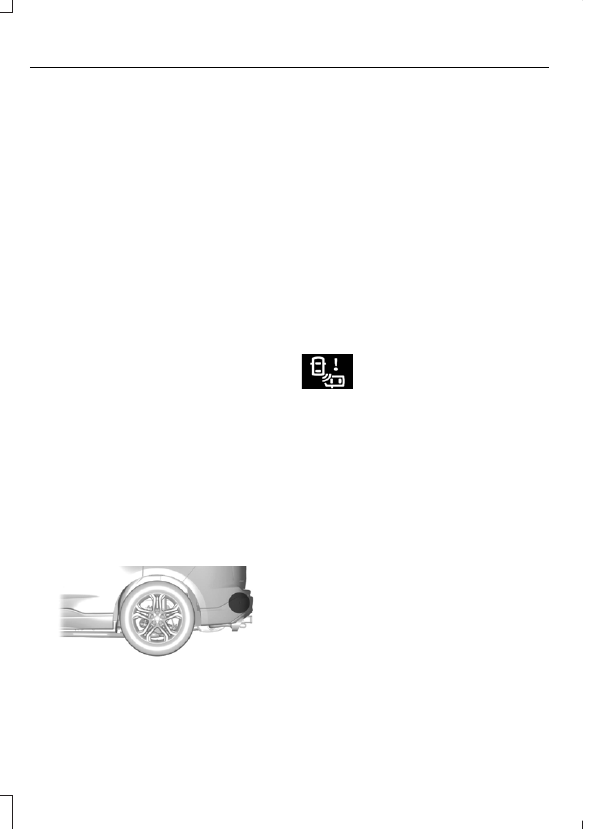
Cross Traffic Alert System Sensors

E205199

The sensors are behind the rear bumper
on both sides of your vehicle.

If something blocks the sensors, a message
may appear in the information display
when you shift into reverse (R).

Note:

Keep the sensors free from snow, ice

and large accumulations of dirt.

Note:

Do not cover the sensors with bumper

stickers, repair compound or other objects.

Note:

Blocked sensors could affect system

performance.

Note:

Bike and cargo racks could cause

false alerts due to obstruction of the sensor.
We recommend switching the feature off
when using a bike or cargo rack.

Cross Traffic Alert Indicator

E268294

When the system detects an
approaching vehicle, a tone
sounds, a warning lamp

illuminates in the relevant exterior mirror,
and arrows appear in the information
display to show which side the
approaching vehicle is coming from.

Note:

If arrows do not display, a message

appears in the information display.

If the system malfunctions, a warning lamp
illuminates in the instrument cluster and
a message appears in the information
display.  Have your vehicle checked as soon
as possible.

Note:

In exceptional conditions, the system

could alert you, even when there is nothing
in the detection zone, for example a vehicle
passing further away from your vehicle.

202

Driving Aids

Cross Traffic Alert Information Messages

Action

Message

Displays instead of indication arrows when the system
detects a vehicle. Check for approaching traffic.

Cross Traffic Alert

Indicates blocked cross traffic alert system sensors. Clean
the sensors. If the message continues to appear, have your
vehicle checked as soon as possible.

Cross Traffic Not Avail-
able Sensor Blocked See
Manual

The system has malfunctioned.  Have your vehicle checked
as soon as possible.

Cross Traffic System
Fault

Displays if you attach a trailer to your vehicle.

Cross Traffic Alert Deac-
tivated Trailer Attached

STEERING

Electric Power Steering

WARNING: 

The electric power

steering system has diagnostic checks
that continuously monitor the system. If
a fault is detected, a message displays
in the information display. Stop your
vehicle as soon as it is safe to do so.
Switch the ignition off. After at least 10
seconds, switch the ignition on and
watch the information display for a
steering system warning message. If a
steering system warning message
returns, have the system checked as
soon as possible.

WARNING: 

If the system detects

an error, you may not feel a difference in
the steering, however a serious condition
may exist. Have your vehicle checked as
soon as possible. Failure to do so may
result in loss of steering control.

Your vehicle has an electric power steering
system, there is no fluid reservoir, no
maintenance is required.

If your vehicle loses electrical power while
you are driving, electric power steering
assistance is lost. The steering system still
operates and you can steer your vehicle
manually. Manually steering your vehicle
requires more effort.

Extreme continuous steering may increase
the effort required for you to steer your
vehicle, this increased effort prevents
overheating and permanent damage to
the steering system. You do not lose the
ability to steer your vehicle manually.
Typical steering and driving maneuvers
allow the system to cool and return to
normal operation.

Steering Tips

If the steering wanders or pulls, check for:

Correct tire pressures.

Uneven tire wear.

Loose or worn suspension
components.

Loose or worn steering components.

Improper vehicle alignment.

Note:

A high crown in the road or high

crosswinds may also make the steering
seem to wander or pull.

203

Driving Aids

Adaptive Learning

 (If Equipped)

The electronic power steering system
adaptive learning helps correct road
irregularities and improves overall handling
and steering feel. It communicates with
the brake system to help operate
advanced stability control and accident
avoidance systems. Additionally, whenever
the battery is disconnected or a new
battery installed, you must drive your
vehicle a short distance before the system
relearns the strategy and reactivates all
systems.

PRE-COLLISION ASSIST

 (IF

EQUIPPED)

WARNING: 

You must remain in

your vehicle when the system turns on.
At all times, you are responsible for
controlling your vehicle, supervising the
system and intervening, if required.
Failure to take care may result in the loss
of control of your vehicle, serious
personal injury or death.

WARNING: 

The system does not

detect vehicles that are driving in a
different direction, cyclists or animals.
Apply the brakes when necessary. Failure
to follow this instruction could result in
the loss of control of your vehicle,
personal injury or death.

WARNING: 

The system does not

operate during hard acceleration or
steering. Failure to take care may lead
to a crash or personal injury.

WARNING: 

The system may fail or

operate with reduced function during
cold and severe weather conditions.
Snow, ice, rain, spray and fog can
adversely affect the system. Keep the
front camera and radar free of snow and
ice. Failure to take care may result in the
loss of control of your vehicle, serious
personal injury or death.

WARNING: 

Some situations and

objects prevent hazard detection. For
example low or direct sunlight, inclement
weather, unconventional vehicle types,
and pedestrians. Apply the brakes when
necessary. Failure to follow this
instruction could result in the loss of
control of your vehicle, personal injury or
death.

WARNING: 

The system cannot

help prevent all crashes. Do not rely on
this system to replace driver judgment
and the need to maintain a safe distance
and speed.

Using the Pre-Collision Assist
System

The system is active at speeds above
3 mph (5 km/h) and pedestrian detection
is active at speeds up to 50 mph
(80 km/h).

E156130

If your vehicle is rapidly approaching
another stationary vehicle, a vehicle
traveling in the same direction as yours, or
a pedestrian within your driving path, the
system provides three levels of
functionality:

1.

Alert.

2. Brake support.

204

Driving Aids

3. Active braking.

E255268

Alert

: When active, a flashing visual

warning and an audible warning tone
sounds.

Brake support

: The system helps reduce

the impact speed by preparing the brakes
for rapid braking. The system does not
automatically apply the brakes. If you press
the brake pedal, the system can apply
additional braking up to maximum braking
force, even if you lightly press the brake
pedal.

Active braking

: It activates if the system

determines that a collision is about to
occur. The system may help the driver
reduce impact damage or completely
avoid the crash.

Note:

Brake support and active braking are

active at speeds up to 80 mph (130 km/h).
If your vehicle has a radar sensor with
adaptive cruise control, then brake support
and active braking are active up to the
maximum speed of your vehicle.

Note:

If you perceive pre-collision assist

alerts as being too frequent or disturbing,
you can reduce the alert sensitivity, though
the manufacturer recommends using the
highest sensitivity setting. Setting lower
sensitivity would lead to fewer and later
system warnings.

Note:

The system turns off when you

manually disable AdvanceTrac™, or when
you select track mode.

Distance Indication and Alert

 (If

Equipped)

Distance indication and alert provides a
graphical indication of the time gap to
other preceding vehicles traveling in the
same direction. The distance indication
and alert screen in the information display
shows an image similar to the one that
follows.

E190004

If the time gap to a preceding vehicle is
small, a red visual indication displays to
the driver.

Note:

Distance indication and alert

deactivates and the images do not display
when adaptive cruise control is active.

205

Driving Aids

Time Gap

Distance Gap

Images

Sensitivity

Speed

>0.9sec

>82 ft (25 m)

Grey

Normal

62 mph

(100 km/h)

0.6sec - 0.9sec

56–82 ft

(17–25 m)

Yellow

Normal

62 mph

(100 km/h)

<0.6sec

<56 ft (17 m)

Red

Normal

62 mph

(100 km/h)

Adjusting Pre-Collision Assist
Settings

Adjust the alert and distance alert
sensitivity to one of three possible settings
by using the information display control.
See 

Information Displays

 (page 99).

You can switch the distance alert and
indication function off using the
information display controls.  See

Information Displays

 (page 99).

You can switch active braking off using the
information display controls.  See

Information Displays

 (page 99).

Note:

Active braking turns on every time

you switch your vehicle on.

Blocked Sensors

E326902

Camera.

1.

Radar sensor.

2.

If a message regarding a blocked sensor
or camera appears in the information
display, the radar signals or camera images
are detecting an obstruction. If your vehicle
has a radar sensor, it is behind the fascia
cover in the center of the lower grille. With
a blocked sensor or camera, the
pre-collision assist system may not
operate, or performance may reduce. The
following table lists possible causes and
actions for when this message displays.

206

Driving Aids

Camera Troubleshooting

Action

Cause

Clean the outside of the windshield in front

of the camera.

The windshield in front of the camera is

dirty or the sensor is detecting an obstruc-

tion.

Wait a short time. It could take several

minutes for the camera to detect that there

is no obstruction.

The windshield in front of the camera is

clean but the message remains in the

display screen.

Radar Troubleshooting

Action

Cause

Clean the grille surface in front of the radar

or remove the object causing the obstruc-

tion.

The surface of the radar in the grille is dirty

or the sensor is detecting an obstruction.

Wait a short time. It could take several

minutes for the radar to detect that there

is no obstruction.

The surface of the radar in the grille is clean

but the message remains in the display

screen.

The pre-collision assist system temporarily

turns off. Pre-collision assist reactivates a

short time after the weather conditions

improve.

Heavy rain, spray, snow or fog is interfering

with the radar signals.

The pre-collision assist system temporarily

turns off. Pre-collision assist reactivates a

short time after the weather conditions

improve.

Swirling water or snow or ice on the surface

of the road may interfere with the radar

signals.

Contact an authorized dealer to check the

radar for proper coverage and operation.

Radar is out of alignment due to a front-

end impact.

Note:

Proper system operation requires a

clear view of the road by the camera. Repair
any windshield damage in the area of the
camera's field of view.

Note:

If something hits the front end of your

vehicle or damage occurs, the radar sensing
zone may change. This could cause missed
or false vehicle detections. Contact an
authorized dealer to check the radar for
proper coverage and operation.

Note:

If your vehicle detects excessive heat

at the camera or a potential misalignment
condition, a message may display in the
information display indicating temporary
sensor unavailability. When operational
conditions are correct, the message
deactivates. For example, when the ambient
temperature around the sensor decreases
or the sensor successfully recalibrates.

207

Driving Aids

DRIVE CONTROL - MACH 1

 (IF

EQUIPPED)

Selectable Drive Modes

Selectable drive modes deliver a
customized driving experience using a
variety of electronic vehicle systems. The
systems optimize vehicle dynamics and
powertrain response based on your
selected mode. Systems associated with
selectable drive modes are:

Electronically power assisted steering.
See 

Steering

 (page 203).

Electronic stability control and traction
control maintain your vehicle control
in adverse conditions or high
performance driving. See 

Stability

Control

 (page 176).  See 

Traction

Control

 (page 175).

Electronic throttle control enhances
the powertrain response to your driving
input.

Adaptive dampers, if your vehicle
comes with them.

Active exhaust, if provided on your
vehicle, adjusts the sound
characteristics of your vehicle.

Using Selectable Drive Modes

E294773

To change the drive mode setting, press
the mode button on the instrument panel
under the display. The first press
illuminates the selected mode, subsequent
presses change the selected mode.

Note:

Mode changes are not available when

the ignition is off or when the transmission
is in reverse (R). Some modes may be
unavailable when the transmission is in drive
(D) or sport (S).

Note:

Your vehicle may have some of the

drive modes that follow.

Modes:

Normal – Best suited for everyday
driving. If your vehicle has adaptive
dampers, the suspension delivers a
balanced combination of comfort and
handling. Selectable steering defaults
to normal but you can change it using
the steering button.

Sport – Engages when you shift your
automatic transmission into sport (S).
Sport mode increases throttle
response and helps your vehicle
accelerate faster, but does not change
the vehicle dynamics or stability
system. The automatic transmission
holds lower gears and a higher RPM
when lifting off the accelerator. The
automatic transmission downshifts to
a higher RPM when braking
aggressively.

Sport+ – Best suited for spirited driving.
This mode increases throttle response,
and if your vehicle has active exhaust,
it takes on a more powerful tone. If your
vehicle has adaptive dampers, the
suspension becomes stiffer, body
motion reduces and the steering
becomes more precise. Selectable
steering defaults to sport. Depending
on your vehicle configuration, you may
be able to change the selectable
steering setting by pressing the steering

208

Driving Aids

button. The automatic transmission
holds lower gears and a higher RPM
when lifting off the accelerator. The
automatic transmission downshifts to
a higher RPM when braking
aggressively.

Track – Provides a performance driving
experience. Throttle response
increases, and if your vehicle has active
exhaust, it takes on a more powerful
tone. This mode automatically utilizes
performance oriented traction control.
In this mode, traction control
intervention reduces and tunes
specifically for track usage only. We do
not intend for you to use this mode on
public roads.  See 

Using Stability

Control

 (page 177). If your vehicle has

adaptive dampers, the suspension is
optimized for transient handling
maneuvers. This mode offers
maximum control and confidence in
handling on road courses or auto-cross
style events. Selectable steering
defaults to sport. Depending on your
vehicle configuration, you could change
the selectable steering setting by
pressing the steering button. The
automatic transmission holds lower
gears and a higher RPM and downshifts
more aggressively under braking than
in sport mode.

Drag Strip - Provides a performance
driving experience tailored to driving
on a drag strip. The engine responds
directly to your inputs, and if your
vehicle has active exhaust, it takes on
a more powerful tone. We do not
intend for you to use this mode on
public roads. If your vehicle has
adaptive dampers, the setting
optimizes for straight line maximum
acceleration. Selectable steering
defaults to sport. Depending on your
vehicle configuration, you could change
the selectable steering setting by
pressing the steering button. The
automatic transmission calibrates to
shift very aggressively to provide a
performance kick when driven at
maximum throttle.

Snow/Wet - Provides a confident
handling driving experience during poor
weather. If your vehicle has adaptive
dampers, the suspension delivers a
balanced combination of comfort and
handling. Selectable steering defaults
to normal. Depending on your vehicle
configuration, you could change the
selectable steering setting by pressing
the steering button.

Using MyMode (If Equipped)

E294774

You can use MyMode to create a unique
drive mode.

209

Driving Aids

To create or save MyMode, press the
button on the steering wheel and access
the menu.  See 

General Information

(page 99). The available systems display.
Choose your desired settings using the
appropriate buttons and menus. Press and
hold OK to save your settings. MyMode
adds to the drive mode list and you can
select the next time you drive your vehicle.

Note:

The system has diagnostic checks

that continuously monitor the system to
make sure it properly operates. If a mode is
unavailable due to a system fault or change
in gear position, the selected mode defaults
to normal.

Note:

Pre-Collision Assist automatically

disables when you select track mode.  See

Pre-Collision Assist

 (page 204).

Note:

If your vehicle has adaptive dampers,

the steering setting optimizes to work with
each drive mode. Other steering settings
may not be available.

Selectable Steering

E174705

Press the steering button on the
instrument panel to change the
steering feel. The first press

illuminates the selected mode. Each time
you press the button, it changes the mode.

Modes:

Normal - Default factory setting.

Sport - Slightly higher effort required
for steering with more road force felt
through the steering wheel.

Comfort - Slightly less effort required
for steering with less road force felt
through the steering wheel.

Note:

You may feel a soft feedback bump

in the steering wheel after you make a
selection.

Note:

The steering setting defaults to

normal if you disconnect or remove the
battery.

Active Exhaust

 (If Equipped)

E287122

Use the information display to
adjust the tone of the exhaust.

Active Exhaust modes:

Quiet - Lowers the noise of the exhaust.

Normal - Default factory setting.

Sport - Raises the noise of the exhaust.

Track - Tunes the exhaust for track
performance.

Note:

The track exhaust mode setting is

only for use at tracks and not for use on
public roadways. Use of this setting results
in increased exterior noise, which may not
meet state and local laws and regulations.
It is the obligation of the driver to operate
the vehicle in a manner that complies with
state and local requirements. Only use the
track exhaust mode setting at a competition
track or an off-road course where elevated
exterior vehicle noise is acceptable.

Rev Match

 (If Equipped)

This feature provides a smoother driving
experience, particularly during a downshift
event. You can accomplish this by a shift
position prediction that commands a quick
engine RPM match to the selected gear.
You can switch this feature on and off
through the information display.  See

General Information

 (page 99).

Note:

The system remembers your last

selection through ignition cycles.

Note:

Rev match is only available with a

manual transmission.

210

Driving Aids

No Lift Shift

 (If Equipped)

This feature provides you with the ability
to keep the accelerator pedal firmly
pressed down during high engine speed,
wide open throttle accelerations. During
wide open throttle gear shifts, the engine
controller prevents the engine speed from
flaring with the clutch disengaged during
a rapid upshift. This allows reduced
manual transmission upshift time, resulting
in quicker acceleration and smoother no
lift shifts.

DRIVE CONTROL

 (IF EQUIPPED)

Selectable Drive Modes

 (If Equipped)

Selectable drive modes deliver a
customized driving experience using a
variety of electronic vehicle systems. The
systems optimize vehicle dynamics and
powertrain response based on your
selected mode. Systems associated with
selectable drive modes are:

Electronically power assisted steering.
See 

Steering

 (page 203).

Electronic stability control and traction
control maintain your vehicle control
in adverse conditions or high
performance driving. See 

Stability

Control

 (page 176).

Electronic throttle control enhances
the powertrain response to your driving
input.

Adaptive dampers (if equipped).

Active exhaust adjusts the sound
characteristics of your vehicle (if
equipped).

Using Selectable Drive Modes

Note:

Your vehicle may have some of the

drive modes that follow.

E294773

To change the drive mode setting, press
the mode button on the instrument panel
under the display. The first press
illuminates the selected mode, subsequent
presses change the selected mode.

Note:

Mode changes are not available when

the ignition is off or when the transmission
is in reverse (R). Some modes may be
unavailable when the transmission is in drive
(D) or sport (S).

Modes:

Normal – Best suited for everyday
driving. If your vehicle has adaptive
dampers, the suspension delivers a
balanced combination of comfort and
handling. Selectable steering defaults
to normal but can be changed using
the steering button.

Sport – Engages when you shift your
automatic transmission into sport (S).
Sport mode increases throttle
response and helps your vehicle
accelerate faster, but does not change
the vehicle dynamics or stability
system.

Sport+ – Best suited for spirited driving.
This mode increases throttle response,
and if your vehicle has active exhaust,
it takes on a more powerful tone. If your
vehicle has adaptive dampers, the
suspension becomes stiffer, body

211

Driving Aids

motion reduces and the steering
becomes more precise. Selectable
steering defaults to sport. Depending
on vehicle configuration, you may be
able to change the selectable steering
setting by pressing the steering button.

Track – Provides a performance driving
experience. Throttle response
increases, and if your vehicle has active
exhaust, it takes on a more powerful
tone. A performance oriented traction
control mode is automatically utilized.
In this mode, traction control
intervention is reduced and tuned
specifically for track usage only. This
mode is not intended for public roads.
See 

Using Stability Control

 (page

177). If your vehicle is equipped with
adaptive dampers, the suspension is
optimized for transient handling
maneuvers. This mode offers
maximum control and confidence in
handling on road courses or auto-cross
style events. Selectable steering
defaults to sport. Depending on vehicle
configuration, you could change the
selectable steering setting by pressing
the steering button.

Drag Strip - Provides a performance
driving experience tailored to driving
on a drag strip. The engine responds
directly to your inputs, and if your
vehicle has active exhaust, it takes on
a more powerful tone. This mode is not
intended for public roads. If your
vehicle has adaptive dampers, the
setting is optimized for straight line
maximum acceleration. Selectable
steering defaults to sport. Depending
on vehicle configuration, you could
change the selectable steering setting
by pressing the steering button.

Snow/Wet - Provides a confident
handling driving experience during poor
weather. If your vehicle has adaptive
dampers, the suspension delivers a
balanced combination of comfort and
handling. Selectable steering defaults
to normal. Depending on vehicle
configuration, you could change the
selectable steering setting by pressing
the steering button.

Using MyMode (If Equipped)

E294774

You can use MyMode to create a unique
drive mode.

212

Driving Aids

To create or save MyMode, press the
button on the steering wheel and access
the menu.  See 

General Information

(page 99). The available systems display.
Select your desired settings using the
appropriate buttons and menus. Press and
hold OK to save your settings. MyMode is
added to the drive mode list and can be
selected the next time you drive your
vehicle.

Note:

The system has diagnostic checks

that continuously monitor the system to
make sure it properly operates. If a mode is
unavailable due to a system fault or change
in gear position, the selected mode defaults
to normal.

Note:

Pre-Collision Assist is automatically

disabled when track mode is selected. See

Pre-Collision Assist

 (page 204).

Note:

If your vehicle has adaptive dampers,

the steering setting is optimized to work with
each drive mode. Other steering settings
may not be available.

Selectable Steering

Note:

The steering setting defaults to

normal if the battery is disconnected or
removed.

E174705

Press the steering button on the
instrument panel to change the
steering feel. The first press

illuminates the selected mode. Each time
you press the button, it changes the mode.

Modes:

Normal - Default factory setting.

Sport - Slightly higher effort required
for steering with more road force felt
through the steering wheel.

Comfort - Slightly less effort required
for steering with less road force felt
through the steering wheel.

Note:

A soft feedback bump in the steering

wheel may be felt after you make a
selection.

Adaptive Dampers

 (If Equipped)

E282723

Press the button on the steering
wheel to adjust the suspension.
The first press illuminates the

current mode. Each time you press the
button, it changes the mode.

Adaptive damper modes:

Normal — Available in normal and
sport drive modes.

Sport — Available in normal, sport and
track drive modes.

Track — Available only in track drive
mode.

Drag Strip — Available only in drag strip
drive mode.

Active Exhaust

 (If Equipped)

E287122

Press the button on the
instrument panel under the
display to adjust the tone of the

exhaust.

Active Exhaust modes:

Quiet - Lowers the noise of the exhaust.

Normal - Default factory setting.

Sport - Raises the noise of the exhaust.

Track - Tunes the exhaust for track
performance.

Note:

The track exhaust mode setting is

only for use at tracks and not for use on
public roadways. Use of this setting results
in increased exterior noise, which may not
meet state and local laws and regulations.
It is the obligation of the driver to operate
the vehicle in a manner that complies with
state and local requirements. Only use the
track exhaust mode setting at a competition
track or an off-road course where elevated
exterior vehicle noise is acceptable.

213

Driving Aids

Rev Match

 (If Equipped)

This feature provides a smoother driving
experience, particularly during a downshift
event. This is accomplished by a shift
position prediction that commands a quick
engine RPM match to the selected gear.
You can switch this feature on and off
through the information display.  See

General Information

 (page 99).

Note:

The system remembers your last

selection through ignition cycles.

214

Driving Aids

LOAD LIMIT

Vehicle Loading - with and
without a Trailer

This section guides you in the
proper loading of your vehicle,
trailer, or both. Keep your loaded
vehicle weight within its design
rating capability, with or without
a trailer. Properly loading your
vehicle provides maximum return
of vehicle design performance.
Before you load your vehicle,
become familiar with the
following terms for determining
your vehicle’s weight rating, with
or without a trailer, from the
vehicle’s Tire and Loading
Information label or Safety
Compliance Certification label.

Tire and Loading Label Information
Example:

E198719

Payload

Payload is the combined weight
of cargo and passengers that your
vehicle is carrying. The maximum
payload for your vehicle appears
on the Tire and Loading label. The
label is either on the B-pillar or the
edge of the driver door. Vehicles
exported outside the US and
Canada may not have a tire and
loading label. Look for “The
combined weight of occupants
and cargo should never exceed
XXX kg OR XXX lb” for maximum
payload. The payload listed on the
Tire and Loading Information label

215

Load Carrying

is the maximum payload for your
vehicle as built by the assembly
plant. If you install any additional
equipment on your vehicle, you
must determine the new payload.
Subtract the weight of the
equipment from the payload listed
on the Tire and Loading label.
When towing, trailer tongue
weight or king pin weight is also
part of payload.

WARNING: 

The

appropriate loading capacity of
your vehicle can be limited either
by volume capacity (how much
space is available) or by payload
capacity (how much weight the
vehicle should carry). Once you
have reached the maximum
payload of your vehicle, do not
add more cargo, even if there is
space available. Overloading or
improperly loading your vehicle
can contribute to loss of vehicle
control and vehicle rollover.

GAWR - Gross Axle Weight
Rating

GAWR is the maximum allowable
weight that a single axle (front or
rear) can carry. These numbers
are on the Safety Compliance
Certification label. The label is
located on the door hinge pillar,
door-latch post, or the door edge
that meets the door-latch post,
next to the driver seating position.

The total load on each axle must
never exceed its Gross Axle
Weight Rating.

GVWR - Gross Vehicle Weight
Rating

GVWR is the maximum allowable
weight of the fully loaded vehicle.
This includes all options,
equipment, passengers and cargo.
It appears on the Safety
Compliance Certification label.
The label is located on the door
hinge pillar, door-latch post, or the
door edge that meets the
door-latch post, next to the driver
seating position.

The gross vehicle weight must
never exceed the Gross Vehicle
Weight Rating.

Safety Compliance Certification Label
Example:

E198828

216

Load Carrying

WARNING: 

Exceeding the

Safety Compliance Certification
label vehicle weight limits can
adversely affect the
performance and handling of
your vehicle, cause vehicle
damage and can result in the
loss of control of your vehicle,
serious personal injury or death.

Maximum Loaded Trailer
Weight

Maximum loaded trailer weight is
the highest possible weight of a
fully loaded trailer the vehicle can
tow. Consult the 

RV & Trailer

Towing Guide

 available at your

authorized dealer, or online.

RV & Trailer Towing Guide Online

http://www.fleet.ford.com/towing-guides/

Website

GCWR - Gross Combined
Weight Rating

GCWR is the maximum allowable
weight of the vehicle and the
loaded trailer, including all cargo
and passengers, that the vehicle
can handle without risking
damage. (Important: The towing
vehicle’s braking system is rated
for operation at Gross Vehicle
Weight Rating, not at Gross
Combined Weight Rating.)
Separate functional brakes should
be used for safe control of towed
vehicles and for trailers where the
Gross Combined Weight of the
towing vehicle plus the trailer
exceed the Gross Vehicle Weight
Rating of the towing vehicle.

The gross combined weight must
never exceed the Gross Combined
Weight Rating.

Note:

 For trailer towing

information refer to the RV and
Trailer Towing Guide available at
an authorized dealer.

WARNING: 

Do not exceed

the GVWR or the GAWR
specified on the certification
label.

WARNING: 

Do not use

replacement tires with lower
load carrying capacities than the
original tires because they may
lower your vehicle's GVWR and
GAWR limitations. Replacement
tires with a higher limit than the
original tires do not increase the
GVWR and GAWR limitations.

217

Load Carrying


Content      ..     11      12      13      14     ..