Ford Transit Connect (2018 year). Manual - part 18
 

  Index      Ford     Ford Transit Connect - service manual 2018 year in english


Search            


Content   ..  16  17  18  19   ..


Ford Transit Connect (2018 year). Manual - part 18


6. Release the control.

7.

Press and hold the control until the
window is fully open.

8. Lift and hold the control until the

window is fully closed.

9. Release the control.

10.

Open the window and then try to
close it automatically.

11.

Repeat the procedure if the window
does not close automatically.

Accessory Delay

 (If Equipped)

You can use the window controls for
several minutes after switching off the
ignition or until opening either front door.

GLOBAL OPENING AND
CLOSING

You can also operate the power windows
with the ignition off using the global
opening and global closing function.

Note: Global opening will only operate for
a short period of time after you have
unlocked your vehicle using the remote
control.

Note: Global closing will only operate if you
have set the memory correctly for each
window.  See Power Windows (page 73).

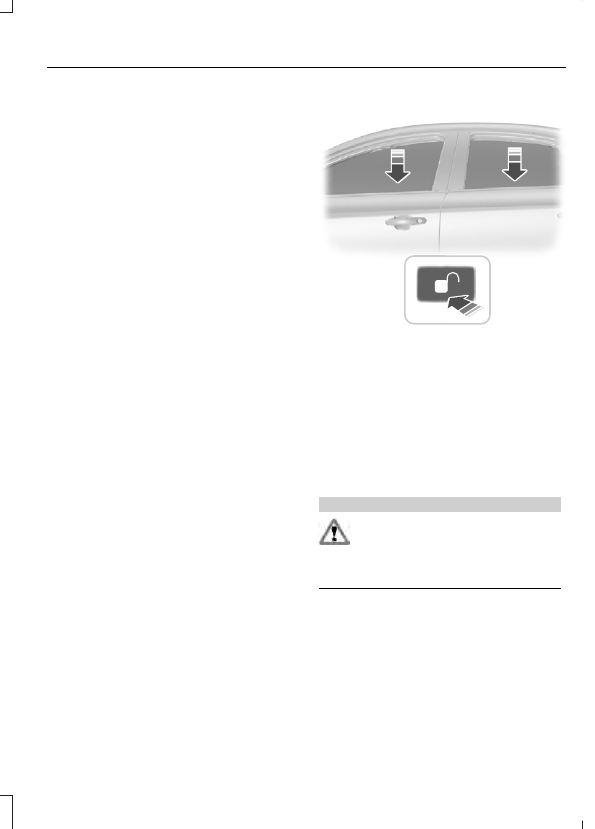
Global Opening

 (If Equipped)

E71955

To open all the windows:

1.

Press and release the remote control
unlock button.

2. Press and hold the remote control

unlock button for at least three
seconds.

Press the lock or unlock button to stop the
opening function.

Global Closing

 (If Equipped)

WARNING

Take care when using global closing.
Failure to follow this warning could
seriously increase the risk of injury or

death. In an emergency, press the lock or
unlock button immediately to stop.

E71956

To close all the windows, press and hold
the remote control lock button for at least
three seconds. Press the lock or unlock
button to stop the closing function. The
bounce-back function is also on during
global closing.

EXTERIOR MIRRORS

Power Exterior Mirrors

 (If Equipped)

WARNING

Do not adjust the mirrors when your
vehicle is moving. This could result
in the loss of control of your vehicle,

serious personal injury or death.

E70846

A

C

B

Left-hand mirror

A

Off

B

Right-hand mirror

C

E70847

Press the arrows to adjust the mirror.

Note: Do not clean the housing or glass of
any mirror with harsh abrasives, fuel or other
petroleum or ammonia-based cleaning
products.

Automatic Folding and Unfolding

The mirrors will automatically fold or
unfold when you use the key to lock or
unlock your vehicle.

Note: If you fold the mirrors using the
manual fold button, you can only unfold
them again manually.

Manual Folding and Unfolding

The power folding mirrors operate with the
ignition on, and for several minutes after
you switch the ignition off.

Note: You can only fold the mirrors when
the controller is set to position B.

Note: Continuous folding and unfolding of
the mirrors will cause them to overheat and
shut down for a short time. This is to avoid
permanent damage.

E165480

Press the down arrow to fold or unfold the
mirrors.

Press the down arrow again to stop and
reverse the direction of movement.

Fold Away Exterior Mirrors

Push the mirror toward the door window
glass. Make sure that you fully engage the
mirror in its support when returning it to its
original position.

INTERIOR MIRROR

WARNING

Do not adjust the mirrors when your
vehicle is moving. This could result
in the loss of control of your vehicle,

serious personal injury or death.

Note: Do not clean the mirror housing or
glass with harsh abrasives, fuel or other
petroleum-based cleaning products.

You can adjust the interior mirror to your
preference. Some mirrors also have a
second pivot point. This lets you move the
mirror head up or down and from side to
side.

Pull the tab below the mirror toward you
to reduce glare at night.

Auto-Dimming Mirror

 (If Equipped)

Note:  Do not block the sensors on the front
and back of the mirror.  A rear center
passenger or raised rear center head
restraint may also block light from reaching
the sensor.

The mirror dims to reduce glare when
bright lights are detected from behind your
vehicle. It will automatically return to
normal reflection when you select reverse
gear to make sure you have a clear view
when backing up.

SUN SHADES

WARNINGS

Do not let children play with the sun
shade or leave them unattended in
the vehicle. They may seriously hurt

themselves.

WARNINGS

When closing the sun shade, you
should verify that it is free of
obstructions and make sure that

children and pets are not in the proximity
of the sunshade.

The control is located in the overhead
console.

The sun shade has a one-touch open and
close feature. To stop motion during
one-touch operation, press the control a
second time.

Opening and Closing the Sun
Shade

E223717

Fully press and release the front of the
control to open the sun shade.

Fully press and release the rear of the
control to close the sun shade.

Bounce-Back

The sun shade will stop automatically
while closing. It will reverse some distance
if there is an obstacle in the way.

Sun Shade Relearning

WARNING

The bounce-back function is not
active during this procedure. Make
sure that there are no obstacles in

the way of the moving sun shade.

Note: You must start the relearning process
within 30 seconds of switching the ignition
on.

In case the sun shade no longer opens or
closes properly, follow this relearning
procedure:

1.

Press the front of the control to the first
action point twice and release it within
two seconds.

2. Press the rear of the control to the first

action point twice and release it within
two seconds.

3. Press and hold the front of the control

to the first action point, until the sun
shade fully opens.

4. Press and hold the rear of the control

to the first action point, until the sun
shade fully closes.

If you do not complete Step 2 within 15
seconds of Step 1, the relearning function
end. Switch the ignition off, wait for
another 30 seconds and then switch the
ignition back on again. Start the procedure
again from the beginning.

Confirm that relearning was successful by
opening and closing the sun shade.


Content   ..  16  17  18  19   ..