Ford Super Duty (2018 year). Manual - part 20
E261582
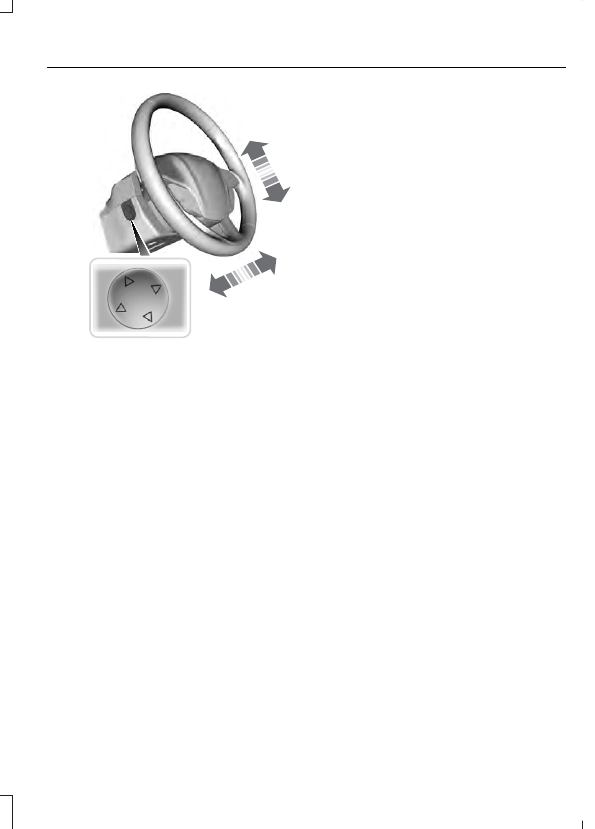
Use the control on the side of the steering
column to adjust the position.
To adjust:
•
Tilt: Press the top or bottom of the
control.
•
Telescope: Press the front or rear of
the control.
End of Travel Position
The steering column sets a stopping
position just short of the end of the column
position to prevent damage to the steering
column. A new stopping position sets if
the steering column encounters an object
when tilting or telescoping.
To reset the steering column to its normal
stopping position:
1.
Confirm there is nothing obstructing
the motion of the steering column.
2. Press and hold the steering column
control until the steering column stops
moving.
3. Press the steering column control
again.
Note: The steering column may begin to
move again.
4. When the steering column stops,
continue holding the control for a few
seconds.
5. Repeat for each direction as necessary.
A new stopping position sets. The next
time you tilt or telescope the steering
column, it stops just short of the end of the
column position.
Memory Feature
You can save and recall the steering
column position with the memory
function. See Memory Function (page
161).
Pressing the adjustment control during
memory recall cancels the operation.
Easy Entry and Exit Feature
The column moves to the full up position
when you switch the ignition off. Switch
the ignition on to return the system to its
previous settings. You can switch this
feature on or off in the information display.
See Information Displays (page 114).
AUDIO CONTROL
You can operate the following functions
with the control: