Ford Focus Electric (2018 year). Manual - part 32
 

  Index      Ford     Ford Focus Electric - service manual 2018 year in english


Search            


Content   ..  30  31  32  33   ..


Ford Focus Electric (2018 year). Manual - part 32


A

B C

D

F

E

E142436

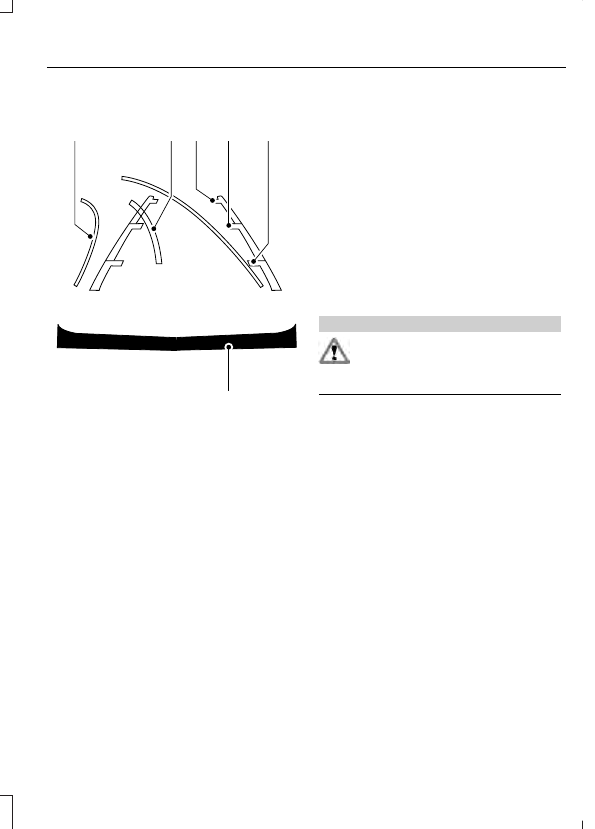
Active guidelines

A

Centerline

B

Fixed guideline: Green zone

C

Fixed guideline: Yellow zone

D

Fixed guideline: Red zone

E

Rear bumper

F

Active guidelines are only shown with fixed
guidelines.  To use active guidelines, turn
the steering wheel to point the guidelines
toward an intended path.  If the steering
wheel position is changed while reversing,
your vehicle might deviate from the original
intended path.

The fixed and active guidelines fade in and
out depending on the steering wheel
position.  The active guidelines are not
shown when the steering wheel position
is straight.

Always use caution while reversing.
Objects in the red zone are closest to your
vehicle and objects in the green zone are
farther away. Objects are getting closer to
your vehicle as they move from the green
zone to the yellow or red zones. Use the
exterior mirrors and rear view mirror to get
better coverage on both sides and rear of
your vehicle.

Manual Zoom

WARNING

When manual zoom is on, the full
area behind your vehicle may not
show. Be aware of your surroundings

when using the manual zoom feature.

Note: Manual zoom is only available when
the transmission is in reverse (R).

Note: When manual zoom is enabled, only
the centerline is shown.

This allows you to get a closer view of an
object behind your vehicle.  The zoomed
image keeps the bumper in the image to
provide a reference.  The zoom is only
active while the transmission is in reverse
(R).  When the transmission is shifted out
of reverse (R), the feature automatically
turns off and must be reset when it is used
again.

Selectable settings for this feature are +
and -. The default setting for the manual
zoom is OFF.

Rear Camera Delay (If Equipped)

When you shift the transmission out of
reverse (R) and into any gear while the rear
camera delay is active, the camera image
displays until:

Your vehicle speed sufficiently
increases.

You shift your vehicle into park (P).

Selectable settings for this feature are ON
and OFF. The default setting for the rear
camera delay is OFF.

Enhanced Park Aids

Note: The reverse sensing system is not
effective at speeds above 6 mph (10 km/h)
and may not detect certain angular or
moving objects.

When the sensing system detects an
object, it displays red, yellow and green
highlights at the top of the image. The alert
highlights all objects detected.

Selectable settings for this feature are ON
and OFF.

PRINCIPLE OF OPERATION

Cruise control lets you maintain a set
speed without keeping your foot on the
accelerator pedal. You can use cruise
control when your vehicle speed is greater
than 20 mph (30 km/h).

USING CRUISE CONTROL

WARNINGS

Do not use cruise control on winding
roads, in heavy traffic or when the
road surface is slippery. This could

result in loss of vehicle control, serious
injury or death.

When you are going downhill, your
vehicle speed may increase above
the set speed. The system will not

apply the brakes. Failure to follow this
warning could result in serious personal
injury or death.

E142437

The cruise controls are on the steering
wheel.

Switching Cruise Control On

Press and release ON.

E71340

The indicator displays in the
instrument cluster.

Setting the Cruise Speed

1.

Drive to desired speed.

2. Press and release SET+.

3. Take your foot off the accelerator

pedal.

Note: The indicator will change color.

Note: Cruise control will disengage if the
vehicle speed decreases more than 10 mph
(16 km/h) below the set speed while driving
uphill.

Changing the Set Speed

Press the accelerator or brake pedal
until you reach the desired speed. Press
and release SET+.

Press and hold SET+ or SET-. Release
the control when you reach the desired
speed.

Press and release SET+ or SET-. The
set speed will change in approximately
3 mph (5 km/h) increments.

Note: If you accelerate by pressing the
accelerator pedal, the set speed will not
change. When you release the accelerator
pedal, your vehicle returns to the speed that
you previously set.

Canceling the Set Speed

Press and release CAN or tap the brake
pedal. You will not erase the set speed.

Resuming the Set Speed

Press and release RES.

Switching Cruise Control Off

Press and release OFF when the system
is in stand by mode or switch the ignition
off.

Note: You erase the set speed when you
switch the system off.


Content   ..  30  31  32  33   ..