Ford Focus Electric (2018 year). Manual - part 18
 

  Index      Ford     Ford Focus Electric - service manual 2018 year in english


Search            


Content   ..  16  17  18  19   ..


Ford Focus Electric (2018 year). Manual - part 18


Fold-Away Exterior Mirrors

Push the mirror toward the door window
glass. Make sure that you fully engage the
mirror in its support when returning it to its
original position.

Heated Exterior Mirrors

See Heated Windows and Mirrors (page
96).

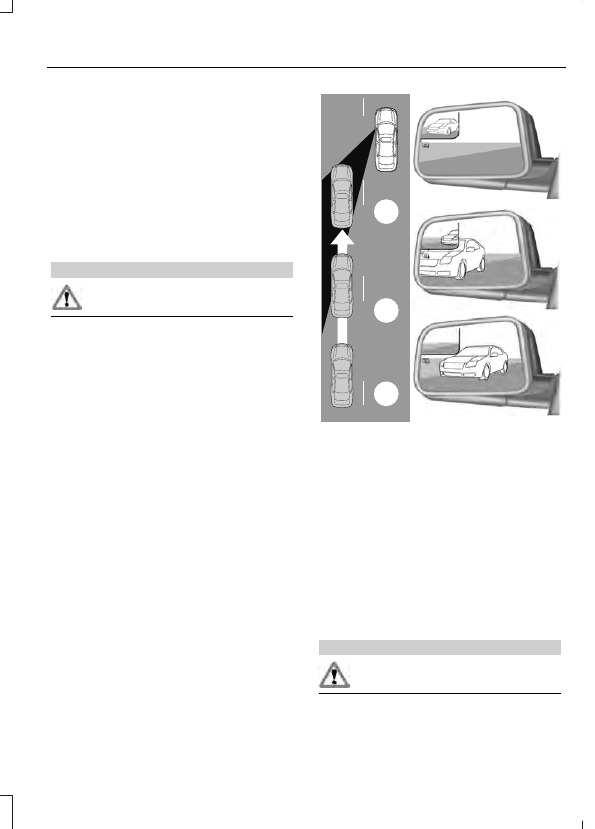
Integrated Blind Spot Mirrors

WARNING

Objects in the blind spot mirror are
closer than they appear.

Blind spot mirrors have an integrated
convex mirror built into the upper outboard
corner of the exterior mirrors. They are
designed to increase your visibility along
the side of your vehicle.

Check the main mirror first before a lane
change, then check the blind spot mirror.
If no vehicles are present in the blind spot
mirror and the traffic in the adjacent lane
is at a safe distance, signal that you intend
to change lanes. Glance over your shoulder
to verify traffic is clear and carefully
change lanes.

A

B

C

E138665

The image of the approaching vehicle is
small and near the inboard edge of the
main mirror when it is at a distance. The
image becomes larger and begins to move
outboard across the main mirror as the
vehicle approaches (A). The image will
transition from the main mirror and begin
to appear in the blind spot mirror as the
vehicle approaches (B). The vehicle will
transition to your peripheral field of view
as it leaves the blind spot mirror (C).

INTERIOR MIRROR

WARNING

Do not adjust the mirror when your
vehicle is moving.

Note: Do not clean the housing or glass of
any mirror with harsh abrasives, fuel or other
petroleum or ammonia-based cleaning
products.

You can adjust the interior mirror to your
preference. Some mirrors also have a
second pivot point. This lets you move the
mirror head up or down and from side to
side.

Pull the tab below the mirror toward you
to reduce glare at night.

SUN VISORS

E138666

Rotate the sun visor toward the side
window and extend it rearward for extra
shade.

Illuminated Vanity Mirror

 (If Equipped)

E162197

Lift the cover to switch the lamp on.

GAUGES

A

C

B

E162393

Left Information Display.

A

Speedometer.

B

Right Information Display.

C

Common Displays

Note: You can switch some features on and
off through the information display.

Battery Gauge

The high voltage battery gauge appears
on the right side of the left information
display screen. This provides State of
Charge, Range Estimate and Regen
Display.

State of Charge - The state of charge
for the high voltage battery is shown
as a colored fill. The fill color is
normally blue. When a low battery
condition is reached the fill turns
amber. When the battery is depleted
the fill turns red. See the Information
Messages section for details on
associated Low Battery and Depleted
Battery warnings.

Distance to Empty - The Range
Estimate in the Battery Gauge is
personalized to your key. This is the
estimated distance your vehicle can
travel before needing a recharge. The
Range Estimate is based on your
typical energy usage while driving. This
includes your Drive Habits as well as
your use of accessories such as Climate
Control. Your Range Estimate may
change immediately when you change
your Climate Control settings.

Regen Display - A circular arrow
symbol appears in the center of the
Battery Gauge when energy is being
recaptured through the regenerative
braking system.

Brake Coach Display

The Brake Coach appears after your
vehicle has come to a stop. It coaches you
to brake in a manner which maximizes the
amount of energy returned through the
regenerative braking system. The percent
displayed is an indication of the
regenerative braking efficiency with 100%
representing the maximum amount of
energy recovery. If desired, this feature can
be disabled in the Display section of the
Settings menu.

Trip Summary and Lifetime Summary

These summaries display after switching
off your vehicle. The Trip Summary
appears first, followed by the Lifetime
Summary. You can toggle between these
displays using the up and down arrow keys
on the left hand steering wheel controls.

Trip Summary data is from the last power
cycle, while Lifetime Summary data is
cumulative from the last Lifetime
Summary reset done through the Settings
menu in the information display.

Trip Summary:

Distance - The total distance traveled,
and regen distance are displayed.
Regen distance is the estimated range
gained from energy recaptured through
regenerative braking.

Energy Used - The total kilowatt hours
and average watt hours per unit of
distance are displayed. The average
watt hours per mi (km) will be shown
in blue if less than (better than) the
lifetime average watt hours per mi
(km).

Brake Score - The percentage of
braking energy recaptured and returned
to the high voltage battery through
regenerative braking. The brake score
will be shown in blue if greater than
(better than) the lifetime brake score.

Lifetime Summary:

Distance - The total regen distance,
which is the estimated range gained
from energy recaptured through
regenerative braking.

Energy Used - The average watt hours
per mi (km).

Brake Score - The average percentage
of braking energy recaptured and
returned to the high voltage battery
through regenerative braking.


Content   ..  16  17  18  19   ..