Ford Focus Electric (2018 year). Manual - part 14
 

  Index      Ford     Ford Focus Electric - service manual 2018 year in english


Search            


Content   ..  12  13  14  15   ..


Ford Focus Electric (2018 year). Manual - part 14


Note: Be careful when opening or closing
the liftgate in a garage or other enclosed
area to avoid damaging the liftgate.

Note: Do not hang anything, for example a
bike rack, from the glass or liftgate. This
could damage the liftgate and its
components.

Note:  Do not leave the liftgate open while
driving.  This could damage the liftgate and
its components.

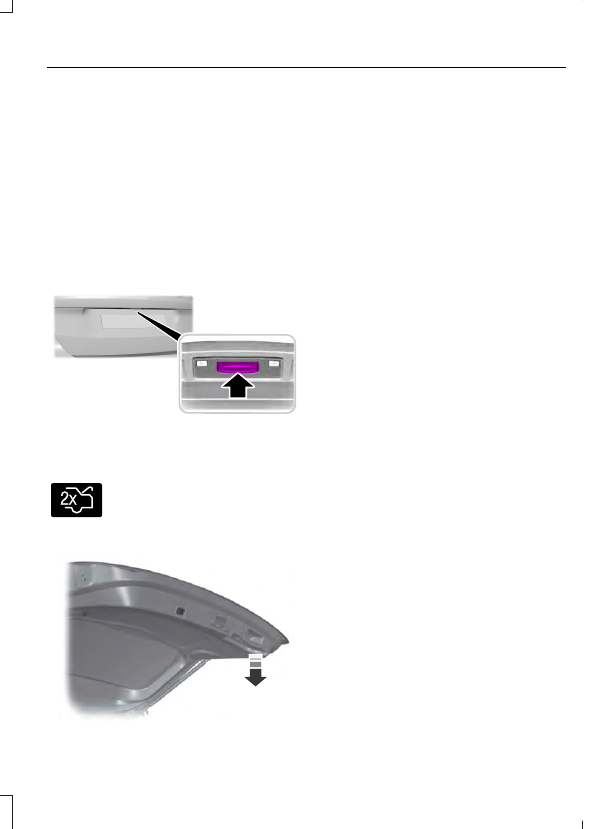
Opening the Liftgate

Manually

E190028

Press the release button above the license
plate to unlatch the liftgate.

With the Remote Control

E138630

Press the button twice within
three seconds.

Closing the Liftgate

E155976

A handle is located inside the liftgate to
help with closing.

PASSIVE ANTI-THEFT
SYSTEM

Note:  The system is not compatible with
non-Ford aftermarket remote start systems.
Use of these systems may result in vehicle
starting problems and a loss of security
protection.

Note:  Metallic objects, electronic devices
or a second coded key on the same key
chain may result in vehicle starting
problems, especially if they are too close to
the key when starting your vehicle.  Prevent
these objects from touching the coded key
when starting your vehicle.  If your vehicle
fails to start, switch your vehicle off, move
all objects on the key chain away from the
key and start your vehicle.

Note:  Do not leave a duplicate coded key
in your vehicle.  Always take your keys and
lock all doors when leaving your vehicle.

SecuriLock

The system helps prevent your vehicle
from starting unless you use a coded key
programmed to your vehicle. A message
may appear in the information display.

If your vehicle fails to start, the system may
have a fault. Contact an authorized dealer.
A message may appear in the information
display.

Automatic Arming

The system arms when you switch your
vehicle off.

Automatic Disarming

The system disarms when you switch your
vehicle on with a coded key.

Replacement Keys

Note: Your vehicle comes with two keys.

The intelligent access key functions as a
programmed key that operates the driver
door lock and turns on the intelligent
access with push button start system, as
well as a remote control.

If your intelligent access keys are lost or
stolen and you do not have an extra coded
key, you need to have your vehicle towed
to an authorized dealer. You need to erase
the key codes from your vehicle and
program new coded keys.

Store a spare intelligent access key away
from your vehicle in a safe place. Contact
an authorized dealer to purchase
additional spare or replacement keys.

Programming a Spare Intelligent
Access Key

You must have two previously
programmed coded keys and the new
unprogrammed key readily accessible.
Contact an authorized dealer to have the
spare key programmed if two previously
programmed keys are not available.

Make sure that your vehicle is switched off
before beginning this procedure. Make sure
that you close all the doors before
beginning and that they remain closed
throughout the procedure. Carry out all
steps within 30 seconds of starting the
sequence. Stop and wait for at least one
minute before starting again if you carry
out any steps out of sequence.

Note: You can program a maximum of eight
coded keys to your vehicle.

Read and understand the entire procedure
before you begin.

E184385

2

1

1.

Open the floor console storage
compartment lid.

2. Remove the tray.

E184386

3

3. Place the first programmed intelligent

access key flat on the symbol at the
bottom of the floor console storage
compartment.

4. Press the START STOP button.

5. Wait five seconds and then press the

START STOP button again.

6. Remove the intelligent access key.

7.

Within 10 seconds, place a second
programmed intelligent access key flat
on the symbol.

8. Press the START STOP button.

9. Wait five seconds and then press the

START STOP button again.

10.

Remove the intelligent access key.

11.

Within 10 seconds, place the
unprogrammed intelligent access key
flat on the symbol.

12.

Press the START STOP button.

Programming is now complete.  Check that
the remote control functions operate and
your vehicle starts with the new intelligent
access key.

If programming was unsuccessful, wait 10
seconds and repeat Steps 1 through 12. If
programming remains unsuccessful, have
your vehicle checked by an authorized
dealer.

ANTI-THEFT ALARM

The system will warn you of an
unauthorized entry to your vehicle. It will
be triggered if any door, the luggage
compartment or the hood is opened
without using the key, remote control or
keyless entry keypad.

The direction indicators will flash and the
horn will sound if unauthorized entry is
attempted while the alarm is armed.

Take all remote controls to an authorized
dealer if there is any potential alarm
problem with your vehicle.

Arming the Alarm

The alarm is ready to arm when there is
not a key in your vehicle. Electronically lock
your vehicle to arm the alarm.

Disarming the Alarm

Disarm the alarm by any of the following
actions:

Unlock the doors or luggage
compartment with the remote control
or keyless entry keypad.

Switch your vehicle on or start your
vehicle.

Use a key in the driver door to unlock
your vehicle, then switch your vehicle
on within 12 seconds.

Note: Pressing the panic button on the
remote control will stop the horn and signal
indicators, but will not disarm the system.


Content   ..  12  13  14  15   ..