Ford Focus Electric (2018 year). Manual - part 13
 

  Index      Ford     Ford Focus Electric - service manual 2018 year in english


Search            


Content   ..  11  12  13  14   ..


Ford Focus Electric (2018 year). Manual - part 13


LOCKING AND UNLOCKING

You can use the power door lock control
or the remote control to lock and unlock
your vehicle.

Note: Always take your keys and lock all
doors when leaving your vehicle.

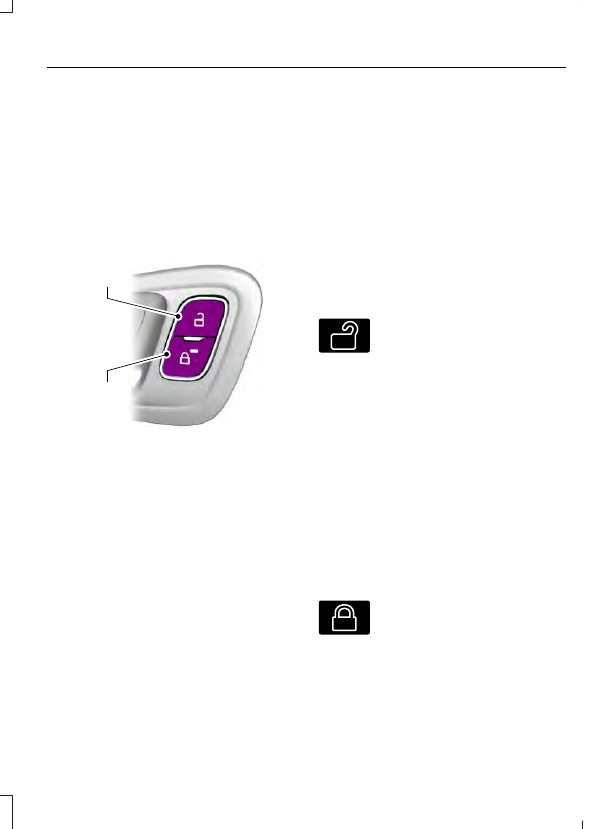
Power Door Locks

The power door lock control is on the driver
and front passenger door panels.

E184784

A

B

Unlock.

A

Lock.

B

Door Lock Indicator

An LED on the power door lock control
illuminates when you lock the door.

It will remain illuminated for up to five
minutes after you switch your vehicle off.

Door Lock Switch Inhibitor

When you electronically lock your vehicle,
the power door lock switch will no longer
operate after approximately 11 seconds.

You must unlock your vehicle with the
remote control or keyless keypad, or switch
your vehicle on, to restore function to these
switches.

Rear Door Unlocking and Opening

Pull the interior door handle twice to
unlock and open a rear door.  The first pull
unlocks the door and the second pull
opens the door.

Remote Control

You can use the remote control at any
time.

The liftgate release button will only work
when the vehicle speed is less than 4 mph
(7 km/h).

Unlocking the Doors (Two-Stage
Unlock)

E138629

Press the button to unlock the
driver door.  Press the button
again within three seconds to

unlock all doors.  The direction indicators
will flash.

Press and hold both the lock and unlock
buttons on the remote control for three
seconds to change between driver door or
all doors unlock mode.  The direction
indicators will flash twice to indicate a
change to the unlocking mode.  Driver door
mode only unlocks the driver door when
you press the unlock button once.  All door
mode unlocks all doors when you press
the unlock button once.  The unlocking
mode applies to the remote control,
keyless entry keypad and intelligent
access.

Locking the Doors

E138623

Press the button to lock all
doors.  The direction indicators
will flash.  Press the button again

within three seconds to confirm that all
the doors are closed.  The doors will lock
again, the horn will sound and the direction
indicators will flash if all the doors and the
liftgate are closed.

Mislock

If any door or the liftgate is open, or if the
hood is open on vehicles with an anti-theft
alarm or remote start, the horn will sound
twice and the direction indicators will not
flash.

Opening the Liftgate

E138630

Press twice within three seconds
to unlatch the liftgate.

Make sure to close and latch the liftgate
before driving your vehicle.  An unlatched
liftgate may cause objects to fall out or
block your view.

Closing the Liftgate

The liftgate will not fully close if an
intelligent access key is located inside the
luggage compartment with the doors
locked.

Note: If a second passive key is located
within the liftgate detection range, the
liftgate can be fully closed.

Activating Intelligent Access

 (If

Equipped)

The system will not function if:

Your vehicle battery has no charge.

The intelligent access key battery has
no charge.

The intelligent access key frequencies
are jammed.

Note: If the system does not function, use
the key blade to lock and unlock your
vehicle. See Keys and Remote Controls
(page 44).

The system allows you to unlock, operate
and lock your vehicle without using a key
or remote control.

E78276

You must have the intelligent access key
within 5 ft (1.5 m) of your vehicle.

Note: The system may not function if the
passive key is close to metal objects or
electronic devices, for example keys or a cell
phone.

At a Door

Pull an exterior door handle to unlock and
open the door.  Do not touch the lock
sensor on the front of the handle.

E185863

The locking sensors are on the front door
handles.

Touch a locking sensor once to lock your
vehicle and arm the alarm.  There is a brief
delay before you can unlock your vehicle
again.

Note: Keep the door handle clean to make
sure the system operates correctly.

Note: Your vehicle does not automatically
lock. If you do not touch a locking sensor
your vehicle will remain unlocked.

At the Liftgate

E190028

Press the release button above the license
plate to unlatch the liftgate.

Smart Unlocks for Intelligent
Access Keys

This helps to prevent you from locking your
key inside the passenger compartment or
rear cargo area.

When you electronically lock your vehicle
with any door open, transmission in park
(P) and your vehicle switched off, the
system will search for an intelligent access
key in the passenger compartment after
you close the last door. If the system finds
a key, all of the doors will immediately
unlock and the horn sounds twice,
indicating that a key is inside.

When you open one of the front doors and
lock your vehicle using the power door lock
control, all doors will lock then unlock if
your vehicle is switched on.

Disabled Intelligent Access Keys

Passive keys left inside your vehicle when
locked are disabled.

You cannot use a disabled passive key to
switch your vehicle on.

You will reactivate disabled passive keys
when you switch your vehicle on using a
valid key.

Autolock

Autolock locks all the doors when all of the
following occur:

All doors are closed.

Your vehicle is switched on.

You shift into any gear putting your
vehicle in motion.

Your vehicle reaches a speed greater
than 4 mph (7 km/h).

Autounlock

Autounlock unlocks all the doors when all
of the following occur:

Your vehicle is switched on, all the
doors are closed and your vehicle has
been in motion at a speed greater than
4 mph (7 km/h).

Your vehicle comes to a stop and you
switch your vehicle off or to accessory.

You open the driver door within 10
minutes of switching your vehicle off
or to accessory.

Note: If you electronically lock your vehicle
after you switch your vehicle off with the
driver door closed, the doors will not
autounlock.

To enable or disable autounlock, do the
following:

1.

Switch your vehicle on.

2. Press the power door unlock control

three times.

3. Switch your vehicle off.

4. Press the power door unlock control

three times.

5. Switch your vehicle on. The horn

sounds indicating your vehicle is in
programming mode.

6. Press the power door lock control and

within five seconds, press the power
door unlock control. The horn sounds
once if disabled or twice if enabled.

7.

Switch your vehicle off. The horn
sounds indicating programming is
complete.

Illuminated Entry

The interior lamps and select exterior
lamps illuminate when you unlock the
doors with the remote entry system.

The lamps turn off if:

Your vehicle is switched on.

You press the remote control lock
button.

25 seconds have elapsed.

The lamps will not turn off if:

You switch them on with the lighting
control.

Any door is open.

Illuminated Exit

The lamps turn off if all the doors remain
closed and:

25 seconds have elapsed.

You press the START/STOP button.

Battery Saver

If you leave the courtesy lamps, dome
lamps or headlamps on, the battery saver
will turn them off 10 minutes after you
switch your vehicle off.

Accessory Mode Battery Saver for
Intelligent Access Keys (If Equipped)

If you leave your vehicle switched on and
the electric motor is not running, the
battery saver will turn the power off when
it detects a certain amount of battery
drain, or after 45 minutes have elapsed.

Opening the Liftgate

With the Remote Control

E138630

Press twice within three seconds
to unlatch the liftgate.

From Outside Your Vehicle

E190028

Press the release button above the license
plate to unlatch the liftgate. Your vehicle
must be unlocked or have an intelligent
access transmitter within 5 ft (1.5 m) of
the liftgate.

MANUAL LIFTGATE

WARNING

It is extremely dangerous to ride in a
cargo area, inside or outside of a
vehicle. In a crash, people riding in

these areas are more likely to be seriously
injured or killed. Do not allow people to ride
in any area of your vehicle that is not
equipped with seats and safety belts. Make
sure everyone in your vehicle is in a seat
and properly using a safety belt. Failure to
follow this warning could result in serious
personal injury or death.


Content   ..  11  12  13  14   ..