Ford F-150 (2018 year). Manual - part 65
 

  Index      Ford     Ford F-150 - service manual 2018 year in english


Search            


Content   ..  63  64  65  66   ..


Ford F-150 (2018 year). Manual - part 65


Adjusting the Pre-Collision Assist
Settings

You can adjust the Alert and Distance Alert
sensitivity to one of three possible settings
by using the information display control.
See General Information (page 111).

You can switch the Distance Indication and
Alert function off using the information
display controls.  See General
Information (page 111).

If required, you can switch active braking
off using the information display controls.
See General Information (page 111).

If required, you can turn the entire
Pre-Collision Assist feature off using the
information display controls.  See General
Information (page 111).

Note: We recommend that you turn the
Pre-Collision Assist system off if a snow
plow or similar object is installed in such a
way that it may block the radar sensor. Your
vehicle remembers the last selected setting
when you switch your vehicle off and then
back on.

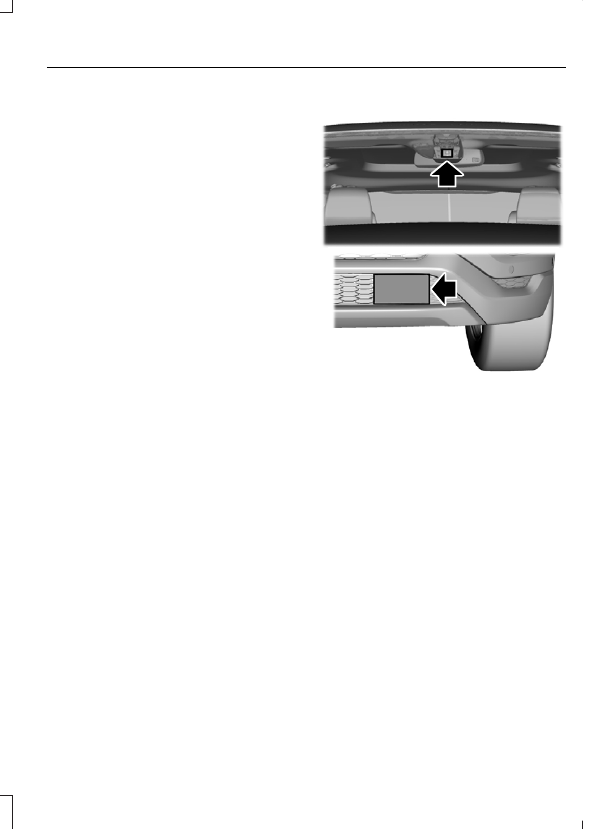
Blocked Sensors

E249424

If a message regarding a blocked sensor
or camera appears in the information
display, the radar signals or camera images
are obstructed. The radar sensor is located
behind a fascia cover near the driver side
of the lower grille. With an obstructed
radar, the Pre-Collision Assist system does
not function and cannot detect a vehicle
ahead. With the front camera obstructed,
the Pre-Collision Assist system does not
respond to pedestrians or stationary
vehicles and the system performance on
moving vehicles reduces. The following
table lists possible causes and actions for
when this message displays.

Action

Cause

Clean the grille surface in front of the radar

or remove the object causing the obstruc-

tion.

The surface of the radar in the grille is dirty

or obstructed in some way.

Wait a short time. It may take several

minutes for the radar to detect that there

is no obstruction.

The surface of the radar in the grille is clean

but the message remains in the display.

The Pre-Collision Assist system is tempor-

arily disabled. Pre-Collision Assist should

automatically reactivate a short time after

the weather conditions improve.

Heavy rain, spray, snow, or fog is interfering

with the radar signals.

The Pre-Collision Assist system is tempor-

arily disabled. Pre-Collision Assist should

automatically reactivate a short time after

the weather conditions improve.

Swirling water, or snow or ice on the surface

of the road may interfere with the radar

signals.

Contact an authorized dealer to have the

radar checked for proper coverage and

operation.

Radar is out of alignment due to a front end

impact.

Clean the outside of the windshield in front

of the camera.

The windshield in front of the camera is

dirty or obstructed in some way.

Wait a short time. It may take several

minutes for the camera to detect that there

is no obstruction.

The windshield in front of the camera is

clean but the message remains in the

display.

Note: Proper system operation requires a
clear view of the road by the camera. Have
any windshield damage in the area of the
camera's field of view repaired.

Note: If something hits the front end of your
vehicle or damage occurs, the radar sensing
zone may change. This could cause missed
or false vehicle detections. Contact an
authorized dealer to have the radar checked
for proper coverage and operation.

Note: If your vehicle detects excessive heat
at the camera or a potential misalignment
condition, a message may display in the
information display indicating temporary
sensor unavailability. When operational
conditions are correct, the message
deactivates. For example, when the ambient
temperature around the sensor decreases
or the sensor automatically recalibrates
successfully.

DRIVE CONTROL

Selectable Drive Modes

The system delivers a driving experience
through a suite of sophisticated electronic
vehicle systems. These systems optimize
steering, handling and powertrain
response. This provides a single location
to control multiple systems performance
settings.

Changing the drive mode automatically
changes the functionality of the following
systems:

Electronic stability control and traction
control maintains your vehicle control
in adverse conditions or high
performance driving.  See Stability
Control (page 224).

Electronic throttle control enhances
the powertrain response to your inputs.

Transmission controls are optimized
with shift schedules tuned to each
terrain.

Using the System

The system automatically tailors your
vehicle configuration for each mode you
select.

Column Shifter

E249567

Console Shifter

E184456

To change the drive mode setting, press
the drive mode button. The drive mode
selection menu appears in the instrument
cluster and allows you to select through
the available drive modes.

Note: Mode changes are not available when
the vehicle ignition is off or in reverse (R). In
drive (D), only some modes may be
available.

E225310

Normal – Delivers a balanced
combination of comfort and
handling. This mode provides an

engaging drive experience and a direct
connection to the road without sacrificing
any of the composure demanded from
your vehicle.

E161509

Tow Haul – Improves
transmission operation when
towing a trailer or a heavy load.

E225312

Snow/Wet – For use during
inclement weather conditions.
Vehicle response becomes

tuned for optimum traction at lower
speeds and confidence inspiring stability
at higher speeds.

E194390

EcoSelect – Offers the best
possible fuel economy with
tradeoffs in vehicle performance

and comfort.

E176099

Sport – Use for spirted and
aggressive off road driving
situations. Vehicle response

becomes tuned for max off road
performance.

Note: Your vehicle may only be equipped
with some of the drive modes listed above.

Note: The system has diagnostic checks
that continuously monitor the system for
proper operation. Certain drive modes are
not available based on the gearshift
position. If a mode is unavailable due to a
system fault or change in gearshift position,
the mode defaults to Normal.

E130458

Some drive modes reduce
traction and stability control
performance and the warning

indicator illuminates in the instrument
cluster.  See Using Stability Control
(page 225).

Selectable Steering

 (If Equipped)

Note: The steering setting defaults to
Normal if the battery is disconnected or
removed.

E174705

To change the steering feel,
toggle the switch on the
instrument panel. The first press

illuminates the selected mode, subsequent
presses will change the selected mode.

Modes:

Normal - Default factory setting.

Sport - Slightly higher effort required
for steering with more road force felt
through the steering wheel.

Comfort - Slightly less effort required
for steering with less road force felt
through the steering wheel.

After selecting the desired setting, you may
feel a soft feedback bump in the steering
wheel when the changeover occurs.

Note: If your vehicle is equipped with the
selectable drive modes feature, the steering
feel will change when you select a new drive
mode. You can override this automatic
selection by pressing the steering button or
switch.


Content   ..  63  64  65  66   ..