Ford F-150 (2018 year). Manual - part 58
 

  Index      Ford     Ford F-150 - service manual 2018 year in english


Search            


Content   ..  56  57  58  59   ..


Ford F-150 (2018 year). Manual - part 58


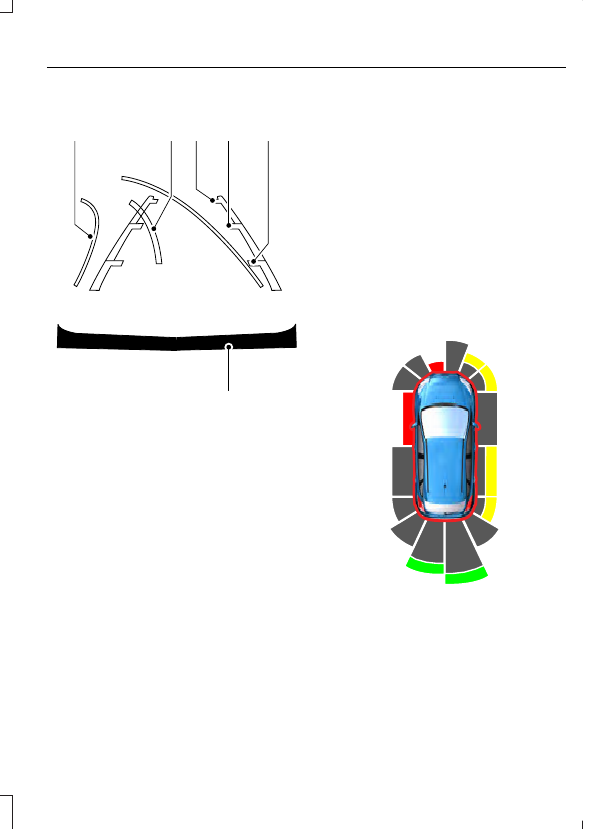
A

B C

D

F

E

E142436

Active guidelines

A

Centerline

B

Fixed guideline: Green zone

C

Fixed guideline: Yellow zone

D

Fixed guideline: Red zone

E

Rear bumper

F

Active guidelines only show with fixed
guidelines. To use active guidelines, turn
the steering wheel to point the guidelines
toward an intended path. If the steering
wheel position changes while reversing,
your vehicle might deviate from the original
intended path.

The fixed and active guidelines fade in and
out depending on the steering wheel
position. The active guidelines do not show
when the steering wheel position is
straight.

Always use caution while reversing.
Objects in the red zone are closest to your
vehicle and objects in the green zone are
farther away. Objects are getting closer to
your vehicle as they move from the green
zone to the yellow or red zones. Use the
side view mirrors and rear view mirror to
get better coverage on both sides and rear
of your vehicle.

Obstacle Distance Indicator

 (If

Equipped)

E190459

The system will provide an image of your
vehicle and the sensor zones. The zones
will highlight green, yellow and red when
the parking aid sensors detect an object in
the coverage area.

Manual Zoom

WARNING

When manual zoom is on, the full
area behind your vehicle may not
show. Be aware of your surroundings

when using the manual zoom feature.

Note: Manual zoom is only available when
the transmission is in reverse (R).

Note: Only the centerline shows when you
enable manual zoom.

Selectable settings for this feature are
Zoom in (+) and Zoom out (-). Press the
symbol on the camera screen to change
the view. The default setting is Zoom OFF.

This allows you to get a closer view of an
object behind your vehicle. The zoomed
image keeps the bumper in the image to
provide a reference. The zoom is only
active while the transmission is in reverse
(R).

Rear Camera Delay

Selectable settings for this feature are ON
and OFF. The default setting for the rear
camera delay is OFF.

When shifting the transmission out of
reverse (R) and into any gear other than
park (P), the camera image remains in the
display until your vehicle speed reaches
6 mph (10 km/h). This occurs when the
rear camera delay feature is on, or until a
radio button is pressed.

360 DEGREE CAMERA

 (If Equipped)

WARNINGS

The 360 degree camera system still
requires the driver to use it in
conjunction with looking out of the

windows, and checking the interior and
exterior mirrors for maximum coverage.

WARNINGS

Objects that are close to either
corner of the bumper or under the
bumper, might not be seen on the

screen due to the limited coverage of the
camera system.

Use caution when turning camera
features on or off when the
transmission is not in park (P). Make

sure your vehicle is not moving.

The 360 degree camera system consists
of front, side and rear cameras. The
system:

Allows you to see what is directly in
front or behind your vehicle.

Provides cross traffic view in front and
behind your vehicle.

Allows you to see a top-down view of
the area outside your vehicle, including
the blind spots.

Provides visibility around your vehicle
to you in parking maneuvers such as:

Centering in a parking space.

Obstacles near vehicle.

Parallel parking.

E183663

The 360 degree camera system
button is located on the
instrument panel and allows you

to toggle through different camera views.
The front and rear cameras have multiple
screens which consist of: Normal view with
360, Normal view, and split view. When in
park (P), neutral (N) or drive (D), only the
front images will be displayed when the
button is pressed. When in reverse (R), only
the rear images will be displayed when the
button is pressed.

Note: The 360 degree camera system will
turn OFF when your vehicle is in motion at
low speed, except when in reverse (R).

Camera Views

The small vehicle icon displayed on the
top left corner of the image illustrates the
camera view being displayed. Camera
views are laid out in the order the screens
will appear once the button is pressed.

Note: The front video image will be
disabled when your vehicle is in motion at
low speed, except when in reverse (R).

Front 360 + Normal: Contains the
normal front camera view next to a
360 degree camera view. This view will
appear on the screen when the button
is pressed in any gear other than
reverse (R).

Front Normal View: Provides an
image of what is directly in front of your
vehicle. Access this view by pressing
the camera button from the Front 360
+ Normal View screen.

Front Split View: Provides an
extended view of what is in front of
your vehicle. Access this view by
pressing the camera button from the
Front Normal View screen.

Rear 360 + Normal: Contains the
normal rear camera view next to a 360
degree camera view. This view can be
accessed by putting your vehicle in
reverse (R), or by pressing the camera
button from the Rear Split View screen.

Rear Normal View: Provides an image
of what is directly behind your vehicle.
Access this view by pressing the
camera button from the Rear 360 +
Normal screen.

Rear Split View: Provides an
extended view of what is behind your
vehicle. Access this view by pressing
the camera button from the Rear
Normal View screen.

Keep Out Zone

E184448

The Keep Out Zone is represented by the
yellow dotted lines running parallel to your
vehicle. It is designed to give you the
indication on the ground of the fully
extended outside mirror position.

Front Camera

WARNING

The front camera system still
requires the driver to use it in
conjunction with looking out of your

vehicle.

E184044

The front video camera, located in the
grille, provides a video image of the area
in front of your vehicle. It adds assistance
to the driver while driving forward at low
speeds.

To use the front video camera system,
place the transmission in any gear except
reverse (R) and press the small icon in the
corner of the screen.

Note:  The front camera system will
automatically switch on when you are in
mud/sand, rock crawl, or Baja mode and
your speed is less than 15 mph (24 km/h)
(F150 Raptor only).

The area displayed on the screen may vary
according to your vehicle's orientation and
road conditions.

Side Camera

E206263

The side view camera, located in the
outside mirror, provide a video image of
the area on the sides of your vehicle as part
of the front 360 + normal view and rear
360 + normal view. It aids you while
parking your vehicle either forward or
backwards.

Note: Use caution when using the 360 view
while any of the doors are ajar. If a door is
ajar, the camera will be out of position and
the video image may be incorrect.


Content   ..  56  57  58  59   ..