Ford F-150 (2018 year). Manual - part 36
 

  Index      Ford     Ford F-150 - service manual 2018 year in english


Search            


Content   ..  34  35  36  37   ..


Ford F-150 (2018 year). Manual - part 36


Note: For rear seat outboard seats, you can
fold the head restraint forward for easier
removal.

Installing the Head Restraint

Align the steel stems into the guide sleeves
and push the head restraint down until it
locks.

Folding the Head Restraint

Note: The rear seat outboard head
restraints may fold forward for improved
visibility.

1.

Press and hold button E.

2. Pull it back up to reset.

Front Seat Center Head Restraint

Your vehicle may be equipped with a front
row center head restraint that you cannot
adjust or remove.

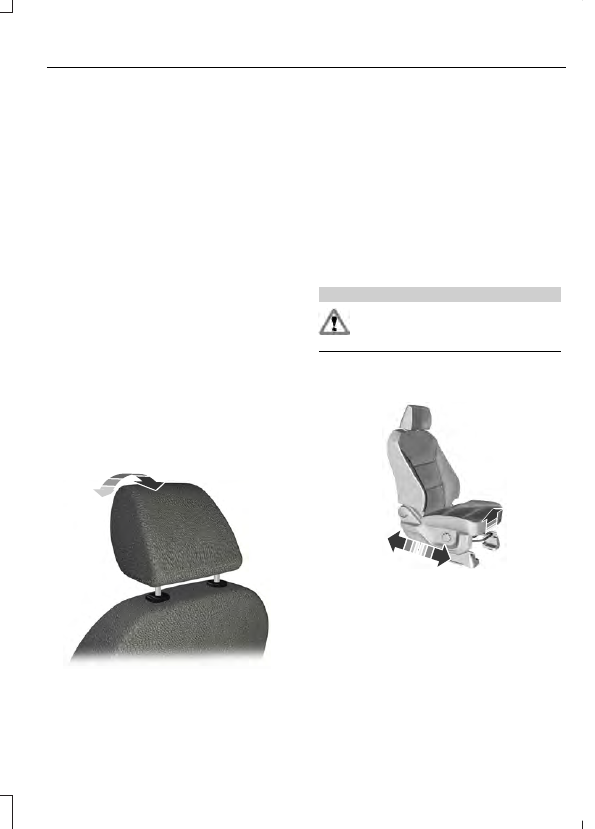
Tilting Head Restraints (If Equipped)

The front head restraints tilt for extra
comfort. To tilt the head restraint, do the
following:

E144727

1.

Adjust the seatback to an upright
driving or riding position.

2. Pivot the head restraint forward toward

your head to the desired position.

After the head restraint reaches the
forward-most tilt position, pivot it forward
again to release it to the rearward, untilted
position.

Note: Do not attempt to force the head
restraint backward after it is tilted. Instead,
continue tilting it forward until the head
restraint releases to the upright position.

MANUAL SEATS

 (If Equipped)

WARNING

Do not adjust the driver's seat or
seatback when your vehicle is
moving.

Moving the Seat Backward and
Forward

E175314

Recline Adjustment

E175315

Manual Lumbar 

 (If Equipped)

E166702

The lumbar support control is located on
the outboard side of the seat. Turn the
control to adjust your support.

POWER SEATS

 (If Equipped)

WARNINGS

Do not adjust the driver seat or seat
backrest when your vehicle is
moving. This may result in sudden

seat movement, causing the loss of control
of your vehicle.

Do not place cargo or any objects
behind the seatback before returning
it to the original position.

E176038

Power Lumbar

 (If Equipped)

E176039

Multi-Contour Front Seats With
Active Motion 

 (If Equipped)

Note: The massage system turns off after
20 minutes.

Note: The engine must be running or the
vehicle must be in accessory mode to
activate the seats.

Note: Allow a few seconds for any selection
to activate. When the seatback and cushion
are both active, the massage will alternate
between zones

E156301

Lumbar and bolster mode

Massage mode

Upper lumbar

Back massage intensity

adjustment

A

Lumbar decrease

Massage intensity decrease

and off

*

B

Lower lumbar

**

Cushion massage intensity

adjustment

C

Lumbar increase

Massage intensity increase

D

-

On and off

E

*

The massage feature defaults to an

alternating massage mode with back
massage intensity adjustment. The lumbar
and bolster feature defaults to the middle
lumbar mode.

**

Press C a second time to adjust the back

bolster. Press C a third time to adjust the
cushion bolster.

You can also adjust this feature through
the touchscreen. When switched on, the
system displays directions for you to adjust
the lumbar settings in your seat or to set
the massage function. To access and make
adjustments to the lumbar setting:

1.

Press the Menu Settings icon > Vehicle
> Multi-contour Seat.

2. Choose the desired seat to adjust.

3. Press the + or - to adjust the lumbar

intensity.

To access and make adjustments to the
massage setting:

1.

Press the Menu Settings icon > Vehicle
>Multi-contour Seat.

2. Choose the desired seat to adjust.

3. Press Off, Low or High.

MEMORY FUNCTION

 (If Equipped)

WARNINGS

Before activating the memory seat,
make sure that the area immediately
surrounding the seat is clear of

obstructions and that all occupants are
clear of moving parts.

Do not use the memory function
when your vehicle is moving.

This function automatically recalls the
position of these features:

Driver seat.

Power mirrors.

Optional power steering column.

Optional power adjustable pedals.

The memory control is on the driver door.


Content   ..  34  35  36  37   ..