Ford F-150 (2018 year). Manual - part 19
 

  Index      Ford     Ford F-150 - service manual 2018 year in english


Search            


Content   ..  17  18  19  20   ..


Ford F-150 (2018 year). Manual - part 19


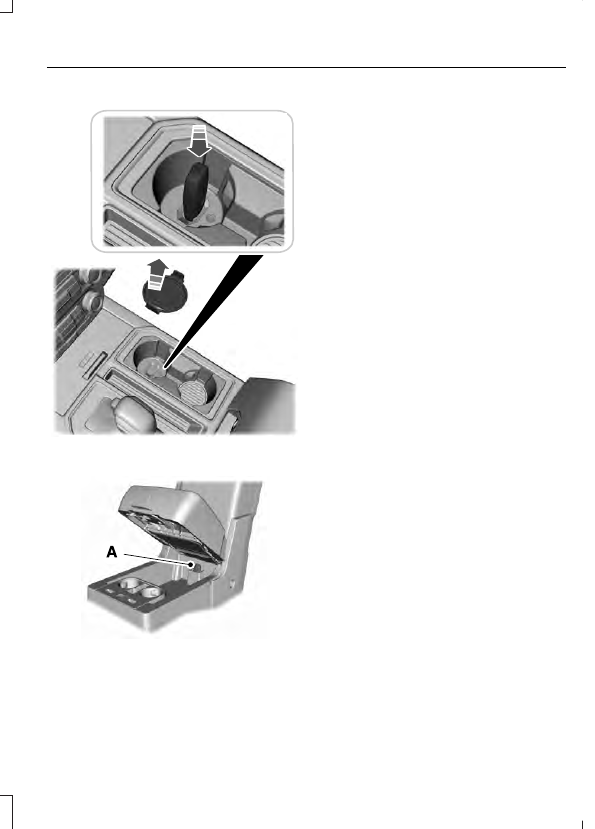
Type One

E244507

Type Two

E187577

1.

Place the first programmed key in the
backup slot (A) in the center console,
then press the push button ignition
switch.  Insert the first previously
programmed coded key into the
ignition.

2. Wait five seconds and then press the

push button ignition switch again.
Switch the ignition from off to on.  Keep
the ignition on for at least three
seconds, but no more than 10 seconds.

3. Remove the intelligent access key.

Switch the ignition off and remove the
first coded key from the ignition.

4. Within 10 seconds, place a second

programmed intelligent access key in
the backup slot.  Press the push button
ignition switch.  After three seconds but
within 10 seconds of switching the
ignition off, insert the second previously
coded key into the ignition.

5. Wait five seconds and then press the

push button ignition switch again.
Switch the ignition from off to on.  Keep
the ignition on for at least three
seconds, but no more than 10 seconds.

6. Remove the intelligent access key.

Switch the ignition off and remove the
second previously programmed coded
key from the ignition.

7.

Place the unprogrammed intelligent
access key in the backup slot and press
the push button ignition switch. After
three seconds but within 10 seconds
of switching the ignition off and
removing the previously programmed
coded key, insert the new
unprogrammed key into the ignition.

Programming is now complete.  Verify the
remote control functions operate and your
vehicle starts with the new intelligent
access key.

If programming was not successful, wait
10 seconds and repeat Steps 1 through 7.
If you are still unsuccessful, take your
vehicle to an authorized dealer.

ANTI-THEFT ALARM

 (If Equipped)

The active anti-theft system is designed
to warn you in the event of unauthorized
vehicle entry and is also designed to help
prevent unwanted towing of your vehicle.
You can choose what is monitored by
arming the system in different ways.  See
Information Displays (page 111).

The direction indicators flash and the horn
sounds if the system triggers while the
alarm is armed.

Take all remote controls to an authorized
dealer if there is any potential alarm
problem with your vehicle.

Using the System

You can select two levels of alarm security.
You can change the level of security
through the information display.  See
General Information (page 111).

Reduced Guard (If Equipped)

Reduced guard monitors the following:

Doors.

Hood.

Tailgate.

Full Guard (If Equipped)

Full guard monitors the following:

Doors.

Hood.

Tailgate.

Movement inside your vehicle.

Change in vehicle inclination, for
example, unwanted towing.

Note: Do not choose full monitor mode
when the vehicle is in transport or if
movement within the vehicle is likely to
occur.

Note: For correct operation of the interior
motion detection system, make sure you
close all the windows prior to arming the
system. This helps prevent accidental alarm
activation due to external influences.
Additionally, the interior motion sensing
system does not arm if any door is ajar.

Arming the Alarm

The alarm is ready to arm when there is
not a key in the ignition. Lock your vehicle
using the remote control or keyless entry
keypad. You can also lock your vehicle
using the lock sensor on the exterior door
handle if your vehicle is equipped with
intelligent access.  See Locking and
Unlocking (page 67).

The direction indicators flash once after
you lock your vehicle. This indicates the
alarm is in the pre-armed mode. It fully
arms after 20 seconds.

Disarming the Alarm

Disarm the alarm by any of the following
actions:

Press the power door unlock button
within the 20-second pre-armed mode.

Unlock the doors with the remote
control or keyless entry keypad. If
equipped with intelligent access, you
can use the unlock sensor on the
exterior door handle.  See Locking and
Unlocking (page 67).

Switch the ignition on or start your
vehicle.

Use a key in the driver door lock
cylinder to unlock your vehicle, then
switch the ignition on within 12
seconds.

Note: Pressing the panic button on the
remote control stops the horn and direction
indicators, but does not disarm the system.

USING POWER RUNNING
BOARDS

WARNINGS

In extreme climates, excessive ice
buildup may occur, causing the
running boards not to deploy. Make

sure that the running boards have
deployed, and have finished moving before
attempting to step on them. The running
boards will resume normal function once
the blockage is cleared.

Switch off the running boards before
jacking or placing any object under
your vehicle. Never place your hand

between the extended running board and
your vehicle. A moving running board may
cause injury.

Note: Do not use the running boards, front
and rear hinge assemblies, running board
motors, or the running board underbody
mounts to lift your vehicle when jacking.
Always use proper jacking points.

Note: The running boards may operate
more slowly in cool temperatures.

Note: The running board mechanism may
trap debris such as mud, dirt, snow, ice and
salt. This may cause unwanted noise. If this
happens, manually set the running boards
to the deployed position. Then, wash the
system, in particular the front and rear hinge
arms, with a high-pressure car wash wand.

Automatic Power Deploy

E166682

The running boards automatically extend
down and out when you open the door.
This can help you enter and exit your
vehicle.

Automatic Power Stow

When you close the doors, the running
boards return to the stowed position after
a two-second delay.

Manual Power Deploy

You can manually operate the running
boards in the information display.

1.

Select Settings.

2. Select Advanced Settings.

3. Select Vehicle.

4. Select Power Running Boards.

5. Select your desired power running

board setting.

Set the running boards in the deployed
position to access the roof.

The running boards return to the stowed
position and enter automatic mode when
the vehicle speed exceeds 3 mph (5 km/h).

 (If Equipped)

Enabling and Disabling

You can enable and disable the power
running board feature in the information
display.

When disabled, the running boards
move to the stowed position regardless
of the door position.

When enabled, the running boards
move back to the correct positions
based on the door position.

Bounce-back

The running board will reverse direction
and move to the end of travel if it
encounters an object while moving.

 (If Equipped)


Content   ..  17  18  19  20   ..