Ford Explorer (2018 year). Manual - part 88
 

  Index      Ford     Ford Explorer - service manual 2018 year in english


Search            


Content   ..  86  87  88  89   ..


Ford Explorer (2018 year). Manual - part 88


Note:  Automatic transmissions that require
MERCON® LV transmission fluid should
only use MERCON® LV transmission fluid.
The use of any other fluid may cause
transmission damage.

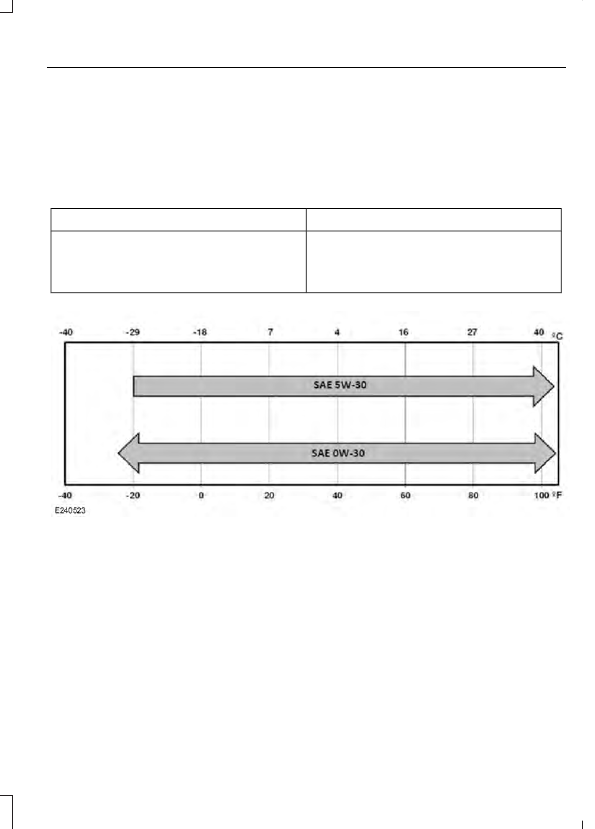
Alternative Engine Oil for
Extremely Cold Climates

To improve engine cold start performance,
we recommend that you use the following
alternative engine oil in extremely cold
climates, where the ambient temperature
reaches -22.0°F (-30°C) or below.

Specification

Name

WSS-M2C953-A1

Motorcraft® SAE 0W-30 Premium
Synthetic Blend Motor Oil:
Engine oil - SAE 0W-30
XO-0W30-QSP

GENERAL INFORMATION

Radio Frequencies and Reception
Factors

AM and FM frequencies are established by
the Federal Communications Commission
(FCC) and the Canadian Radio and
Telecommunications Commission (CRTC).
Those frequencies are:

AM: 530, 540-1700, 1710 kHz

FM: 87.9-107.7, 107.9 MHz

Radio Reception Factors

The further you travel from an AM or FM station, the
weaker the signal and the weaker the reception.

Distance and strength

Hills, mountains, tall buildings, bridges, tunnels, freeway
overpasses, parking garages, dense tree foliage and
thunderstorms can interfere with the reception.

Terrain

When you pass a ground-based broadcast repeating
tower, a stronger signal may overtake a weaker one and
result in the audio system muting.

Station overload

CD and CD Player Information

Note: CD units play commercially pressed
4.7 in (12 cm) audio compact discs only. Due
to technical incompatibility, certain
recordable and re-recordable compact discs
may not function correctly when used in
Ford CD players.

Note: Do not insert CDs with homemade
paper (adhesive) labels into the CD player
as the label may peel and cause the CD to
become jammed. You should use a
permanent felt tip marker rather than
adhesive labels on your homemade CDs.
Ballpoint pens may damage CDs. Please
contact an authorized dealer for further
information.

Note: Do not use any irregularly shaped
discs or discs with a scratch protection film
attached.

Always handle discs by their edges only.
Clean the disc with an approved CD
cleaner only. Wipe it from the center of the
disc toward the edge. Do not clean in a
circular motion.

Do not expose discs to direct sunlight or
heat sources for extended periods.

MP3 and WMA Track and Folder
Structure

Audio systems capable of recognizing and
playing MP3 and WMA individual tracks
and folder structures work as follows:

There are two different modes for MP3
and WMA disc playback: MP3 and
WMA track mode (system default) and
MP3 and WMA folder mode.

MP3 and WMA track mode ignores any
folder structure on the MP3 and WMA
disc. The player numbers each MP3
and WMA track on the disc (noted by
the MP3 or WMA file extension) from
T001 to a maximum of T255. The
maximum number of playable MP3 and
WMA files may be less depending on
the structure of the CD and exact
model of radio present.

MP3 and WMA folder mode represents
a folder structure consisting of one
level of folders. The CD player numbers
all MP3 and WMA tracks on the disc
(noted by the MP3 or WMA file
extension) and all folders containing
MP3 and WMA files, from F001 (folder)
T001 (track) to F253 T255.

Creating discs with only one level of
folders helps with navigation through
the disc files.

If you are burning your own MP3 and WMA
discs, it is important to understand how
the system reads the structures you create.
While various files may be present (files
with extensions other than MP3 and
WMA), only files with the MP3 and WMA
extension are played; other files are
ignored by the system. This enables you to
use the same MP3 and WMA disc for a
variety of tasks on your work computer,
home computer and your in-vehicle
system.

In track mode, the system displays and
plays the structure as if it were only one
level deep (all MP3 and WMA files play,
regardless of being in a specific folder). In
folder mode, the system only plays the
MP3 and WMA files in the current folder.

AUDIO UNIT - VEHICLES WITH:
PREMIUM AM/FM/CD

WARNING

Driving while distracted can result in
loss of vehicle control, crash and
injury. We strongly recommend that

you use extreme caution when using any
device that may take your focus off the
road. Your primary responsibility is the safe
operation of your vehicle. We recommend
against the use of any hand-held device
while driving and encourage the use of
voice-operated systems when possible.
Make sure you are aware of all applicable
local laws that may affect the use of
electronic devices while driving.

Note:  The touchscreen system controls
most of the audio features. See your SYNC
information.

Note: Some features, such as SIRIUS
satellite radio, may not be available in your
location. Check with an authorized dealer.

Note: Depending on your vehicle options,
your audio system may not be equipped
with a CD player.

Vol and Power: Turn to adjust the volume. Press to switch the system on and
off.

A

CD slot: Insert a CD.

B

MEDIA and TUNE: Press to access or switch between devices you plug into
your vehicle. Turn to search through the radio frequency band.

C

Seek, Fast Forward and Reverse: In radio mode, select a frequency band
and press either button. The system stops at the first station it finds in that
direction. In SIRIUS mode, press to select the next or previous satellite radio
station. If you select a specific category (such as jazz, rock or news), press to
find the next or previous station in the category you select. In CD mode, press
to select the next or previous track. Press and hold to move quickly forward or
backward through the current track.

D

Eject: Press to eject a CD.

E


Content   ..  86  87  88  89   ..