Ford Explorer (2018 year). Manual - part 16
 

  Index      Ford     Ford Explorer - service manual 2018 year in english


Search            


Content   ..  14  15  16  17   ..


Ford Explorer (2018 year). Manual - part 16


The lamps do not turn off if:

You switch them on with the lighting
control.

Any door is open.

Illuminated Exit

The interior lamps and some exterior
lamps illuminate when all doors are closed
and you switch the ignition off.

The lamps turn off if all the doors remain
closed and:

25 seconds have elapsed.

You lock your vehicle from the outside.

Battery Saver

If you leave the courtesy lamps, interior
lamps or headlamps on, the battery saver
shuts them off 10 minutes after you switch
the ignition off.

Battery Saver for Intelligent Access
Keys (If Equipped)

If you leave the ignition switched on and
the engine is not running, the battery saver
will turn the ignition off when it detects a
certain amount of battery drain, or after
45 minutes have elapsed.

KEYLESS ENTRY

 (If Equipped)

SECURICODE™ Keyless Entry
Keypad

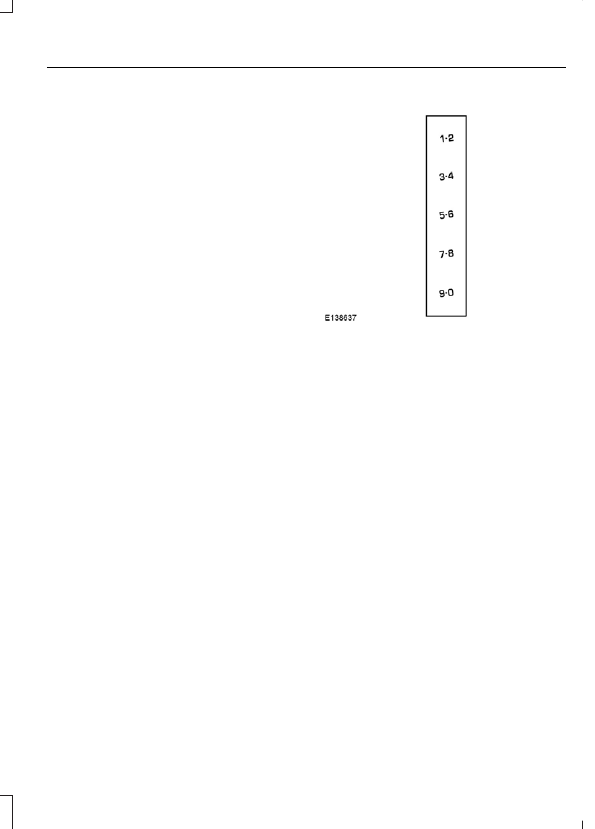
The keypad is near the driver window.  It
illuminates when touched.

Note:  If you enter your entry code too fast
on the keypad, the unlock function may not
work.  Enter your entry code again more
slowly.

You can use the keypad to do the
following:

Lock or unlock the doors.

Program and erase user codes.

Arm and disarm the anti-theft alarm.

You can operate the keypad with the
factory-set five-digit entry code.  The code
is on the owner's wallet card in the glove
box and is available from an authorized
dealer.  You can also program up to five of
your own five-digit personal entry codes.

Programming a Personal Entry Code

1.

Enter the factory-set five-digit code.

2. Press 1·2 on the keypad within five

seconds.

3. Enter your personal five-digit code. You

must enter each number within five
seconds of each other.

4. Press 1·2 on the keypad to save

personal code 1.

The doors lock then unlock to confirm that
programming was successful.

To program additional personal entry
codes, repeat steps 1 through 3, then for
step 4:

Press 3·4 to save personal code 2.

Press 5·6 to save personal code 3.

Press 7·8 to save personal code 4.

Press 9·0 to save personal code 5.

Hints:

Do not set a code that uses five of the
same number.

Do not use five numbers in sequential
order.

The factory-set code works even if you
have set your own personal code.

Erasing a Personal Code

1.

Enter the factory-set five-digit code.

2. Press and release 1·2 on the keypad

within five seconds.

3. Press and hold 1·2 for two seconds.

You must do this within five seconds
of completing step 2.

All personal codes erase and only the
factory-set five-digit code works.

Anti-Scan Feature

The keypad goes into an anti-scan mode
if you enter the wrong code seven times.
This mode turns off the keypad for one
minute and the keypad lamp flashes.

The anti-scan feature turns off after any
of the following occur:

One minute of keypad inactivity.

You press the unlock button on the
remote control.

You switch your vehicle on.

You unlock the vehicle using intelligent
access.

Locking and Unlocking the Doors

Locking All Doors

Press and hold 7·8 and 9·0 on the keypad
simultaneously with the driver door closed.
You do not need to enter a code first.

Unlocking All Doors

Enter the factory-set code or your personal
code, then press 3·4 on the keypad within
five seconds.

Unlocking Only the Driver Door

Enter the factory-set or your personal
five-digit code.  You must press each
number within five seconds of each other.
The interior lamps illuminate.

Note: All doors unlock if the two-stage
unlocking feature is turned off.  See Locking
and Unlocking
 (page 64).

MANUAL LIFTGATE

 (If Equipped)

WARNINGS

It is extremely dangerous to ride in a
cargo area, inside or outside of a
vehicle. In a crash, people riding in

these areas are more likely to be seriously
injured or killed. Do not allow people to ride
in any area of your vehicle that is not
equipped with seats and seatbelts. Make
sure everyone in your vehicle is in a seat
and properly using a seatbelt. Failure to
follow this warning could result in serious
personal injury or death.

Make sure to close and latch the
liftgate to prevent drawing exhaust
fumes into your vehicle. This will also

prevent passengers and cargo from falling
out. If you must drive with the liftgate open,
keep the vents or windows open so outside
air comes into your vehicle. Failure to
follow this warning could result in serious
personal injury.

Note: Be careful when opening or closing
the liftgate in a garage or other enclosed
area to avoid damaging the liftgate.

Note: Do not hang anything, for example a
bike rack, from the glass or liftgate. This
could damage the liftgate and its
components.

Note: Do not leave the liftgate open while
driving. This could damage the liftgate and
its components.

Opening the Liftgate

Manually

Press the button located in the top of the
liftgate pull cup handle to unlatch the
liftgate, and then pull on the outside
handle.

With the Remote Control

Press the button twice within
three seconds.

Closing the Liftgate

A handle is located inside the liftgate to
help with closing.

POWER LIFTGATE

 (If Equipped)

WARNINGS

It is extremely dangerous to ride in a
cargo area, inside or outside of a
vehicle. In a crash, people riding in

these areas are more likely to be seriously
injured or killed. Do not allow people to ride
in any area of your vehicle that is not
equipped with seats and seatbelts. Make
sure everyone in your vehicle is in a seat
and properly using a seatbelt. Failure to
follow this warning could result in serious
personal injury or death.

Make sure that you fully close the
liftgate to prevent exhaust fumes
from entering your vehicle. If you are

unable to fully close the tailgate, open the
air vents or the windows to allow fresh air
to enter your vehicle. Failure to follow this
instruction could result in personal injury
or death.

Keep keys out of reach of children.
Do not allow children to operate or
play near an open or moving power

liftgate. You should supervise the
operation of the power liftgate at all times.

Note:  Make sure that you close the liftgate
before operating or moving your vehicle,
especially in an enclosure, like a garage or
a parking structure.  This could damage the
liftgate and its components.

Note:  Do not hang anything, for example
a bike rack, from the glass or liftgate.  This
could damage the liftgate and its
components.

For automatic transmissions, the liftgate
only operates with the transmission in park
(P).

For manual transmissions, the liftgate only
operates if the vehicle speed is less than
3 mph (5 km/h)

If there is a problem with the open or close
request, a tone will sound for one of the
following reasons:

The ignition is on and the transmission
is not in park (P).

The battery voltage is below the
minimum operating voltage.

The liftgate is not fully closed and your
vehicle speed is at or above 3 mph
(5 km/h).

If the liftgate starts to close after it has
fully opened, this indicates there may be
excessive weight on the liftgate or a
possible strut failure. A repetitive tone
sounds and the liftgate closes under
control. Remove any excessive weight from
the liftgate. If the liftgate continues to
close after opening, have the system
checked by an authorized dealer.

Opening and Closing the Liftgate

WARNING

Make sure all persons are clear of the
power liftgate area before using the
power liftgate control.

Note: Make sure the area behind your
vehicle is free from obstruction and that
there is enough room for you to operate the
liftgate. Objects too close to your vehicle,
for example a wall, garage door or another
vehicle may come into contact with the
moving liftgate. This could damage the
liftgate and its components.

Note: Be careful when opening or closing
the liftgate in a garage or other enclosed
area to avoid damaging the liftgate.

Note:  Do not leave the liftgate open when
you are driving.  This could damage the
liftgate and its components.


Content   ..  14  15  16  17   ..