Ford Escape Hybrid (2012 year). Manual - part 57
 

  Index      Ford     Ford Escape Hybrid - service manual 2012 year in english


Search            


Content   ..  55  56  57  58   ..


Ford Escape Hybrid (2012 year). Manual - part 57


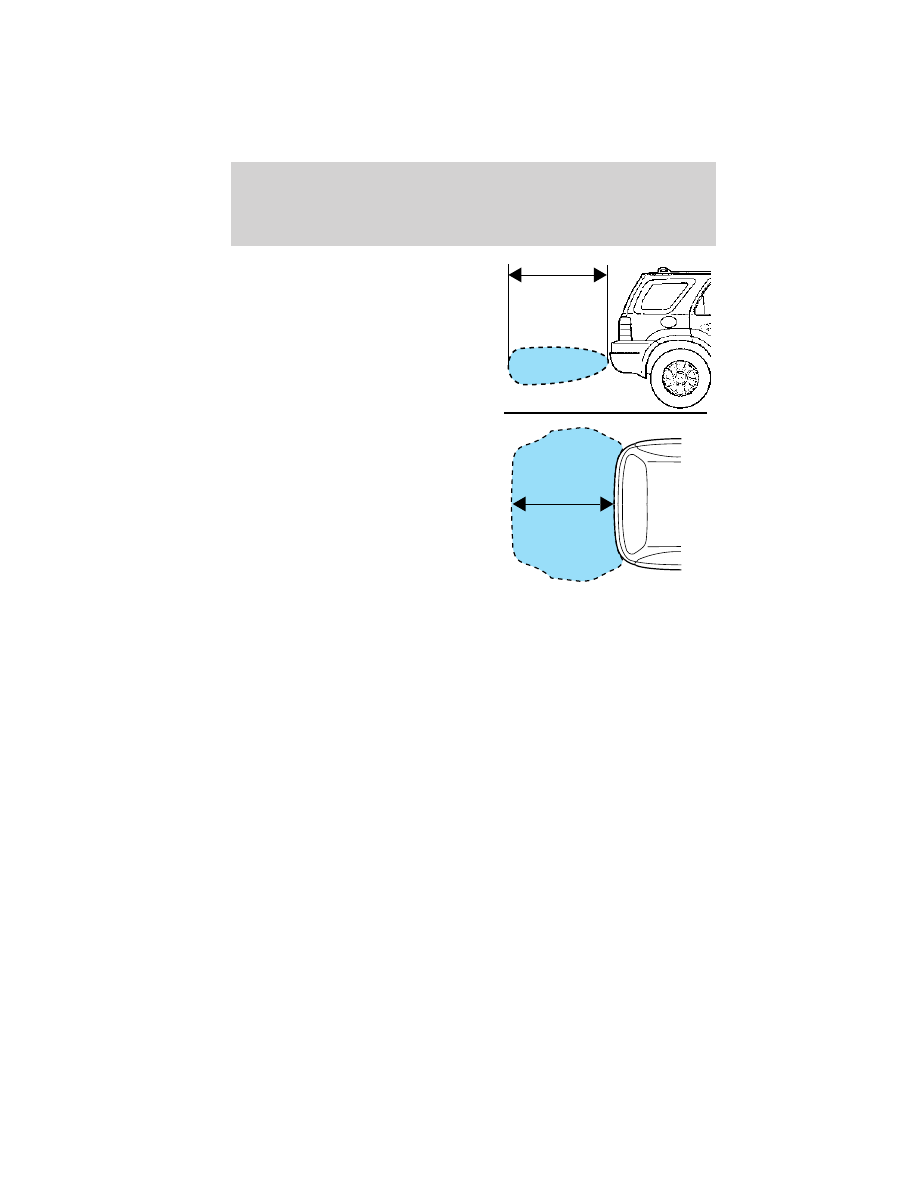
The RSS detects obstacles up to
6 feet (1.8 meters) from the rear
bumper with a decreased coverage
area at the outer corners of the
bumper, (refer to the figures for
approximate zone coverage areas).
As you move closer to the obstacle,
the rate of the tone increases. When
the obstacle is less than 10 inches
(25.0 cm) away, the tone will sound
continuously. If the RSS detects a
stationary or receding object further
than 10 inches (25.0 cm) from the
side of the vehicle, the tone will
sound for only three seconds. Once
the system detects an object
approaching, the tone will sound
again.

While receiving a warning the radio volume will be reduced to a
predetermined level. After the warning goes away, the radio will return
to the previous value. The RSS automatically turns on when the gearshift
lever is placed in R (Reverse) and the ignition is on. A control in the
message center allows the driver to disable the system, refer to Message
center 
in the Instrument Cluster chapter for more information.

Note: If the system cannot be turned off, refer to MyKey

威 in the Locks

and Security chapter for more information.

Keep the RSS sensors (located on the rear bumper/fascia) free
from snow, ice and large accumulations of dirt (do not clean the
sensors with sharp objects). If the sensors are covered, it will
affect the accuracy of the RSS.

If your vehicle sustains damage to the rear bumper/fascia, leaving
it misaligned or bent, the sensing zone may be altered causing
inaccurate measurement of obstacles or false alarms.

Driving

230

REARVIEW CAMERA SYSTEM (IF EQUIPPED)

The rearview camera system located
on the liftgate provides a video
image, which appears in the
rearview mirror or on the navigation
screen (if equipped), of the area
behind the vehicle. It adds
assistance to the driver while
reversing or reverse parking the
vehicle.

To use the camera, place the transmission in R (Reverse); an image will
display on the left portion of the rearview mirror or on the navigation
screen (if equipped). The area displayed on the screen may vary
according to the vehicle orientation and/or road condition.
• (1) Rear bumper
• (2) Red zone
• (3) Yellow zone
• (4) Green zone
• (5) Centerline of vehicle
Always use caution while backing.

Objects in the red zone are closest
to your vehicle and objects in the
green zone are further away. Objects
are getting closer to your vehicle as they move from the green zone to
the yellow or red zones.

Use the side mirrors and rearview mirror to get better coverage on both
sides and rear of the vehicle.

Image delay if displayed through the rearview mirror:

When shifting out of R (Reverse) and into any other gear, the image in
the rearview mirror will remain on for a few seconds before it shuts off
to assist in parking or trailer hookup.

Image delay if displayed through the Navigation screen:

After shifting out of R (Reverse) and into any gear other than P (Park),
the image in the navigation screen will remain until the vehicle speed
reaches 5 mph (8 km/h), only if the rear camera delay feature is on, or
until any navigation radio button is pressed.

Driving

231

Note: The default setting for the camera delay is off. Press the
“Settings” button found on the navigation screen (if equipped) to set the
camera delay feature to on or off.

When towing, the camera will only see what is being towed behind the
vehicle; this might not provide adequate coverage as it usually provides
in normal operation and some objects might not be seen.

The lens for the camera is located on the liftgate. Keep the lens clean so
the video image remains clear and undistorted. Clean the lens with a
soft, lint-free cloth and non-abrasive cleaner.

Note: If the camera image is not clear or seems distorted, it may be
covered with water droplets, snow, mud or any other substance. If this
occurs, clean the camera lens before using the reverse camera.

WARNING: The camera is a reverse aid supplement device that
still requires the driver to use it in conjunction with the rearview

mirror and the side mirrors for maximum coverage.

WARNING: Objects that are close to either corner of the
bumper or under the bumper, might not be seen on the screen

due to the limited coverage of the camera.

WARNING: Backup as slow as possible since higher speeds
might limit your reaction time to stop the vehicle.

WARNING: Do not use the camera with the liftgate open.

If the back end of the vehicle is hit or damaged, then check with your
authorized dealer to have your camera checked for proper coverage and
operation.

Night time and dark area use

At night time or in dark areas, the camera relies on the reverse lamp
lighting to produce an image. Therefore it is necessary that both reverse
lamps are operating in order to get a clear image in the dark. If either of
the lamps are not operating, stop using the camera, at least in the dark,
until the lamp(s) are replaced and functioning.

Driving

232

Servicing
• If the image comes on while the vehicle is not in R (Reverse), have

the camera inspected by your authorized dealer.

• If the image is not clear, then check if there is anything covering the

lens such as dirt, mud, ice, snow, etc. If the image is still not clear
after cleaning, have your camera inspected by your authorized dealer.

ACTIVE PARK ASSIST (APA) (IF EQUIPPED)

Active park assist (APA) will detect an available parallel parking space
and automatically steer the vehicle into the space (hands free) while you
control the accelerator, gearshift and brakes. The system will visually
and/or audibly instruct the driver to park the vehicle.

WARNING: This system is designed to be a supplementary park
aid. It may not work in all conditions and is not intended to

replace the driver’s attention and judgment. The driver is responsible
for avoiding hazards and maintaining a safe distance and speed, even
when the APA is in use.

Conditions in which the systems may not work:
• Something passes between the front bumper and the space such as a

pedestrian or cyclist

• The edge of the neighboring parked vehicle is high from the ground

such as a bus, tow truck or flatbed truck

Automatic search for parking space

To start, press the APA control
switch located on the instrument
panel. The message center will
display ACTIVE PARK SEARCHING.
To designate what side of the street
to search on, use the turn signal.
The arrow symbols >> and << in
the message center indicate on
which side of the vehicle APA will park. If the turn signal is not on, the
system will automatically search the passenger side.

Driving

233


Content   ..  55  56  57  58   ..