Ford Edge (2018 year). Manual - part 18
 

  Index      Ford     Ford Edge - service manual 2018 year in english


Search            


Content   ..  16  17  18  19   ..


Ford Edge (2018 year). Manual - part 18


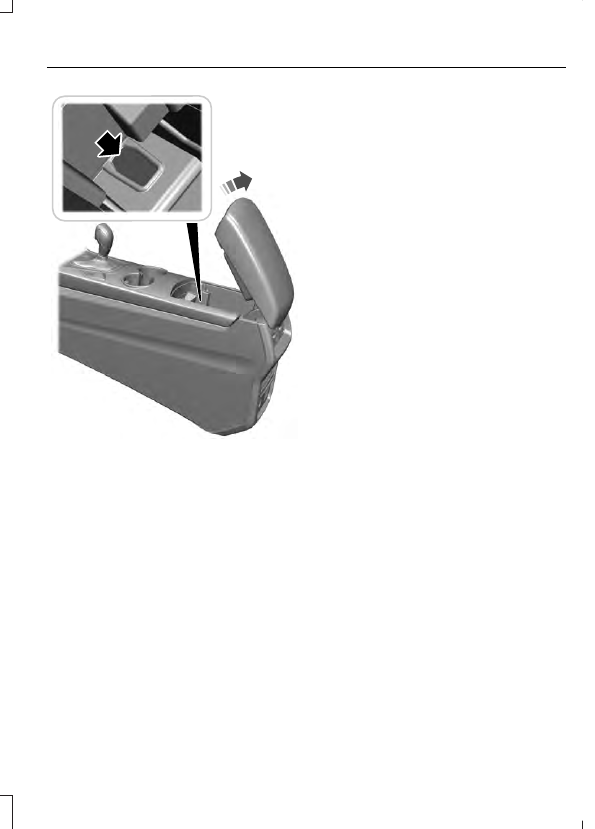
E260239

2. Open the center console lid. With the

buttons facing upward and the unlock
button facing the front of your vehicle,
place the first intelligent access key
into the backup slot.

3. Press the push button ignition switch.

4. Wait five seconds and then press the

push button ignition switch again.

5. Remove the intelligent access key.

6. Within 10 seconds, place a second

programmed intelligent access key in
the backup slot and press the push
button ignition switch.

7.

Wait five seconds and then press the
push button ignition switch again.

8. Remove the intelligent access key.

9. Wait five seconds, then place the

unprogrammed intelligent access key
in the backup slot and press the push
button ignition switch.

Programming is now complete.  Check that
the remote control functions operate and
your vehicle starts with the new intelligent
access key.

If programming was unsuccessful, wait 10
seconds and repeat steps 1 through 7.  If it
still does not work, take your vehicle to an
authorized dealer.

ANTI-THEFT ALARM

The system will warn you of an
unauthorized entry to your vehicle. It will
be triggered if any door, the luggage
compartment or the hood is opened
without using the key, remote control or
keyless entry keypad.

The direction indicators will flash and the
horn will sound if unauthorized entry is
attempted while the alarm is armed.

Take all remote controls to an authorized
dealer if there is any potential alarm
problem with your vehicle.

Arming the Alarm

The alarm is ready to arm when there is
not a key in your vehicle. Electronically lock
your vehicle to arm the alarm.

Disarming the Alarm

Disarm the alarm by any of the following
actions:

Unlock the doors or luggage
compartment with the remote control
or keyless entry keypad.

Switch your vehicle on or start your
vehicle.

Use a key in the driver door to unlock
your vehicle, then switch your vehicle
on within 12 seconds.

Note: Pressing the panic button on the
remote control will stop the horn and signal
indicators, but will not disarm the system.

ADJUSTING THE STEERING
WHEEL - VEHICLES WITH:
MANUAL ADJUSTABLE
STEERING COLUMN

WARNING

Do not adjust the steering wheel
when your vehicle is moving.

Note: Make sure that you are sitting in the
correct position.  See Sitting in the Correct
Position
 (page 138).

E259854

1.

Unlock the steering column.

2. Adjust the steering wheel to the desired

position.

E259855

3. Lock the steering column.

ADJUSTING THE STEERING
WHEEL - VEHICLES WITH:
POWER ADJUSTABLE
STEERING COLUMN

WARNING

Do not adjust the steering wheel
when your vehicle is moving.

Note:  Make sure that you are sitting in the
correct position.  See Sitting in the Correct
Position
 (page 138).

E251370

Use the control on the side of the steering
column to adjust the position.

To adjust:

Tilt: Press the top or bottom of the
control.

Telescope: Press the front or rear of
the control.

End of Travel Position

The steering column sets a stopping
position just short of the end of the column
position to prevent damage to the steering
column.  A new stopping position sets if
the steering column encounters an object
when tilting or telescoping.

To reset the steering column to its normal
stopping position:

1.

Confirm there is nothing obstructing
the motion of the steering column.

2. Press and hold the steering column

control until the steering column stops
moving.

3. Press the steering column control

again.

Note: The steering column may begin to
move again.

4. When the steering column stops,

continue holding the control for a few
seconds.

5. Repeat for each direction as necessary.

A new stopping position sets.  The next
time you tilt or telescope the steering
column, it stops just short of the end of the
column position.

Memory Feature

You can save and recall the steering
column position with the memory
function.  See Memory Function (page
142).

Pressing the adjustment control during
memory recall cancels the operation.

Easy Entry and Exit Feature

The column moves to the full up and in
position when you switch the ignition off.
Switch the ignition on to return the system
to its previous settings.  You can switch
this feature on or off in the information
display.  See Information Displays (page
102).

AUDIO CONTROL

You can operate the following functions
with the control:


Content   ..  16  17  18  19   ..