Ford C-MAX Hybrid / Energi (2017 year). Manual - part 73
 

  Index      Ford     Ford C-MAX Hybrid / Energi - service manual 2017 year in english


Search            


Content   ..  71  72  73  74   ..


Ford C-MAX Hybrid / Energi (2017 year). Manual - part 73


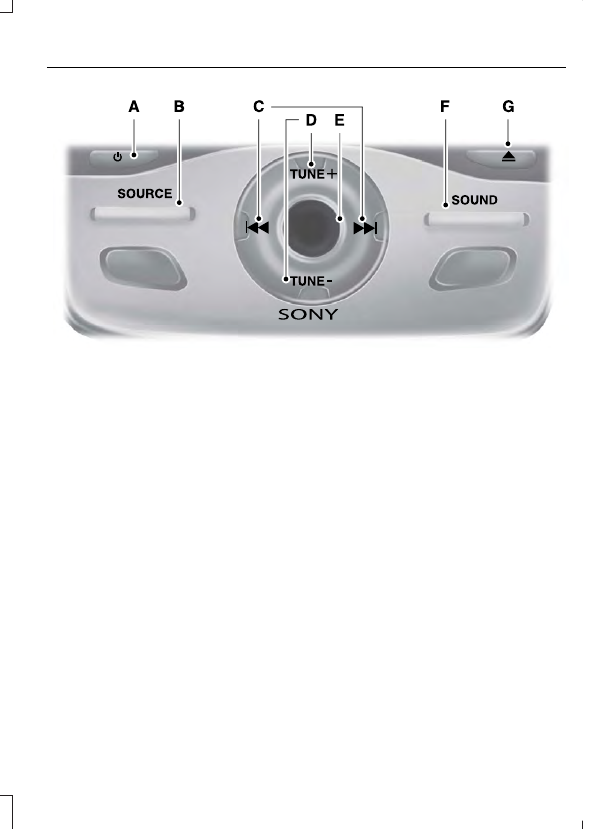
E143844

Power: Press to switch the system on and off.

A

SOURCE: Press to access different audio modes, for example AM, FM, Media,
and Satellite Radio.

B

Seek, Fast Forward and Reverse: In radio mode, select a frequency band
and press this button. The system stops at the first station it finds in that
direction. In SIRIUS mode, press to select the next or previous satellite radio
station. If a specific category is selected (such as jazz, rock or news), press to
find the next or previous in the selected category. In CD mode, press to select
the previous or next track. Press and hold to move quickly forward or backward
through the current track.

C

TUNE: In radio mode, press to manually search through the radio frequency
band. In SIRIUS mode, press to find the previous or next available satellite radio
station.

D

Volume: Turn to adjust the volume.

E

SOUND: Press to access settings for Treble, Midrange, Bass, Fade or Balance.
Use the up and down arrow buttons to select the various settings. When you
make your selection, press the left and right arrow buttons to change the
settings. Press OK to set or press MENU to exit. Sound settings can be set for
each audio source independently.

F

Eject: Press to eject a CD.

G

Menu Structure

Note: Depending on your system, some
options may appear slightly different.

Press MENU.

Press the up and down arrow buttons to
scroll through the options.

Press the right arrow to enter a menu.
Press the left arrow to exit a menu.

Press OK to confirm a selection.

Radio

Use the left and right arrows to go up or down the
frequency band.

Manual Tune

Select for a brief sampling of all available channels.

Scan

Select to store the six strongest local stations on the AM-
AST and FM-AST frequency bands.

AST

Select to have the system search by certain music
categories (such as Rock, Pop or Country).

Set Category for Seek/Scan

Select to view additional broadcast data, if available. This
feature defaults to off. RBDS must be on for you to set a
category.

RDS Text Display

SIRIUS

Select for a brief sampling of all available channels.

Scan

Select to view your satellite radio electronic serial number
(ESN). You will need this number when communicating
with SIRIUS to activate, modify or track your account.

Electronic Serial Number
(ESN)

Select to view available satellite radio channels. Press OK
to open a list of the following options for this channel.
Once you skip or lock a channel, you can only access it by
pressing Direct Tune and entering the channel number.
Locking or unlocking a channel requires your PIN.

Check Channel Guide

Select to view channel categories (such as Pop, Rock or
News). If you select a category, seek and scan functions
only stop on channels in that category.

Set Category for Seek/Scan

Select to switch alerts on or off for songs, artists or teams.
The system alerts you when the selection is playing on
another channel. Save up to 20 alerts.

Alerts

SIRIUS

Use your PIN to unlock previously locked stations.

Unlock All Stations

Use to restore any channels you previously skipped.

Skip No Stations

Select to create a PIN, which allows you to lock or unlock
channels. Your initial PIN is 1234.

Parental Lockout

Audio Settings

Automatically adjusts the volume to compensate for
speed and wind noise. You can set the system between
0 and +7.

Speed Compensated
Volume

Select to adjust settings for Treble, Midrange, Bass, Fade
or Balance.

Sound

Select to optimize sound quality for the chosen seating
position.

Occupancy Mode

Choose between the stereo modes.

DSP

CD Settings

Select to scan all disc selections.

Scan All

Select to scan all music in the current MP3 folder.

Scan Folder

Select to bring soft and loud passages together for a more
consistent listening level.

CD Compression

Clock Settings

Select to set the time and calendar date.

Set Date and Time

Select to view clock time in a 12-hour mode or 24-hour
mode.

24 Hour

Display Settings

Select to change display brightness.

Brightness

Select to display the language in English, French or
Spanish.

Language

Select to display the outside temperature in Fahrenheit
or Celsius.

Temp. Setting

AUDIO UNIT - VEHICLES WITH:
AM/FM/CD/SATELLITE RADIO

WARNING

Driving while distracted can result in
loss of vehicle control, crash and
injury. We strongly recommend that

you use extreme caution when using any
device that may take your focus off the
road. Your primary responsibility is the safe
operation of your vehicle. We recommend
against the use of any hand-held device
while driving and encourage the use of
voice-operated systems when possible.
Make sure you are aware of all applicable
local laws that may affect the use of
electronic devices while driving.

Note: Depending on your vehicle option
package, your system may look different
from what you see here.

Note: Some features, such as Sirius satellite
radio, may not be available in your location.
Check with an authorized dealer.


Content   ..  71  72  73  74   ..