Ford C-MAX Hybrid / Energi (2017 year). Manual - part 72
 

  Index      Ford     Ford C-MAX Hybrid / Energi - service manual 2017 year in english


Search            


Content   ..  70  71  72  73   ..


Ford C-MAX Hybrid / Energi (2017 year). Manual - part 72


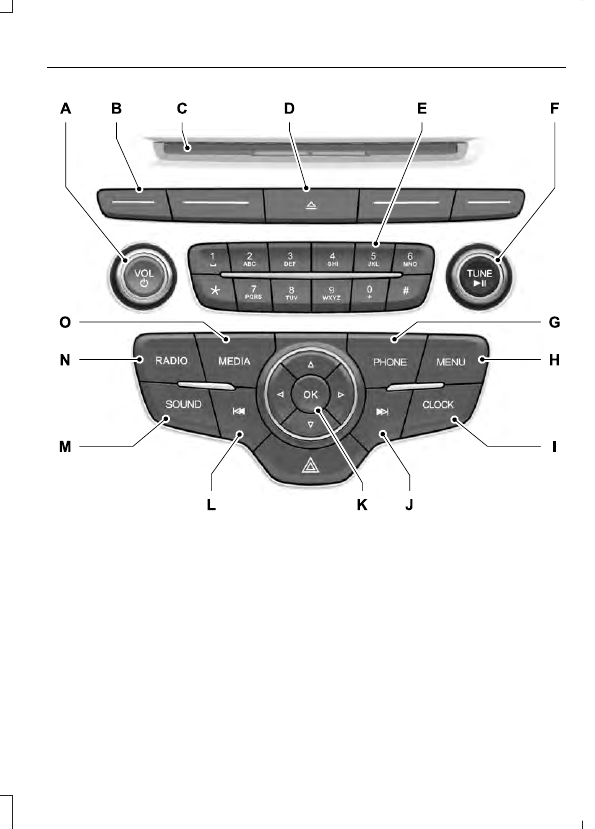
E184901

VOL and Power: Press to switch the system on and off. Turn the control to
adjust the volume.

A

Function buttons: Select different functions of the audio system depending
on which mode you are in (such as Radio mode or CD mode).

B

CD slot: Insert a CD.

C

Eject: Press to eject a CD.

D

Number block: In radio mode, you can store your favorite radio stations. To
store a radio station, tune to the station, then press and hold a preset button
until sound returns. In CD mode, select a track. In phone mode, enter a phone
number.

E

TUNE and Play or Pause: In radio mode, turn to search the frequency band
in individual increments. Press to mute the station. In media mode, turn to select
a new track. Press to either play or pause a track. This button also mutes the
radio sources.

F

PHONE: Press to access the phone features of the SYNC system. See your
SYNC information.

G

MENU: Press to access different audio system features. See Menu Structure
later in this chapter.

H

CLOCK: If not in phone mode, press to display the clock.

I

Seek and Fast Forward: In radio mode, select a frequency band and press
this button. The system stops at the first station up the band. Press and hold
the button to move quickly, then release to stop at the next available station.
In CD mode, press to select the next track. Press and hold the button to move
quickly forward through the current track.

J

OK and Arrow buttons: Press OK to confirm menu selections. Press to scroll
through the menu choices.

K

Seek and Reverse: In radio mode, select a frequency band and press this
button. The system stops at the first station down the band. Press and hold
the button to move quickly, then release to stop at the previous available station.
In CD mode, press to select the previous track. Press and hold the button to
move quickly backward through the current track.

L

SOUND: Press to access settings for Treble, Midrange, Bass, Fade or Balance.
Use the up and down arrow buttons to select the various settings. When you
make your selection, press the left and right arrow buttons to change the
settings. Press OK to set or press MENU to exit. Sound settings can be set for
each audio source independently.

M

RADIO: Press this multiple times to select a radio band. Press and hold to
select the autostore function. Press to return to the main screen of the active
radio band.

N

MEDIA: Press to open the media source menu. You can press this multiple
times to change to CD or to a SYNC-Media device or scroll through the media
sources using the arrow buttons. Press OK to select a source.

O

AUDIO UNIT - VEHICLES WITH:
PREMIUM AM/FM/CD

WARNING

Driving while distracted can result in
loss of vehicle control, crash and
injury. We strongly recommend that

you use extreme caution when using any
device that may take your focus off the
road. Your primary responsibility is the safe
operation of your vehicle. We recommend
against the use of any hand-held device
while driving and encourage the use of
voice-operated systems when possible.
Make sure you are aware of all applicable
local laws that may affect the use of
electronic devices while driving.

Note: The system controls most of the
audio features. See your SYNC information.

E185024

TUNE: In radio mode, press to manually search through the radio frequency
band. In SIRIUS mode, press to find the previous or next available satellite radio
station.

A

CD slot: Insert a CD.

B

VOL and Power: Press to switch the system on and off. Turn to adjust the
volume.

C

SOURCE: Press to access different audio modes, for example AM, FM and
Media, and Satellite Radio.

D

Eject: Press to eject a CD.

E

DISP: Press to switch the display screen on and off.

F

SOUND: Press to access settings for Treble, Midrange, Bass, Fade or Balance.
Use the up and down arrow buttons to select the various settings. When you
make your selection, press the left and right arrow buttons to change the
settings. Press OK to set or press MENU to exit. Sound settings can be set for
each audio source independently.

G

Seek, Fast Forward and Reverse: In radio mode, select a frequency band
and press this button. The system stops at the first station it finds in that
direction. In SIRIUS mode, press to select the next or previous satellite radio
station. If a specific category is selected (such as jazz, rock or news), press to
find the next or previous in the selected category. In Media mode, press to select
the previous or next track. Press and hold to move quickly backward or forward
through the current track.

H

AUDIO UNIT - VEHICLES WITH:
SONY AM/FM/CD

WARNING

Driving while distracted can result in
loss of vehicle control, crash and
injury. We strongly recommend that

you use extreme caution when using any
device that may take your focus off the
road. Your primary responsibility is the safe
operation of your vehicle. We recommend
against the use of any hand-held device
while driving and encourage the use of
voice-operated systems when possible.
Make sure you are aware of all applicable
local laws that may affect the use of
electronic devices while driving.

Note: The CD slot is directly above the
touchscreen.

Note: The touchscreen system controls
most of the audio features. See your SYNC
information.


Content   ..  70  71  72  73   ..