Ford C-MAX Hybrid (2018 year). Manual - part 20
 

  Index      Ford     Ford C-MAX Hybrid - service manual 2018 year


Search            


Content   ..  18  19  20  21   ..


Ford C-MAX Hybrid (2018 year). Manual - part 20


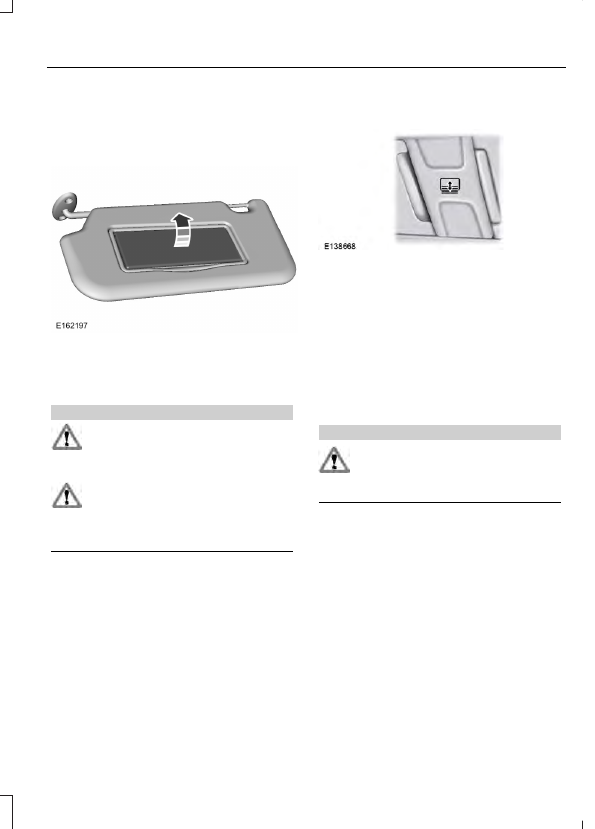
Rotate the sun visor toward the side
window and extend it rearward for extra
shade.

Illuminated Vanity Mirror

Lift the cover to switch the lamp on.

SUN SHADES

 (If Equipped)

WARNINGS

Do not let children play with the sun
shade or leave them unattended in
the vehicle. They may seriously hurt

themselves.

When closing the sun shade, you
should verify that it is free of
obstructions and make sure that

children and pets are not in the proximity
of the sunshade.

The control is located in the overhead
console.

The sun shade has a one-touch open and
close feature. To stop motion during
one-touch operation, press the control a
second time.

Opening and Closing the Sun
Shade

Fully press and release the front of the
control to open the sun shade.

Fully press and release the rear of the
control to close the sun shade.

Bounce-Back

The sun shade will stop automatically
while closing. It will reverse some distance
if there is an obstacle in the way.

Sun Shade Relearning

WARNING

The bounce-back function is not
active during this procedure. Make
sure that there are no obstacles in

the way of the moving sun shade.

Note: You must start the relearning process
within 30 seconds of switching the ignition
on.

In case the sun shade no longer opens or
closes properly, follow this relearning
procedure:

1.

Press the front of the control to the first
action point twice and release it within
two seconds.

2. Press the rear of the control to the first

action point twice and release it within
two seconds.

3. Press and hold the front of the control

to the first action point, until the sun
shade fully opens.

4. Press and hold the rear of the control

to the first action point, until the sun
shade fully closes.

If you do not complete Step 2 within 15
seconds of Step 1, the relearning function
end. Switch the ignition off, wait for
another 30 seconds and then switch the
ignition back on again. Start the procedure
again from the beginning.

Confirm that relearning was successful by
opening and closing the sun shade.

GAUGES

Left Information Display.

A

Speedometer.

B

Right Information Display.

C

Left Information Display

Odometer

Located in the bottom of the information
display. Registers the accumulated
distance your vehicle has traveled.

Battery Gauge:

An optional small battery gauge is provided
for Hybrid vehicles. You can switch this
feature on in the Settings menu under
Battery Display.  See General Information
(page 92). 
 The fill level, or State of Charge,
indicates the amount of energy stored in
the high voltage battery as a percent of
total energy capacity. The level increases
or decreases as the battery charges and
discharges during normal operation.

Regen Display:

A circular arrow symbol displays when
energy is being recaptured through the
regenerative braking system. You can
switch the Regen Display off in the Settings
menu.  See General Information (page
92).

Fuel Gauge:

Note: The fuel gauge may vary slightly
when your vehicle is moving or on a gradient.

Switch the ignition on.  The fuel gauge will
indicate approximately how much fuel is
left in the fuel tank.  The arrow adjacent to
the fuel pump symbol indicates on which
side of your vehicle the fuel filler door is
located.

The needle should move toward F when
you refuel your vehicle. If the needle points
to E after adding fuel, this indicates your
vehicle needs service soon.

After refueling some variability in needle
position is normal:

It may take a short time for the needle
to reach F after leaving the gas station.
This is normal and depends upon the
slope of pavement at the gas station.

The fuel amount dispensed into the
tank is a little less or more than the
gauge indicated. This is normal and
depends upon the slope of pavement
at the gas station.

If the gas station nozzle shuts off
before the tank is full, try a different
gas pump nozzle.

Low Fuel Reminder

A low fuel reminder triggers when the fuel
gauge needle is at 1/16th.

Variations:

Distance-to-empty

Fuel gauge position

Driving type (fuel economy

conditions)

35–80 mi (56–129 km)

1/16th

Highway driving

35 mi (56 km)

1/16th

Severe duty driving (trailer

towing, extended idle)

Vehicle Settings and Personalization

Display/Trip

See General Information (page 92).

Information

See General Information (page 92).

Settings

See General Information (page 92).

Brake Coach Display:

The Brake Coach appears after the vehicle
has come to a stop. It coaches you to brake
in a manner which maximizes the amount
of energy returned through the
regenerative braking system. The percent
displayed is an indication of the
regenerative braking efficiency with 100%
representing the maximum amount of
energy recovery.

This feature can be switched on or off in
the information displays settings menu.
See General Information (page 92).


Content   ..  18  19  20  21   ..