Fiat 500 (2022 year). Manual in english - page 17
271
The app allows you to browse
information related to the car:
when the telephone is connected to
FIAT Link & Drive via
Bluetooth®
, you
can see the energy flows while driving,
listen to music and web radio, manage
telephone calls and use the navigation
apps available on your smartphone;
when the telephone is not connected
to FIAT Link & Drive, you can use the
app to see the data saved when the
car was switched off: last location,
battery charge level and voltage,
charging schedule of the high-voltage
battery, trip statistics and car usage
data, the nearest Fiat Dealerships and
a dictionary of the on-board warning
lights.
NOTE After updating the phone
software, for proper operation, it is
recommended to remove the phone
from the list of devices linked to the
radio, delete the previous system
pairing also from the list of
Bluetooth®
devices on the phone and make a new
pairing.
WARNING If the
Bluetooth®
connection between mobile phone
and system is lost, consult the mobile
phone handbook.
FIAT Link & Drive controls
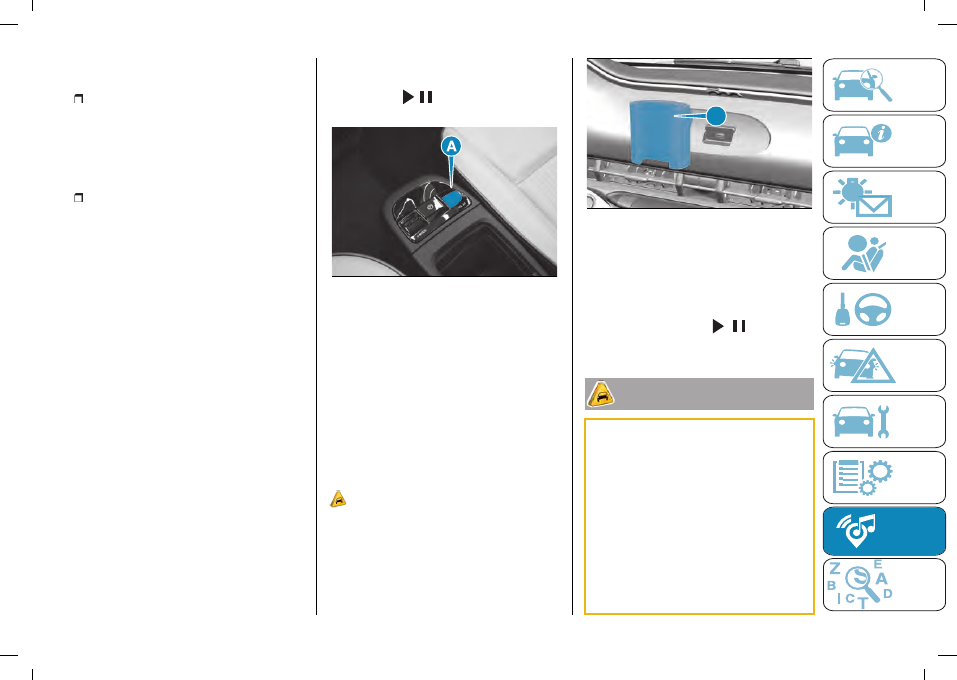
The volume up/down controls (A)
fig. 251 and / are located on the
central tunnel.
251
F0S1197
In addition, you can use the steering
wheel controls to manage telephone
calls, fast forward tracks being played
by FIAT Link & Drive, select the audio
source, and call up the smartphone
voice assistant (Google Assistant, Siri,
etc.).
There is a mount (A) fig. 252 on the
dashboard for your smartphone;
always use it in order to interact with
your smartphone safely.
103)
The USB port located near the
smartphone stand is preferable for
charging the smartphone stand and
does not allow media files to be read.
A
252
F0S1210
When the motor is off, the FIAT Link &
Drive system remains on for up to 20
minutes or until the driver's side door is
opened.
You can switch the system back on
again by pressing the /
button
located on the central tunnel.
102)
Some multimedia players may not
be compatible with the FIAT Link & Drive
system. Only use devices (e.g. USB flash
drives) from safe sources on the car.
Devices from unknown sources could
contain software infected by viruses which,
if installed on the car, could increase the
vulnerability of the car's electric/electronic
systems to hacking.
103)
Telephone voice commands: not
all mobile phones are compatible with
this function. You can obtain further
information from your mobile phone
service provider or the user guide for your