Fiat 500 Hybrid (2020 year). Manual in english - page 3
KNOWING THE INSTRUMENT PANEL
40
SETUP MENU
52
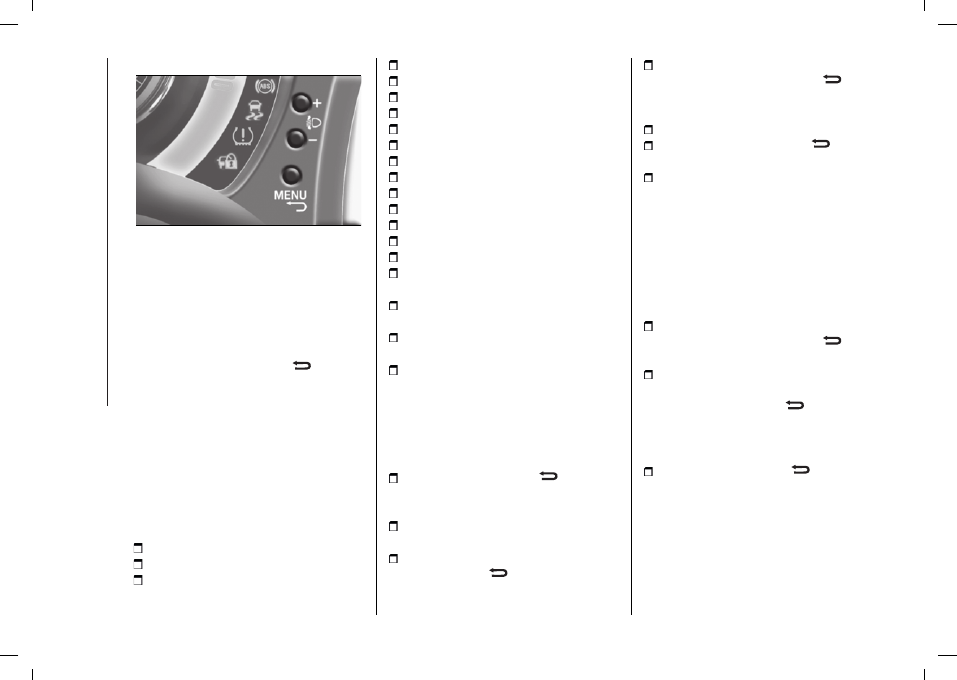
F0S0383
The menu comprises a series of
options which can be selected using
buttons
+
and
–
fig. 52 to access
the different selection and setting
operations (Setup) indicated below.
The menu can be activated by briefly
pressing the MENU button
.
Single presses on buttons + or
–
will scroll through the setup menu
options. Operating modes are different
according to the characteristics of the
option selected. Some options have a
submenu.
Indicatively the menu contains the
following items, but they may vary
according to the instrument panel
installed:
MENU
DIMMER
SPEED BEEP
ACTIVATION
SET TIME
SET DATE
AUTOCLOSE
UNITS
LANGUAGE
BUZZER VOLUME
BUTTON VOLUME
SEAT BELT BUZZER
SERVICE
AIRBAG / PASSENGER AIRBAG
DAYTIME RUNNING LIGHTS
RESET TYRES
SEE RADIO (for markets/versions,
where provided)
SEE PHONE (for versions/markets,
where provided)
SEE NAVIGATION (for
versions/markets, where provided)
EXIT MENU
Set Time (Setting the clock)
Using this function, it is possible to
set the clock through two submenus:
"Time" and "Format".
To adjust, proceed as follows:
briefly press the MENU
button:
the display will show the two submenus
“Time” and “Format”;
press the
+
or
–
button to move
between the two submenus;
once you have selected a submenu,
press the MENU
button briefly;
when you select the “Time”
submenu, pressing the MENU
button briefly the display shows the
"hours";
press the
+
or
–
button to adjust;
briefly pressing the MENU
button
the “minutes” are displayed;
press the
+
or
–
button to adjust.
NOTE The setting will increase or
decrease by one unit each time the
+
or
–
button is pressed. Hold down the
button to increase/decrease the setting
rapidly and automatically. Complete the
adjustment with single presses of the
button when you approach the desired
value.
When you select the “Format”
submenu, pressing the MENU
button briefly the mode is displayed;
press
+
or
–
to select “24h” or “12h”.
When you have made the adjustment,
press the MENU button
briefly to
return to the submenu screen or hold
the button down to return to the main
menu screen without storing.
hold the MENU button
or SAVE
for colour displays down again to return
to the standard screen or to the main
menu according to where you are in
the menu.
Set date (Setting the date)
This function may be used to update
the date (year/month/day).