Lincoln Aviator (2023 year). Manual in english - page 8
 

  Index      Manuals     Lincoln Aviator (2023 year). Manual in english


Search            copyright infringement  


Content      ..     6      7      8      9     ..


Lincoln Aviator (2023 year). Manual in english - page 8


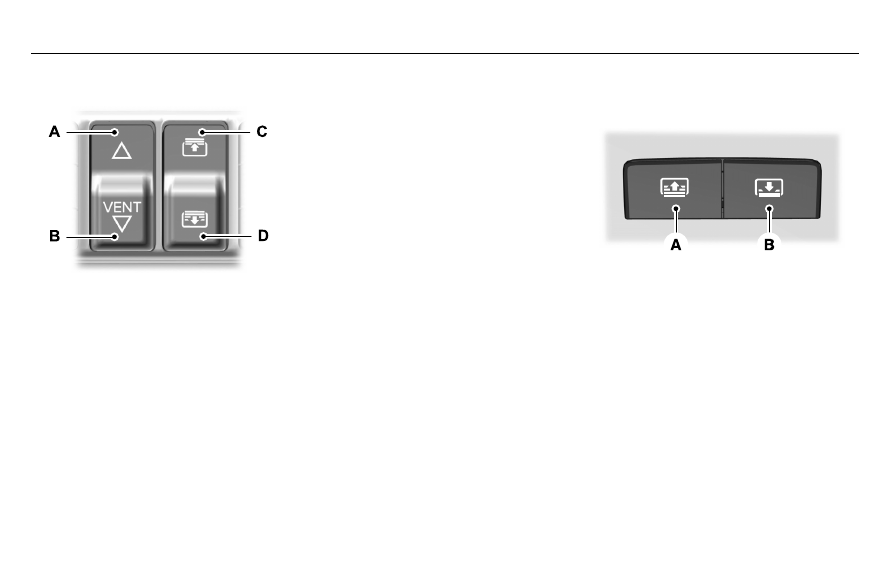
Opening and Closing the Moonroof

E295253

Moonroof open.

 Press and release

to open the moonroof.

A

Moonroof vent or close.

 Press and

release to vent or close the
moonroof.

B

Sunshade open.

 Press and release

to open the sunshade. The
sunshade opens with the
moonroof.

C

Sunshade close.

 Press and release

to close the sunshade.

D

Note:

The sunshade stops short of the fully

open position for the comfort of rear
passengers. To fully open the sunshade,
press the control again.

Note:

When closing, the sunshade stops

at the first panel for the dual panel
moonroof. Press and release again to
continue to fully close the sunshade.

Rear Sunshade Opening and Closing

 (If

Equipped)

E297640

E297640

Sunshade close.

 Press and release

to close the sunshade.

A

Sunshade open.

 Press and release

to open the sunshade. The
sunshade opens with the
moonroof.

B

Note:

The rear sunshade open and close

controls can be on the rear console or fold
down armrest bezel.

126

Windows and Mirrors

-------------------------------------------------------------------------------------------------------------------------------------------------------------

Note:

The sunshade stops short of its fully

opened position for the comfort of rear
passengers. To fully open the sunshade,
press the control again.

Bounce-Back

The moonroof reverses some distance if it
detects an obstacle when closing.

To override this feature, press and hold the
moonroof close control within two seconds
after the roof comes to a stop following a
bounce-back reversal.

127

Windows and Mirrors

-------------------------------------------------------------------------------------------------------------------------------------------------------------

GAUGES

E307726

E307726

128

Instrument Cluster

-------------------------------------------------------------------------------------------------------------------------------------------------------------

Status bar.

A

Speedometer.

B

Information on demand.

C

Vehicle range display.

D

Fuel and battery gauges.

E

Engine coolant temperature gauge.

F

Tachometer.

G

Note:

Clusters shown in single gauge view.

Note:

Displays may appear slightly different

depending on region.

Status Bar

Displays information related to the current
audio source, compass direction and outside
air temperature.

Information On Demand

Displays selected on-demand information
screens.  See 

General Information

 (page

136).

Fuel Gauge

The fuel gauge indicates approximately how
much fuel is in the fuel tank.

The arrow adjacent to the fuel pump symbol
indicates on which side of your vehicle the
fuel filler door is located.

Note:

The fuel gauge may vary slightly when

your vehicle is moving or on a slope.

Low Fuel Reminder

A low fuel reminder displays and sounds
when the distance to empty reaches 75 mi
(120 km) to empty for MyKey, and at 50 mi
(80 km), 25 mi (40 km), 10 mi (20 km) and
0 mi (0 km) for all vehicle keys.

Note:

The low fuel reminder can appear at

different fuel gauge positions depending on
fuel economy conditions. This variation is
normal.

Battery Gauge

The high voltage battery gauge displays the
total amount of charge associated with your
available electric only driving range. A full fill
represents the total amount of energy you
can get from an external charge by plugging
your vehicle in. When the fill reaches empty
the powertrain system switches to hybrid
operation.  See 

Plug-In Hybrid Vehicle

Operation

 (page 219).

129

Instrument Cluster

-------------------------------------------------------------------------------------------------------------------------------------------------------------

Vehicle Range Display

Displays the approximate range your vehicle
can travel with the energy currently onboard.
Estimates vary based on the energy used
when driving.

Changes in driving pattern can cause the
values to not only decrease but also increase
or stay constant for periods of time.

The amount of energy being used when
driving is affected by:

Mild or aggressive acceleration or
braking.

Vehicle speed.

Use of accessories, such as climate
control.

Ambient temperature and other weather
conditions.

Driving in a city or on a highway.

Driving on flat or hilly roads.

Towing.

Note:

It is normal for vehicle range estimates

to vary due to changes in average energy
usage. This is why you typically see different
range estimates each time you fill up the fuel
tank or fully charge the battery.

Note:

Electric range is lower in cold

temperatures due to reduced energy
capacity in the high voltage battery. Set a
departure time and cabin temperature to
maintain battery temperature for best range
and performance.  See 

Electric Vehicle

Information

 (page 546).

Gasoline Distance to Empty

Indicates the approximate distance your
vehicle can travel on the fuel remaining in
the tank.

Electric Range

Indicates the approximate distance your
vehicle can travel on electric power only with
the engine off.

Engine Coolant Temperature Gauge

WARNING: 

Do not remove the

coolant reservoir cap when the engine is
on or the cooling system is hot. Wait 10
minutes for the cooling system to cool
down. Cover the coolant reservoir cap with
a thick cloth to prevent the possibility of
scalding and slowly remove the cap.
Failure to follow this instruction could result
in personal injury.

Indicates the engine coolant temperature.
At normal operating temperature, the level
indicator is in the normal range. If the engine
coolant temperature exceeds the normal
range, stop your vehicle as soon as safely
possible, switch off the engine and let the
engine cool.

130

Instrument Cluster

-------------------------------------------------------------------------------------------------------------------------------------------------------------

WARNING LAMPS AND
INDICATORS

The following warning lamps and indicators
alert you to a vehicle condition that may
become serious.  Some lamps illuminate
when you start your vehicle to make sure
they work.  If any lamps remain on after
starting your vehicle, refer to the respective
system warning lamp for further information.

Depending on your vehicle options and
instrument cluster type, not all warning lamps
and indicators shown are available.

Note:

Some warning indicators appear in

the instrument cluster and function the same
as a warning lamp, but do not display when
you start your vehicle.

Adaptive Cruise Control

 (If Equipped)

E144524

The speed control system indicator
light changes color to indicate
what mode the system is in.  See

How Does Adaptive Cruise Control With
Stop and Go Work

 (page 305).

On (white light): Illuminates when you switch
on the adaptive cruise control system. Turns
off when the speed control system is turned
off.

Engaged (green light): Illuminates when you
engage the adaptive cruise control system.
Turns off when you disengage the speed
control system.

Anti-Lock Brake System

If it illuminates when you are
driving, this indicates a system
error.  You continue to have the

normal braking (without ABS) unless the
brake system warning lamp also illuminates.
Have the system checked as soon as
possible.

Automatic High Beam Control

Illuminates when this feature is on.
See 

Automatic High Beam

Control

 (page 119).

Auto Hold Active

E197933

Illuminates when the system holds
your vehicle stationary.

Auto Hold Unavailable

E197934

Illuminates when the system is on,
but unavailable to hold your
vehicle stationary.

Auto Start-stop

 (If Equipped)

E121377

Illuminates when the engine shuts
down or in conjunction with a
message.

Battery

If it illuminates while driving, it
indicates a system error. Switch off
all unnecessary electrical

equipment and have the system checked
immediately.

131

Instrument Cluster

-------------------------------------------------------------------------------------------------------------------------------------------------------------

Blind Spot Monitor

E151262

Illuminates when you switch this
feature off or in conjunction with a
message.  See 

Blind Spot

Information System

 (page 326).

Brake System Warning Lamp

WARNING: 

Driving your vehicle with

the warning lamp on is dangerous. A
significant decrease in braking
performance may occur. It may take you
longer to stop your vehicle. Have your
vehicle checked as soon as possible.
Driving extended distances with the
parking brake engaged can cause brake
failure and the risk of personal injury.

Note:

Indicators vary depending on region.

This lamp is a dual function lamp and
illuminates when:

You apply the parking brake with the
ignition on.

Your vehicle has a brake fault or low
brake fluid level, regardless of parking
brake position.

E270480

If the lamp illuminates when you
are moving, you may have the
parking brake applied. Make sure
the parking brake is off. Have your
vehicle checked as soon as
possible if the lamp continues to

illuminate.

Cruise Control

E71340

Illuminates when you switch this
feature on.

Direction Indicator

Illuminates when you switch on the
left-hand or right-hand direction
indicator or the hazard flasher. If

the indicators stay on or flash faster, check
for a burned out bulb.  See 

Changing a Bulb

(page 420).

Distance Alert

E281485

Flashes when your vehicle is
rapidly approaching another
vehicle or a pedestrian within your

driving path.  See 

Pre-Collision Assist

 (page

337).

Door Ajar

Illuminates when the ignition is on
and any door is not completely
closed.

Electric Park Brake

E270480

Illuminates or flashes when the
electric parking brake has a system
error.  See 

Electric Parking Brake

(page 272).

Engine or Motor Coolant Temperature

Illuminates when your vehicle
coolant temperature is high. Stop
your vehicle as soon as it is safe

to do so. Allow the engine to cool.  See

Engine Coolant Check

 (page 404).

132

Instrument Cluster

-------------------------------------------------------------------------------------------------------------------------------------------------------------

Engine Oil

If it illuminates with the engine
running or when you are driving,
this indicates a system error.  Stop

your vehicle as soon as it is safe to do so
and switch the engine off.  Check the engine
oil level.   See 

Engine Oil Check

 (page 401).

Note:

Do not resume your journey if it

illuminates despite the level being correct.
Have the system checked as soon as
possible.

Fasten Seatbelt

E71880

Illuminates and a tone sounds to
remind you to fasten your seatbelt.
See 

Seatbelt Reminder

 (page 50).

Fasten Rear Seatbelt

E206718

Illuminates and a tone sounds to
signal the rear seatbelts are not
fastened.

Front Airbag

E67017

If it fails to illuminate when you
start your vehicle, continues to
flash or remains on, it indicates

there is a system error. Have the system
checked as soon as possible.

Front Fog Lamps

 (If Equipped)

Illuminates when you switch the
front fog lamps on.

High Beam

Illuminates when you switch the
high beam headlamps on. It flashes
when you use the headlamp

flasher.

Hill Descent

 (If Equipped)

Illuminates when you switch hill
descent on.

Hood Ajar

E246598

Illuminates when the ignition is on
and the hood is not completely
closed.

Lamps On

Illuminates when you switch the
low beam headlamps or the
parking lamps on.

Liftgate Ajar

E162453

Illuminates when the liftgate is not
completely closed.

Low Beam Warning

E181350

Illuminates when the low beam
headlamp bulb is not functioning
properly.

Low Fuel Level

Illuminates when the fuel level is
low or the fuel tank is nearly
empty.  Refuel as soon as possible.

133

Instrument Cluster

-------------------------------------------------------------------------------------------------------------------------------------------------------------

Low Tire Pressure Warning

Illuminates when your tire pressure
is low. If the lamp remains on with
the engine running or when

driving, check your tire pressure as soon as
possible.

It also illuminates momentarily when you
switch the ignition on to confirm the lamp is
functional. If it does not illuminate when you
switch the ignition on, or begins to flash at
any time, have the system checked as soon
as possible.

Low Washer Fluid

E132353

Illuminates when the windshield
washer fluid is low.

Powertrain Fault

Illuminates when the system
detects a powertrain or an 4WD
fault. Have the system checked as

soon as possible.

Ready to Drive

 (If Equipped)

E224090

Illuminates when you have
switched on your vehicle and it is
ready to drive. A corresponding

message may appear stating ready to drive.

Service Engine Soon

It illuminates when you switch the
ignition on prior to engine start to
check the bulb and to indicate

whether your vehicle is ready for Inspection
and Maintenance (I/M) testing.

Normally, it illuminates until the engine is
cranked and automatically turns off if no
system errors are present. However, if after
15 seconds it flashes eight times, this
indicates that your vehicle is not ready for
Inspection and Maintenance (I/M) testing.
See 

Catalytic Converter

 (page 235).

If it illuminates when the engine is running
this indicates a system error. The On Board
Diagnostics system has detected an error in
the vehicle emission control system.

If it flashes, engine misfire may be occurring. 
Continuing to drive your vehicle may cause
reduced power or the engine to stop.  Failure
to respond to the warning lamp may cause
component damage not covered by the
vehicle Warranty.  Have your vehicle
checked as soon as possible.

Stability Control

E138639

It flashes when the system is
active. If it remains illuminated or
does not illuminate when you

switch the ignition on, this indicates a system
error. During a system error the system
switches off. Have the system checked
immediately.  See 

Using Stability Control

(page 283).

Stability Control Off

E130458

Illuminates when you switch the
system off. It goes out when you
switch the system back on or when

you switch the ignition off.  See 

Using

Stability Control

 (page 283).

134

Instrument Cluster

-------------------------------------------------------------------------------------------------------------------------------------------------------------

Stop Safely Now

E144693

Illuminates if your vehicle has an
electrical component fault or failure
that could cause your vehicle to

shutdown or enter into a limited operating
mode. You may also see a message.

Tow Haul Indicator

 (If Equipped)

E246592

Illuminates when the system
switches on.

Vehicle Plugged in

 (If Equipped)

E228962

Illuminates when your vehicle is
plugged in. A corresponding
message may display after

attempting to start your vehicle.

AUDIBLE WARNINGS AND
INDICATORS

Keyless Warning Alert

The horn will sound twice when you exit your
vehicle with the intelligent access key and
your vehicle is in RUN, indicating your vehicle
is still on.

Headlamps On Warning Chime

Sounds when you have left the headlamps
or parking lamps on and open the driver door
with the vehicle off.

Parking Brake On Warning Chime

Sounds when you have left the parking brake
on and drive your vehicle. If the warning
chime remains on after you have released
the parking brake, have the system checked
by your authorized dealer immediately.

135

Instrument Cluster

-------------------------------------------------------------------------------------------------------------------------------------------------------------

GENERAL INFORMATION

WARNING: 

Driving while distracted

can result in loss of vehicle control, crash
and injury. We strongly recommend that
you use extreme caution when using any
device that may take your focus off the
road. Your primary responsibility is the safe
operation of your vehicle. We recommend
against the use of any hand-held device
while driving and encourage the use of
voice-operated systems when possible.
Make sure you are aware of all applicable
local laws that may affect the use of
electronic devices while driving.

You can control various systems on your
vehicle using the quick action menu on the
right-hand side of the steering wheel. The
information display provides the
corresponding information.

Information Display Controls

E

E281

281

81

81

81

81

81

1

1

1

1

8

220

22

22

220

220

2

2

220

220

Note:

The controls change when you enter

a submenu.

E281481

Move the selector switch up to
enter the navigation submenu.

E280315

Move the selector switch down to
enter the settings submenu.

Move the selector switch to the
right to enter the mode phone
submenu.

E100027

Move the selector switch to the left
to enter the media submenu.

E281483

Press the folder button to scroll
through information on demand
display screens.  See 

Personalized

Settings

 (page 140).

Menu Controls

The following controls are only available
once you enter a submenu:

E

E299

299

299

99

99

99

99

9

9

9

9

9

701

701

701

0

701

0

701

0

701

Use the selector switch to toggle up and
down.

E272621

Press the home button to exit a
submenu.

136

Information Displays

-------------------------------------------------------------------------------------------------------------------------------------------------------------

E281480

Move the selector switch to the left
to exit a submenu.

E265041

Move the selector switch to the
right to choose and confirm
settings or messages.

Menu

E204495

This icon shows the features on or
off status. A check in the box
indicates the feature is on, and

unchecked indicates the feature is off.

Note:

Some menu items are regional specific

or optional and may appear slightly different
or not at all.

Settings

Settings

See 

Personalized Settings

 (page 140).

Information Screens

Display Setup

Speedometer km/h

Speedometer MPH

Add Tachometer to View

Hold OK to Reset

Driving History

Enter the submenu and select your setting

Border Crossing

Brake Coach

Displays your oil life status

Oil Life

Hold OK to Reset

Hold OK to Reset

Tire Monitor

137

Information Displays

-------------------------------------------------------------------------------------------------------------------------------------------------------------

Note:

Additional vehicle settings are

available through your touchscreen.  See

Settings

 (page 555).

Head Up Display

Head Up Display

Menu options covered in the head up display section.

Phone

Phone

Menu options covered in the SYNC chapter.  See 

Phone

 (page 536).

Audio

Audio

Menu options covered in the SYNC chapter.  See 

Entertainment

 (page 521).

138

Information Displays

-------------------------------------------------------------------------------------------------------------------------------------------------------------

Navigation

 (If Equipped)

Navigation

Menu options covered in the SYNC chapter.  See 

Navigation

 (page 538).

Hybrid Display Information

Displays unique hybrid vehicle information
when you shut off your vehicle or come to a
stop.

Brake Coach

Appears after the vehicle has come to a stop.
It coaches you to brake in a manner that
maximizes the amount of energy returned
through the regenerative braking system.

The percent displayed is an indication of the
regenerative braking efficiency with 100%
representing the maximum amount of energy
recovery. Brake Coach can be turned on or
off in the settings menu.

Trip Summary

Displays when you shut off your vehicle. The
values are cumulative since you last started
your vehicle.

The information shown is the same as the
This Trip on demand screen.  See

Personalized Settings

 (page 140).

Vehicle Charging Status

Displays when you shut off your vehicle and
when you turn on your vehicle while plugged
in. Charging status includes the charge start
or charge end time as appropriate. You can
modify your vehicle's charge settings through
the touchscreen.  See 

SYNC™ 3

 (page 507).

139

Information Displays

-------------------------------------------------------------------------------------------------------------------------------------------------------------

PERSONALIZED SETTINGS

Information On Demand

 (If Equipped)

Note:

On Demand information appears on the right-hand side of the instrument cluster in single gauge view, and in the center of the instrument

cluster in dual gauge view when you switch certain drive modes on.

Note:

Pure EV information is only available when you switch on the Pure EV drive mode.

Information On Demand

Calm Screen

PURE EV

Trip 1

Trip 2

This Trip

Fuel Economy

Seatbelts

Tire Pressure

Power Distribution

Trailer Light Check

Off Road

140

Information Displays

-------------------------------------------------------------------------------------------------------------------------------------------------------------

Information On Demand

EV Coach

Electric Efficiency

Trip 1 and 2

Provides trip timer, trip average fuel
economy, total trip distance traveled, and
distance traveled on electric power only with
the engine off.

Press and hold the folder button to reset.

This Trip

Provides trip timer, trip average fuel
economy, total trip distance traveled, and
distance traveled on electric power only with
the engine off. If the gasoline engine has not
turned on during the trip, then trip average
fuel economy does not display. This Trip
automatically resets each time you start your
vehicle.

Fuel Economy

An Instant Fuel Economy gauge is provided
along with Average Fuel Economy. Average
fuel economy is continuously averaged since
the last reset.

Both electric only and hybrid operation are
included in the calculation. More electric only
driving will result in greater average fuel
economy.

While viewing this screen you can reset your
average fuel economy by pressing and
holding the folder button.

When the gasoline engine is off the instant
fuel economy gauge is replaced with an
electric driving message.

EV Coach

EV Coach can help you to get the most out
of your vehicle’s electric driving and
regenerative braking capabilities.

When you are accelerating or maintaining
speed you will see a blue or white solid bar
indicating vehicle power. You may also see
a blue rectangular box which shows the
power level at which the engine will turn on.

When the power level is within the box,
the color of the bar will be blue. This
means you are in Electric operation and
the engine is off.

When the power level is outside of the
box, the color of the bar will be white.
This means you are in Hybrid operation
with a combination of the electric motor
and the engine providing vehicle power.

141

Information Displays

-------------------------------------------------------------------------------------------------------------------------------------------------------------


Content      ..     6      7      8      9     ..