Lincoln MKZ (2020 year). Manual in english - page 6
 

  Index      Manuals     Lincoln MKZ (2020 year). Manual in english


Search            copyright infringement  


Content      ..     4      5      6      7     ..


Lincoln MKZ (2020 year). Manual in english - page 6


The mirror will dim automatically to reduce
glare when bright lights are detected from
behind your vehicle. It will automatically
return to normal reflection when you select
reverse gear to make sure you have a clear
view when backing up.

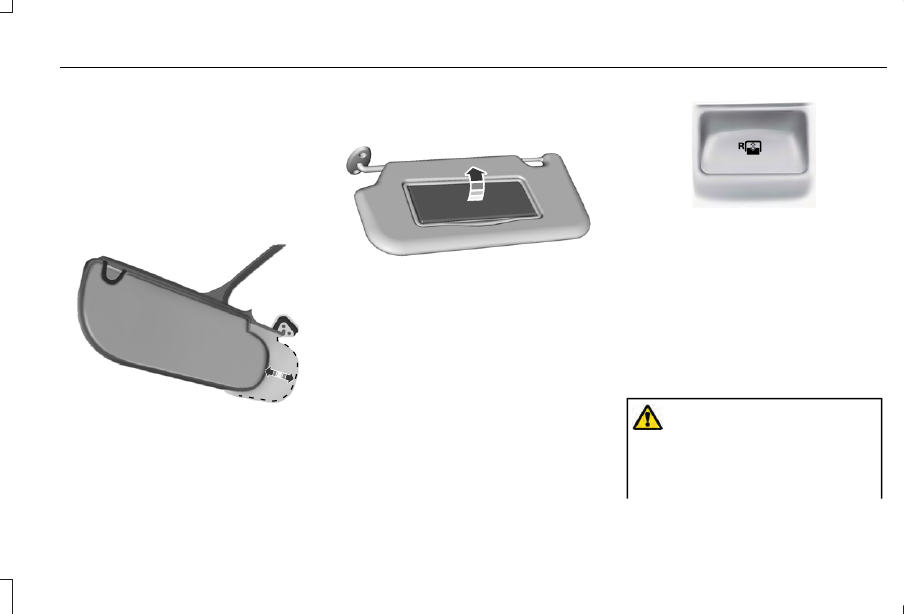
SUN VISORS

E138666

Rotate the sun visor toward the side window
and extend it rearward for extra shade.

Illuminated Vanity Mirror

E162197

Lift the cover to switch the lamp on.

SUN SHADES

Note: Do not try to move the sun shade
manually.

The power rear sun shade covers the rear
window of the vehicle.

E145986

The control is in the overhead console.

The sun shade has a one-touch up and down
feature. Press and release the control to
move the sun shade. To stop motion, press
the control a second time.

The sun shade automatically retracts when
you shift the transmission into R (Reverse).

MOONROOF

 (IF EQUIPPED)

WARNING: Do not leave children

unattended in your vehicle and do not let
them play with the moonroof. Failure to
follow this instruction could result in
personal injury.

99

Windows and Mirrors

-------------------------------------------------------------------------------------------------------------------------------------------------------------

WARNING: When closing the

moonroof, verify that it is free of
obstruction and make sure that children
and pets are not in the proximity of the roof
opening.

Type 1

The sliding shade can be manually opened
or closed when the moonroof is closed. Pull
the shade toward the front of the vehicle to
close it.

The moonroof controls are on the overhead
console and have a one-touch open and
close feature. To stop it during one-touch
operation, touch the control a second time.

Opening and Closing

E144499

Open

A

Vent

B

Close

C

Press A to open the moonroof. It will stop
short of the fully opened position.

Note: This position helps to reduce wind
noise or rumbling which may happen with
the moonroof fully open. Press A again to
fully open the moonroof.

Press C to close the moonroof.

Venting the Moonroof

Press and release to close the sunshade. If
fully open, the sunshade stops after covering
the rear glass panel. Press and release again
to fully close the sunshade.

Bounce-Back

The moonroof reverses some distance if an
obstacle is detected while closing.

Press and hold C within two seconds of a
bounce-back event to override this function.

Type 2

Note: With the panoramic moonroof fully
open and vehicle speed increasing to about
50 mph (80 km/h), the moonroof opening
panel closes about 8 in (20 cm) to reduce
excessive wind noise at higher speeds. This
feature only functions one time per key cycle,
so that you can open the glass further if
desired.

100

Windows and Mirrors

-------------------------------------------------------------------------------------------------------------------------------------------------------------

The moonroof controls are on the overhead
console and have a one-touch open and
close feature. To stop its movement during
one-touch operation, press the control a
second time.

Opening and Closing

E191272

Moonroof open.

A

Moonroof vent.

B

Sunshade open.

C

Sunshade close.

D

Moonroof close.

E

Moonroof Open

Press and release to open the moonroof. 
The moonroof stops short of the fully opened
position.  Press and release the control again
to open the moonroof fully.

Moonroof Vent

Press and release to vent the moonroof.

Sunshade Open

Press and release to open the sunshade.
The sunshade opens with the moonroof. You
can also open the sunshade with the
moonroof closed.

Note: The sunshade stops short of its fully
opened position for the comfort of rear
passengers. To open the sunshade fully,
press the control again.

Sunshade Close

Press and release to close the sunshade. If
fully open, the sunshade stops after covering
the rear glass panel. Press and release again
to fully close the sunshade.

Moonroof Close

Press and release to close the moonroof
from either the open or vent positions.

Bounce-Back

The moonroof reverses some distance if an
obstacle is detected while closing.

To override this feature, press and hold the
moonroof close control within two seconds
after the roof comes to a stop following a
bounce-back reversal or two successive
reversals.

101

Windows and Mirrors

-------------------------------------------------------------------------------------------------------------------------------------------------------------

GAUGES

E270687

102

Instrument Cluster

-------------------------------------------------------------------------------------------------------------------------------------------------------------

Tachometer

A

Information display

B

Speedometer

C

Fuel gauge

D

Engine coolant temperature gauge

E

Information Display

Odometer

Located in the bottom of the information
display. Registers the accumulated distance
your vehicle has traveled.

Trip Computer

See General Information (page 109).

Vehicle Settings and Personalization

See General Information (page 109).

Fuel Gauge

The fuel gauge indicates about how much
fuel is in the fuel tank.

The arrow adjacent to the fuel pump symbol
indicates on which side of your vehicle the
fuel filler door is located.

Note: The fuel gauge may vary slightly when
your vehicle is moving or on a slope.

Low Fuel Reminder

A low fuel level reminder displays and
sounds when the distance to empty reaches
75 mi (120 km) for MyKey, and at 50 mi
(80 km), 25 mi (40 km), 10 mi (20 km) and
0 mi (0 km) for all vehicle keys.

Note: The low fuel reminder can appear at
different fuel gauge positions depending on
fuel economy conditions. This variation is
normal.

Engine Coolant Temperature Gauge

WARNING: Do not remove the

coolant reservoir cap when the engine is
on or the cooling system is hot. Wait 10
minutes for the cooling system to cool
down. Cover the coolant reservoir cap with
a thick cloth to prevent the possibility of
scalding and slowly remove the cap.
Failure to follow this instruction could result
in personal injury.

103

Instrument Cluster

-------------------------------------------------------------------------------------------------------------------------------------------------------------

Indicates engine coolant temperature. At
normal operating temperature, the level
indicator will be in the normal range. If the
engine coolant temperature exceeds the
normal range, stop the vehicle as soon as
safely possible, switch off the engine and let
the engine cool.

WARNING LAMPS AND
INDICATORS

The following warning lamps and indicators
alert you to a vehicle condition that may
become serious.  Some lamps illuminate
when you start your vehicle to make sure
they work.  If any lamps remain on after
starting your vehicle, refer to the respective
system warning lamp for further information.

Note: Some warning indicators appear in
the information display and operate the
same as a warning lamp but do not
illuminate when you start your vehicle.

Adaptive Cruise Control Indicator

 (If

Equipped)

E144524

The speed control system indicator
light changes color to indicate
what mode the system is in:  See

Using Adaptive Cruise Control (page 222).

On (white light): Illuminates when you switch
the adaptive cruise control system on. Turns
off when you switch the speed control
system off.

Engaged (green light): Illuminates when the
adaptive cruise control system engages.
Turns off when the speed control system
disengages.

Anti-Lock Brake System Warning Lamp

If it illuminates when you are
driving, this indicates a
malfunction.  You will continue to

have the normal braking system (without
ABS) unless the brake system warning lamp
is also illuminated.  Have the system checked
by your authorized dealer.

Auto Hold Active

E197933

It illuminates when the system
holds your vehicle stationary.

Auto Hold Unavailable

E197934

It illuminates when the system is
on, but unavailable to hold your
vehicle stationary.

Automatic Headlamp High Beam
Indicator

It illuminates when the system
automatically turns the headlamp
high beam on.

See What Is Automatic High Beam Control
(page 93).

Battery

If it illuminates when driving, it
indicates a malfunction. Switch off
all unnecessary electrical

equipment and have the system checked by
your authorized dealer immediately.

104

Instrument Cluster

-------------------------------------------------------------------------------------------------------------------------------------------------------------

Blind Spot Monitor

E151262

It illuminates when you switch this
feature off or in conjunction with a
message.  See Blind Spot

Information System (page 237).   See
Information Messages (page 115).

Brake System Warning Lamp

WARNING: Driving your vehicle with

the warning lamp on is dangerous. A
significant decrease in braking
performance may occur. It may take you
longer to stop your vehicle. Have your
vehicle checked as soon as possible.
Driving extended distances with the
parking brake engaged can cause brake
failure and the risk of personal injury.

Note: Indicators vary depending on region.

This lamp is a dual function lamp and
illuminates when:

You apply the parking brake with the
ignition on.

Your vehicle has a brake fault or low
brake fluid level, regardless of parking
brake position.

E270480

If the lamp illuminates when you
are moving, you may have the
parking brake applied. Make sure
the parking brake is off. Have your
vehicle checked as soon as
possible if the lamp continues to

illuminate.

Cruise Control Indicator

E71340

It illuminates when you switch the
system on.

See What Is Cruise Control (page

221).

Direction Indicator

Illuminates when you switch on the
left or right direction indicator or
the hazard flasher. If the indicators

stay on or flash faster, check for a burned
out bulb.  See Changing a Bulb (page 322).

Door Ajar

Displays when the ignition is on
and any door is not completely
closed.

Electric Park Brake

E146190

It illuminates or flashes when the
electric parking brake
malfunctions. See Electric Parking

Brake (page 194).

Engine Coolant Temperature Warning
Lamp

Illuminates when the engine
coolant temperature is high. Stop
the vehicle as soon as possible,

switch off the engine and let it cool.  See
Engine Coolant Check (page 308).

Engine Oil

It illuminates when you switch the
ignition on.

105

Instrument Cluster

-------------------------------------------------------------------------------------------------------------------------------------------------------------

If it illuminates when the engine is running,
this indicates a malfunction.  Stop your
vehicle as soon as it is safe to do so and
switch the engine off.  Check the engine oil
level.  If the oil level is sufficient, this
indicates a system malfunction.  Have your
vehicle checked as soon as possible.

See Engine Oil Check (page 306).

Fasten Seatbelt Warning Lamp

E71880

It illuminates and a chime sounds
until you fasten the seatbelts.

Front Airbag

E67017

If it fails to illuminate when you
start your vehicle, continues to
flash or remains on, it indicates a

malfunction. Have the system checked by
your authorized dealer.

Heads Up Display

 (If Equipped)

E156133

A red beam of lights will illuminate
on the windshield in certain
instances when using adaptive

cruise control, and the collision warning
system. It also illuminates momentarily when
you start your vehicle to make sure the
display works.

Headlamp High Beam Indicator

It illuminates when you switch the
high beam headlamps on. It flashes
when you use the headlamp

flasher.

Hood Ajar

E159324

Displays when the ignition is on
and the hood is not completely
closed.

Lane Keeping System Lamp

E144813

It illuminates when the system
activates.

Low Fuel Level Warning Lamp

It illuminates when the fuel level is
low or the fuel tank is nearly
empty.  Refuel as soon as possible.

Low Tire Pressure Warning Lamp

If the lamp remains on with the
engine running or when driving,
check your tire pressure as soon

as possible. It illuminates when your tire
pressure is low.

It also illuminates momentarily when you
switch the ignition on to confirm the lamp is
functional. If it does not illuminate when you
switch the ignition on, or begins to flash at
any time, have the system checked by your
authorized dealer.

Low Washer Fluid Level Warning Lamp

E132353

It illuminates when the windshield
washer fluid is low.

106

Instrument Cluster

-------------------------------------------------------------------------------------------------------------------------------------------------------------

Parking Lamps

It illuminates when you switch the
parking lamps on.

Powertrain Fault

Illuminates when the system
detects a powertrain or an AWD
fault. Contact your authorized

dealer as soon as possible.

Service Engine Soon

If it illuminates when the engine is
running this indicates a
malfunction.  The On Board

Diagnostics system detects a malfunction of
the vehicle emission control system.

If it flashes, engine misfire may be occurring. 
Increased exhaust gas temperatures could
damage the catalytic converter or other
vehicle components. Drive in a moderate
fashion (avoid heavy acceleration and
deceleration) and have your vehicle
immediately serviced.

It illuminates when you switch the ignition
on prior to engine start to check the bulb and
to indicate whether your vehicle is ready for
Inspection and Maintenance (I/M) testing.

Normally, it illuminates until the engine is
cranked and automatically turns off if no
malfunctions are present. However, if after
15 seconds it flashes eight times, this
indicates that your vehicle is not ready for
Inspection and Maintenance (I/M) testing.
See Emission Law (page 174).

Stability Control

E138639

It flashes when the system is
active. If it remains illuminated or
does not illuminate when you

switch the ignition on, this indicates a
malfunction. During a malfunction the system
turns off. Have the system checked by your
authorized dealer immediately.  See Using
Stability Control
 (page 201).

Stability Control Off

E130458

It illuminates when you switch the
system off.

Trunk Ajar

E159323

Displays when the ignition is on
and the trunk is not completely
closed.

AUDIBLE WARNINGS AND
INDICATORS

Keyless Warning Alert

The horn will sound twice when you exit your
vehicle with the intelligent access key and
your vehicle is in RUN, indicating your vehicle
is still on.

Headlamps On Warning Chime

Sounds when you have left the headlamps
or parking lamps on and open the driver door
with the vehicle off.

107

Instrument Cluster

-------------------------------------------------------------------------------------------------------------------------------------------------------------

Parking Brake On Warning Chime

Sounds when you have left the parking brake
on and drive your vehicle. If the warning
chime remains on after you have released
the parking brake, have the system checked
by your authorized dealer immediately.

108

Instrument Cluster

-------------------------------------------------------------------------------------------------------------------------------------------------------------

GENERAL INFORMATION

WARNING: Driving while distracted

can result in loss of vehicle control, crash
and injury. We strongly recommend that
you use extreme caution when using any
device that may take your focus off the
road. Your primary responsibility is the safe
operation of your vehicle. We recommend
against the use of any hand-held device
while driving and encourage the use of
voice-operated systems when possible.
Make sure you are aware of all applicable
local laws that may affect the use of
electronic devices while driving.

You can control various systems on your
vehicle using the information display controls
on the steering wheel. The information
display shows the corresponding information.

Information Display Controls

E152750

Press the up and down arrow buttons to
scroll through and highlight the options
within a menu.

Press the right arrow button to enter a
sub-menu.

Press the left arrow button to exit a menu.

Press and hold the left arrow button at
any time to return to the main menu
display (escape button).

Press the OK button to choose and
confirm settings or messages.

E204495

This icon gives you the ability to
switch a feature on or off. A check
in the box indicates the feature is

enabled, and unchecked indicates the
feature is disabled.

Main menu

From the main menu bar on the left side of
the information display, you can choose from
the following categories:

Trip 1 & 2

Fuel Economy

Driver Assist

Settings

Scroll up or down to highlight one of the
categories and then press the right arrow
key or OK to enter into that category. Press
the left arrow key as needed to exit back to
the main menu.

109

Information Displays

-------------------------------------------------------------------------------------------------------------------------------------------------------------

Trip 1 & 2

Press and hold OK to reset the currently
displayed trip information.

Trip 1 & 2

All value screen (Trip odometer, Average fuel economy, Trip Timer)

Trip odometer — Shows your accumulated trip distance.

Average fuel economy — Shows your average fuel economy for a given trip.

Trip Timer— The timer stops when you switch off your vehicle and restarts when you restart your vehicle.

Fuel Economy

Use the left or right arrow buttons to choose
the desired fuel economy display.

Fuel Economy

Instantaneous Fuel Economy

Average MPG

Instantaneous Fuel Economy: This display shows a visual graph of your instantaneous fuel economy.

Average MPG — Shows your average fuel economy for a given trip.

Press and hold OK to reset your current fuel economy information.

110

Information Displays

-------------------------------------------------------------------------------------------------------------------------------------------------------------

Driver Assist

Use the up or down arrow buttons to choose
between different driver assist choices.

Driver Assist

Traction Control

Blindspot

Cross Traffic

Adaptive or Normal

Cruise Control

Driver Alert

Intelligent AWD

Alert, Aid or Alert + Aid

Mode

Lane Keeping Sys

High, Normal or Low

Intensity

High, Normal or Low

Alert Sensitivity

Pre-Collision

Active Braking

Rear Park Aid

Tire Monitor

111

Information Displays

-------------------------------------------------------------------------------------------------------------------------------------------------------------

Settings

Use the up or down arrow buttons to choose
between different driver setting choices.

Note: Some items are optional and may not
appear.

Note: Some MyKey items will only appear if a MyKey is set.

Settings

Comfort, Normal or Sport

Handling in D

Drive Control

Vehicle

Normal or Sport

Handling in S

Normal or Sport

Performance in S

Easy Entry/Exit

Auto Engine Off

Adaptive Headlamps

Adaptive Headlamps

Lighting

Traffic Setup

Auto Highbeam

Select time interval

Autolamp Delay

Daytime Lights

Welcome Lighting

Autolock

Locks

Autounlock

112

Information Displays

-------------------------------------------------------------------------------------------------------------------------------------------------------------

Settings

Select your setting

Feedback

Mislock

All doors or Driver door

Remote Unlock

Switches Inhibit

Autofold

Mirror

Hold OK to Initialize

Neutral Towing

Remaining Life XXX% - Hold OK to Reset

Oil Life

Enable Switch or Disable Switch

Power Decklid

Auto or Last Settings

Climate Control

Remote Start

Auto Heated or Off

Front Seats & Wheel

5, 10 or 15 minutes

Duration

System

Remote

Windows

Courtesy Wipe

Wipers

Rain Sensing

Hold OK to Create MyKey

Create MyKey

MyKey

113

Information Displays

-------------------------------------------------------------------------------------------------------------------------------------------------------------

Settings

Always On or User Selectable

911 Assist

Always On or User Selectable

Traction Control

Choose desired speed or off

Max Speed

Choose desired speed or off

Speed Minder

Volume Limiter

Always On or User Selectable

Do Not Disturb

Hold OK to Clear All MyKeys

Clear MyKeys

Miles & Gallons, L/100km or km/L

Distance Unit

Display

°Fahrenheit or °Celsius

Temperature Unit

psi, kPa or BAR

Tire Pressure

Choose your applicable setting - Hold OK to Set

Language

Speedo in km/h

114

Information Displays

-------------------------------------------------------------------------------------------------------------------------------------------------------------


Content      ..     4      5      6      7     ..