Dodge Durango (DN). Manual - part 327
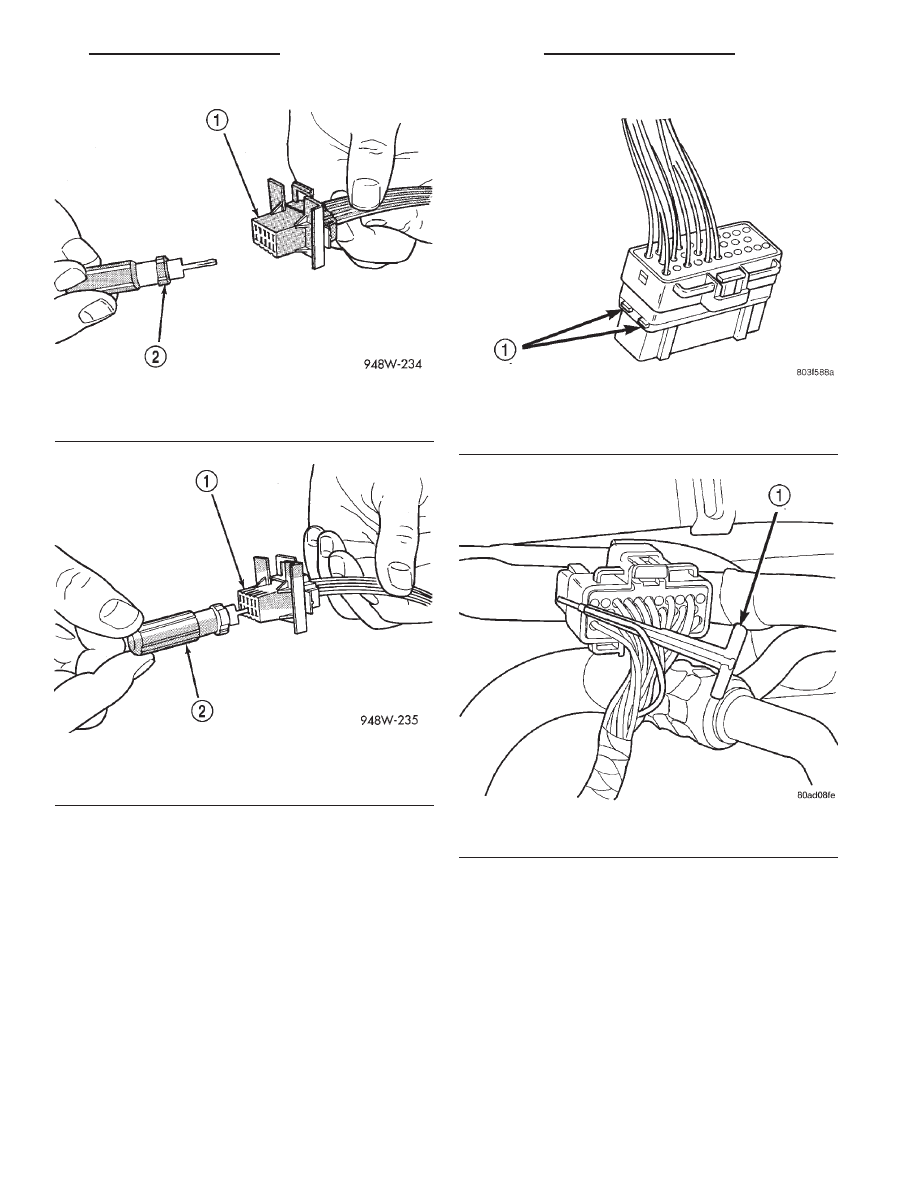
(3) Push in the two lock tabs on the side of the
connector (Fig. 10).
(4) Insert the probe end of special tool 6934 into
the back of the connector cavity (Fig. 11).
(5) Grasp the wire and tool 6934 and slowly
remove the wire and terminal from the connector.
(6) Repair or replace the terminal.
(7) Install the wire and terminal in the connector.
Fully seat the terminal in the connector.
(8) Push in the single lock tab on the side of the
connector (Fig. 12).
TERMINAL/CONNECTOR REPAIR- AUGAT
CONNECTORS
(1) Disconnect battery.
(2) Disconnect the connector from its mating half/
component.
(3) Push down on the yellow connector locking tab
to release the terminals (Fig. 13).
(4) Using special tool 6932, push the terminal to
remove it from the connector (Fig. 14).
(5) Repair or replace the connector or terminal as
necessary.
(6) When re-assembling the connector, the locking
wedge must be placed in the locked position to pre-
vent terminal push out.
Fig. 8 Molex Connector Repair
1 – CONNECTOR
2 – SPECIAL TOOL 6742
Fig. 9 Using Special Tool 6742
1 – CONNECTOR
2 – SPECIAL TOOL 6742
Fig. 10 Thomas and Betts Connector Lock Release
Tabs
1 – LOCK TABS
Fig. 11 Removing Wire Terminal
1 – SPECIAL TOOL 6934
DN
8W - 01 GENERAL INFORMATION
8W - 01 - 11
SERVICE PROCEDURES (Continued)