Citroën Berlingo (2022 year). Manual in english - page 15
 

  Index      Manuals     Citroën Berlingo (2022 year). Manual in english


Search            copyright infringement  


Content      ..     13      14      15      16     ..


Citroën Berlingo (2022 year). Manual in english - page 15


226

Technical data


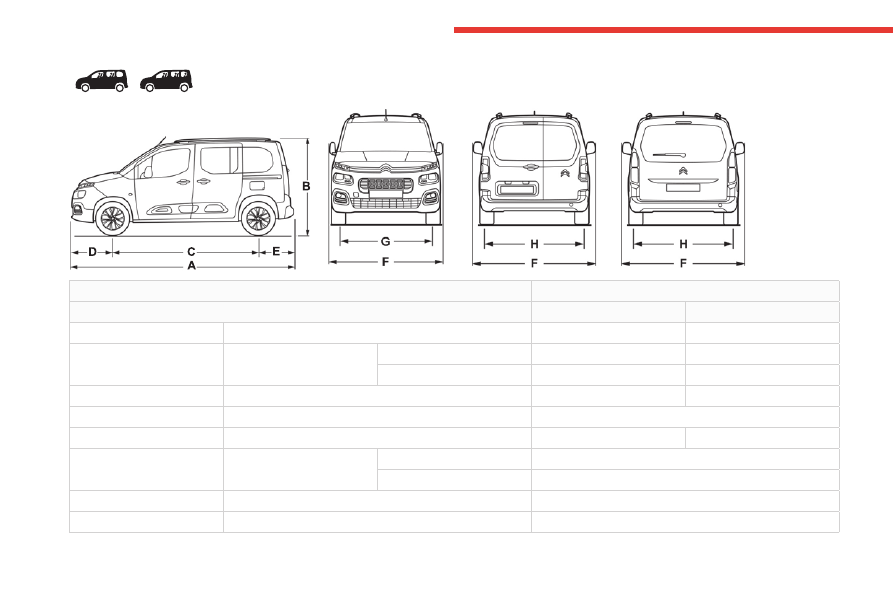
Vehicle length

M (L1)

XL (L2)

A

Overall length

4,403

4,753

B

Overall height

Without roof bars

1,800 to 1,807

1,812 to 1,818

With roof bars

1,837 to 1,844

1,843 to 1,849

C

Wheelbase

2,785

2,975

D

Front overhang

892

E

Rear overhang

726

886

F

Width inc. mirrors

Folded

1,921

Unfolded

2,107

G

Front track width

1,553

H

Rear track width

1,567

-------------------------------------------------------------------------------------------------------------------------------------------------------------

227

Technical data

9

Engine technical data and 

towed loads

Engines

The engine characteristics are given in the 

vehicle's registration document, as well as in 

sales brochures.

Only the values available at the time of 

publication are presented in the tables.

Contact a CITROËN dealer or a qualified 

workshop to obtain missing values.

The maximum power corresponds to the 

value type-approved on a test bed, under 

conditions defined by European legislation 

(Directive 1999/99/EC).

For more information, contact a CITROËN dealer 

or a qualified workshop.

Weights and towed loads

The weights and towed loads relating to 

the vehicle are indicated on the registration 

document, as well as in sales brochures.

These values are also indicated on the 

manufacturer's plate or label.

For more information, contact a CITROËN dealer 

or a qualified workshop.

The GTW (Gross Train Weight) and towed load 

values indicated are valid up to a maximum 

altitude of 1,000 metres. The towed load value 

must be reduced by 10% for each additional 

1,000 metres of altitude.

The maximum authorised nose weight 

corresponds to the weight permitted on the 

towball.

When exterior temperatures are high, the 

vehicle performance may be limited in 

order to protect the engine. When the exterior 

temperature is higher than 37°C, reduce the 

towed weight.

Towing even with a lightly loaded vehicle 

can adversely affect its road holding.

Braking distances are increased when towing 

a trailer.

When using a vehicle to tow, never exceed 

a speed of 62 mph (100 km/h) (observe the 

local legislation in force).

If the exterior temperature is high, it is 

recommended that the engine is allowed 

to idle for 1 to 2 minutes after the vehicle 

comes to a stop, to facilitate its cooling.

Engines and towed loads - PETROL


Vehicles fitted with the 

VTi 110 BVM5

 engine are not suitable for towing.

-------------------------------------------------------------------------------------------------------------------------------------------------------------

228

Technical data

Engines and towed loads - PETROL EURO 6.3


Engine

PureTech 110 S&S BVM6

PureTech 130 S&S EAT8

Gearbox

Manual 6-speed

Automatic 8-speed

Code

EB2ADT MB6 STTD

EB2ADTS ATN8 STTD

Length

M (L1)

XL (L2)

M (L1)

XL (L2)

Model Code

5 seats


ERHNP2-A

ERHNP2-C

ERHNS3-A

ERHNS3-C

7 seats


ERHNP2-B

ERHNP2-D

ERHNS3-B

ERHNS3-D

Cubic capacity (cc)

1,199

1,199

Max. power: EC standard (kW)

81

96

Fuel

Unleaded

Unleaded

Braked trailer (within 

the GTW limit) on a 12% 

slope (kg)

5 seats

1,150

1,100

1,200

1,150

7 seats

1,000

900/950

1,050

1,000/950

Unbraked trailer (kg)

5 seats

720/730

750

740/750

750

7 seats

750

750

750

750

Maximum authorised 

nose/towball weight (kg)

5 seats

74

74

74

74

7 seats

50/70

50

70/50

50

-------------------------------------------------------------------------------------------------------------------------------------------------------------

229

Technical data

9

Engines and towed loads - DIESEL


Engine

HDi 92 S&S BVM5

Gearbox

Manual 5-speed

Code

DV6DR

Length

M (L1)

XL (L2)

Model Code

5 seats


EC___A-A

EC___A-C

7 seats


EC___A-B

EC___A-D

Cubic capacity (cc)

1,560

Max. power: EC standard (kW)

68

Fuel

Diesel

Braked trailer (within 

the GTW limit) on a 12% 

slope (kg)

5 seats

1,100

1,050

7 seats

950

900

Unbraked trailer (kg)

5 seats

720

750

7 seats

750

750

Maximum authorised 

nose/towball weight (kg)

5 seats

74

74

7 seats

70 (Citroën)

50

-------------------------------------------------------------------------------------------------------------------------------------------------------------

230

Technical data

Engines and towed loads - DIESEL EURO 6.1


Engine

BlueHDi 100 BVM5

Gearbox

Manual 5-speed

Code

DV6FD BE

Length

M (L1)

XL (L2)

Model Code

5 seats


ECBHYB-A

ECBHYB-C

7 seats


ECBHYB-B

ECBHYB-D

Cubic capacity (cc)

1,560

Max. power: EC standard (kW)

73

Fuel

Diesel

Braked trailer (within the GTW limit) on a 12% slope (kg)

5 seats

1,100

1,050

7 seats

950

900

Unbraked trailer (kg)

5 seats

730

750

7 seats

750

Maximum authorised nose/towball weight (kg)

5 seats

74

74

7 seats

70 (Citroën)

50

-------------------------------------------------------------------------------------------------------------------------------------------------------------

231

Technical data

9

Engines and towed loads - DIESEL EURO 6.2


Engine

BlueHDi 100 S&S BVM5

BlueHDi 100 BVM5

BlueHDi 130 S&S EAT8

Gearbox

Manual 5-speed

Manual 5-speed

Automatic 8-speed

Code

DV5RD STTd BVM5

DV5RD BVM5

DV5RC STTd ATN8

Model Code

EFYHYC-L

EFYHYJ-L

EFYHZR-L

Cubic capacity (cc)

1,499

1,499

1,499

Max. power: EC standard (kW)

75

75

96

Fuel

Diesel

Diesel

Diesel

Braked trailer (within the GTW 

limit) on a 12% slope (kg)

1,050

1,050

1,050

Unbraked trailer (kg)

750

750

750

Maximum authorised nose/

towball weight (kg)

74

74

74

-------------------------------------------------------------------------------------------------------------------------------------------------------------

232

Technical data


Engine

BlueHDi 100 S&S BVM5

BlueHDi 130 S&S EAT8

Gearbox

Manual 5-speed

Automatic 8-speed

Code

DV5RD BE STTD - TBC

DV5RC STTd ATN8

Length

M (L1)

XL (L2)

M (L1)

XL (L2)

Model Code

5 seats


ECYHYC-A

ECYHYC-C

ECYHZR-A

ECYHZR-C

7 seats


ECYHYC-B

ECYHYC-D

ECYHZR-B

ECYHZR-D

Cubic capacity (cc)

1,499

1,499

Max. power: EC standard (kW)

75

96

Fuel

Diesel

Diesel

Braked trailer (within the GTW 

limit) on a 12% slope (kg)

5 seats

1,300

1,250

1,300

1,225/1,250

7 seats

1,150

1,050/1,100

1,100/1,150

1,050/1,100

Unbraked trailer (kg)

5 seats

740/750

750

750

750

7 seats

750

750

750

750

Maximum authorised nose/

towball weight (kg)

5 seats

74

74

52

74

7 seats

60 (Citroën)

50/60 (Citroën)

50

50

-------------------------------------------------------------------------------------------------------------------------------------------------------------

233

Technical data

9

Engines and towed loads - DIESEL EURO 6.3


Engine

BlueHDi 100 S&S 

BVM6

BlueHDi 100 BVM6

BlueHDi 130 S&S 

BVM6

BlueHDi 130 BVM6

BlueHDi 130 S&S 

EAT8

Gearbox

Manual 6-speed

Manual 6-speed

Manual 6-speed

Manual 6-speed

Automatic 8-speed

Code

DV5RCf MB6 STTD

DV5RCf MB6

DV5RC ML6C STTD

DV5RC ML6C 

DV5RC ATN8 STTD

Model Code

EFYHT2-L

EFYHT2-L

EFYHZ2-L

EFYHZ2-L

EFYHZ3-L

Cubic capacity (cc)

1,499

1,499

1,499

1,499

1,499

Max. power: EC standard 

(kW)

75

75

96

96

96

Fuel

Diesel

Diesel

Diesel

Diesel

Diesel

Braked trailer (within 

the GTW limit) on a 12% 

slope (kg)

1,250

1,250

1,250

1,250

Unbraked trailer (kg)

750

750

750

750

Maximum authorised 

nose/towball weight (kg)

74

74

74

74

-------------------------------------------------------------------------------------------------------------------------------------------------------------

234

Technical data


Engine

BlueHDi 100 S&S BVM6

BlueHDi 130 S&S BVM6

BlueHDi 130 S&S EAT8

Gearbox

Manual 6-speed

Manual 6-speed

Automatic 8-speed

Code

DV5RCf MB6 STTD

DV5RC ML6C STTD

DV5RC ATN8 STTD

Length

M (L1)

XL (L2)

M (L1)

XL (L2)

M (L1)

XL (L2)

Model Code

5 seats


ECYHT2-A

ECYHT2-C

ECYHZ2-A

ECYHZ2-C

ECYHZ3-A

ECYHZ3-C

7 seats


ECYHT2-B

ECYHT2-D

ECYHZ2-B

ECYHZ2-D

ECYHZ3-B

ECYHZ3-D

Cubic capacity (cc)

1,499

1,499

1,499

Max. power: EC standard (kW)

74

96

96

Fuel

Diesel

Diesel

Diesel

Braked trailer (within 

the GTW limit) on a 12% 

slope (kg)

5 seats

1,300

1,250

1,500

1,450

7 seats

1,150

1,050/1,100

1,350

1,250

Unbraked trailer (kg)

5 seats

740/750

750

750

750

7 seats

750

750

750

750

Maximum authorised 

nose/towball weight (kg)

5 seats

74

74

74

74

7 seats

60 (Citroën)

50/60 

(Citroën)

55/60

50

-------------------------------------------------------------------------------------------------------------------------------------------------------------

235

Technical data

9

Motor and towed loads - Electric

Electric motor

Electric motor

Technology

Synchronous with permanent magnets

Max. power : EC standard (kW)/(hp)

100

Traction battery

Technology

Lithium-Ion

Battery pack

18 modules

Installed capacity (kWh)

50

Domestic charging

Mode 2

Alternating current (AC) voltage

Rating (A)

230

8 or 16

Accelerated charging

Mode 3

Alternating current (AC) voltage

Rating (A)

230 (single-phase or three-phase)

16 or 32

Superfast charging

Mode 4

Direct current (DC) voltage

400

Towed loads

Model codes:

ZKX

Braked trailer (within the GTW limit) (kg)

on a 10% or 12% gradient

750

Unbraked trailer (kg)

750

Maximum authorised nose weight (kg)

50

-------------------------------------------------------------------------------------------------------------------------------------------------------------

236

Technical data

Identification markings

Various visible markings for vehicle identification 

and vehicle search.


A. 

Vehicle Identification Number (VIN), under 

the bonnet.

Stamped on the chassis, near the right-hand 

front wheel arch.

B. Vehicle Identification Number (VIN), on the 

dashboard.

Printed on an adhesive label visible through the 

windscreen.

C. Manufacturer's label.

Affixed to the centre pillar, left-hand side or right-

hand side.

Bears the following information:

–  Manufacturer’s name.

–  European whole vehicle type approval 

number.

–  Vehicle Identification number (VIN).

–  Gross vehicle weight (GVW).

–  Gross train weight (GTW).

–  Maximum weight on the front axle.

–  Maximum weight on the rear axle.

D. Tyres/paint code label.


Affixed to the driver's door.

Bears the following information about the tyres:

–  Tyre pressures, unladen and laden.

–  Tyre specification, made up of the dimensions 

and type as well as the load and speed indices.

–  Spare tyre inflation pressure.

Also indicates the paint colour code.

The vehicle may be originally equipped 

with tyres with higher load and speed 

indices than those indicated on the label, 

without affecting tyre pressure (on cold tyres).

In the event of a change in the type of tyres, 

contact a CITROËN dealer for the tyre fits 

approved for the vehicle.

-------------------------------------------------------------------------------------------------------------------------------------------------------------

237

Touch screen BLUETOOTH audio system

10

Touch screen 

BLUETOOTH audio 

system


Multimedia audio system - 

Bluetooth

®

 telephone

The functions and settings described 

vary according to the vehicle version and 

configuration.

For safety reasons and because they 

require sustained attention by the driver, 

the following operations must be carried out 

with the 

vehicle stationary

 and the ignition 

on:

–  Pairing the smartphone with the system in 

Bluetooth mode.

–  Using the smartphone.

–  Changing the system settings and 

configuration.

The system is protected in such a way 

that it will only operate in the vehicle.

The 

Energy Economy Mode

 message is 

displayed when the system is about to enter 

the corresponding mode.

First steps

With the engine running, a press mutes 

the sound.

With the ignition off, a press turns the system on.

Increase or decrease the volume using 

the thumbwheel on the left-hand side.

To access the menus, press this button 

on the touch screen.

Press the back arrow to go back a level.

To clean the screen, use a soft, 

non-abrasive cloth (e.g. spectacles cloth) 

with no additional product.

Do not use sharp objects on the screen.

Do not touch the screen with wet hands.

Certain information is displayed permanently in 

the upper bar of the touch screen:

–  Air conditioning information (depending on 

version).

–  Bluetooth connection.

–  Indication of location data sharing.

Selection of the audio source:

–  FM/AM/DAB radio stations (depending on 

equipment).

–  Telephone connected via Bluetooth and 

Bluetooth multimedia broadcast (streaming).

–  USB memory stick.

–  Media player connected via the auxiliary 

socket (depending on equipment).

In very hot conditions, the volume may 

be limited to protect the system. It may 

go into standby (screen and sound off) for at 

least 5 minutes.

The return to normal takes place when the 

temperature in the passenger compartment 

has dropped.

Steering mounted controls

Steering mounted controls - 

Type 1


Radio:

Select the previous/next preset radio 

station.

Select the previous/next item in a menu or a list.

Media:

Select the previous/next track.

Select the previous/next item in a menu or a list.

Radio:

-------------------------------------------------------------------------------------------------------------------------------------------------------------

238

Touch screen BLUETOOTH audio system

Short press: display the list of radio stations.

Long press: update the list.

Media:

Short press: display the list of folders.

Long press: display the available sorting options.

Short press: change audio source (radio; 

USB; AUX if equipment connected; CD; 

streaming).

Long press: display the call log. 

Short press during an incoming call: accept the 

call.

Short press during a call in progress: end the 

call.

Confirm a selection.


Increase volume. 

Decrease volume. 

Mute/restore sound by simultaneously 

pressing the increase and decrease 

volume buttons.

Steering mounted controls - 

Type 2


Voice commands

:

This control is located on the steering 

wheel or at the end of the lighting control stalk 

(depending on equipment).

Short press, smartphone voice commands via 

the system.

Increase volume. 

Decrease volume.

Mute by pressing the volume increase 

and decrease buttons simultaneously 

(depending on equipment).

Restore the sound by pressing one of the two 

volume buttons.

Change the multimedia source. 

Short press: display the calls log.

Short press during an incoming call: 

accept the call.

Long press during an incoming call: reject the 

call.

Short press during a call in progress: end the 

call.

Radio

 (rotate): previous/next preset 

station.

Media

 (rotate): previous/next track, move in a 

list.

Short press

: confirm a selection; if nothing 

selected, access to presets.

Radio

: display the list of stations.

Media

: display the list of tracks.

Menus

Radio


Select a radio station. 

Media


Select an audio source. 

-------------------------------------------------------------------------------------------------------------------------------------------------------------

239

Touch screen BLUETOOTH audio system

10

Telephone


Connect a mobile phone via Bluetooth

®

Driving


Activate, deactivate or configure certain 

vehicle functions (depending on 

equipment/version).

Settings


Adjust the sound settings (balance, 

ambience, etc.), the display (language, 

units, date, time, etc.) or configure the system 

(privacy).

Air conditioning/Heating


Depending on equipment/Depending on version.

Manage various temperature and air flow 

settings.

Radio

Choose the band

Press the "

Radio

" menu. 

Press the "

SOURCE

" button.

Choose the band: 

FM

AM

 or 

DAB

, depending 

on equipment.

Selecting a station

Press one of the buttons for an automatic 

search for radio stations.

Or

Press on the displayed frequency. 

Enter the FM and AM waveband values 

using the virtual keypad.

Or

Press this button to display the list of 

stations received and available on the 

waveband.

Radio reception may be affected by the 

use of electrical equipment not approved 

by the Brand, such as a USB charger 

connected to the 12 V socket.

The exterior environment (hills, buildings, 

tunnels, basement car parks, etc.) may block 

reception, including in RDS mode. This 

behaviour is normal in propagation of radio 

waves and does not indicate any failure of the 

audio system.

-------------------------------------------------------------------------------------------------------------------------------------------------------------

240

Touch screen BLUETOOTH audio system

Presetting a station

Select a radio station or frequency.

Press the "

Presets

" button. 

Make a long press on an empty line to preset the 

station. An audible signal confirms the presetting 

of the station.

It is possible to preset up to 16 stations.

To replace a preset station by the 

currently playing station, make a long 

press on the preset station.

Activating/Deactivating RDS

RDS, if activated, allows you to continue 

listening to the same station by automatically 

retuning to alternative frequencies.

In certain conditions, tracking may not be 

assured throughout the entire country as 

radio stations do not cover 100% of the 

territory. This explains the loss of reception of 

the station during a journey.

Press the "

Radio Settings

" button. 

Activate/Deactivate "

RDS options

". 

Playing TA messages

The TA (Traffic Announcement) function gives 

priority to TA alert messages.

To operate, this function needs good reception 

of a radio station that transmits this type of 

message. While traffic information is being 

broadcast, the current media is automatically 

interrupted so that the TA message can be 

heard. Normal play of the media previously 

playing is resumed at the end of the message.

Press the "

Radio Settings

" button. 

Activate/Deactivate "

Traffic 

announcement (TA)

".

Audio settings

Press the "

Radio Settings

" button. 

In the list, select "

Audio Settings

".

Activate/deactivate and configure the available 

options (sound balance, ambiances, etc.).

The sound balance/distribution is audio 

processing that allows the quality of the 

sound to be adapted according to where the 

passengers are sitting in the vehicle.

DAB (Digital Audio 

Broadcasting) radio

Terrestrial Digital Radio

Choosing the DAB radio

Terrestrial digital radio (DAB) provides higher 

quality reception.

The different "multiplexes/ensembles" offer a 

choice of radio stations arranged in alphabetical 

order.

Press the "

Radio

" menu. 

Press the "

SOURCE

" button.

In the list of available sources, choose "

DAB 

Radio

".

Activating FM-DAB Tracking

"DAB" does not cover 100% of the territory.

When the digital radio signal is poor, the 

"FM-DAB tracking" allows you to continue 

listening to the same station, by automatically 

switching to the corresponding "FM" analogue 

station (if there is one).

Press the "

Radio Settings

" button. 

Activate "

DAB-FM

". 

If "FM-DAB tracking" is activated, there 

may be a difference of a few seconds 

-------------------------------------------------------------------------------------------------------------------------------------------------------------

241

Touch screen BLUETOOTH audio system

10

when the system switches to "FM" analogue 

radio with sometimes a variation in volume.

Once the digital signal quality is restored, the 

system automatically changes back to "DAB".

If the "DAB" station being listened to is 

not available on "FM", or if the "FM-DAB 

tracking" is not activated, the sound will cut 

out while the digital signal is too weak.

Media

Selecting the source

Press the "

Media

" menu. 

Press the "

SOURCE

" button.

Select the source (USB, Bluetooth or AUX, 

depending on equipment).

USB port

Insert the USB memory stick into the USB 

port or connect the USB device to the 

USB port using a suitable cable (not supplied).

To protect the system, do not use a USB 

hub.

The system builds playlists (in temporary 

memory); this operation can take from a 

few seconds to several minutes at the first 

connection.

Playlists are updated whenever a USB memory 

stick is connected or the contents of a particular 

USB memory stick are changed. The lists 

are memorised: if they are not modified, the 

subsequent loading time will be shorter.

Auxiliary (AUX) jack socket

Depending on equipment

Connect a portable device (MP3 player, 

etc.) to the auxiliary jack socket using an 

audio cable (not supplied).

This source is only available if "

Aux 

Amplification

" has been selected in the audio 

settings.

First adjust the volume on the portable device 

(to a high level). Then adjust the volume of the 

audio system.

Controls are managed via the portable device.

Bluetooth

®

streaming

Streaming allows you to listen to music from your 

smartphone.

The Bluetooth profile must be activated, first 

adjust the volume on the portable device (to a 

high level).

Then adjust the volume of the system.

If play does not start automatically, it may be 

necessary to start the audio playback from the 

smartphone.

Control is from the portable device or by using 

the system's touch buttons.

Once connected in Streaming mode, the 

smartphone is considered to be a media 

source.

Connecting Apple

®

 players

Connect the Apple

®

 player to the USB socket 

using a suitable cable (not supplied).

Play starts automatically.

Control is via the audio system.

The classifications available are those of 

the portable device connected (artists/

albums/genres/playlists/audio books/

podcasts). It is also possible to use a 

classification structured in the form of a 

library.

The default classification used is by artist. To 

modify the classification used, return to the 

first level of the menu then select the desired 

classification (playlists for example) and 

confirm to go down through the menu to the 

desired track.

The version of software in the audio system may 

not be compatible with the generation of the 

Apple

®

 player.

Media settings

Press the "

Media Settings

" button. 

Activate/deactivate track playback options and 

access the audio settings.

-------------------------------------------------------------------------------------------------------------------------------------------------------------


Content      ..     13      14      15      16     ..