Citroen C4 Cactus (2016 year). Instruction - part 9
 

  Index      Citroen     Citroen C4 Cactus - instruction 2016 year in english


Search            


Content   ..  7  8  9  10   ..


Citroen C4 Cactus (2016 year). Instruction - part 9


127

6

Driving

Operation

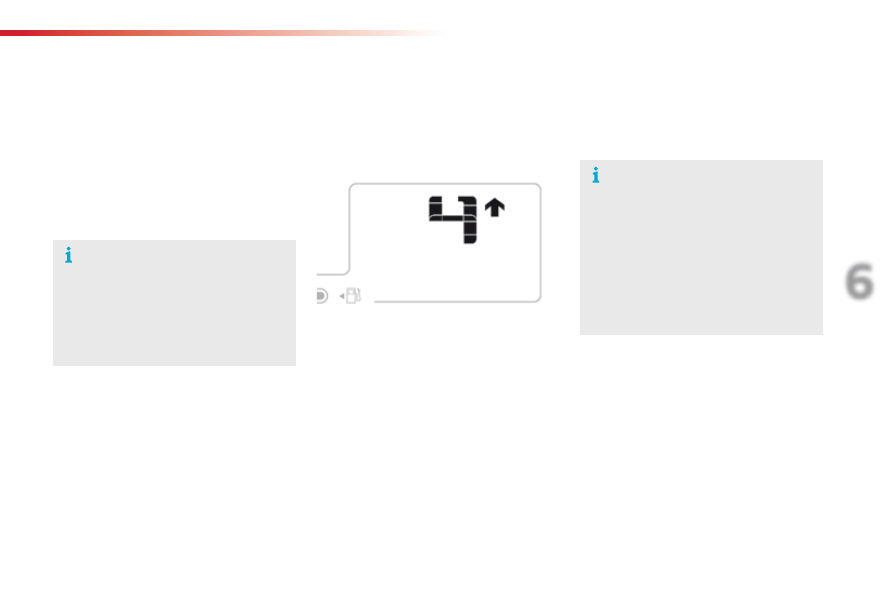
Gear efficiency indicator

System which reduces fuel consumption by advising the driver to change up, on vehicles fitted with a manual gearbox.

The system adapts its gear change 
recommendation according to the 
driving conditions (slope, load, ...) and 
the demands of the driver (power, 
acceleration, braking, ...).
The system never suggests:
-  engaging first gear,
-  engaging reverse gear,
-  engaging a lower gear.

Example:
-  You are in third gear.

Depending on the driving situation and your 
vehicle's equipment, the system may advise 
you to skip one (or more) gear(s). You can 
follow this instruction without engaging the 
intermediate gears.

-  You press the accelerator pedal.

-  The system may suggest that you engage 

a higher gear.

The information appears in the instrument 
panel in the form of an arrow, accompanied by 
the recommended gear.

On certain Diesel versions with manual 
gearbox, the system may suggest 
changing into neutral (N is displayed in 
the instrument panel) so that the engine 
can go into standby (STOP mode 
with Stop & Start), in certain driving 
conditions.

The gear engagement recommendations must 
not be considered compulsory. In fact, the 
configuration of the road, the amount of traffic 
and safety remain determining factors when 
choosing the best gear. Therefore, the driver 
remains responsible for deciding whether or not 
to follow the advice given by the system.
This system cannot be deactivated.

128

Driving

ETG electronic gearbox

N

  Neutral: with your foot on the brake, press 

this control to put the gearbox into neutral 
and for starting the engine.

D

  Drive: press this control to engage forward 

drive with automatic operation of the gears.

R

  Reverse: with your foot on the brake, press 

this control to engage reverse.

Control panel

F

  Operate the paddle to the 

right

 of the steering wheel to 

change up

.

Steering mounted controls

The steering mounted paddles do not 
allow neutral to be selected, or reverse 
gear to be engaged or disengaged.

Five or six-speed electronically controlled gearbox which offers the comfort of automatic control of the gears, without any action by the driver.
You can temporarily take control of gear changes at any time, using the steering mounted control paddles.

F

  Operate the paddle to the left 

of the steering wheel to change 
down

.

Display in the instrument panel

F  Place your foot on the brake 

when this warning lamp flashes.

N Neutral
D

 and 1 2 3 4 5 / 6  Drive (forward drive) and 

the gear engaged.

R Reverse

129

6

Driving

N

 flashes in the instrument panel, 

accompanied by an audible signal and 
a message if the control N has not been 
pressed for starting.
Press control N

 to select neutral.

Moving off

F

  Switch on the ignition.

F  Select neutral (control N

).


The indicator lamp for the control comes on.

F

  Press the brake pedal fully.

F

  Start the engine.

N

 appears in the instrument panel.

F

  Select forward drive (control D) or reverse 

(control R)


The associated indicator lamp comes on in 
the control panel.

D

 and 1 or R appear in the instrument 

panel.

Creep function

This function allows the vehicle to be 
manoeuvred more easily at low speeds (when 
parking, in traffic jams...).
After pressing control D or Rthe vehicle 
moves as soon as you take your foot off the 
brake pedal

, at low speed and with the engine 

at idle.

The creep function may be temporarily 
unavailable if the clutch temperature is 
too high or the slope too steep.

Do not leave children unsupervised 
inside the vehicle when the engine is 
running.

You must keep your foot on the brake 
pedal while starting the engine.
The "Foot on the brake" warning and 
the associated control panel indicator 
lamp flash if the brake pedal is not 
pressed when starting the engine.
Press firmly on the brake pedal.

F

  Release the parking brake.

F

  Progressively take your foot off the brake 

pedal.


The vehicle moves off.

130

Driving

Never select neutral (position N) when 
moving.

Forward drive

F  Press control D

.


The indicator lamp in the control comes on.

D

 and the gear engaged appear in 

the instrument panel.

The gearbox then operates in auto-adaptive 
mode, without any action on the part of the 
driver. It continuously selects the most suitable 
gear taking account of:
-  optimisation of fuel consumption,
-  driving style,
-  road conditions,
-  vehicle load.

For optimum acceleration, when 
overtaking another vehicle for example, 
press the accelerator pedal fully down, 
beyond the point of resistance.

Temporary control of gear 
changing

You can temporarily take over control of gear 
changes using the steering mounted "+" and "-" 
control paddles: if the engine speed allows, the 
gear change is carried out.
This function allows you to anticipate certain 
situations such as overtaking another vehicle or 
approaching a bend.
After a few moments without any action on the 
paddles, the gearbox resumes control of gear 
changing automatically.

To engage reverse, the vehicle must be 
immobilised with your foot on the brake.
F  Press control R

.


The indicator lamp in the control comes on.

Reverse

There is an audible signal on 
engagement of reverse.

If reverse gear is requested when moving, 
the N

 warning lamp flashes and the gearbox 

goes into neutral automatically.
To engage reverse, stop the vehicle then, with 
your foot on the brake pedal, press control N
then R

.

Do not press the brake and accelerator 
pedals at the same time: this could 
cause very rapid wear of the clutch.

131

6

Driving

Before switching off the engine:
-  press control N to be in neutral,
 or
-  leave the vehicle in gear; in this case the 

vehicle cannot be moved.

Stopping the vehicle

For all parking situations, you must 
apply the parking brake

 to immobilise 

the vehicle.

When immobilising the vehicle with 
the engine running, you must select 
neutral N

.

Operating fault

- - -

 appears in the instrument panel.

F  Press control N

.

F

  Press the brake pedal.

F

  Wait for around 30 seconds until N or a 

gear appears in the instrument panel.

F  Press control D, then N

.

F

  With your foot still on the brake pedal, start 

the engine.

The gearbox is operational again.

Reinitialisation
(5-speed electronic 
gearbox)

Following disconnection of the battery, it is 
necessary to reinitialise the gearbox.
F

  Switch on the ignition.

In exceptional circumstances, the 
gearbox may need an automatic 
reinitialisation: starting and gear 
changing are no longer possible.

- - -

 appears in the instrument 

panel.

Follow the procedure described above.

Before doing anything under the bonnet, 
ensure that control N

 has been pressed 

and that the parking brake is applied.

With the ignition on, illumination of 
this warning lamp, accompanied by 
an audible signal and a message, 
indicates a gearbox fault.

Have it checked by a CITROËN dealer or a 
qualified workshop.

132

Driving

Hill start assist

System which keeps your vehicle immobilised 
temporarily (approximately 2 seconds) when 
starting on a gradient, the time it takes to 
move your foot from the brake pedal to the 
accelerator pedal.
This system only operates when:
-  the vehicle is completely stationary, with 

your foot on the brake pedal,

-  certain conditions of slope are met,
-  with the driver’s door closed.
The hill start assist system cannot be 
deactivated.

On an ascending slope, with the vehicle 
stationary, the vehicle is held momentarily 
when you release the brake pedal, provided 
that:
-  you are in first gear or neutral with a 

manual gearbox,

-  you are in position D with an electronic 

gearbox.

Operation

On a descending slope, with the vehicle 
stationary and reverse gear engaged, the 
vehicle is held momentarily when you 
release the brake pedal.

Operating fault

If a fault in the system occurs, these warning 
lamps come on, accompanied by an alert 
message. Contact a CITROËN dealer or 
a qualified workshop to have the system 
checked.

Do not leave the vehicle while it is being 
held in the hill start assist phase.
If you need to exit the vehicle with 
the engine running, apply the parking 
brake.

133

6

Driving

Stop & Start

Operation

Going into engine STOP  
mode

The "ECO"

 warning lamp comes on 

in the instrument panel and the engine 
goes into standby automatically:

-  with a manual gearbox, when stationary, 

in neutral, and you release the clutch 
pedal.

-  with an electronic gearbox, when 

stationary or at speeds below 5 mph 
(8 km/h) (depending on version), in neutral 
(control on N

) or when you press the brake 

pedal.

Never refuel with the engine in STOP 
mode; you must switch off the ignition.

For your comfort, during parking 
manoeuvres, STOP mode is not 
available for a few seconds after 
coming out of reverse gear.
The Stop & Start system does not affect 
the the vehicle's other systems, such as 
for example braking, power steering...

The Stop & Start system puts the engine 
temporarily into standby - STOP mode - during 
stops in the traffic (red lights, traffic jams, or 
other...). The engine restarts automatically - 
START mode - as soon as you want to move 
off. The restart takes place instantly, quickly 
and silently.
Perfect for urban use, the Stop & Start system 
reduces fuel consumption and exhaust 
emissions as well as the noise level when 
stationary.

Stop & Start time  
counter

A cumulative time counter for periods 
in STOP mode during a journey.

It is displayed in the trip computer (accessible 
via the "Driving assistance

" menu of the 

touch screen tablet).
It resets to zero every time the ignition is 
switched on.

The Stop & Start system requires 
the use of a 12 V battery of special 
technology and specification. All 
work on this type of battery must 
only be done by a CITROËN dealer 
or a qualified workshop. For more 
information on the 12 V battery, refer to 
the corresponding section.

134

Driving

Going into engine START  
mode

The "ECO"

 warning lamp goes off 

and the engine starts automatically:

-  with a manual gearbox, when you fully 

depress the clutch pedal.

-  with an electronic gearbox:

●  control on D, when you release the brake 

pedal,

●  control on N and brake pedal released, 

when you press control D,

●  when you engage reverse.

START mode is invoked automatically when:
-  you open the the driver's door,
-  you unfasten the driver's seat belt,
-  the speed of the vehicle exceeds 7 mph  

(11 km/h) with an electronic gearbox,

-  some special conditions (battery charge, 

engine temperature, braking assistance, 
ambient temperature...) where the engine is 
needed for control of a system.

Special cases: START invoked 
automatically

In this case the "ECO"

 warning 

lamp flashes for a few seconds, then 
goes off.

This operation is perfectly normal.

Special cases: STOP mode not 
available

STOP mode is not invoked principally when:
-  the vehicle is on a steep slope (rising or 

falling),

-  the driver's door is open,
-  the driver's seat belt is not fastened,
-  the vehicle has not exceeded 6 mph 

(10 km/h) since the last engine start by the 
driver,

-  the engine is needed to maintain a 

comfortable temperature in the passenger 
compartment,

-  demisting is active,
-  some special conditions (battery charge, 

engine temperature, braking assistance, 
ambient temperature...) where the engine is 
needed to assure control of a system.

In this case, the "ECO"

 warning 

lamp flashes for a few seconds then 
goes off.

This operation is perfectly normal.

135

6

Driving

A fault with the system is signalled 
in the "Driving assistance

" menu 

(primary page) of the touch screen 
tablet.

Operating fault

In the event of a fault with the system, 
the symbol in the button changes to alert 
mode and the indicator lamp flashes for a 
few moments then stays on continuously.

If you press this button to reactivate the 
system, the indicator lamp flashes again for a 
few moments and then stays on continuously.

In certain circumstances, such as the need 

to maintain a comfortable temperature in the 

passenger compartment, it may be preferable 

to deactivate the Stop & Start system.

The system can be deactivated at any time, 

once the ignition is on.

If the system is deactivated while in 

STOP mode, the engine then restarts.

The Stop & Start system is automatically 

reactivated every time the engine is started.

Deactivation

The Stop & Start system can be deactivated 
and manually reactivated in the touch screen 
tablet.

F  Select "Stop & Start" in the 

"Driving assistance

" menu.

When the system is deactivated, the indicator 
lamp in this button comes on continuously.
When the system is reactivated manually, the 
indicator lamp in this button goes off.

Have it checked by a CITROËN dealer or a 
qualified workshop.

In the event of a fault in STOP mode, the 
vehicle may stall.
All of the instrument panel warning lamps  
come on.

Depending on version, an alert 
message may also be displayed, asking 
you to change to neutral (control on N
and put your foot on the brake pedal.
You must switch off the ignition, then 
start the engine again.

Before doing anything under the 

bonnet, deactivate the Stop & Start 

system to avoid the risk of injury 

related to an automatic change to 

START mode.

Opening the bonnet

Driving on flooded roads
Before driving through a flooded road, 
it is strongly recommended that you 
deactivate the Stop & Start system.
For more advice on driving, particularly 
on flooded roads, refer to the 
corresponding section.

136

Driving

Steering mounted controls

6.

  Speed limiter on / pause indication.

7.

  Programmed speed setting.

8.

  Speed limiter mode selection indication.

Speed limiter

System which prevents the vehicle from exceeding the speed programmed by the driver.

The speed limiter cannot, in any circumstances, 
replace the need to observe speed limits, nor can it 
replace the need for vigilance on the part of the driver.

1.

  Select speed limiter mode.

2.

  Decrease value.

3.

  Increase value.

4.

  Speed limiter on / pause.

5.

  List of memorised speeds display button.

Display in the instrument panel

The programmed speed remains in the system 
memory when the ignition is switched off.

137

6

Driving

Switching on / Pause

F  Turn wheel 1 to the "LIMIT"

 position: the 

speed limiter mode is selected but is not 
switched on (Pause).

F

  Switch the speed limiter back on by 

pressing button 4, if the speed displayed 
is suitable (by default, the last speed 
programmed).

F

  You can temporarily stop the the speed 

limiter by pressing button 4 again: the 
display confirms that it has been stopped 
(Pause).

After first selecting speed limiter mode (wheel 1 
in position "LIMIT

"), you can modify the speed 

setting by:
-  a press on button 5:

F

 the six speeds memorised are displayed 

in the touch screen tablet,

F

 choosing a speed: it is displayed in the 

instrument panel.

  The selection screen closes after a 

few moments.

Speed limits can be memorised in the 
"Driving assistance"

 menu.

For more information on memorising 
speeds, refer to the corresponding 
section.

You do not have to switch the speed 
limiter on in order to set the speed.

The speed limiter is switched on 
manually: it requires a programmed 
speed of at least 20 mph (30 km/h).

Adjusting the speed limit 
setting

Or:
-  using buttons 2 and 3, increasing or 

decreasing the speed displayed:
F

 by successive short presses, to modify 

by + or - 1 mph (km/h),

F

 by a maintained press, to modify in steps 

of + or - 5 mph (km/h).

138

Driving

On sharp acceleration, as when 
descending a steep hill, the speed 
limiter will not be able to prevent 
the vehicle from exceeding the 
programmed speed.
The limiter is temporarily deactivated 
and the displayed programmed speed 
flashes.
An audible signal accompanies the 
flashing of the programmed speed 
when exceeding the speed is not due to 
an action by the driver.
The use of mats not approved by 
CITROËN may interfere with the 
operation of the speed limiter.
To avoid any risk of jamming of the 
pedals:
-  ensure that the mat is secured 

correctly,

-  do not fit one mat on top of another.

Flashing of the dashes indicates a fault with the 
speed limiter.
Have it checked by a CITROËN dealer or a 
qualified workshop.

Operating fault

Switching off

F  Turn wheel 1 to the "0"

 position.


The display of information related to the 
speed limiter disappears.

F Press 

firmly

 on the accelerator pedal, 

going beyond the point of resistance, to 
exceed the programmed speed limit.

The speed limiter is deactivated temporarily 
and the displayed programmed speed flashes.

Temporarily exceeding the 
programmed speed

As soon as the vehicle's speed returns to the 
programmed value, the limiter operates again: 
the display of the programmed speed setting 
becomes steady again.

An audible signal accompanies the 
flashing of the programmed speed 
when exceeding the speed is not due to 
an action by the driver (steep hill...).

139

6

Driving

Steering mounted controls

6.

  Cruise control pause / resume indication.

7.

  Programmed speed setting.

8.

  Cruise control mode selection indication.

Cruise control

System which automatically maintains the speed of the vehicle at the value programmed by the driver, without any action on the accelerator pedal.

The cruise control system cannot, in 

any circumstances, replace the need to 

observe speed limits, nor can it replace the 

need for vigilance on the part of the driver.

You are advised to keep your feet near the 

pedals at all times.

1.

  Select cruise control mode.

2.

  Programme a speed / Decrease the value.

3.

  Programme a speed / Increase the value.

4.

  Pause / resume cruise control.

5.

  Display the list of memorised speeds.

Display in the instrument panel

Switching off the ignition cancels any 
programmed speed value.

140

Driving

Switching on

With the cruise control switched on (ON), you 
can then modify the speed setting in one of the 
following ways:
-  by pressing button 5:

F

 the six memorised speeds are displayed 

in the the touch screen tablet,

F

 pressing the the button for the speed 

setting you have chosen.

  The value is then displayed in the 

instrument panel.

  The selection screen closes after a 

few moments.

  The modification is then accepted.

F  Turn wheel 1 to the "CRUISE"

 position: the 

cruise control mode is selected but is not 
switched on (Pause).

F  Press button 2 or 3

: your vehicle's current 

speed becomes the cruise speed.

The cruise control is activated (ON).

Adjusting the cruise speed 
setting

The cruise control is switched on 
manually: it requires a minimum vehicle 
speed of 25 mph (40 km/h).

The memorised speeds can be 
programmed in the "Driving 
assistance

" menu.

For more information on memorising 
speeds, refer to the corresponding 
section.

Or by:
-  using buttons 2 or 3:

F

 by successive short presses, to modify 

the speed by + or - 1 mph (km/h),

F

 by a long press, to modify the speed in 

steps of + or - 5 mph (km/h).

141

6

Driving

Flashing of the dashes indicates a fault with the 
cruise control.
Have it checked by a CITROËN dealer or a 
qualified workshop.

Operating fault

Switching off

F  Turn wheel 1 to the "0"

 position.


The display of information related to the 
cruise control disappears.

When the cruise control is switched on, 
be careful if you maintain the pressure 
on one of the programmed speed 
changing buttons: this may result in a 
very rapid change in the speed of your 
vehicle.
Do not use the cruise control on 
slippery roads or in heavy traffic.
On a steep descent, the cruise control 
will not be able to prevent the vehicle 
from exceeding the programmed speed.
On steep climbs or when towing, the 
programmed speed may not be reached 
or maintained.
The use of mats not approved by 
CITROËN may interfere with the 
operation of the cruise control.
To avoid any risk of jamming of the 
pedals:
-  ensure that the mat is secured 

correctly,

-  never fit one mat on top of another.

It is possible to exceed the programmed speed 
temporarily by pressing the accelerator pedal.
To return to the programmed speed, simply 
release the accelerator pedal until the 
programmed cruise speed is reached again.

Exceeding the programmed 
speed

Once switched on, you can pause the cruise 
control at any time by pressing button 4: the 
screen confirms the pause.

Pause

If the programmed speed is exceeded, 
the displayed speed flashes.
Once the speed of the vehicle returns 
to the programmed speed setting, the 
display becomes steady again.

The cruise control is paused

 manually 

or by pressing the brake or clutch pedal 
or if the ESC system is invoked for 
safety reasons.

142

Driving

Memorising speeds

Memorising

This function allows speeds to be saved, which can then be offered to set the two systems: the speed limiter (to limit the speed of the vehicle) or the 
cruise control (for a vehicle cruising speed).
You can memorise up to six speed settings for each of the two systems. By default, some speed settings are already memorised.

F

  Select the system for which you want to 

memorise new speed settings:

F  Select "Speed settings" in the 

"Driving assistance

" menu.

F

  Enter the new value using the numerical 

keypad and confirm.

F

  Confirm to save the modification and quit 

the menu.

●  speed limiter

or

●  cruise control.

F

  Press the button corresponding to the 

speed setting you want to modify.

This function is accessible in the touch screen 
tablet.

As a safety measure, the driver must 
carry out these operations when 
stationary.


Content   ..  7  8  9  10   ..