Citroen SpaceTourer (2016 year). Instruction - part 16
 

  Index      Citroen     Citroen SpaceTourer - instruction 2016 year in english


Search            


Content   ..  14  15  16  17   ..


Citroen SpaceTourer (2016 year). Instruction - part 16


239

6

Driving

Spacetourer-VP_en_Chap06_conduite_ed01-2016

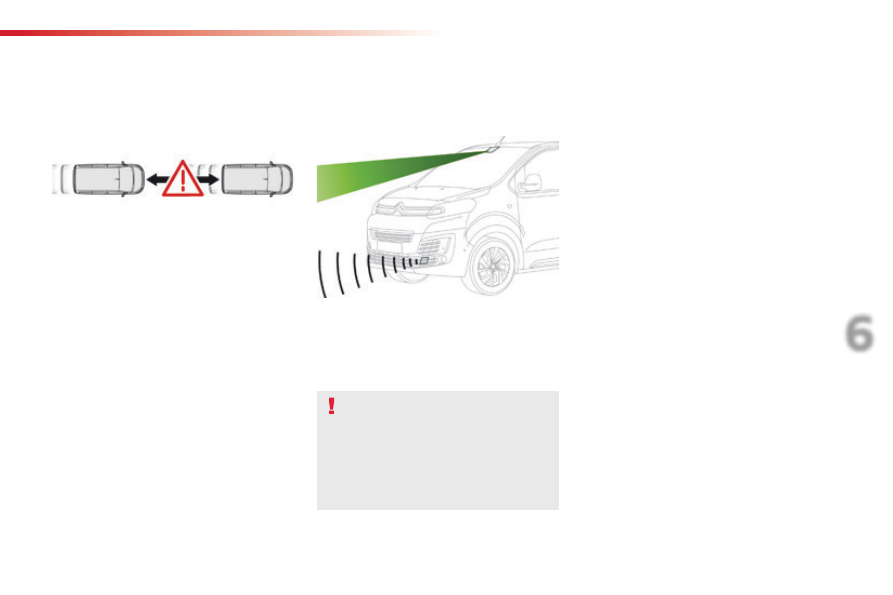
Collision Risk Alert and Active Safety 

Brake

Conditions for operation

The Active Safety Brake

 system operates:

-  between 3 and 87 mph (5 and 140 km/h), in 

the case of a moving vehicle,

-  at a speed below 50 mph (80 km/h), in the 

case of a stationary vehicle,

-  at a speed below 36 mph (60 km/h), in the 

case of a pedestrian,

-  if the passenger seat belts are fastened,
-  if the vehicle is not accelerating sharply,
-  if the vehicle is not in a tight corner.

The Collision Risk Alert system allows the 
driver to be warned that their vehicle is at 
risk of collision with the vehicle
 in front or a 
pedestrian in their traffic lane.
The Active Safety Brake
 system intervenes 
following the alert if the driver does not 
react quickly enough and does not operate 
the vehicle's brakes.
If the driver fails to act, it contributes 
towards avoiding a collision or limiting 
its severity by reducing the speed of your 
vehicle.

These systems use a radar located in the 
front bumper and a camera at the top of the 
windscreen.

These system are designed to improve 
road safety.
It is the driver's responsibility to 
continuously monitor the state of the 
traffic, observing the driving regulations.
These systems do not replace the need 
for vigilance on the part of the driver.

The Collision Risk Alert system only 
operates:
-  with a registered vehicle pointing in the 

same direction as the traffic, moving or 
stationary,

-  with pedestrians.
-  from 4 mph (7 km/h) (and is deactivated at 

3 mph (5 km/h)).

240

Driving

Spacetourer-VP_en_Chap06_conduite_ed01-2016

The Active Safety Brake system does not 
operate:
-  if the front bumper is damaged,
-  if the system has been triggered in the last 

10 seconds,

if the electronic stability control system has 
a fault.

Limits of operation

It is recommended that the system be 
deactivated in the vehicle configuration menu 
in the following cases:
-  if the windscreen has impact damage close 

to the detection camera,

-  when towing a trailer or caravan,
-  when a load on the roof rack extends 

beyond the windscreen (for example: long 
objects),

-  when the vehicle is being towed, with the 

engine running,

when a "space-saver" type spare wheel is 
fitted (if your vehicle has one),

-  when on a rolling road for a service in a 

workshop,

when in an automatic car wash,

-  if the brake lamps are not working.

Following an impact, the system 
is automatically disabled; contact 
a CITROËN dealer or a qualified 
workshop to have the system checked.

Collision Risk Alert

Depending on the degree of risk of collision 
detected by the system and the alert threshold 
chosen, different levels of alert can be 
triggered and displayed in the instrument panel 
or the head-up display.

This level of alert is based on the inter-vehicle 
time between your vehicle and the vehicle 
ahead.

Level 1

: visual alert only, warning you 

that the vehicle ahead is very close.
A message on your vigilance is 
displayed as you close on the vehicle 
ahead.

This information also appears in the 
head-up display.
For more information on the Head-up 
display

, refer to the corresponding 

section.

241

6

Driving

Spacetourer-VP_en_Chap06_conduite_ed01-2016

This level of alert is based on the time before 
collision. It takes account of the vehicle 
dynamics, the speed of your vehicle and the 
one in front, the environmental conditions, the 
operation of the vehicle (cornering, pedals 
pressed, etc.) to trigger the alert at the best 
moment.

Level 2

: visual and audible alert, 

warning you that a collision is 
imminent.
A message indicating that you should 
brake is displayed.

Where the speed of your vehicle is too 
high approaching another vehicle, the 
first level of alert may not be displayed: 
the level 2 alert may be displayed 
directly.
Furthermore, the level 1 alert is never 
displayed with the "Close

" threshold.

Poor weather conditions (very heavy 
rain, accumulation of snow in front of 
the radar and the camera) may hinder 
the operation of the system, with the 
display of an operating fault message. 
The system remains out of service until 
the message disappears.

Programming the alert 
thresholds

The thresholds for triggering an alert determine 
how you wish to be warned of the presence of a 
vehicle moving or stationary ahead of you, or a 
pedestrian in your traffic lane.
You can select one of three thresholds:
- "Distant", to be warned early (cautious 

driving).

- "Normal

".

- "Close

", to be warned later.

In the vehicle settings menu, activate/
deactivate "Collision risk alert and automatic 
braking

".

With the touch screen

With the audio system

In the "Personalisation-configuration
menu, activate/deactivate "Auto. emergency 
braking

".

Then modify the alert threshold.

Then modify the alert threshold.
Press on "Confirm

" to save the change.

242

Driving

Spacetourer-VP_en_Chap06_conduite_ed01-2016

This system, also called automatic emergency 
braking, aims to reduce the speed of impact 
or avoid a frontal collision by your vehicle 
(between 3 and 87 mph (5 and 140 km/h) 
where the driver fails to react.
Using a radar and a camera, this system acts 
on the vehicle's braking system.

Active Safety Brake

The driver can take back control of the vehicle 
at any time by sharply turning the steering 
wheel and/or pressing the accelerator pedal.

Operation of the system may be felt by 
slight vibration in the brake pedal.
If the vehicle comes to a complete stop, 
the automatic braking is maintained for 
1 to 2 seconds.
If your vehicle has a manual gearbox, in 
the event of the automatic emergency 
braking bringing the vehicle to a 
complete stop, the engine may stall.
If your vehicle has an automatic 
gearbox, in the event of the automatic 
emergency braking bringing the vehicle 
to a complete stop, the vehicle will 
move off again; press the brake pedal.

If automatic emergency braking is 
not activated, you are alerted by the 
fixed display of this warning lamp 
accompanied by a message.

If the radar and the camera have 
confirmed the presence of a vehicle 
or a pedestrian, this warning lamp 
flashes when the system is operating.

Important

: if operation of the 

automatic emergency braking is 
triggered, you should take back 
control of your vehicle and brake 
with the pedal to add to or finish the 
automatic braking.

243

6

Driving

Spacetourer-VP_en_Chap06_conduite_ed01-2016

Deactivation / Activation of 
the alert and the braking

By default, the function is automatically 
activated at every engine start.
The deactivation or activation of the function is 
done in the vehicle configuration menu.

With the audio system

In the "Personalisation-configuration
menu, activate/deactivate "Auto. emergency 
braking

".

Intelligent emergency 
braking assistance

If the driver does not brake sufficiently 
to avoid an accident, this system will 
complete the braking.
This emergency braking system will not 
act if you press the brake pedal.

With the touch screen

In the vehicle settings menu, activate/
deactivate "Collision risk alert and automatic 
braking

".

In the event of a fault, you are alerted 
by the illumination of this warning 
lamp, accompanied by an audible 
signal and a message.
Contact a CITROËN dealer or a 
qualified workshop.

Operating fault

There may be interference in the 
operation of the camera or it not work at 
all in the following situations:

poor visibility (inadequate street 
lighting, falling snow or rain, fog, ...),

dazzle (headlamps of an 
approaching vehicle on the other 
side of the road, low sun, reflection 
on a wet road, leaving a tunnel, 
alternating between light and 
shade, ...),

-  the area in front of the windscreen: 

dirty, misty, frosty, snow-covered, 
damaged or covered by a sticker.

The operation of the radar, located in 
the front bumper, may be disturbed 
in certain weather conditions: with 
accumulations of snow, ice, mud, ...

244

Driving

Spacetourer-VP_en_Chap06_conduite_ed01-2016

Clean the front bumper, removing the 
snow, mud, ...

If one of the two sensors (camera 
or radar) is masked or its visibility 
is reduced, while the other sensor 
is able to work normally, the system 
still operates, but at a lower level of 
performance. This is not indicated by a 
message or a warning lamp.
To ensure correct operation of the radar 
radar, do not paint over the paintwork 
on the vehicle's bumper.

Keep the windscreen in front of the 
camera clean.
Do not allow snow to accumulate on 
the bonnet or roof of the vehicle as this 
could mask the camera's view.

245

6

Driving

Spacetourer-VP_en_Chap06_conduite_ed01-2016

Lane departure warning system

With the audio system

Activation / Deactivation

F  Press on this buttton, its indicator 

lamp comes on, the system is 
activated.

F  Press on this buttton, its indicator 

lamp goes off, the system is 
deactivated.

To activate the system:

To deactivate the system:

The system is activated or deactivated via the 
vehicle configuration menu.

System that uses a camera to recognise 
continuous or broken lines on traffic lanes and 
triggers an alert if the vehicle wanders off line.
If the direction indicator is not used at speeds 
above 37 mph (60 km/h) and there is a risk of 
one of these lines on the ground being crossed, 
the system triggers the alert.
The system is particularly useful on motorways 
and fast roads.

Detection - Alert

You are alerted by the flashing of 
this warning lamp in the instrument 
panel, accompanied by an audible 
signal.

No alert is given while the direction 
indicators are operating and for 
approximately 20 seconds after the 
direction indicators are switched off.

The lane departure warning system 
cannot in any circumstances replace 
the need for vigilance on the part of the 
driver.
It is necessary to observe the driving 
regulations and to take a break every 
two hours.

246

Driving

Spacetourer-VP_en_Chap06_conduite_ed01-2016

Operating fault

With the touch screen

In the Driving

 menu, activate/deactivate "Lane 

departure warning

".

Contact a CITROËN dealer or a qualified 
workshop.

The indicator lamp in this button 
flashes.

The button flashes and a fault appears.

Depending on your vehicle's equipment:

The detection may be impeded:
-  if the markings on the ground are 

worn and do not contrast well with 
the road surface,

if the windscreen is dirty,

in certain severe weather 
conditions: fog, heavy rain, snow, 
shade, bright sunlight and direct 
exposure to the sun (low sun, 
leaving a tunnel, ...).

or

247

6

Driving

Spacetourer-VP_en_Chap06_conduite_ed01-2016

Fatigue detection system

The system resets itself if one of the following 
conditions is met:
-  engine running, the vehicle has been 

stationary for more than 15 minutes,

-  the ignition has been switched off for a few 

minutes,

-  the driver's seat belt is unfastened and 

their door is open.

As soon as the speed of the vehicle 
drops below 40 mph (65 km/h), the 
system goes into standby.
The driving time is counted again once 
the speed is above 40 mph (65 km/h).

The system cannot in any 
circumstances replace the need for 
vigilance on the part of the driver.
Do not take the wheel if you are tired.

The system triggers an alert once it 
detects that the driver has not taken 
a break after two hours of driving at a 
speed above 40 mph (65 km/h).

It is recommended that you take a break 
as soon as you feel tired or at least every 
two hours.
Depending on version, the vehicle either has 
the "Driving time warning system" only, or this 
combined with the "Fatigue detection system".

Driving time warning

With the audio system

In the "Personalisation-configuration
menu, activate/deactivate "Fatigue Detection 
System

".

Activation / Deactivation

The system is activated or deactivated via the 
vehicle configuration menu.

This alert takes the form of the display of a 
message encouraging you to take a break, 
accompanied by an audible signal.
If the driver does not follow this advice, the 
alert is repeated hourly until the vehicle is 
stopped.

In the vehicle settings menu, activate/
deactivate "Fatigue Detection System

".

With the touch screen

248

Driving

Spacetourer-VP_en_Chap06_conduite_ed01-2016

Using a camera placed at the top of the 
windscreen, the system assesses the driver's 
level of vigilance by identifying variations in 
trajectory compared to the lane markings.
This system is particularly suited to fast roads 
(speed higher than 40 mph (65 km/h)).

Fatigue detection system

Depending on version, the "Driving time 
warning system" may be combined with the 
"Fatigue detection system".

The system cannot, in any 
circumstances, replace the need for 
vigilance on the part of the driver.
Do not drive if you are tired or taking 
medicines that can cause drowsiness.

Once the system considers that the behaviour 
of the vehicle suggests a certain level of fatigue 
or inattention by the driver, it triggers the first 
level of alert.

After three first level alerts, the system triggers 
a new alert with the message "Take a break!", 
accompanied by a more pronounced audible 
signal.

In certain driving conditions (poor road 
surface or strong winds), the system 
may give alerts independent of the 
driver's level of vigilance.

The following situations may interfere 
with operation of the system or prevent 
it working:
-  poor visibility (inadequate lighting 

of the roadway, falling snow, heavy 
rain, dense fog, ...),

-  dazzle (headlamps of an oncoming 

vehicle, low sun, reflections on 
a damp road, leaving a tunnel, 
alternating shade and light, ...),

windscreen area located in front 
of the camera: dirty, misted, frost-
covered, snow-covered, damaged 
or covered by a sticker,

-  lane markings absent, worn, 

masked (snow, mud) or multiple 
(roadworks, ...),

close to the vehicle ahead (lane 
markings not detected),

-  roads that are narrow, winding, ...

The driver is then alerted by the message 
"Take care!", accompanied by an audible 
signal.

249

6

Driving

Spacetourer-VP_en_Chap06_conduite_ed01-2016

Blind spot monitoring system

A warning lamp appears in the door mirror on 
the side in question:
-  immediately, when being overtaken,

after a delay of about one second, when 
overtaking a vehicle slowly.

This driving assistance system warns the driver 
of the presence of another vehicle in the blind 
spot angle of their vehicle (areas masked from 
the driver's field of vision), as soon as this 
presents a potential danger.

The alert is given by a warning lamp which 
comes on in the door mirror on the side in 
question as soon as a vehicle - car, lorry, 
bicycle - is detected and the following 
conditions are fulfilled:
-  all the vehicles must be moving in the 

same direction and on adjacent lanes,

-  the speed of your vehicle is between 7 and 

87 mph (12 and 140 km/h),

-  when you overtake a vehicle with a speed 

difference of less than 6 mph (10 km/h),

-  when a vehicle overtakes you with a speed 

difference of less than 15 mph (25 km/h),

-  the traffic must be flowing normally,
-  in the case of an overtaking manoeuvre, 

if this is prolonged and the vehicle being 
overtaken returns to the blind spot,

-  you are driving on a straight or slightly 

curved road,

-  your vehicle is not pulling a trailer, 

a caravan...

This system is designed to improve 
safety when driving and is in no 
circumstances a substitute for the use 
of the interior rear view mirror and door 
mirrors. It is the driver's responsibility to 
constantly check the traffic, to assess 
the distances and relative speeds 
of other vehicles and to predict their 
movements before deciding whether to 
change lane.
The blind spot sensor system does not 
replace the need for vigilance on the 
part of the driver.

250

Driving

Spacetourer-VP_en_Chap06_conduite_ed01-2016

No alert will be given in the following situations:
-  in the presence of immobile objects 

(parked vehicles, barriers, street lamps, 
road signs...),

-  with vehicles moving in the opposite 

direction,

-  driving on a winding road or in a sharp 

corner,

-  when overtaking (or being overtaken by) a 

very long vehicle (lorry, coach...) which is 
at the same time detected at the rear in the 
blind spot angle and present in the driver's 
forward field of vision,

-  in very heavy traffic: vehicles detected in 

front and behind are confused with a lorry 
or an immobile object,

-  when overtaking quickly.

The system is activated or deactivated via the 
vehicle configuration menu.

Activation / Deactivation

F  Press on this buttton, its indicator 

lamp comes on, the system is 
activated.

F  Press on this buttton, its indicator 

lamp goes off, the system is 
deactivated.

To activate the system:

To eactivate the system:

With the audio system

251

6

Driving

Spacetourer-VP_en_Chap06_conduite_ed01-2016

Operating fault

Have it checked by a CITROËN dealer or a 
qualified workshop.

The system may suffer temporary 
interference in certain weather 
conditions (rain, hail...).
In particular, driving on a wet surface 
or moving from a dry area to a wet area 
can cause false alerts (for example, the 
presence of a fog of water droplets in 
the blind spot angle is interpreted as a 
vehicle).
In bad or wintry weather, ensure that 
the sensors are not covered by mud, 
ice or snow.
Take care not to cover the warning zone 
in the door mirrors or the detection 
zones on the front and rear bumpers 
with adhesive labels or other objects; 
they may hamper the correct operation 
of the system.

Depending on your vehicle's equipment:

With the touch screen

In the Driving

 menu, activate/deactivate "Blind 

spot monitoring

".

In the event of a fault, these warning lamps 
flash.

The indicator lamp in this button 
flashes and a message appears, 
accompanied by an audible signal.

The state of the system remains in 
memory on switching off the ignition.

The system is automatically deactivated 
when towing with a towbar approved by 
CITROËN.

High pressure jet wash
When washing your vehicle, do not 
place the tip of the lance within 30 cm 
of the sensors as otherwise there is a 
risk of damaging them.

or

252

Driving

Spacetourer-VP_en_Chap06_conduite_ed01-2016

This system indicates the proximity of an 
obstacle (examples: pedestrian, vehicle, tree, 
gate) which comes within the field of detection 
of sensors located in the bumper.
Certain types of obstacle (examples: stake, 
roadworks cone) detected initially will no longer 
be detected at the end of the manoeuvre, if 
they are located in blind spots in the sensors' 
field of detection.

Parking sensors

The system is switched on by engaging reverse 
gear.
This is confirmed by an audible signal.
The system is switched off when you come out 
of reverse gear.

Audible assistance

Rear parking sensors

This supplements the audible signal by 
displaying bars in the screen or the instrument 
panel which move progressively nearer to 
the vehicle. When the obstacle is near, the 
"Danger" symbol is displayed.

Visual assistance

This system cannot in any 
circumstances replace the need for 
vigilance on the part of the driver.

The proximity information is given by an 
intermittent audible signal, the frequency of 
which increases as the vehicle approaches the 
obstacle.
The sound emitted by the speaker (right or 
left) indicates the side on which the obstacle is 
located.
When the distance between the vehicle and 
the obstacle becomes less than approximately 
thirty centimetres, the audible signal becomes 
continuous.

253

6

Driving

Spacetourer-VP_en_Chap06_conduite_ed01-2016

Front parking sensors

As an addition to the rear parking sensors, the 
front parking sensors are triggered when an 
obstacle is detected in front and the speed of 
the vehicle is still below 6 mph (10 km/h).
The front parking sensors are interrupted if 
the vehicle stops for more than three seconds 
in forward gear, if no further obstacles are 
detected or when the speed of the vehicle 
exceeds 6 mph (10 km/h).

With the audio system

Deactivation / Activation

Deactivation or activation of the system is done 
via the vehicle configuration menu.

The sound from the speakers (front or 
rear) indicates whether the obstacle is 
in front or behind.

The system will be automatically 
deactivated where a towbar or towbar-
mounted bicycle carrier is fitted 
(vehicle fitted with a towbar installed as 
recommended by a CITROËN dealer).

In the "Personalisation-configuration" menu, 
activate/deactivate "Parking assistance".

With the touch screen

In the Driving

 menu, activate/deactivate 

"Parking sensors

".

When engaging reverse and depending on the 
vehicle's equipment, in the event of a fault:

Contact a CITROËN dealer or a qualified 
workshop.

This warning lamp comes on and a 
message appears, accompanied by 
an audible signal.
The warning lamp in this button 
flashes and a message appears, 
accompanied by an audible signal.

In bad weather or in winter, ensure 
that the sensors are not covered with 
mud, ice or snow. When reverse gear is 
engaged, an audible signal (long beep) 
indicates that the sensors may be dirty.
Certain sound sources (motorcycle, 
lorry, pneumatic drill, etc.) may trigger 
the audible signals of the parking 
sensor system.

High pressure jet wash
When washing your vehicle, do not 
place the tip of the lance within 30 cm 
of the sensors, as there is a risk of 
damaging them.

Operating fault

254

Driving

Spacetourer-VP_en_Chap06_conduite_ed01-2016

Reversing camera with display in the interior mirror

The visual aid reversing camera is activated 
automatically when reverse gear is engaged.

The function may be completed with parking 
sensors.

Opening the tailgate or rear door 
(depending on equipment) can interfere 
with the display.
If a side door is open, allow for the 
space it occupies.
Some deformation of the image is 
normal.

The reversing camera cannot in any 
circumstances be a substitute for 
vigilance on the part of the driver.

Check the cleanliness of the camera 
lens regularly.
Clean the reversing camera regularly 
using a soft, dry cloth.

The image is displayed in the interior mirror.

High pressure jet washing (if muddy, 
for example)
When washing your vehicle, do not 
place the tip of the lance within 30 cm 
of the camera as there is a risk of 
damaging it.

The blue lines represent the width of your 
vehicle including the mirrors.
The red line represents a distance of 30 cm 
from the rear bumper and the thin blue lines 
respectively 1 m (A) and 2 m (B

).


Content   ..  14  15  16  17   ..