Alfa Romeo Stelvio (2022 year). Manual in english - page 11
STARTING AND DRIVING
174
Change of indications provided by the
system
The indications provided by the Lane
Keeping Assist system may be modified
using the Connect system.
Proceed as follows:
use the "Driver Assistance" menu;
select "Settings" and then select
"Warning type" or "Mode" and select one
of the required settings.
System limited operation warning
65) 66)
If the dedicated message is shown on
the instrument panel display, a condition
limiting the system operation may have
occurred. The possible reasons of this
limitation are something blocking the
camera view or a fault.
If an obstruction is signalled, clean the
area of the windscreen by the interior
rear-view mirror.
Although the car can still be driven in
normal conditions, the system may be
not completely available.
When the conditions limiting the system
functions end, this will go back to normal
and complete operation. Should the
fault persist, contact an Alfa Romeo
Dealership.
System Fault Message
If the system switches off and the
system
appears on the instrument
panel display, it means that there is a
failure on the system.
In this case, it is still possible to drive the
vehicle, but you are advised to contact
an Alfa Romeo Dealership as soon as
possible.
IMPORTANT
61)
Projecting loads on the roof of the car
may interfere with the correct operation of
the camera. Before starting make sure the
load is correctly positioned, in order not to
cover the camera operating range.
62)
If the windscreen must be replaced due
to scratches, chipping or breakage, contact
exclusively an Alfa Romeo Dealership. Do
not replace the windscreen on your own, risk
of malfunction! It is advisable to replace the
windscreen if it is damaged in the area of
the camera.
63)
Do not tamper with nor operate on the
camera. Do not close the openings in the
aesthetic cover located under the interior
rear-view mirror. In the event of a failure
of the camera, contact an Alfa Romeo
Dealership.
64)
Do not cover the operating range of the
camera with stickers or other objects. Also
pay attention to other objects on the bonnet
(e.g. a layer of snow) and make sure they do
not interfere with the camera.
65)
The camera may have limited or absent
operation due to weather conditions such
as: heavy rain, hail, thick fog, heavy snow,
formation of ice layers on the windscreen
glass.
66)
Camera operation may also be
compromised by the presence of dust,
condensation, dirt or ice on the windscreen
glass, by traffic conditions (e.g. cars that
are driving not aligned with yours, car
driving in a transverse or opposite way on
the same lane, bend with a small radius of
curvature), by road surface conditions and
by driving conditions (e.g. off-road driving).
Make sure the windscreen is always clean.
Use specific detergents and clean cloths
to avoid scratching the windscreen. The
camera operation may also be limited or
absent in some driving, traffic and road
surface conditions.
REAR BACK-UP CAMERA /
DYNAMIC GRIDLINES
DESCRIPTION
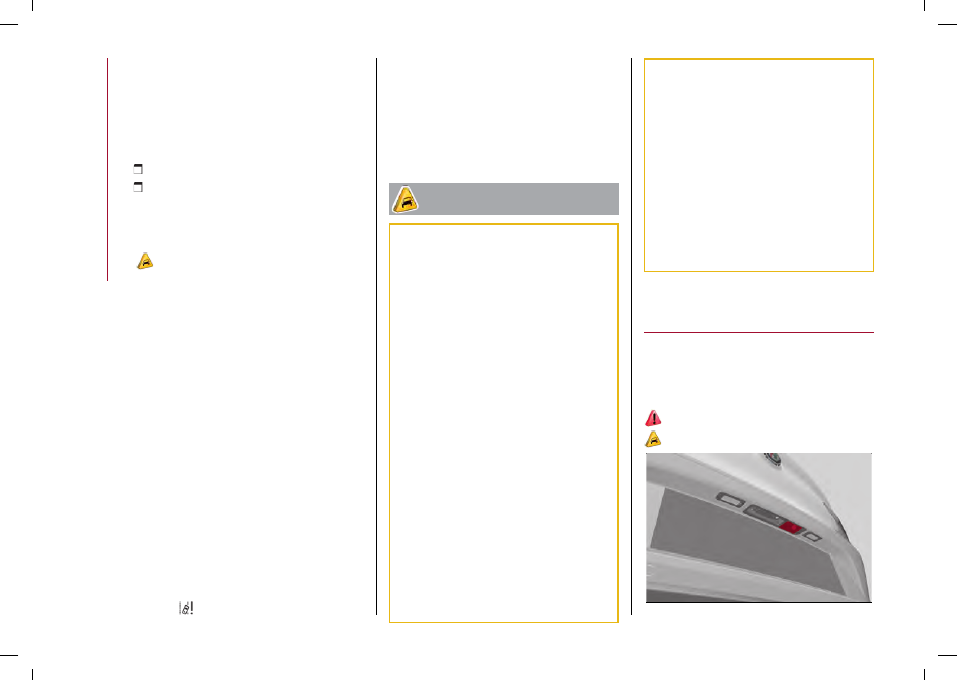
The Rear Back-up Camera is located on
the tailgate, near the opening button,
fig. 196.
151)
67)
196
07186V0001EM