Acura TLX (2021 year). Manual in english - page 24
 

  Index      Manuals     Acura TLX (2021 year). Manual in english


Search            copyright infringement  


Content      ..     22      23      24      25     ..


Acura TLX (2021 year). Manual in english - page 24


381

uu

When Driving

u

Shifting

Continued

Driving

(

P

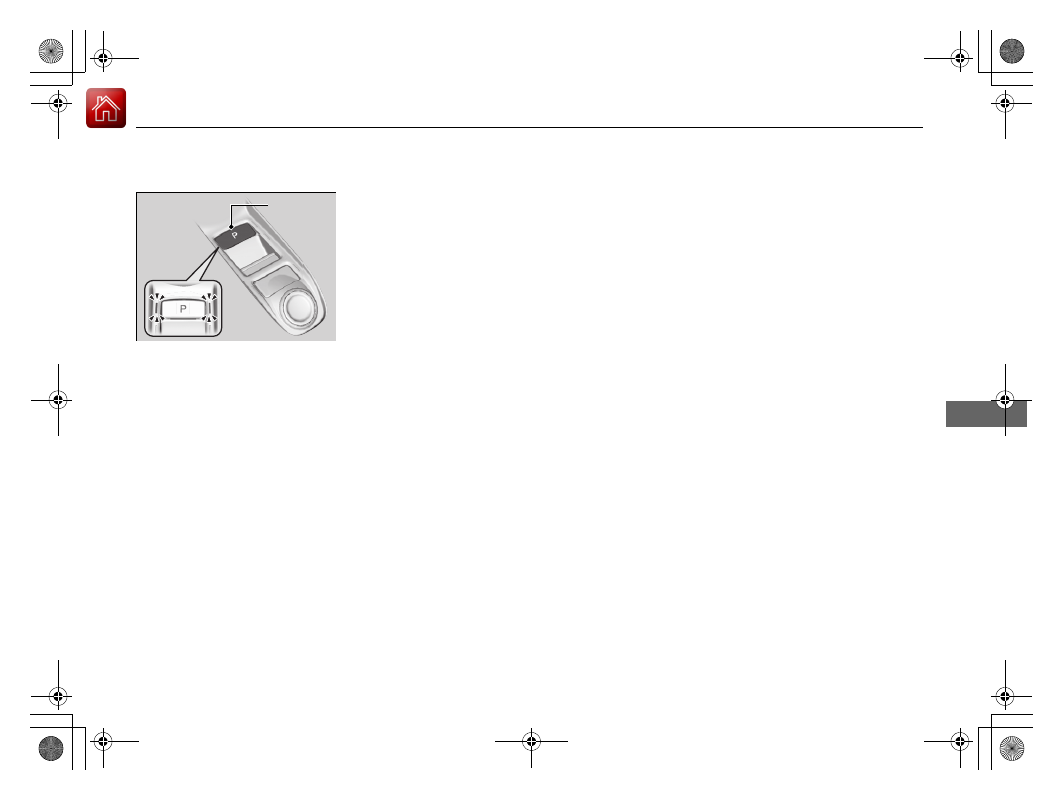
 (parking) button

Park your vehicle in a safe place with the 
power mode in ON, then apply the brakes and 
press the 

(

P

 button to put the transmission in 

Park.
The indicators on the sides of the 

(

P

 button 

come on.

(

P

 Button

-------------------------------------------------------------------------------------------------------------------------------------------------------------

uu

When Driving

u

Shifting

382

Driving

Shift Operation

1

Shift Operation

NOTICE

When you change 

(

D

 to 

(

R

 and vice versa, come to 

a complete stop and keep the brake pedal depressed.
Operating the shift button before the vehicle has 
come to a complete standstill can damage the 
transmission.

Use the gear position indicator and the shift button 
indicator to check the gear position before selecting 
a shift button.

If the indicator of the currently selected gear position, 
or all the gear position indicators are blinking 
simultaneously, there is a problem with the 
transmission.
Avoid sudden acceleration and have the transmission 
checked by a dealer as soon as possible.

The fuel supply may be cut off if you drive at engine 
speeds in or over the tachometer’s red zone (engine 
speed limit). If this happens, you may experience a 
slight jolt.

When the engine speed is increased while the 
transmission is in 

(

N

(

P

 or 

(

R

, the fuel supply may 

be cut off even without the engine speed entering 
the tachometer’s red zone.

When shifting gears in extremely low temperatures 
(−22°F/−30°C), there may be a short delay before the 
shift is indicated in the display. Always confirm you 
are in the correct gear before driving.

Gear Position Indicator

Tachometer’s red zone

Press the 

(

P

 button.

Pull back the 

(

R

 button.

Press the 

(

N

 button.

Press the 

 button.

Each time you press the button, 

the mode switches between Drive 

and S Position mode.

D/S

Shift Button Indicator

M

 (sequential mode) Indicator

Sequential Mode Gear 

Selection Indicator

-------------------------------------------------------------------------------------------------------------------------------------------------------------

Continued

383

uu

When Driving

u

Shifting

Driving

When opening the driver’s door

If you open the driver’s door under the following conditions, the gear position 
automatically changes to 

(

P

.

The vehicle is stationary with the engine running, or moving at 1 mph (2 km/h) or 
slower.

The transmission is in other than 

(

P

.

You have unfastened the driver side seat belt.

u

If you manually change the gear position from 

(

P

 with the brake pedal 

depressed, the gear position will automatically return to 

(

P

 once you release 

the brake pedal.

When turning off the power mode

If you turn the engine off while the vehicle is stationary, and the transmission is in 
other than 

(

P

, the gear position automatically changes to 

(

P

.

1

Shift Operation

The beeper sounds once when you change to 

(

R

.

2

Customized Features

 P. 300

1

When opening the driver’s door

While the system is designed to automatically change 
the gear position to 

(

P

 under the described 

conditions, in the interest of safety you should always 
select 

(

P

 before opening the driver's door.

Make sure to park the vehicle in a safe place.

2

When Stopped

 P. 492

If you want to drive the vehicle after the gear position 
has automatically changed to 

(

P

 under the described 

conditions, close the door, fasten the seat belt, 
depress the brake pedal, then change the gear 
position.

If you leave the vehicle, turn off the engine and lock 
the doors.

-------------------------------------------------------------------------------------------------------------------------------------------------------------

uu

When Driving

u

Shifting

384

Driving

If you want to keep the transmission in 

(

N

 position [car wash mode]

With the engine running:

1.

Press and hold the brake pedal.

2.

Select 

(

N

, then release the button to display 

(

N

 (Neutral) hold mode on the 

multi-information display.

3.

Press and hold 

(

N

 again for two seconds.

u

This puts the vehicle in car wash mode which must be used when your vehicle 
is pulled through a conveyor type automatic car wash where you or an 
attendant do not remain in the vehicle.

If the 

ENGINE START/STOP

 button is pressed 

after car wash mode has been activated, the 
power mode will change to ACCESSORY and 
a message will be displayed on the multi-
information display.

u

The gear position remains in 

(

N

 with the 

power mode in ACCESSORY for 15 
minutes, then, it automatically changes 
to 

(

P

 and the power mode changes to 

OFF.

u

Manually changing to 

(

P

 cancels 

ACCESSORY mode. The 

(

P

 indicator 

comes on and the power mode changes 
to OFF. You must always shift to 

(

P


when car wash mode is no longer 
needed.

1

If you want to keep the transmission in 

(

N

 position [car wash 

mode]

The transmission may not stay in 

(

N

 position while 

the following indicators are on or when the message 
below appears:

Malfunction indicator lamp

Transmission system indicator

Charging system indicator

The 

12 Volt Battery Charging System Problem. 

Do Not Drive.

 message on the multi-information 

display.

-------------------------------------------------------------------------------------------------------------------------------------------------------------

385

uu

When Driving

u

Shifting

Continued

Driving

Restrictions on selecting a gear position

You cannot select a gear position under certain circumstances that may lead to a crash.

When the 
transmission is in:

1. Under these 
circumstances:

2. If you try to change to 
the following:

3. The gear position 
remains in/changes to:

How to change the 
gear position

(

P

The brake pedal is not 
depressed.

Other gear position

(

P

Release the accelerator 
pedal and depress the 
brake pedal.

The accelerator pedal is 
depressed.

(

N

The vehicle is moving at low 
speed without the brake pedal 
depressed.

(

N

The vehicle is moving at low 
speed with the accelerator 
pedal depressed.

(

N

(

D

 or 

(

S

The vehicle is moving forward.

(

R

Stop your vehicle in a 
safe place, depress the 
brake pedal, and select 
the appropriate gear 
position.

(

R

 or 

(

N

The vehicle is moving backward.

(

D

(

S

(

R

(

N

(

D

 or 

(

S

The vehicle is moving.

(

P

-------------------------------------------------------------------------------------------------------------------------------------------------------------

386

uu

When Driving

u

Shifting

Driving

Use the paddle shifters to change between 1st and 10th gears without releasing 
your hands from the steering wheel. The transmission will switch to the sequential 
mode.

When the transmission is in 

(

D

:

The vehicle will go into the sequential mode momentarily, and the sequential mode 
gear selection indicator will come on.
When the vehicle goes into the sequential mode by 

(

-

 paddle shifter and the lower 

gear is available, the transmission properly selects single or double gear change.
Once you start traveling at a constant speed, the sequential mode will automatically 
switch off, and the sequential mode gear selection indicator will go off.

Hold the 

(

+

 paddle shifter for two seconds or push the 

 button to return to 

normal drive.

When the transmission is in 

(

S

:

The vehicle will go into the sequential mode, and the 

M

 (sequential mode) indicator 

and sequential mode gear selection indicator will come on.
If the vehicle speed increases and the engine speed reaches near the tachometer’s 
red zone, the transmission automatically shifts up to the next gear.

You can cancel this mode by holding the 

(

+

 paddle shifter for two seconds or 

push the 

 button.

You can cancel this mode by turning the 

Dynamic Mode

 switch to select any 

other dynamic mode (

COMFORT

NORMAL

SPORT

) or push the 

 button to 

return to Drive mode.
When the sequential mode is canceled, the sequential mode indicator and 
sequential mode gear selection indicator turn off.

Sequential Mode

D/S

D/S

D/S

-------------------------------------------------------------------------------------------------------------------------------------------------------------

387

uu

When Driving

u

Shifting

Driving

Sequential Mode Operation

1

Sequential Mode Operation

Each paddle shift operation makes a single or double 
gear change.
To change gears continuously, release the paddle 
shifter before pulling it again for the next gear.

If the sequential mode gear selection indicator blinks 
when you try to shift up or down, this means your 
vehicle speed is not in its allowable gear range or the 
protection of transmission system is necessary.
Slightly accelerate to shift up and decelerate to shift 
down while the indicator is blinking.

When the transmission is in 

(

S

 and 

SPORT

 or 

INDIVIDUAL

 mode, to prioritize the engine 

performance enhancement, the transmission may 
not allow for shifting up while the engine speed is 
low.

Sequential Mode Gear 

Selection Indicator

Downshifting when pulling 

the 

 paddle shifter.

(Changes to a lower gear)

Upshifting when pulling 

the 

 paddle shifter.

(Changes to a higher gear)

Paddle Shifter 

(Shift down)

Paddle Shifter 

(Shift up)

-------------------------------------------------------------------------------------------------------------------------------------------------------------

388

uu

When Driving

u

Integrated Dynamics System

Driving

Integrated Dynamics System

Modifies the dynamic character of the vehicle. There are four modes to select from: 

COMFORT

NORMAL

SPORT

, and 

INDIVIDUAL

.

Turn the 

Dynamic Mode

 switch to select 

COMFORT

NORMAL

 or 

SPORT

. Press 

the   button to select 

INDIVIDUAL

. The mode you have selected appears on the 

audio/information screen.

1

Integrated Dynamics System

The mode may not be able to be change when:

The vehicle is turning

The VSA

®

 system is activating

There is a problem with the engine, transmission, 
the brake system, the VSA

®

, the EPS, the Active 

Damper System

*

, and the SH-AWD

®

*

* Not available on all models

-------------------------------------------------------------------------------------------------------------------------------------------------------------

389

uu

When Driving

u

Integrated Dynamics System

Continued

Driving

Selecting the Dynamic Mode

Audio/Information 

Screen

INDIVIDUAL


Setting screen

2

 P. 393

COMFORT

 mode

NORMAL

 mode

SPORT

 mode

Changing modes 

alters the screen on 

the multi-information 

display.
Currently selected 

mode is displayed in 

the right bottom.

Currently selected mode

Dynamic Mode


Switch

 Button

INDIVIDUAL

 mode

Rotate

Rotate

Rotate

Rotate

Push

Push

Press and 

hold

Press the 

 or 

 button on the 

True Touchpad 

Interface

-------------------------------------------------------------------------------------------------------------------------------------------------------------

390

uu

When Driving

u

Integrated Dynamics System

Driving

Mode descriptions

Each mode has been crafted for different driving styles according to the following chart.

*1:Interior accent light only available if equipped. Interior accent light changes with 

Dynamic Mode

 only when 

Accent Light Theme

 is 

set to 

Dynamic Mode

.

2

Customized Features

 P. 300

2

Lighting area of the accent light

 P. 392

Mode

Function

Accent Light Color

*1

COMFORT

Maximizes driver comfort through decreased steering effort and reduced ride 
firmness (if Active Damper System is equipped)

Blue

NORMAL

Balanced response for everyday use

White

SPORT

Enhances vehicle response through increased steering effort, heightened 
throttle response, modified active sound control, and more responsive ride 
and/or handling (if Active Damper System and/or SH-AWD is equipped)
When in 

SPORT

, the Auto Idle Stop System will stay disabled regardless of 

the Auto Idle Stop 

OFF

 button

2

Auto Idle Stop

 P. 395

Red

INDIVIDUAL

Each category can be customized separately to suit the driver’s preference

2

Customizing the INDIVIDUAL Settings

 P. 393

Blue, white, or red

2

Customizing the INDIVIDUAL 
Settings

 P. 393

-------------------------------------------------------------------------------------------------------------------------------------------------------------

391

uu

When Driving

u

Integrated Dynamics System

Continued

Driving

Next start-up mode

The mode for the next start-up is saved according to the following chart. Each keyless access remote has it’s own mode saved.

*1:Interior accent light only available if equipped. Interior accent light changes with 

Dynamic Mode

 only when 

Accent Light Theme

 is 

set to 

Dynamic Mode

.

2

Customized Features

 P. 300

Last Dynamic Mode

Next Dynamic Mode

Welcome Accent Light Color

*1

COMFORT

COMFORT

Blue

NORMAL

 or 

SPORT

NORMAL

White

INDIVIDUAL

 (via 

COMFORT

)

COMFORT

Blue

INDIVIDUAL

 (via 

NORMAL

 or 

SPORT

)

NORMAL

White

-------------------------------------------------------------------------------------------------------------------------------------------------------------

392

uu

When Driving

u

Integrated Dynamics System

Driving

Lighting area of the accent light

Interior accent light only available if equipped. Interior accent light changes with 

Dynamic Mode

 only when 

Accent Light Theme

 is set to 

Dynamic Mode

.

2

Customized Features

 P. 300

Lighting Area of the Accent Light

-------------------------------------------------------------------------------------------------------------------------------------------------------------

393

uu

When Driving

u

Integrated Dynamics System

Continued

Driving

You can customize the 

INDIVIDUAL

 settings linked to your current keyless access remote. Each keyless access remote has it’s own settings.

1.

Push and hold the   button to enter 

INDIVIDUAL

 mode and open the 

INDIVIDUAL

 settings.

2

Selecting the Dynamic Mode

 P. 389

2.

Drag to highlight the setting category icon and click the A-zone touchpad to display the setting screen.

3.

Drag to highlight the desired setting and click the A-zone touchpad to change the setting.

u

Press the 

 button to return to 

INDIVIDUAL

 settings screen.

u

Press the 

 button to return to the audio/information screen.

2

True Touchpad Interface

 P. 209

Customizing the INDIVIDUAL Settings

Swipe to highlight the 

setting category icon and 

click the A-zone touchpad

INDIVIDUAL

 Setting screen

When 

Engine

 is selected

 Button

Current setting

-------------------------------------------------------------------------------------------------------------------------------------------------------------

394

uu

When Driving

u

Integrated Dynamics System

Driving

*1:Interior accent light only available if equipped. Interior accent light changes with 

Dynamic Mode

 only when 

Accent Light Theme

 is 

set to 

Dynamic Mode

.

2

Customized Features

 P. 300

2

Lighting area of the accent light

 P. 392

Category

Description

Engine

Select 

COMFORT

NORMAL

, or 

SPORT

 for the engine throttle response and transmission shift response

Steering

Select 

COMFORT

NORMAL

, or 

SPORT

 for the steering effort

Suspension

Select 

COMFORT

NORMAL

, or 

SPORT

 for ride and/or handling:

The suspension stiffness with the Active Damper System (if equipped)

The power distribution to the wheels with SH-AWD (if equipped)

Idle Stop

Set the Auto Idle Stop system to 

Enabled

 or 

Disabled

. While 

Idle Stop

 is 

Disabled

 in 

INDIVIDUAL

 mode, 

the Auto Idle Stop System will stay disabled regardless of the Auto Idle Stop 

OFF

 button

2

 Auto Idle Stop

 P. 395

Lighting

*1

Set the interior accent lighting. 

COMFORT

 for blue, 

NORMAL

 for white, and 

SPORT

 for red

Reset to Default

Engine

Steering

Suspension

 and 

Lighting

 is set to 

Normal

, and 

Idle Stop

 is set to 

Enabled

-------------------------------------------------------------------------------------------------------------------------------------------------------------

395

uu

When Driving

u

Auto Idle Stop

Continued

Driving

Auto Idle Stop

To help maximize fuel economy, the engine automatically stops when the vehicle 
comes to a stop, depending on environmental and vehicle operating conditions. The 
indicator (green) comes on at this time.

The environmental and vehicle conditions that 
impact Auto Idle Stop system operation are 
varied.

2

Auto Idle Stop Activates When:

 P. 398, 399

The engine then restarts once the vehicle is 
about to move again, and the indicator 
(green) goes off.

2

The Engine Automatically Restarts When:


P. 400

1

Auto Idle Stop

The 12-volt battery installed in this vehicle is 
specifically designed for a model with Auto Idle Stop. 
Using a 12-volt battery other than this specified type 
may shorten the 12-volt battery life, and prevent 
Auto Idle Stop from activating. If you need to replace 
the 12-volt battery, make sure to select the specified 
type. Ask a dealer for more details.

Auto Idle Stop 

Indicator (Green)

-------------------------------------------------------------------------------------------------------------------------------------------------------------

396

uu

When Driving

u

Auto Idle Stop

Driving

If the Auto Idle Stop function does not 
activate, the indicator comes on and a 
message appears on the multi-information 
display.

2

Indicators

 P. 78

If the driver’s door is opened while the 
indicator (green) comes on, a buzzer sounds 
to notify you that the Auto Idle Stop function 
is in operation.

A message associated with Auto Idle Stop 
appears on the multi-information display.

2

Auto Idle Stop System ON/OFF

 P. 397

-------------------------------------------------------------------------------------------------------------------------------------------------------------


Content      ..     22      23      24      25     ..