Acura TLX (2021 year). Manual in english - page 16
253
uu
Audio System Basic Operation
u
Playing an iPod
Continued
Features
Playing an iPod
Using your USB connector, connect the iPod to the USB port
(2.5A), then select
the USB mode.
2
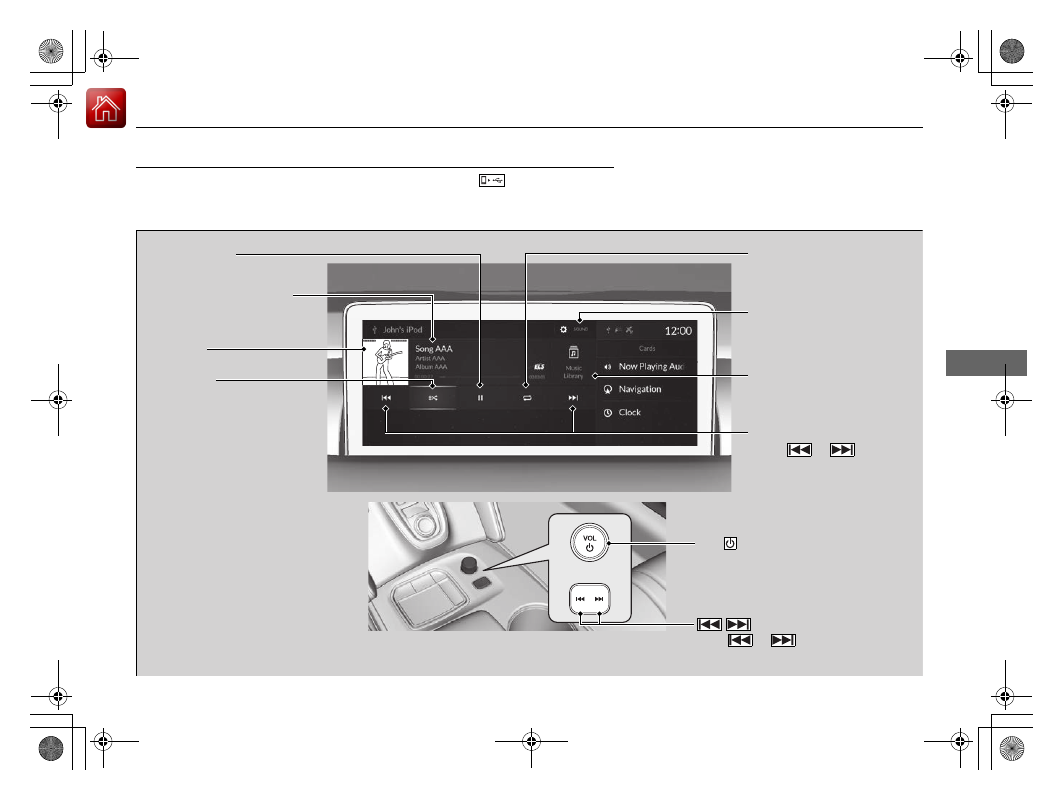
Repeat Icon
Select to repeat the
current song.
SOUND
Select to display the sound
settings.
Music Library
Select to display the music
search screen.
Skip/Seek Icons
Select
or
to
change songs.
Select and hold to move
rapidly within a song.
Shuffle Icon
Select to change a play mode
in album shuffle or shuffle all
songs.
VOL
(Volume/Power) Knob
Push to turn the audio system on
and off. Turn to adjust the volume.
/
(Seek/Skip) Button
Press
or
to change songs.
Press and hold to move rapidly within
a song.
Play/Pause Icon
Album Art
Current Song Information
Select to display the play list
screen.