Acura RDX (2021 year). Manual in english - page 34
543
uu
Maintenance Minder
TM
u
To Use Maintenance Minder
TM
Main
tenan
ce
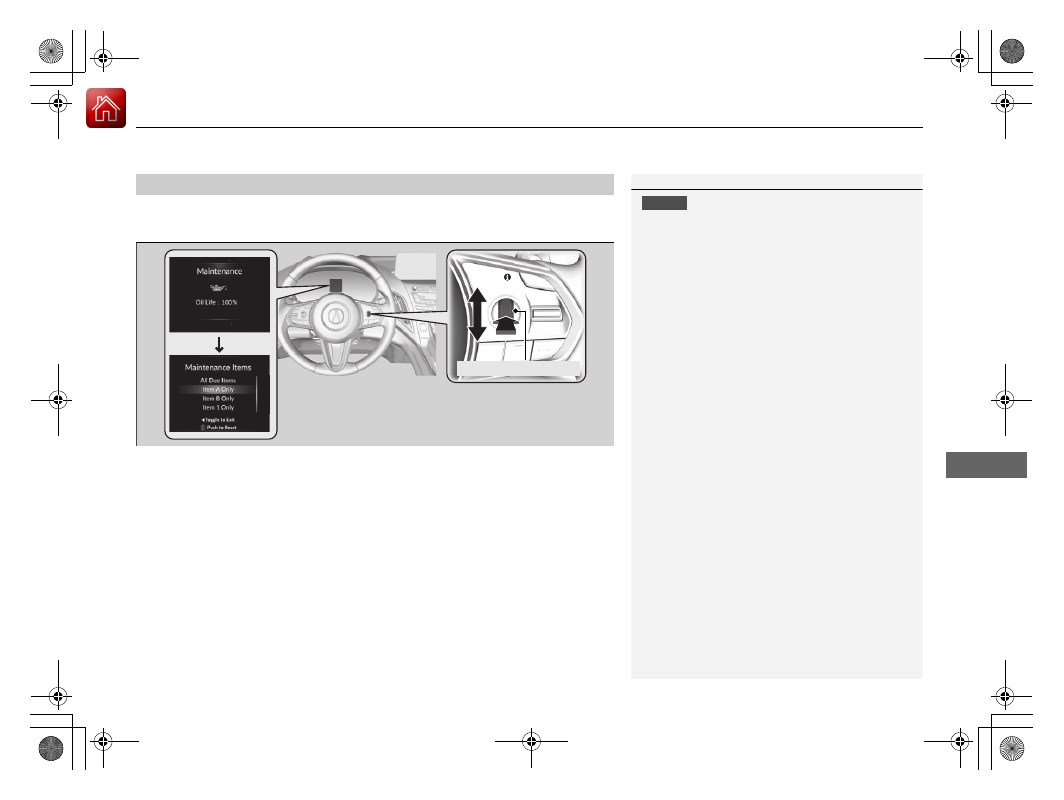
Reset the maintenance minder information display if you have performed the
maintenance service.
1.
Set the power mode to ON.
2.
Press the right selector wheel until the content is displayed.
3.
Roll the right selector wheel until the
Maintenance
screen is displayed.
4.
Press and hold the right selector wheel for about 10 seconds to enter the reset mode.
5.
Roll the right selector wheel to select a maintenance item to reset, or to select
All
Due Items
(You can also press the right selector wheel to the left to end the
process).
6.
Press the right selector wheel to reset the selected item.
7.
Repeat from step 4 for other items you wish to reset.
■
Resetting the Display
1
NOTICE
Failure to reset the Maintenance Minder
TM
display
after a maintenance service results in the system
showing incorrect maintenance intervals, which can
lead to serious mechanical problems.
The dealer will reset the Maintenance Minder
TM
display after completing the required maintenance
service. If someone other than a dealer performs
maintenance service, reset the Maintenance
Minder
TM
display yourself.
You can also reset the Maintenance Minder
TM
display
using the audio/information screen.
2
P. 341
Right Selector Wheel