Acura RDX (2021 year). Manual in english - page 26
 

  Index      Manuals     Acura RDX (2021 year). Manual in english


Search            copyright infringement  


Content      ..     24      25      26      27     ..


Acura RDX (2021 year). Manual in english - page 26


414

uu

Towing a Trailer

u

Towing Preparation

Driving

Trailer light

Trailer lights and equipment must comply with federal, state, province/territory, and 
local regulations. Check with your local trailer sales or rental agency for the 
requirements in the area where you plan to tow.

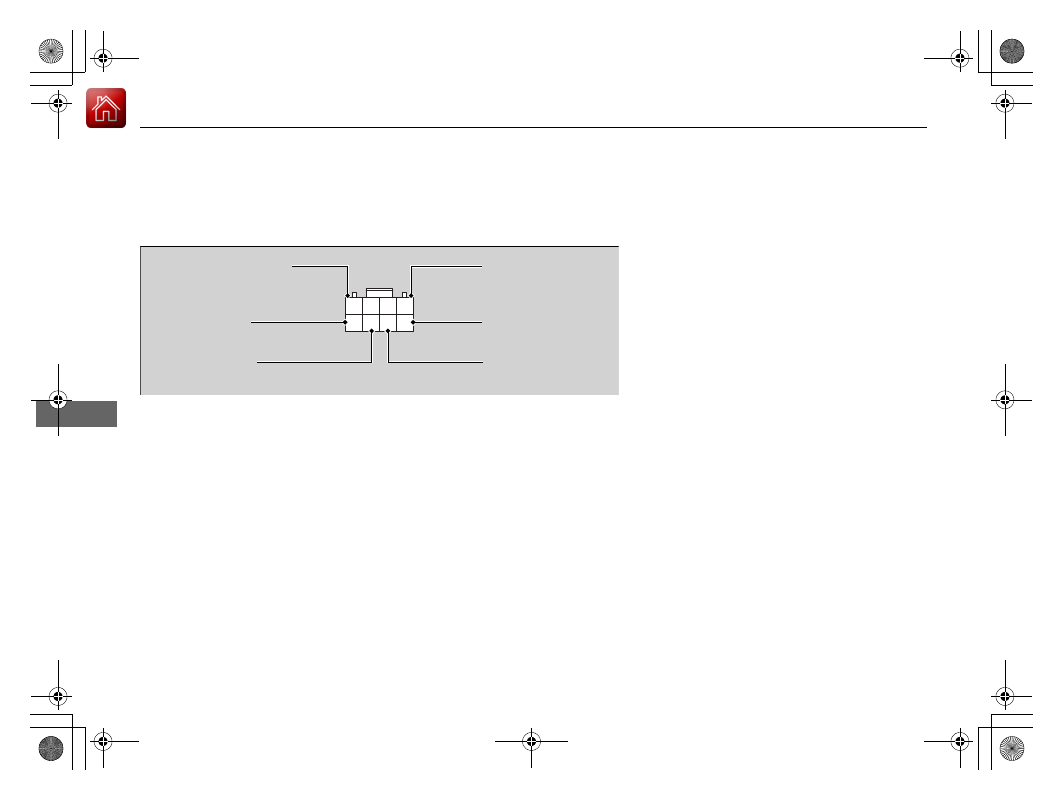
Your trailer lighting connector is located behind the left side panel in the cargo area. 
Each pin’s purpose and wiring color code are shown in the image.

When using a non-Acura trailer lighting harness and converter, get the connector 
and pins for your vehicle from a dealer.

Stop Light 
(Light Green)

Small Light +B 
(Red)

Left Turn Signal 
(Gray)

Right Turn Signal 
(Light Green)

Small Light 
(Sky Blue)

Trailer Hazard +B 
(Pink)

-------------------------------------------------------------------------------------------------------------------------------------------------------------

415

uu

Towing a Trailer

u

Driving Safely with a Trailer

Continued

Driving

Driving Safely with a Trailer

Have the trailer properly serviced and keep it in good condition.

Make sure that all the weights and load in the vehicle and trailer are within limits.

2

Towing Load Limits

 P. 411

Securely attach the hitch, safety chains, and other necessary parts to the trailer.

Securely store all the items in and on the trailer so that they do not shift while 
driving.

Check if the lights and brakes on the trailer are working properly.

Check the pressures of the trailer tires, including the spare.

Turn off the Auto Idle Stop system using the Auto Idle Stop 

OFF

 button. The 

trailer weight can affect your vehicle’s brake effectiveness if Auto Idle Stop is 
activated on a hill while towing a trailer.

Drive slower than normal.

Obey posted speed limits for vehicles with trailers.

Use the 

(

D

 position when towing a trailer on level roads.

Turn more slowly and with a wider turning arc than normal.

Allow more time and distance for braking.

Do not brake or turn suddenly.

Things You Need To Know Before Towing a Trailer

Towing Speeds and Gears

Turning and Braking

1

Driving Safely with a Trailer

Operating speed when towing a trailer must not 
exceed 62 mph (100 km/h).

Parking
In addition to the normal precautions, place wheel 
chocks at each of the trailer’s tires.

-------------------------------------------------------------------------------------------------------------------------------------------------------------

416

uu

Towing a Trailer

u

Towing Your Vehicle

Driving

Monitor your temperature gauge. If it nears the red (Hot) mark, turn off the 
climate control system and reduce speed. Pull to the side of the road safely to cool 
down the engine if necessary.

Put the transmission into 

(

S

 if the transmission shifts frequently.

Towing Your Vehicle

Your vehicle is not designed to be towed behind a motor home. If your vehicle needs 
to be towed in an emergency, refer to the emergency towing information.

2

Emergency Towing

 P. 634

Driving in Hilly Terrain

-------------------------------------------------------------------------------------------------------------------------------------------------------------

417

Driving

Off-Highway Driving Guidelines

General Information

Your vehicle has been designed primarily for use on pavement, however, its higher 
ground clearance allows you to occasionally travel on unpaved roads. It is not 
designed for trail-blazing, or other challenging off-highway activities.

If you decide to drive on unpaved roads, you will find that it requires somewhat 
different driving skills and that your vehicle will handle somewhat differently than it 
does on pavement. Pay attention to the precautions and tips in this section, and get 
acquainted with your vehicle before leaving the pavement.

Important Safety Precautions

To avoid loss of control or rollover, be sure to follow all precautions and 
recommendations:

Be sure to store cargo properly and do not exceed your cargo load limits.

2

Maximum Load Limit

 P. 409

Whenever you drive, make sure you and your passengers always wear seat belts.

Keep your speed low, and never go faster than the conditions allow.

It’s up to you to continually assess the situation and drive within the limits.

1

Off-Highway Driving Guidelines

Failure to operate your vehicle correctly might result 
in a crash or a rollover.

2

Important Handling Information

 P. 34

2

Precautions While Driving

 P. 424

Spinning the tires can also damage the SH-AWD

®


system.

3

WARNING

Improperly operating this vehicle on or off-
pavement can cause a crash or rollover in 
which you and your passengers could be 
seriously injured or killed.

Follow all instructions and guidelines in 
this owner’s manual.

Keep your speed low, and don’t drive 
faster than conditions permit.

Models with SH-AWD

®

-------------------------------------------------------------------------------------------------------------------------------------------------------------

418

uu

Off-Highway Driving Guidelines

u

Avoiding Trouble

Driving

Avoiding Trouble

Check Out Your Vehicle

 before you leave the pavement and make sure that all 

scheduled maintenance has been completed. Pay special attention to the 
condition of the tires, and check the tire pressures.

Remember

 the route you choose presents limits (too steep or bumpy), you have 

limits (driving skill and comfort), and your vehicle has limits (traction, stability, and 
power). Failing to recognize these limits will likely put you and your passengers in 
a hazardous situation.

Accelerating and Braking

 should be done slowly and gradually. Trying to start 

or stop too fast can cause a loss of traction and you could lose control.

Avoiding Obstacles and Debris

 in the road reduces the likelihood of a rollover 

or damage to your suspension or other components.

Driving on Slopes

 increases your risk of a rollover, particularly if you attempt to 

drive across a slope that is too steep. Going straight up or down a slope is usually 
the safest. If you can’t clearly see all conditions or obstacles on a slope, walk it 
before you drive it. If there is any doubt whether you can safely pass, don’t try it. 
Find another route. If you get stuck when climbing, do not try to turn around. 
Back down slowly following the same route you took up the hill.

Crossing a Stream

 - Avoid driving through deep water. If you encounter water 

in your route (a small stream or large puddle, for example), evaluate it carefully 
before going ahead. Make sure it is shallow, flowing slowly, and has firm ground 
underneath. If you are not sure of the depth or the ground, turn around and find 
another route. Driving through deep water can also damage your vehicle. The 
water can get into the transmission and differential, diluting the lubricant and 
causing an eventual failure. It can also wash the grease out of the wheel bearings.

If You Get Stuck

, carefully go in the direction that you think will get you 

unstuck. Do not spin the tires as this will only make things worse and could 
damage the transmission. If you are unable to free yourself, your vehicle will need 
to be towed. Front tow hooks are provided for this purpose.

-------------------------------------------------------------------------------------------------------------------------------------------------------------

419

Continued

Driving

When Driving

Starting the Engine

1.

Make sure the parking brake is applied.

u

The Parking Brake and Brake System 
indicator (red) comes on for 30 seconds 
when you press the electric parking 
brake switch.

u

The parking brake must be applied to 
start the engine.

2.

Depress the brake pedal.

u

Although it is possible to start the vehicle 
in 

(

N

 with the parking brake is applied, it 

is safer to start it in 

(

P

.

3.

Press the 

ENGINE START/STOP

 button 

without depressing the accelerator pedal.

1

Starting the Engine

Keep your foot firmly on the brake pedal when 
starting the engine.

The engine is harder to start in cold weather and in thinner 
air found at altitudes above 8,000 feet (2,400 meters).

When starting the engine in cold weather, turn off all 
electrical accessories such as the lights, climate 
control system, and rear defogger in order to reduce 
battery drain.

If you live in a region where winter is extremely cold, 
an engine block heater will improve starting and 
warming of the engine. Consult a dealer for details. 

If the exhaust system sounds abnormal or you can 
smell exhaust gas inside the vehicle, have your vehicle 
checked by a dealer. There may be a problem with 
the engine or exhaust system.

Bring the keyless access remote close to the 

ENGINE 

START/STOP

 button if the battery in the keyless 

access remote is weak.

2

If the Keyless Access Remote Battery is 
Weak

 P. 614

The engine may not start if the keyless access remote 
is subjected to strong radio waves.

Do not hold the 

ENGINE START/STOP

 button to 

start the engine.
If the engine does not start, wait at least 30 seconds 
before trying again.

Electric Parking 
Brake Switch

Brake Pedal

-------------------------------------------------------------------------------------------------------------------------------------------------------------

uu

When Driving

u

Starting the Engine

420

Driving

You can turn the engine off when the vehicle is completely stopped.

1.

Put the transmission into 

(

P

.

2.

Press the 

ENGINE START/STOP

 button.

Stopping the Engine

1

Starting the Engine

The immobilizer system protects your vehicle from 
theft. If an improperly coded device is used, the 
engine’s fuel system is disabled.

2

Immobilizer System

 P. 177

-------------------------------------------------------------------------------------------------------------------------------------------------------------

Continued

421

uu

When Driving

u

Starting the Engine

Driving

You can remotely start the engine using the two-way keyless access remote from 
extended distances.

To start the engine

The engine runs for up to 10 minutes without you starting the vehicle.
To extend the run time for another 10 minutes during the first run, press the 


button, then press and hold the 

 button.

u

The amber LED blinks, then the green LED comes back on if a 10-minute 
extension request was transmitted successfully.

After pressing the 

 button, wait for the green LED to blink. This indicates that 

the all the doors and the tailgate are locked. 

Remote Engine Start

*

1

Remote Engine Start

*

The remote engine start may violate local laws.
Before using the remote engine start, check your 
local laws.

If there are buildings and obstacles between your 
vehicle and the remote, the range will be reduced.
This distance may vary by external electrical 
interference.
The engine may not start by the remote engine start if:

You have disabled a remote engine start setting 
using the audio/information screen.

The power mode is not in VEHICLE OFF (LOCK).

The transmission is in a position other than 

(

P

.

The hood is open, or any door or the tailgate is 
unlocked.

You have already used the remote twice to start 
the engine.

3

WARNING

Carbon monoxide gas is toxic and can 
rapidly accumulate in closed or even partly 
enclosed areas.

Breathing it can cause unconsciousness and 
even kill you.

Never use the remote engine starter with 
the vehicle parked in a garage or other 
areas with limited ventilation.

Press the 

 button, then press and hold 

the  

button.

Amber LED: Blinks when any button is pressed.

Continues to blink 
during a vehicle 
self check until the 
engine starts.

Go within the range, 
and try again.

Green LED: Comes on while 
the engine is running.

Red LED: Blinks when the 
remote is out of the keyless 
access system range.

* Not available on all models

-------------------------------------------------------------------------------------------------------------------------------------------------------------

uu

When Driving

u

Starting the Engine

422

Driving

To stop the engine

Press and hold the 

 button 

for one second.

Go within the range, 
and try again.

Amber LED: Blinks when any 
button is pressed.

Red LED:

Comes on for one second to let you 
know that the engine has stopped.

Blinks when the remote is out of 
the keyless access system range. 
The engine will not stop.

1

Remote Engine Start

*

Another registered keyless access remote is in the 
vehicle.

There is any antenna failure.

The door is unlocked with the built-in key.

The engine oil pressure is low.

The engine coolant temperature is extremely high.

The telematics unit malfunctions.

The security system alarm is not set.

Before starting the engine, make sure to check the 
door lock status using the remote. When you press 
the 

 button, wait for the green LED to blink. If 

the red LED turns on, the doors and tailgate did not 
lock, and the engine does not start.

While the engine is running, the vehicle will 
automatically precondition inside the vehicle.
When it is warm outside:

The climate control system is activated in 
recirculation mode.

The seat ventilation is activated

*

.

When it is cold outside:

The defroster is activated at a moderately warm 
temperature.

The rear defogger and door mirror heaters are 
activated.

The seat heaters and heated steering wheel

*

 are 

activated.

2

Heated Steering Wheel

*

 P. 231

2

Front Seat Heaters and Ventilation

*


P. 232

* Not available on all models

-------------------------------------------------------------------------------------------------------------------------------------------------------------

423

uu

When Driving

u

Starting the Engine

Driving

1.

Depress the brake pedal and press the 

ENGINE START/STOP

 button 

simultaneously.

2.

Keeping your right foot on the brake pedal, put the transmission into 

(

D

. Select 

(

R

 when reversing.

3.

With the parking brake applied, release the brake pedal and gently depress the 
accelerator pedal.

u

Make sure the Parking Brake and Brake System indicator (red) goes off.

2

Parking Brake

 P. 498

2

If the Transmission System Indicator Blinks along with the Warning 
Message

 P. 626

Hill start assist system

Hill start assist keeps the brake engaged briefly to help prevent the vehicle from 
rolling on inclines as you move your foot from the brake pedal to the accelerator.

Put the transmission into 

(

D

 or 

(

S

 when facing uphill, or 

(

R

 when facing downhill, 

then release the brake pedal.

Starting to Drive

1

Starting to Drive

You can also release the parking brake by pulling the 
electric parking brake switch while depressing the 
brake pedal. When facing downhill, you can start 
your vehicle more smoothly by manually releasing it 
with the electric parking brake switch than by 
releasing it with the accelerator pedal.

The engine stops when the transmission position is 
changed from 

(

P

 before the 

ENGINE START/STOP


button is pressed. Follow step 1 when starting to 
drive.

When the engine was started using the keyless access 
remote

*

When the engine was started using the keyless access remote

*

When the engine was started in any case

1

Hill start assist system

Hill start assist may not prevent the vehicle from 
rolling downhill on a very steep or slippery slope, and 
will not operate on small inclines.

Hill start assist is not a replacement for the parking 
brake.

Hill start assist will operate even when VSA

®

 is 

switched off.

* Not available on all models

-------------------------------------------------------------------------------------------------------------------------------------------------------------

424

uu

When Driving

u

Precautions While Driving

Driving

Precautions While Driving

Utility vehicles have a significantly higher rollover rate than other types of vehicles. 
To prevent rollovers or loss of control:

Take corners at slower speeds than you would with a passenger vehicle.

Avoid sharp turns and abrupt maneuvers whenever possible.

Do not modify your vehicle in any way that you would raise the center of gravity.

Do not carry heavy cargo on the roof.
Never carry more than 165 lbs (75 kg) of cargo on the roof rack (Acura accessory).

Avoid driving in deep water and on flooded roads. This can damage the engine or 
driveline, or cause electrical component failure.

If there is a strong impact with something under the vehicle, stop in a safe location. 
Check the underside of the vehicle for damage or any fluid leaks.

Driving Guidelines for Your Utility Vehicle

In Rain

Other Precautions

1

Precautions While Driving

NOTICE

Do not change the transmission while pressing the 
accelerator pedal. You could damage the transmission.

NOTICE

If you repeatedly turn the steering wheel at an 
extremely low speed, or hold the steering wheel in the 
full left or right position for a while, the electric power 
steering (EPS) system heats up. The system goes into a 
protective mode, and limits its performance. The 
steering wheel becomes harder and harder to operate. 
Once the system cools down, the EPS system is restored. 
Repeated operation under these conditions can 
eventually damage the system.

If the power mode is set to ACCESSORY while 
driving, the engine will shut down and all steering 
and brake power assist functions will stop, making it 
difficult to control the vehicle.

Do not put the transmission into 

(

N

, as you will lose 

engine braking (and acceleration) performance.

During the first 600 miles (1,000 km) of operation, 
avoid sudden acceleration or full throttle operation so 
as not to damage the engine or powertrain.

Avoid hard braking for the first 200 miles (300 km). You 
should also follow this when the brake pads are replaced.

1

Driving Guidelines for Your Utility Vehicle

Failure to operate your vehicle correctly might result 
in a crash or a rollover.

2

Important Handling Information

 P. 34

-------------------------------------------------------------------------------------------------------------------------------------------------------------

425

uu

When Driving

u

Automatic Transmission

Driving

Automatic Transmission

The engine runs at a higher idle speed and creeping increases.
Keep the brake pedal firmly depressed when stopped.

Quickly depressing the accelerator pedal while driving uphill may cause the 
transmission to drop to a lower gear, unexpectedly increasing vehicle speed. Depress 
the accelerator pedal carefully, especially on slippery roads and curves.

Creeping

Kickdown

-------------------------------------------------------------------------------------------------------------------------------------------------------------

426

uu

When Driving

u

Shifting

Driving

Shifting

Change the gear position in accordance with your driving needs.

Shift button positions

1

Shifting

To prevent malfunction and unintended 
engagement:

Do not spill any liquids on or around shift buttons.

Do not place or drop any objects on or around shift 
buttons.

Do not let passengers or children operate the shift 
buttons.

The beeper sounds and the message appears on the 
multi-information display when you depress the 
accelerator pedal with the gear position in 

(

N

.

2

Multi-Information Display Warning and 
Information Messages

 P. 101

Change the gear position to 

(

D

 or 

(

R

 with the brake 

pedal depressed.

3

WARNING

The vehicle can roll away if left unattended 
without confirming that Park is engaged.

A vehicle that rolls away could cause a crash 
resulting in serious injury or death.

Always keep your foot on the brake pedal 
until you have confirmed that 

(

P

 is shown 

on the gear position indicator.

Reverse

Used when reversing

Park

Used when parking, before turning off or 
starting the engine

Neutral

Transmission is not locked

Drive/S Position

Each time you press the 

 button, the 

mode switches between Drive and S Position 
mode.
Used for:

Normal driving (gears change between 
1st and 10th automatically)

Temporarily driving in the sequential 
mode

Automatically changing gears between 
1st and 8th (8th gear is used only at high 
speed)

Driving in the sequential mode

D/S

Drive

S Position

-------------------------------------------------------------------------------------------------------------------------------------------------------------

Continued

427

uu

When Driving

u

Shifting

Driving

(

P

 (parking) button

The gear position changes to 

(

P

 when you 

press the 

(

P

 button while the vehicle is 

parked with the power mode in ON.
The indicators on the sides of the 

(

P

 button 

come on.

1

Shifting

When shifting gears in extremely low temperatures 
(−22°F/−30°C), there may be a short delay before the 
shift is indicated in the display. Always confirm you 
are in the correct gear before driving.

(

P

 Button

-------------------------------------------------------------------------------------------------------------------------------------------------------------

uu

When Driving

u

Shifting

428

Driving

Shift Operation

1

Shift Operation

NOTICE

When you change 

(

D

 to 

(

R

 and vice versa, come to 

a complete stop and keep the brake pedal depressed.
Operating the shift button before the vehicle has 
come to a complete standstill can damage the 
transmission.

Use the gear position indicator and the shift button 
indicator to check the gear position before selecting 
a shift button.

If the indicator of the currently selected gear position, 
or all the gear position indicators are blinking 
simultaneously, there is a problem with the 
transmission.
Avoid sudden acceleration and have the transmission 
checked by a dealer as soon as possible.

The fuel supply may be cut off if you drive at engine 
speeds in or over the tachometer’s red zone (engine 
speed limit). If this happens, you may experience a 
slight jolt.

When the engine speed is increased while the 
transmission is in 

(

N

(

P

 or 

(

R

, the fuel supply may 

be cut off even without the engine speed entering 
the tachometer’s red zone.

The beeper sounds once when you change to 

(

R

.

2

Customized Features

 P. 341

Gear Position Indicator

Tachometer’s red zone

Press the 

(

P

 button.

Pull back the 

(

R

 button.

Press the 

(

N

 button.

Shift Button 
Indicator

M

 (sequential mode) 

Indicator

Sequential Mode Gear 
Selection Indicator

Press the 

 button.

Each time you press the button, 
the mode switches between 
Drive and S Position mode.

D/S

-------------------------------------------------------------------------------------------------------------------------------------------------------------

Continued

429

uu

When Driving

u

Shifting

Driving

When opening the driver’s door

If you open the driver’s door under the following conditions, the gear position 
automatically changes to 

(

P

.

The vehicle is stationary with the engine running, or moving at 1 mph (2 km/h) or 
slower.

The transmission is other than 

(

P

.

You have unfastened the driver side seat belt.

u

If you manually change the gear position from 

(

P

 with the brake pedal 

depressed, the gear position will automatically return to 

(

P

 once you release 

the brake pedal.

When turning off the power mode

If you turn the engine off while the vehicle is stationary, and the transmission is in 
other than 

(

P

, the gear position automatically changes to 

(

P

.

1

When opening the driver’s door

While the system is designed to automatically change 
the gear position to 

(

P

 under the described 

conditions, in the interest of safety you should always 
select 

(

P

 before opening the driver’s door.

Make sure to park the vehicle in a safe place.

2

When Stopped

 P. 507

If you want to drive the vehicle after the gear position 
has automatically changed to 

(

P

 under the described 

conditions, close the door, fasten the seat belt, 
depress the brake pedal, then change the gear 
position.

If you leave the vehicle, turn off the engine and lock 
the doors.

-------------------------------------------------------------------------------------------------------------------------------------------------------------


Content      ..     24      25      26      27     ..