Acura RLX HYBRID (2020 year). Manual in english - page 22
 

  Index      Manuals     Acura RLX HYBRID (2020 year). Manual in english


Search            copyright infringement  


Content      ..     20      21      22      23     ..


Acura RLX HYBRID (2020 year). Manual in english - page 22


Continued

353

uu

Bluetooth

®

 HandsFreeLink

®

u

HFL Menus

Features

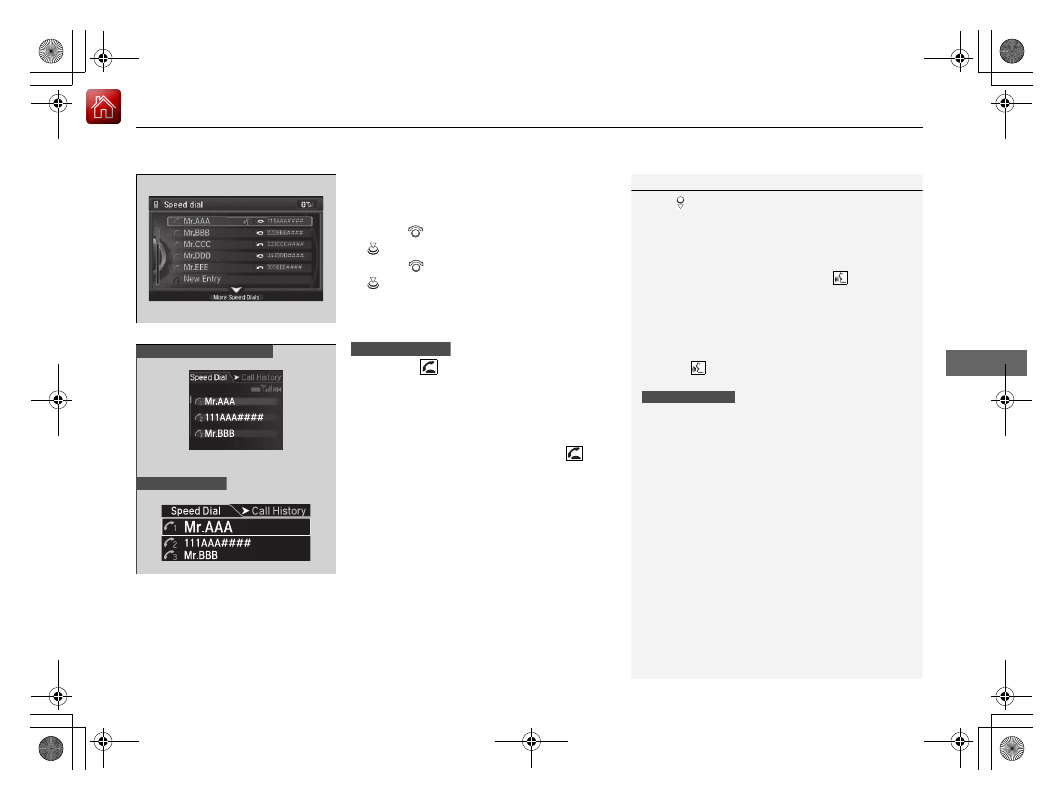
To make a call using a speed dial entry

1.

Press the 

PHONE

 button.

2.

Press the 

MENU

 button.

3.

Rotate  

to 

select 

Speed Dial

, then press 

.

4.

Rotate 

 to select a number, then press 

.

u

Dialing starts automatically.

1.

Press the 

 button.

2.

Move the left selector wheel left to select 

Speed Dial

.

3.

Roll the left selector wheel to select a 
number.

4.

Push the left selector wheel or the 


button.

u

Dialing starts automatically.

1

To make a call using a speed dial entry

Move 

 to select 

More Speed Dials

 to view 

another paired phone’s speed dial list. You can make 
a call from that list using the currently connected 
phone.

When a voice tag is stored, press the 

 button to 

call the number using the voice tag.

2

Speed Dial

 P. 341

Any voice-tagged speed dial entry, phonebook name 
or number can be dialed by voice from any screen.
Press the 

 button and follow the prompts.

The speed dial displays the 20 speed dial entries.

Steering switches

111AAA####

Mr.AAA

Mr.BBB

Multi-information display

Head-up display

Steering switches

-------------------------------------------------------------------------------------------------------------------------------------------------------------

uu

Bluetooth

®

 HandsFreeLink

®

u

HFL Menus

354

Features

When there is an incoming call, an audible 
notification sounds (if activated) and the 

Incoming call

 screen appears.

Press the 

 button to answer the call.

Press the 

 button to decline or end the 

call.

Receiving a Call

1

Receiving a Call

Call Waiting
Press the 

 button to put the current call on hold to 

answer the incoming call.
Press the 

 button again to return to the current 

call.
Ignore the incoming call if you do not want to answer 
it.
Press the 

 button if you want to hang up the 

current call.

You can select the icons on the On Demand Multi-
Use Display

TM

 instead of the 

 and 

 buttons.

-------------------------------------------------------------------------------------------------------------------------------------------------------------

Continued

355

uu

Bluetooth

®

 HandsFreeLink

®

u

HFL Menus

Features

The following options are available during a call.

Mute

: Mute your voice.

Transfer

: Transfer a call from HFL to your phone.

Touch Tones

: Send numbers during a call. This is useful when you call a menu-

driven phone system.

The available options are shown on the Phone 
screen.
Rotate 

 to select the option, then press 

.

u

The mute icon appears when 

Mute

 is 

selected. Select 

Mute

 again to turn it off.

Options During a Call

1

Options During a Call

Touch Tones

: Available on some phones.

You can select the icons on the On Demand Multi-
Use Display

TM

.

0123456789####

01’23

John

10

Mute Icon

-------------------------------------------------------------------------------------------------------------------------------------------------------------

uu

Bluetooth

®

 HandsFreeLink

®

u

HFL Menus

356

Features

HFL can display newly received text/e-mail messages as well as 20 of the most 
recently received messages on a linked cell phone. Each received message can be 
read aloud and replied to using a fixed common phrase.

1.

A pop-up appears and notifies you of a new 
text/e-mail message.

2.

Rotate 

 to select 

Read

 to check the 

message, then press 

.

u

The text/e-mail message is displayed.

Receiving a Text/E-mail Message

1

Receiving a Text/E-mail Message

The system does not display any received messages 
while you are driving. You can only hear them read 
aloud.

With some phones, you may be able to display up to 
20 most recent text/e-mail messages.

State or local laws may limit your use of the HFL text/
e-mail message feature. Only use the text/e-mail 
message feature when conditions allow you to do so 
safely.

When you receive a text/e-mail message for the first 
time since the phone is paired to HFL, you are asked 
to turn the 

New Text/Email Alert

 setting to 

On

.

2

To turn on or off the text/e-mail message 
notice

 P. 335

-------------------------------------------------------------------------------------------------------------------------------------------------------------

Continued

357

uu

Bluetooth

®

 HandsFreeLink

®

u

HFL Menus

Features

If a paired phone has text message or mail accounts, you can select one of them to 
be active and receive notifications.

1.

Press the 

SETTINGS

 button.

2.

Rotate 

 to select 

Phone Settings

, then 

press .

3.

Move  

or  

to 

select 

the 

Text/Email


tab.

4.

Rotate 

 to select 

Select Account

, then 

press .

5.

Rotate 

 to select 

Text Messages

 or an 

e-mail account you want, then press 

.

Selecting a Mail Account

1

Selecting a Mail Account

You can also select a mail account from the folder list 
screen or the message list screen.
Move 

 to select 

Select Account

, then press 

.

You can only receive notifications from one text 
message or mail account at a time.

-------------------------------------------------------------------------------------------------------------------------------------------------------------

uu

Bluetooth

®

 HandsFreeLink

®

u

HFL Menus

358

Features

Displaying text messages

1.

Press the 

PHONE

 button.

2.

Press the 

MENU

 button.

3.

Rotate 

 to select 

Text/Email

, then press 

.

u

Select account if necessary.

4.

Rotate 

 to select a message, then press 

.

u

The text message is displayed.

Displaying Messages

1

Displaying Messages

The 

 icon appears next to an unread message.

If you delete a message on the phone, the message is 
also deleted in the system. If you send a message 
from the system, the message goes to your phone’s 
outbox.

To see the previous or next message, move 

 or 


on the text message screen.

Message List

Text Message

-------------------------------------------------------------------------------------------------------------------------------------------------------------

Continued

359

uu

Bluetooth

®

 HandsFreeLink

®

u

HFL Menus

Features

Displaying e-mail messages

1.

Press the 

PHONE

 button.

2.

Press the 

MENU

 button.

3.

Rotate 

 to select 

Text/Email

, then press 

.

4.

Rotate 

 to select a folder, then press 

.

5.

Rotate 

 to select a message, then press 

.

u

The e-mail is displayed.

1

Displaying e-mail messages

Received text/e-mail messages may appear in the 
message list screen at the same time. In this case, text 
messages are titled 

No subject

.

Folder List

Message List

E-mail

-------------------------------------------------------------------------------------------------------------------------------------------------------------

uu

Bluetooth

®

 HandsFreeLink

®

u

HFL Menus

360

Features

Read or stop reading a message

1.

Go to the text/e-mail message screen.

2

Displaying Messages

 P. 358

2.

Press 

 to read the message aloud.

3.

Press 

 to stop reading.

Press 

 again to start reading the message 

from the beginning.

Reply to a message

1.

Go to the text/e-mail message screen.

2

Displaying Messages

 P. 358

2.

Move 

 and rotate 

 to select 

Reply

then press 

.

3.

Rotate 

 to select the reply message, then 

press .

u

The pop-up menu appears on the screen.

4.

Select 

Send

 to send the message.

u

Message sent

 appears on the screen 

when the reply message was successfully 
sent.

1

Reply to a message

The available fixed reply messages are as follows:

Talk to you later, I’m driving.

I’m on my way.

I’m running late.

OK

Yes

No

You cannot add, edit, or delete reply messages.

Only certain phones receive and send messages when 
paired and connected. For a list of compatible 
phones:

U.S.: Visit 

www.Handsfreelink.com/Acura

, or call 

1-888-528-7876.

Canada: For more information on smartphone 
compatibility, call 1-888-528-7876.

-------------------------------------------------------------------------------------------------------------------------------------------------------------

361

uu

Bluetooth

®

 HandsFreeLink

®

u

HFL Menus

Continued

Features

Making a call to a sender

1.

Go to the text message screen.

2

Displaying text messages

 P. 358

2.

Move 

 and rotate 

 to select 

Call

, then 

press .

-------------------------------------------------------------------------------------------------------------------------------------------------------------

uu

Bluetooth

®

 HandsFreeLink

®

u

HFL Menus

362

Features

Provides a nationwide service for unexpected incidents. You can call for assistance 
using a phone paired and connected to 

Bluetooth

®

 HandsFreeLink

®

.

1.

From the 

Phone

 screen, press the 

MENU


button.

2.

Rotate 

 to select 

Roadside Assistance

then press 

.

3.

Rotate 

 to select a phone number, then 

press .

u

Dialing starts automatically.

Roadside Assistance

1

Roadside Assistance

If you are subscribed to a paid AcuraLink package, 
you can call roadside assistance using the 

LINK


button instead of your phone.

2

AcuraLink

®

 P. 363

-------------------------------------------------------------------------------------------------------------------------------------------------------------

363

Continued

Features

AcuraLink

®

Is a subscription-based service that provides convenient features such as voice 
communication in case of emergency, online security, one-on-one operator 
assistance, and the transmission of important messages regarding your vehicle’s 
status.
For information on traffic rerouting and traffic information updates, provided by the 
AcuraLink server, see the Navigation System Manual.

Automatic collision notification

If your vehicle’s airbags deploy or if the unit 
detects that the vehicle is severely impacted, 
your vehicle will automatically attempt to 
connect to the AcuraLink operator. Once 
connected, information about your vehicle, its 
positioning, and its condition will be sent to 
the operator; you also can speak to the 
operator when connected.

In Case of Emergency

1

AcuraLink

®

AcuraLink also provides services you can operate 
from the Internet or your smartphone.

To subscribe to AcuraLink, or to get more 
information about all of its features, contact an Acura 
dealer, or visi

owners.acura.com

 (in U.S.) or 

www.acura.ca

 (in Canada).

1

In Case of Emergency

Your vehicle may not be able to connect to the operator 
if the battery level is low, the line is disconnected or you 
do not have adequate cellular coverage.

You cannot use emergency services when:

You travel outside the AcuraLink service coverage 
areas.

There is a problem with the connecting devices, 
such as the 

ASSIST

 button, microphone, speakers, 

or the unit itself.

You are not subscribed to the service or your 
subscription is no longer valid.

You cannot operate other navigation- or phone-
related functions using the screens while talking to 
the operator.
Only the operator can terminate the connection to 
your vehicle.

1

Automatic collision notification

If the unit fails to connect to the operator, it 
repeatedly tries until it succeeds.

Audio/information screen

On Demand Multi-Use Display

TM

When connected to the AcuraLink 
operator:

-------------------------------------------------------------------------------------------------------------------------------------------------------------

uu

AcuraLink

®

u

364

Features

Manual operator connection

If you need to talk to the AcuraLink operator 
in an emergency situation, you can manually 
connect to them by pressing the 

ASSIST


button with the power mode in ACCESSORY 
or ON.

1.

Open the cover attached to the ceiling 
console.

2.

Press the 

ASSIST

 button.

u

You are connected to the AcuraLink 
operator.

1

Manual operator connection

Do not press the button while driving. When you 
need to contact the operator, park the vehicle in a 
safe place.

If the unit fails to connect to the operator, it 
automatically cancels the action after three minutes.

In an emergency, the cover can be broken through to 
press the 

ASSIST

 button.

ASSIST


Button

-------------------------------------------------------------------------------------------------------------------------------------------------------------

Continued

365

uu

AcuraLink

®

u

Features

Your subscribed telematics service provider can track your vehicle’s location, 
remotely lock or unlock doors, and help you find your vehicle.
To use these features, you need your user ID and personal identification number 
(PIN).

Stolen vehicle tracking

This feature searches and tracks down your vehicle position even if it is on the move. 
If you believe that your vehicle has been stolen, contact the police as well as the 
provider.

Remote door lock/unlock

The provider can remotely lock or unlock doors upon your request.

Vehicle finder

This feature is convenient to use when trying to locate your vehicle in large areas, 
such as a crowded parking lot. If you cannot locate your vehicle after using the 
remote transmitter’s answerback function, you can contact the provider which can 
then flash your vehicle’s exterior lights and sound the horn.

Security alarm notification

If the security system in your vehicle detects an abnormal condition, such as 
someone tampering with the lock on your vehicle, the provider notifies you by e-
mail or SMS.

Security Features

1

Security Features

The contact information of your provider, your user 
ID and PIN will be given when you subscribe to 
AcuraLink. If you forget any of the above, contact a 
dealer, or go to 

owners.acura.com

 (in U.S.) or 

www.acura.ca

 (in Canada).

You can also activate the remote door lock/unlock 
and vehicle finder features from the Internet or using 
your smartphone app. Ask a dealer, or visit 

owners.acura.com

 (in U.S.) or 

www.acura.ca

 (in 

Canada) for details.

1

Vehicle finder

The lights will stop flashing and horn will stop 
sounding under the following conditions:

When 30 seconds have elapsed.

You unlock the doors using the remote transmitter.

You unlock the doors using the keyless access 
system.

You unlock the doors using the built-in key.

The power mode is set to ACCESSORY or ON.

-------------------------------------------------------------------------------------------------------------------------------------------------------------

uu

AcuraLink

®

u

366

Features

Connect to the AcuraLink operator when trying to find a destination or for roadside 
assistance.

1.

Press the 

LINK

 button.

u

Connection to the operator begins.

2.

Talk to the operator.

u

To disconnect, press the selector knob, 
select 

End Call

 on the On Demand 

Multi-Use Display

TM

, or press the Hang-

up button.

Operator Assistance

1

Operator Assistance

Remain attentive to road conditions and driving 
during operator assistance.

LINK

 Button

Audio/information screen 
when connected to the 
AcuraLink operator.

-------------------------------------------------------------------------------------------------------------------------------------------------------------

Continued

367

uu

AcuraLink

®

u

Features

AcuraLink sends you messages on vehicle 
features, safety and emissions recall 
campaigns, maintenance reminders (U.S. 
models only), and diagnostic information.
When you receive a new message, an icon 
appears on the audio/information screen.

Message category

There are six message categories.

Feature Guide

: Appears for the first 90 days of ownership, introducing vehicle 

features each day.

Quick Tips

information.

Diagnostic Info

: Appears when a warning indicator or message comes on.

Rotate 

 to select 

Check Later

 or 

Check Now

.

u

Selecting 

Check Now

 lets you know if you should see a dealer immediately or 

later in accordance with the warning severity level.

Scheduled Dealer Appointment

 (U.S. models only): An appointment made 

through the Acura server or Acura Owners website can be rescheduled or 
canceled from this option. 

2

 Dealer Appointments

 P. 369

Maintenance Minder

 (U.S. models only): Lets you know which maintenance 

item is due along with a reminder message.

Recalls/Campaigns

: Reminds you of a recall or important safety information. 

You should also be notified by mail.

AcuraLink Message

1

AcuraLink Message

Messages may not appear immediately after your 
vehicle purchase. It can take several days for your 
dealer to register your vehicle’s ID.

If an icon includes an exclamation point, it indicates 
that Acura gives high priority to this message 
compared to the one without.

: An unread message with high priority

: An unread message

Message Icon

1

Message category

Message categories can be added, edited, or deleted 
through broadcast messages from Acura.

You can call your dealer, find the nearest dealer, or 
schedule appointments (U.S. models only) from the 
message options in 

Maintenance Minder

 (U.S. 

models only), 

Recalls/Campaigns

, and 

Diagnostic 

Info

.

2

Message Options

 P. 368

-------------------------------------------------------------------------------------------------------------------------------------------------------------

uu

AcuraLink

®

u

368

Features

Reading a message

1.

Press the 

INFO

 button, rotate 

 to select 

AcuraLink/Messages

, then press 

.

u

If your display has changed from 

Info


menu to 

Current Drive

, press the 

MENU

 button.

u

AcuraLink messages appears.

2.

Rotate 

 to select a category, then press 

.

u

If there are unread messages in a 
category, a message icon appears next to 
that category.

3.

Rotate 

 to select a message you want to 

read, then press 

.

Message Options

While a message is displayed, you can use 
options to take immediate action to the 
message.

Available options are:

Voice

: Reads the message aloud. Select 

Stop Reading

 to cancel it.

Find Acura Dlr.

 (U.S. models only): Searches for the nearest Acura dealer.

Delete

 (U.S. models only): Deletes the displayed message. Rotate 

 to select 

this option, then press 

.

Call Your Dealer

: Calls your Acura dealer using HFL.

1

Reading a message

If there is no message listed on the menu, 

AcuraLink/Messages

 is grayed out and cannot be 

selected.

The message icon disappears once you read the 
message.

However, the exclamation mark that indicates that 
the message has a high priority remains.

: A read message with high priority.

1

Message Options

The available options vary by message category.

You can delete all messages in a category at once.

2

Customized Features

 P. 295

Voice

 is available only when the language selected is 

English.

2

Customized Features

 P. 295

Dec. 31, 2011 

The engine may not be operating properly. 
Select VOICE FOR DETAILS. 

Engine System. P062F 

-------------------------------------------------------------------------------------------------------------------------------------------------------------


Content      ..     20      21      22      23     ..