Acura RLX HYBRID (2020 year). Manual in english - page 7
 

  Index      Manuals     Acura RLX HYBRID (2020 year). Manual in english


Search            copyright infringement  


Content      ..     5      6      7      8     ..


Acura RLX HYBRID (2020 year). Manual in english - page 7


111

uu

Indicators

u

Multi-Information Display Warning and Information Messages

In

strum

e

nt Pa

nel

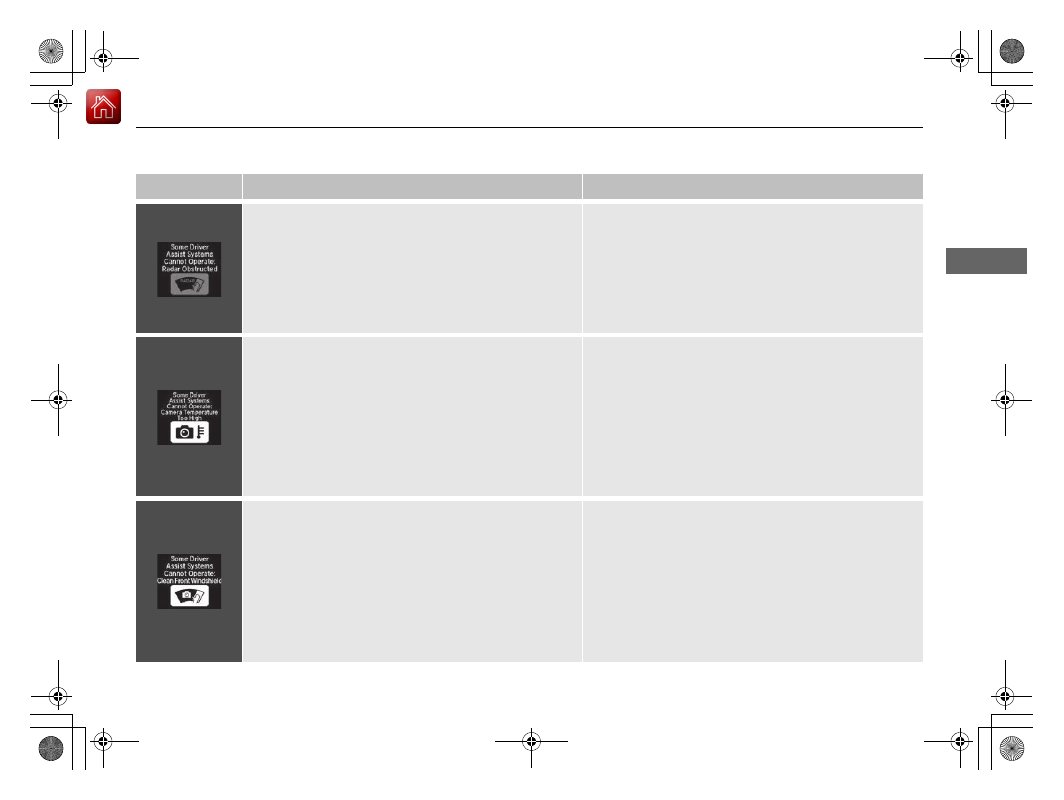
Message

Condition

Explanation

Appears if anything covers the radar sensor cover and 
prevents the sensor from detecting a vehicle in front.

May appear when driving in bad weather (rain, snow, 
fog, etc.)

When the radar sensor gets dirty, stop your vehicle in a 
safe place, and wipe off dirt using a soft cloth.

2

Collision Mitigation Braking System

TM

 (CMBS

TM

)


P. 458

2

Adaptive Cruise Control (ACC) with Low Speed 
Follow

 P. 402

2

Road Departure Mitigation (RDM) System

 P. 416

2

Traffic Jam Assist

 P. 428

Appears if the temperature inside the camera is too 
high.

Use the climate control system to cool down the 
camera.

2

Front Sensor Camera

 P. 400

2

Collision Mitigation Braking System

TM

 (CMBS

TM

)


P. 458

2

Adaptive Cruise Control (ACC) with Low Speed 
Follow

 P. 402

2

Lane Keeping Assist System (LKAS)

 P. 421

2

Road Departure Mitigation (RDM) System

 P. 416

2

Traffic Jam Assist

 P. 428

Appears when the area around the camera is blocked 
by dirt, mud, etc.

May appear when driving in bad weather (rain, snow, 
fog, etc.)

Stop your vehicle in a safe place, and wipe it off with a 
soft cloth.

2

Front Sensor Camera

 P. 400

2

Collision Mitigation Braking System

TM

 (CMBS

TM

)


P. 458

2

Adaptive Cruise Control (ACC) with Low Speed 
Follow

 P. 402

2

Lane Keeping Assist System (LKAS)

 P. 421

2

Road Departure Mitigation (RDM) System

 P. 416

2

Traffic Jam Assist

 P. 428

-------------------------------------------------------------------------------------------------------------------------------------------------------------

112

In

strum

e

nt Pa

nel

Gauges and Displays 

Gauges

Gauges include the speedometer, tachometer, fuel gauge, High Voltage battery 
charge level gauge, and related indicators. They are displayed when the power 
mode is set to ON.

Displays your driving speed in mph or km/h.

Shows the number of engine revolutions per minute.

Displays the amount of fuel left in the fuel tank.

Speedometer

Tachometer

Fuel Gauge

1

Fuel Gauge

NOTICE

You should refuel when the needle approaches 

.

Running out of fuel can cause the engine to misfire, 
damaging the catalytic converter.

The actual amount of remaining fuel may differ from 
the fuel gauge reading.

E

-------------------------------------------------------------------------------------------------------------------------------------------------------------

113

uu

Gauges and Displays

u

Gauges

In

strum

e

nt Pa

nel

Shows the remaining High Voltage battery charge level.

High Voltage Battery Charge Level Gauge

1

High Voltage Battery Charge Level Gauge

The High Voltage battery charge level may decrease 
under the following conditions:

When the 12-volt battery has been replaced.

When the 12-volt battery has been disconnected.

When the High Voltage battery control system 
corrects its reading.

The charge level reading will be corrected 
automatically while driving.

Changes in the temperature of the High Voltage 
battery can increase or decrease the battery’s 
charging capacity. If temperature changes cause the 
battery’s capacity to change, the number of 
indicators in the battery charge level gauge may also 
change, even if the amount of charging remains the 
same.

-------------------------------------------------------------------------------------------------------------------------------------------------------------

114

uu

Gauges and Displays

u

Multi-Information Display

In

strum

e

nt Pa

nel

Multi-Information Display

The multi-information display displays the odometer, trip meter, outside 
temperature, and other gauges. It also displays important messages such as 
warnings and other helpful information.

Main displays

Roll the right selector wheel to change the display.

Switching the Display

Right Selector Wheel

Engine Oil Life

Elapsed Time

Blank Screen

Average Speed

Range

Instant Fuel 
Economy/Average 
Fuel Economy

Compass

Tire Pressure for 
Each Tire

Current Mode for 
ACC with Low Speed 
Follow, the LKAS, 
and Traffic Jam 
Assist

Head-up Display 
Content

This message shows 
when ACC with Low 
Speed Follow, the 
LKAS, and Traffic 
Jam Assist are off.

Turn-by-Turn 
Directions

-------------------------------------------------------------------------------------------------------------------------------------------------------------

115

uu

Gauges and Displays

u

Multi-Information Display

Continued

In

strum

e

nt Pa

nel

Lower displays

Press the 

TRIP

 button to change the display.

Odometer

Trip A

Trip B

Outside temperature

TRIP

 Button

TRIP

TRIP

TRIP

-------------------------------------------------------------------------------------------------------------------------------------------------------------

uu

Gauges and Displays

u

Multi-Information Display

116

In

strum

e

nt Pa

nel

Shows the total number of miles or kilometers that your vehicle has accumulated.

Shows the total number of miles or kilometers driven since the last reset. Meters A 
and B can be used to measure two separate trips.

Resetting a trip meter

To reset the trip meter, display it, and then press and hold the 

TRIP

 button. The trip 

meter is reset to 

0.0

.

Shows the outside temperature in Fahrenheit (U.S.) or Celsius (Canada).

Adjusting the outside temperature display

Adjust the temperature reading by up to ± 5°F (U.S.) or ± 3°C (Canada) if the 
temperature reading seems incorrect.
Use the audio/information screen to correct the temperature.

2

Customized Features

 P. 295

Shows the estimated average fuel economy of each trip meter in mpg (U.S.) or 
l/100 km (Canada). The display is updated at set intervals. When a trip meter is reset, 
the average fuel economy is also reset.

Odometer

Trip Meter

Outside Temperature

Average Fuel Economy

1

Trip Meter

Switch between trip meter A and trip meter B by 
pressing the 

TRIP

 button.

1

Outside Temperature

The temperature sensor is in the front bumper.
Road heat and exhaust from another vehicle can 
affect the temperature reading when your vehicle 
speed is less than 19 mph (30 km/h).

It may take several minutes for the display to be 
updated after the temperature reading has stabilized.

1

Average Fuel Economy

You can change when the average fuel economy is 
reset.

2

Customized Features

 P. 295

-------------------------------------------------------------------------------------------------------------------------------------------------------------

Continued

117

uu

Gauges and Displays

u

Multi-Information Display

In

strum

e

nt Pa

nel

Shows the instant fuel economy as a bar graph in mpg (U.S.) or l/100 km (Canada).

Shows the estimated distance you can travel on the remaining power and fuel. This 
estimated distance is based on the vehicle’s current fuel economy.

Shows the time elapsed since Trip A or Trip B was reset.

Shows the average speed in mph (U.S.) or km/h (Canada) since Trip A or Trip B was 
reset.

Shows the current mode for ACC with Low Speed Follow, LKAS, and traffic jam 
assist.

2

To Switch ACC with Low Speed Follow to Cruise Control

 P. 414

2

Lane Keeping Assist System (LKAS)

 P. 421

2

Traffic Jam Assist

 P. 428

Instant Fuel Economy

Range

Elapsed Time

Average Speed

Current Mode for ACC with Low Speed Follow, the LKAS, 
and Traffic Jam Assist

1

Elapsed Time

You can change when the elapsed time is reset.

2

Customized Features

 P. 295

1

Average Speed

You can change when the average speed is reset.

2

Customized Features

 P. 295

-------------------------------------------------------------------------------------------------------------------------------------------------------------

uu

Gauges and Displays

u

Multi-Information Display

118

In

strum

e

nt Pa

nel

The navigation system shows you turn-by-turn directions to your destination.

When the navigation system is not providing driving guidance, an image of a 
compass appears in the multi-information display.

2

Refer to the Navigation System Manual

Shows the remaining oil life and Maintenance Minder

TM

.

2

Maintenance Minder

TM

 P. 495

Shows the tire pressure of each tire.

2

Tire Pressure Monitoring System (TPMS)

 P. 445

Shows the display for changing the head-up display content.

2

To Change Head-Up Display Content

 P. 121

Turn-by-Turn Directions

Engine Oil Life

Tire Pressure Monitor

Head-Up Display Content

1

Turn-by-Turn Directions

You can select whether to have the turn-by-turn 
display come on during the route guidance.

2

Customized Features

 P. 295

-------------------------------------------------------------------------------------------------------------------------------------------------------------

119

uu

Gauges and Displays

u

Head-Up Display

Continued

In

strum

e

nt Pa

nel

Head-Up Display

Shows the power distribution monitor, current mode for ACC with Low Speed 
Follow, LKAS, and traffic jam assist, tachometer, gear position indicator, or turn-by-
turn directions along with the vehicle speed. You can choose which item to be 
displayed using the multi-information display. They are displayed when the power 
mode is in ON.

To turn the head-up display on and off

: Press the 

HUD

 button.

The display can be moved up and down to come level with your eyes.

To raise or lower the head-up display

: Press and hold the 

 or 

 button until 

the desired position is reached.

3

4

 Button

3

 Button

4

HUD

 Button

Head-Up Display

Press and hold the 

 button 

to raise the display.

3

Press and hold the 

 button 

to lower the display.

4

-------------------------------------------------------------------------------------------------------------------------------------------------------------

120

uu

Gauges and Displays

u

Head-Up Display

In

strum

e

nt Pa

nel

The display also shows the following 
warnings.

System Message Indicator: 

Appears 

when a problem is detected. A system 
message on the multi-information display 
appears at the same time.

2

Multi-Information Display Warning 
and Information Messages

 P. 94

Lane Departure Warning: 

When your 

vehicle is too close to the traffic lane lines, 
the lane departure warning appears.

2

Lane Keeping Assist System (LKAS)


P. 421

Head-up Warning Lights:

Flash when the 

BRAKE

 message appears 

on the multi-information display.

2

Collision Mitigation Braking System

TM


(CMBS

TM

)

 P. 458

Come on when the 

BRAKE

 message 

appears on the multi-information display.

2

Adaptive Cruise Control (ACC) with 
Low Speed Follow

 P. 402

Lane Departure Warning

System Message Indicator

-------------------------------------------------------------------------------------------------------------------------------------------------------------

Continued

121

uu

Gauges and Displays

u

Head-Up Display

In

strum

e

nt Pa

nel

To change the item that comes on along with the vehicle speed on the head-up 
display, do the following:

1.

Roll the right selector wheel to select 

Head-

up Display Content

 on the multi-

information display, then push the right 
selector wheel.

2

Switching the Display

 P. 114

To Change Head-Up Display Content

1

To Change Head-Up Display Content

Accessing the 

Head-up Display Content

 menu on 

the multi-information display turns on the head-up 
display.

When pushing the right selector wheel on any display 
on the multi-information display, you can also access 
the 

Head-up Display Content

 menu.

Right 
Selector 
Wheel

-------------------------------------------------------------------------------------------------------------------------------------------------------------

122

uu

Gauges and Displays

u

Head-Up Display

In

strum

e

nt Pa

nel

2.

Roll the right selector wheel to select the vehicle information you want to display, 
then push the right selector wheel.

u

The head-up display and multi-information display show the same content.

Head-Up Display

Multi-
Information 
Display

Right 
Selector 
Wheel

Power Distribution Monitor, 
Vehicle Speed

Current Mode for ACC with Low 
Speed Follow, the LKAS, and 
Traffic Jam Assist, Vehicle Speed

Tachometer, Gear 
Position Indicator, 
Vehicle Speed

Vehicle Speed

Turn-by-Turn Directions, 
Vehicle Speed

Compass, Vehicle 
Speed

-------------------------------------------------------------------------------------------------------------------------------------------------------------

Continued

123

uu

Gauges and Displays

u

Head-Up Display

In

strum

e

nt Pa

nel

Shows your driving speed in mph or km/h.

Shows the number of engine revolutions as a bar graph.

Shows the current gear selection.

2

Gear Position Indicator

 P. 81

Shows the current mode for ACC with Low Speed Follow, LKAS, and traffic jam 
assist.

2

To Switch ACC with Low Speed Follow to Cruise Control

 P. 414

2

Lane Keeping Assist System (LKAS)

 P. 421

2

Traffic Jam Assist

 P. 428

The navigation system shows you turn-by-turn directions to your destination.

When the navigation system is not providing driving guidance, an image of a 
compass appears in the head-up display.

2

Refer to the Navigation System Manual

Vehicle Speed

Tachometer

Gear Position Indicator

Current Mode for ACC with Low Speed Follow, the LKAS, 
and Traffic Jam Assist

Turn-by-Turn Directions

1

Vehicle Speed

Switch between mph and km/h by using the 
customized features on the audio/information 
screen.

2

Customized Features

 P. 295

1

Turn-by-Turn Directions

You can select whether to have the turn-by-turn 
display come on during the route guidance.

2

Customized Features

 P. 295

-------------------------------------------------------------------------------------------------------------------------------------------------------------

uu

Gauges and Displays

u

Head-Up Display

124

In

strum

e

nt Pa

nel

Consists of two monitoring displays, one that indicates the vehicle’s power flow, 
and the other, the torque distribution.

Power flow monitor

Shows motor and engine power flow, indicating what supplies power to the vehicle, 
or if the battery is being charged.

Power Distribution Monitor

Head-up display

Color of 

indicators

Power is 
supplied by the 
motors and the 
engine.

Blue

Power is only 
supplied by the 
motors.

Blue

Power is only 
supplied by the 
engine.

Blue

The motors 
charge the High 
Voltage battery.

Green

1

Power Distribution Monitor

The power distribution monitor can be also displayed 
on the audio/information display.

2

Audio/Information Screen

 P. 225

While the vehicle is stationary with the engine 
running, the following may appear on the display.

Engine Icon 
(Engine on)

Power Flow 
Indicator

Engine Icon 
(Engine off)

Power Flow 
Indicator

Engine Icon 
(Engine on)

Power Flow 
Indicator

Engine Icon 
(Engine on)

Power Flow 
Indicator

-------------------------------------------------------------------------------------------------------------------------------------------------------------

125

uu

Gauges and Displays

u

Head-Up Display

In

strum

e

nt Pa

nel

SPORT HYBRID SH-AWD

®

 torque distribution monitor

The indicators on the display show the amount of torque being transferred to each 
wheel or regenerative energy being supplied to the High Voltage battery.

2

SPORT HYBRID Super Handling-All Wheel Drive

TM

 (SPORT HYBRID SH-AWD

®

)


P. 442

Torque Indicator

How much torque is being 
transferred is shown in 
four scales. The indicators 
appear in blue.

How much regenerative 
braking is being supplied to 
the High Voltage battery is 
shown in three scales. The 
indicators appear in green.

-------------------------------------------------------------------------------------------------------------------------------------------------------------

127

Controls

This chapter explains how to operate the various controls necessary for driving.

Clock

.................................................. 128

Locking and Unlocking the Doors

Key Type and Functions ................... 129
Low Keyless Access Remote Signal 

Strength......................................... 130

Locking/Unlocking the Doors from the 

Outside .......................................... 131

Locking/Unlocking the Doors from the 

Inside ............................................. 139

Childproof Door Locks ..................... 141
Auto Door Locking/Unlocking .......... 142

Opening and Closing the Trunk

....... 143

Security System

Immobilizer System .......................... 146
Security System Alarm...................... 146

Opening and Closing the Windows

.... 149

Moonroof

.......................................... 151

Operating the Switches Around the 

Steering Wheel

POWER Button................................. 152
Turn Signals ..................................... 155
Light Switches.................................. 156
Fog Lights

*

...................................... 159

Daytime Running Lights ................... 159
Auto High-Beam .............................. 160
Wipers and Washers ........................ 163
Brightness Control ........................... 166
Rear Defogger/Heated Door Mirror/Heated 

Windshield Button ......................... 168

Driving Position Memory System ...... 169
Adjusting the Steering Wheel .......... 171

Adjusting the Mirrors

Interior Rearview Mirror ................... 172
Power Door Mirrors ......................... 173

Adjusting the Seats

Front Seats ...................................... 175

Interior Lights/Interior Convenience 

Items

Interior Lights .................................. 182
Interior Convenience Items .............. 184

Climate Control System

Using Automatic Climate Control .... 200
Automatic Climate Control Sensors......209

* Not available on all models

-------------------------------------------------------------------------------------------------------------------------------------------------------------


Content      ..     5      6      7      8     ..