Acura MDX HYBRID (2020 year). Manual in english - page 14
 

  Index      Manuals     Acura MDX HYBRID (2020 year). Manual in english


Search            copyright infringement  


Content      ..     12      13      14      15     ..


Acura MDX HYBRID (2020 year). Manual in english - page 14


Continued

223

uu

Climate Control System

u

Using Automatic Climate Control

Co
ntrols

In addition to the button/switch controls, you can operate the climate control system 
from the On Demand Multi-Use Display

TM

 touch screen.

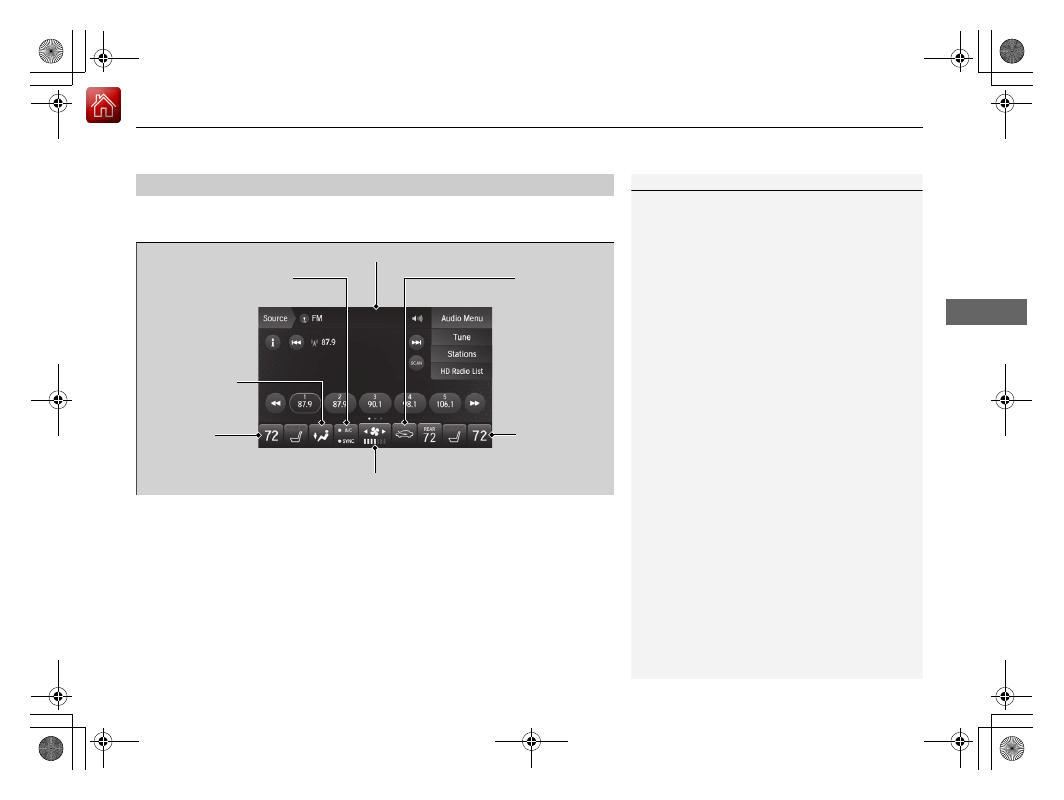
Operating from the On Demand Multi-Use Display

TM

1

Using Automatic Climate Control

When you unlock the doors with your remote, the 
driver’s ID (

Driver 1

 or 

Driver 2

) is detected, and the 

climate control settings are turned to the respective 
mode automatically when you set the power mode to 
ON.

On Demand Multi-Use Display

TM

A/C

 (Air Conditioning) and 

SYNC

 (Synchronization) 

Icon

Driver’s Side 

Temperature 

Control Icon

Recirculation/

Fresh Air mode 

Icon

Fan Control Icon

Passenger’s Side 

Temperature 

Control Icon

Vent Mode Icon

-------------------------------------------------------------------------------------------------------------------------------------------------------------

uu

Climate Control System

u

Using Automatic Climate Control

224

Co
ntrols

1.

Select the driver’s or passenger’s side 
temperature control icon.

2.

Change the temperature setting from the 
following:

Temperature bar: 

Select a point where your 

desired temperature setting is.
Farther to the left is for a lower, and to the 
right for a higher setting.

(

+

/

(

-

: To raise or lower the temperature 

setting one degree at a time.
While you select and hold 

(

+

/

(

-

, the 

temperature decreases or increases.

Max Cool: 

To rapidly cool down the interior.

u

The A/C indicator comes on. The setting 
returns to the previously selected value 
when you select it again.

Max Heat: 

To rapidly warm up the interior.

u

The A/C indicator goes off. The setting 
returns to the previously selected value 
when you select it again.

Changing the Interior Temperature Setting

1

Using Automatic Climate Control

If you select the 

Max Heat

 during Auto Engine Stop, 

the engine restarts automatically.

The side you selected.

Temperature Bar

-------------------------------------------------------------------------------------------------------------------------------------------------------------

Continued

225

uu

Climate Control System

u

Using Automatic Climate Control

Co
ntrols

Switching the vent mode

Select a desired vent mode icon, or 

Front 

Mode Auto

: The system automatically selects 

the vent mode most suitable to the ambient 
environment.

Vent mode

: Dashboard vents
: Dashboard and floor vents
: Floor vents
: Floor and defroster vents

A/C on and off

1.

Select 

A/C

.

2.

Select 

On

 or 

Off

.

1

Switching the vent mode

While the climate control system is in auto, 

Front 

Mode Auto

 is highlighted.

-------------------------------------------------------------------------------------------------------------------------------------------------------------

uu

Climate Control System

u

Using Automatic Climate Control

226

Co
ntrols

SYNC on and off

1.

Select 

SYNC

.

2.

Select 

On

 for synchronization mode.

u

When in synchronization mode, the front 
passenger’s side temperature and the 
rear passenger compartment become 
the same as the driver’s side settings.

3.

Adjust the temperature or change the 
mode from the driver’s side.

Changing the fan speed

1.

Select .

u

When the left or right side of the 


is selected, the fan speed level goes up or 
down one level at a time.

2.

Change the fan speed with one of the 
following:
The fan speed level indicators: Select your 
desired speed level. The smaller indicator is 
for a slower speed, and the larger for a 
faster speed.

(

+

/

(

-

: To go up or down one level at a 

time.

Front Fan AUTO

: The system automatically 

selects the fan speed most suitable to the 
ambient environment.

1

SYNC on and off

When you press the 

 button or select the 

Front


icon, the system synchronizes the driver’s and front 
passenger’s temperature settings.

When the system is not in SYNC mode, the driver's 
side temperature, the front passenger’s side 
temperature and the rear passenger compartment (if 
it is on) can be set separately.

You can also turn off SYNC mode by changing the 
front passenger’s side temperature or rear 
passenger’s temperature.

1

Changing the fan speed

While the climate control system is in auto, 

Front 

Fan AUTO

 is highlighted.

Fan Speed Level Indicators

-------------------------------------------------------------------------------------------------------------------------------------------------------------

227

uu

Climate Control System

u

Using Automatic Climate Control

Continued

Co
ntrols

Select 

 or 

 currently shown to 

switch between the modes depending on 
environmental conditions.

u

Selecting  

or  

currently shown 

changes the display to the 

Fresh Air/

Recirculation

 display. You can also 

switch the mode by selecting 

 or 

 icon appearing in the display.

 (Recirculation Mode): Recirculates air 

from the vehicle’s interior through the system.

 (Fresh Air Mode): Maintains outside 

ventilation. Keep the system in fresh air mode 
in normal situations.

Switching between the Recirculation and Fresh Air Modes

-------------------------------------------------------------------------------------------------------------------------------------------------------------

uu

Climate Control System

u

Using Automatic Climate Control

228

Co
ntrols

Pressing the 

 button or selecting the 

Front


 icon appearing after the vent mode icon is 

selected turns the air conditioning system on 
and automatically switches the system to fresh 
air mode.

Press the 

 button or select the 

Front


icon again to turn off, the system returns to 
the previous settings.

To rapidly defrost the windows

1.

Press the 

 button, or select the vent 

mode icon and then the 

Front


icon.

2.

Select the recirculation mode.

2

Switching between the Recirculation 
and Fresh Air Modes

 P. 227

Defrosting the Windshield and Windows

1

Defrosting the Windshield and Windows

For your safety, make sure you have a clear view 
through all the windows before driving.

Do not set the temperature near the upper or lower 
limit.
When cold air hits the windshield, the outside of the 
windshield may fog up.

If the side windows fog up, adjust the vents so that 
the air hits the side windows.

1

To rapidly defrost the windows

After defrosting the windows, switch over to fresh air 
mode.
If you keep the system in recirculation mode, the 
windows may fog up from humidity. This impedes 
visibility.

-------------------------------------------------------------------------------------------------------------------------------------------------------------

229

uu

Climate Control System

u

Rear Climate Control System

Continued

Co
ntrols

Rear Climate Control System

Use the system when the power system is on.

1.

Select 

REAR

.

2.

Select 

Auto

.

u

The rear system changes to auto mode.

3.

Adjust the rear passenger’s compartment temperature using the temperature 
control icon.

4.

Select the 

On/Off

 to cancel.

u

When the turned back on, the system returns to your last selection.

Using the Rear Climate Control System From the Front Panel

1

Rear Climate Control System

If any icons on the touch screen are pressed while 
using the rear climate control system in auto, the 
function of the icon that was pressed will take 
priority.

Rear Lock: 

Appears on the front panel. When 

selected, it disables the rear panel control.

LOCK: 

Appears on the rear control panel while the 

rear lock is on.

If the rear lock is on while in SYNC mode, the rear 
control panel is disabled. 

LOCK SYNC

 appears on the 

rear control panel.

On Demand Multi-Use Display

TM

(

+

/

(

-

 (Temperature Control) 

Icon

On/Off

 Icon

Auto

 Icon

Vent Mode Icon

Fan Speed Level 

Indicators

Rear Lock

 Icon

-------------------------------------------------------------------------------------------------------------------------------------------------------------

uu

Climate Control System

u

Rear Climate Control System

230

Co
ntrols

Changing the rear temperature setting

Change the temperature setting from the 
following:

(

+

/

(

-

: To raise or lower the temperature 

setting one degree at a time.
While you select and hold 

(

+

/

(

-

, the 

temperature decreases or increases.

Switching the vent mode

Select a desired vent mode icon.

Vent mode

: Rear console vents
: Rear console vents and floor vents
: Rear floor vents

1

Changing the rear temperature setting

When you set the temperature to the lower or upper 
limit, 

Lo

 or 

Hi

 is displayed.

(

+

/

(

-

 (Temperature Control) Icon

Vent Mode Icon

-------------------------------------------------------------------------------------------------------------------------------------------------------------

231

uu

Climate Control System

u

Rear Climate Control System

Continued

Co
ntrols

Changing the fan speed

Change the fan speed with one of the 
following:
The fan speed level indicators: Select your 
desired speed level. The smaller indicator is for 
a slower speed, and the larger for a faster 
speed.

(

+

/

(

-

: To go up or down one level at a time.

Fan Speed Level Indicators

-------------------------------------------------------------------------------------------------------------------------------------------------------------

uu

Climate Control System

u

Rear Climate Control System

232

Co
ntrols

Use the system when the power system is on.

1.

Press the 

AUTO

 button.

2.

Adjust the interior temperature using the rear temperature control button.

3.

To turn off the rear climate control system, press 

 button.

Using the Rear Climate Control System From the Rear Panel

1

Using the Rear Climate Control System From the Rear Panel

When the 

Rear Lock

 icon on the front control panel 

is off, the temperature of the rear passenger 
compartment can be controlled independently.

Rear floor 

vents

Rear console 

vents and 

floor vents

Rear console 

vents

 / 


(Fan Control) 
Buttons

 (On/Off) Button

Rear Temperature 

Control Buttons

AUTO

 Button

-------------------------------------------------------------------------------------------------------------------------------------------------------------

233

uu

Climate Control System

u

Automatic Climate Control Sensors

Co
ntrols

Automatic Climate Control Sensors

The automatic climate control system is 
equipped with sensors. Do not cover or spill 
any liquid on them.

Sensor

Sensor

-------------------------------------------------------------------------------------------------------------------------------------------------------------

235

Features

This chapter describes how to operate technology features.

Audio System

About Your Audio System................ 236
USB Ports ......................................... 237
Auxiliary Input Jack .......................... 240
Audio System Theft Protection ......... 240
Audio Remote Controls.................... 241

Audio System Basic Operation

........ 243

On Demand Multi-Use Display

TM

....... 244

Information Screen .......................... 248
Adjusting the Sound ........................ 256
Display Setup ................................... 257
Voice Control Operation .................. 258

Playing AM/FM Radio....................... 261
Playing SiriusXM

®

 Radio ................... 264

Playing a CD .................................... 275
Playing Hard Disk Drive (HDD) Audio ... 278
Playing an iPod ................................ 291
Song By Voice

TM

 (SBV)...................... 294

Playing Pandora

®

*1

........................... 298

Playing a USB Flash Drive ................. 300
Playing 

Bluetooth

®

 Audio................. 303

Siri Eyes Free .................................... 305
Apple CarPlay .................................. 306
Android Auto................................... 310

Audio Error Messages

...................... 315

General Information on the Audio 

System

............................................. 323

Rear Entertainment System (RES)

*

.. 342

Customized Features

........................ 362

HomeLink

®

 Universal Transceiver

... 394

Bluetooth

®

 HandsFreeLink

®

Using HFL ........................................ 397
HFL Menus ...................................... 400

AcuraLink

®

........................................ 438

*1: Available only on U.S. models.

* Not available on all models

-------------------------------------------------------------------------------------------------------------------------------------------------------------

236

Features

Audio System

About Your Audio System

The audio system features AM/FM radio and SiriusXM

®

 Radio service. It can also play 

audio CDs, WMA/MP3/AAC files, Hard Disk Drive (HDD) audio, USB flash drives, and 
iPod, iPhone and 

Bluetooth

®

 devices.

You can operate the audio system from the remote controls on the steering wheel, 
or the icons on the On Demand Multi-Use Display

TM

.

1

About Your Audio System

SiriusXM

®

 Radio is available on a subscription basis 

only. For more information on SiriusXM

®

 Radio, 

contact a dealer.

2

General Information on the Audio System


P. 323

SiriusXM

®

 Radio is available in the United States and 

Canada, except Hawaii, Alaska, and Puerto Rico.

SiriusXM

®

 is a registered trademark of SiriusXM 

Radio, Inc.

Video CDs, DVDs

*

, and 3-inch (8-cm) mini CDs are 

not supported.

iPod, iPhone and iTunes are trademarks of Apple Inc.

State or local laws may prohibit the operation of 
handheld electronic devices while operating a 
vehicle.

When the screen is viewed through polarized 
sunglasses, a rainbow pattern may appear on the 
screen due to optical characteristics of the screen. If 
this is disturbing, please operate the screen without 
polarized sunglasses.

Remote Controls

iPod

USB Flash 

Drive

* Not available on all models

-------------------------------------------------------------------------------------------------------------------------------------------------------------

237

uu

Audio System

u

USB Ports

Continued

Features

USB Ports

In the front console compartment

Install the device USB connector or the USB 
flash drive to the USB port 

 (2.5A).

u

The USB port 

 (2.5A) is for charging 

devices, playing audio files and 
connecting compatible phones with 
Apple CarPlay or Android Auto.

u

To prevent any potential issues, be sure 
to use an Apple MFi Certified Lightning 
Connector for Apple CarPlay, and for 
Android Auto, the USB cables should be 
certified by USB-IF to be compliant with 
USB 2.0 Standard.

The USB ports 

 (2.5A) are only for charging 

devices.

1

USB Ports

Do not leave the iPod or USB flash drive in the 
vehicle. Direct sunlight and high temperatures may 
damage it.

We recommend that you use a USB cable if you are 
attaching a USB flash drive to the USB port.

Do not connect the iPod or USB flash drive using a 
hub.

Do not use a device such as a card reader or hard 
disk drive, as the device or your files may be 
damaged.

We recommend keeping your data backed up 
before using the device in your vehicle.

Displayed messages may vary depending on the 
device model and software version.

The USB port can supply up to 2.5A of power. It does 
not output 2.5A unless requested by the device.
For amperage details, read the operating manual of 
the device that needs to be charged.

USB charge

USB Port 

 (2.5A)

USB Ports 

 (2.5A)

-------------------------------------------------------------------------------------------------------------------------------------------------------------

uu

Audio System

u

USB Ports

238

Features

On the back of the front console 
compartment

The USB ports 

 (2.5A) are only for charging 

devices.

1

USB Ports

These ports are for battery charge only. You cannot 
play music even if you have connected a music player 
to it.

Under certain conditions, a device connected to the 
port may generate noise in the radio you are listening 
to.

USB Ports 

 (2.5A)

Models without rear console compartment

Models without rear entertainment 

system

Models with rear entertainment 

system

-------------------------------------------------------------------------------------------------------------------------------------------------------------

239

uu

Audio System

u

USB Ports

Features

In the rear console compartment

The USB ports 

 (2.5A) are only for charging 

devices.

On the back of the rear console 
compartment

The USB ports 

 (2.5A) are only for charging 

devices.

Models with rear console compartment

-------------------------------------------------------------------------------------------------------------------------------------------------------------


Content      ..     12      13      14      15     ..