Acura MDX (2020 year). Manual in english - page 8
 

  Index      Manuals     Acura MDX (2020 year). Manual in english


Search            copyright infringement  


Content      ..     6      7      8      9     ..


Acura MDX (2020 year). Manual in english - page 8


uu

Gauges and Multi-Information Display (MID)

u

MID

124

In

strum

e

nt Pa

nel

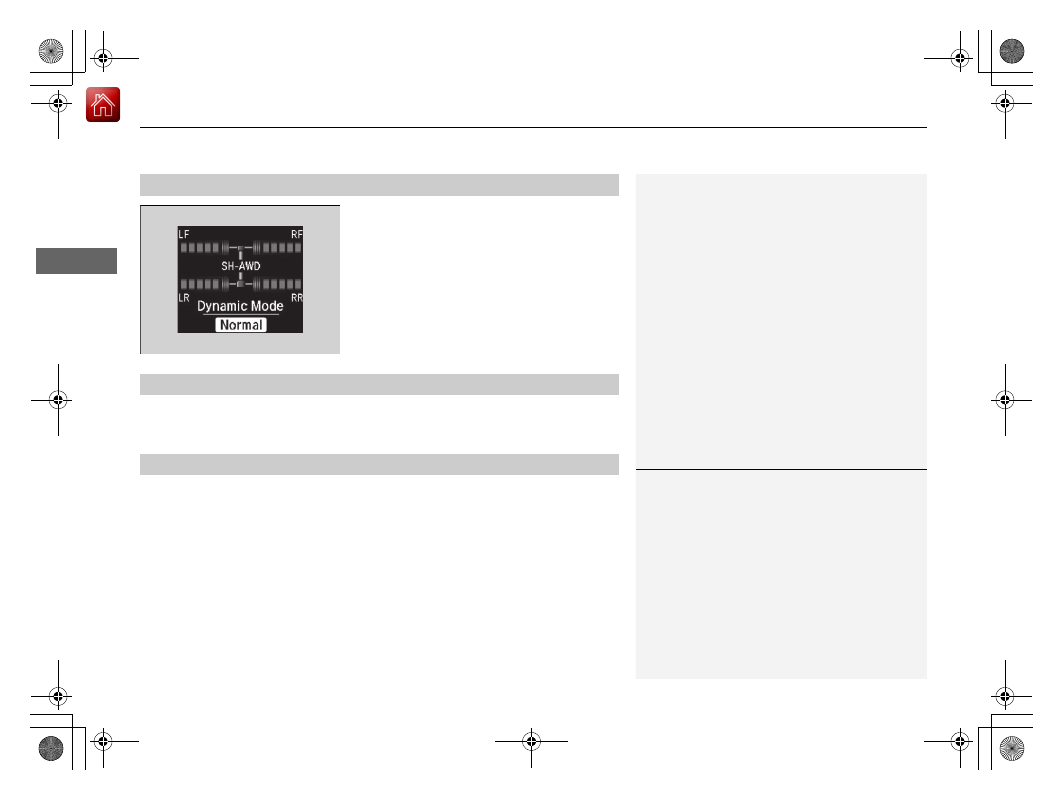
The indicators on the display show the 
amount of torque being transferred to the 
right front, left front, right rear, and left rear 
wheels.

2

Super Handling-All Wheel Drive

TM

 (SH-

AWD

®

)

*

 P. 521

Shows the current mode for Dynamic Mode.

2

Integrated Dynamics System

 P. 486

Compass

Shows the compass screen.

Turn-by-Turn Directions

When driving guidance is provided by the navigation system

*

 or Android Auto, turn-

by-turn directions to your destination appear.

2

Refer to the Navigation System Manual

2

Android Auto

 P. 303

SH-AWD

®

 Torque Distribution Monitor

*

Current Mode for Dynamic Mode

Navigation

1

Navigation

You can select whether the turn-by-turn display 
comes on or not during the route guidance.

2

Customized Features

 P. 126, 358

* Not available on all models

-------------------------------------------------------------------------------------------------------------------------------------------------------------

125

uu

Gauges and Multi-Information Display (MID)

u

MID

Continued

In

strum

e

nt Pa

nel

Shows the remaining oil life and Maintenance Minder

TM

.

2

Maintenance Minder

TM

 P. 577

Shows each tire’s pressure.

2

Tire Pressure Monitoring System (TPMS) with Tire Fill Assist

 P. 522

Engine Oil Life and Maintenance Items

Tire Pressure Monitor

-------------------------------------------------------------------------------------------------------------------------------------------------------------

uu

Gauges and Multi-Information Display (MID)

u

MID

126

In

strum

e

nt Pa

nel

Use the MID to customize certain features.

How to customize

Select the 

Vehicle Settings

 screen by rolling the multi-function steering-wheel 

controls while the power mode is in ON, and the vehicle is at a complete stop. Push 
the multi-function steering-wheel controls.

Customized Features

1

Customized Features

To customize other features, roll the multi-function 
steering-wheel controls.

2

List of customizable options

 P. 129

2

Example of customization settings

 P. 134

Customization is possible when you see the driver’s 
ID (

Driver 1

 or 

Driver 2

) on the screen.

The driver’s ID indicates which remote transmitter 
you have used to unlock the driver’s door. The 
customized settings are recalled every time you 
unlock the driver’s door with that remote.

Put the transmission into 

(

P

 before you attempt to 

change any customized setting.

Customizing is also available from the information 
screen.
You cannot have 

Vehicle Settings

 displayed on the 

multi-information display while the information 
screen shows the same menu.

2

Customized Features

 P. 358

Multi-function Steering-
wheel Controls
Roll:

 Changes the 

customize menus and 
items.

Push:

 Enter the selected 

item.

MID: Goes to 

Vehicle Settings

.

-------------------------------------------------------------------------------------------------------------------------------------------------------------

127

uu

Gauges and Multi-Information Display (MID)

u

MID

Continued

In

strum

e

nt Pa

nel

Customization flow

Roll the multi-function steering-wheel controls to select 

Vehicle Settings

 and push the multi-function steering-wheel controls.

Vehicle Settings

“Trip A” Reset Timing

Language Selection

Adjust Outside Temp. Display

Memory Position Link

Door Unlock Mode

Driver Assist System Setup

Meter Setup

Driving Position Setup

Keyless Access Setup

“Trip B” Reset Timing

Forward Collision Warning Distance

ACC Forward Vehicle Detect Beep

ACC Display Speed Unit

Roll

Push

Roll

Lane Keeping Assist Suspend Beep

Blind Spot Info

*

Easy Entry/Exit

Roll

Roll

Walk Away Auto Lock

Roll

Push

Roll

Roll

Roll

Roll

Turn by Turn Display

*

Auto Engine Idle Stop Guidance Screens

Road Departure Mitigation Setting

Push

Push

Push

Push

Reverse Alert Tone

Remote Start System On/Off

*

Keyless Access Beep

Keyless Access Light Flash

* Not available on all models

-------------------------------------------------------------------------------------------------------------------------------------------------------------

128

uu

Gauges and Multi-Information Display (MID)

u

MID

In

strum

e

nt Pa

nel

Exit

Door Setup

Dynamic Mode Setup

Default All

Lighting Setup

Key And Remote Unlock Mode

Auto Door Lock

Auto Door Unlock

Keyless Lock Answer Back

Auto Folding Door Mirror

*

Interior Light Dimming Time

Headlight Auto Off Timer

Auto Light Sensitivity

*

Roll

Push

Push

Roll

Roll

Roll

Roll

Roll

Roll

Power Tailgate Setup

Push

Power Open By Outer Handle

Keyless Open Mode

Push

Maintenance Info.

Roll

Push

Preferred Dynamic Mode

Roll

Roll

Roll

Push

Maintenance Reset

Security Relock Timer

* Not available on all models

-------------------------------------------------------------------------------------------------------------------------------------------------------------

129

uu

Gauges and Multi-Information Display (MID)

u

MID

Continued

In

strum

e

nt Pa

nel

List of customizable options

*1:Default Setting

Setup Group

Customizable Features

Description

Selectable Settings

Driver Assist 
System Setup

Forward Collision 
Warning Distance

Changes at which distance forward collision 
warning alerts.

Long

/

Normal

*1

/

Short

ACC Forward Vehicle 
Detect Beep

Causes the system to beep when the system detects 
a vehicle, or when the vehicle goes out of the ACC 
with Low Speed Follow range.

On

/

Off

*1

ACC Display Speed Unit

Changes the speed unit for ACC with Low Speed 
Follow on the MID.

mph

*1

/

km/h

 (U.S.)

mph

/

km/h

*1

 (Canada)

Road Departure 
Mitigation Setting

Changes the setting for the road departure 
mitigation system.

Normal

*1

/

Wide

/

Warning 

Only

Lane Keeping Assist 
Suspend Beep

Causes the system to beep when the LKAS is 
suspended.

On

/

Off

*1

Blind Spot Info

*

Changes the setting for the blind spot information.

Audible And Visual Alert

*1

/

Visual Alert

/

Off

* Not available on all models

-------------------------------------------------------------------------------------------------------------------------------------------------------------

130

uu

Gauges and Multi-Information Display (MID)

u

MID

In

strum

e

nt Pa

nel

*1:Default Setting

Setup Group

Customizable Features

Description

Selectable Settings

Meter Setup

Language Selection

Changes the displayed language.

English

*1

/

Français

/

Español

Adjust Outside Temp. 
Display

Adjusts the temperature reading by a few degrees.

-5°F

 ~ 

±0°F

*1

 ~ 

+5°F

 (U.S.)

-3°C

 ~ 

±0°C

*1

 ~ 

+3°C

 (Canada)

“Trip A” Reset Timing

Changes the setting of how to reset trip meter A, 
average fuel economy A, average speed A, and 
elapsed time A.

When Refueled

/

IGN Off

/

Manually Reset

*1

“Trip B” Reset Timing

Changes the setting of how to reset trip meter B, 
average fuel economy B, average speed B, and 
elapsed time B.

When Refueled

/

IGN Off

/

Manually Reset

*1

Reverse Alert Tone

Causes the beeper to sound once when the change 
the gear position to 

(

R

.

On

*1

/

Off

Auto Engine Idle Stop 
Guidance Screens

Selects whether the Auto Idle Stop guidance screens 
comes on.

On

/

Off

*1

Turn by Turn Display

*

Select whether the turn-by-turn display comes on 
during the route guidance.

On

*1

/

Off

* Not available on all models

-------------------------------------------------------------------------------------------------------------------------------------------------------------

131

uu

Gauges and Multi-Information Display (MID)

u

MID

Continued

In

strum

e

nt Pa

nel

*1: Default Setting

Setup Group

Customizable Features

Description

Selectable Settings

Driving 
Position 
Setup

Memory Position Link

Turns the driving position memory system on and 
off.

On

*1

/

Off

Easy Entry/Exit

Moves the seat rearward and steering wheel fully up 
when you get in/get out of the vehicle. Changes the 
setting for this feature.

Seat & Steering Wheel

*1

/

Seat Only

/

Steering Wheel 

Only

/

Off

Keyless 
Access Setup

Door Unlock Mode

Changes which doors unlock when you grab the 
driver’s door handle.

Driver’s Door or Tailgate 
Only

*1

/

All Doors

Keyless Access Light 
Flash

Causes some exterior lights to flash when you 
unlock/lock the doors.

On

*1

/

Off

Keyless Access Beep

Causes the beeper to sound when you unlock/lock 
the doors.

On

*1

/

Off

Remote Start System 
On/Off

*

Turns the remote engine start feature on and off.

On

*1

/

Off

Walk Away Auto Lock

Changes the settings for the automatic locking the 
doors when you walk away from the vehicle while 
carrying the keyless access remote.

On

/

Off

*1

* Not available on all models

-------------------------------------------------------------------------------------------------------------------------------------------------------------

132

uu

Gauges and Multi-Information Display (MID)

u

MID

In

strum

e

nt Pa

nel

*1: Default Setting

Setup Group

Customizable Features

Description

Selectable Settings

Lighting 
Setup

Interior Light Dimming 
Time

Changes the length of time the interior lights stay 
on after you close the doors.

60sec

/

30sec

*1

/

15sec

Headlight Auto Off 
Timer

Changes the length of time the exterior lights stay 
on after you close the driver’s door.

60sec

/

30sec

/

15sec

*1

/

0sec

Auto Light Sensitivity

*

Changes the timing for the headlights to come on.

Max

/

High

/

Mid

*1

/

Low

/

Min

Door Setup

Auto Door Lock

Changes the setting for when the doors 
automatically lock.

With Vehicle Speed

*1

/

Shift 

From P

/

Off

Auto Door Unlock

Changes the setting for when the doors 
automatically unlock.

All Doors When Driver’s 
Door Opens

*1

/

All Doors 

When Shifted To Park

/

All 

Doors When Ignition 
Switched Off/Off

Key And Remote Unlock 
Mode

Sets up either the driver’s door or all doors to unlock 
on the first operation of the remote or built-in key.

Driver Door

*1

/

All Doors

Keyless Lock Answer 
Back

LOCK/UNLOCK- The exterior lights flash.
LOCK (2nd push)- The beeper sounds.

On

*1

/

Off

Security Relock Timer

Changes the time it takes for the doors to relock and 
the security system to set after you unlock the 
vehicle without opening any door.

90sec

/

60sec

/

30sec

*1

Auto Folding Door 
Mirror

*

Changes how you can fold the door mirrors.

Auto Fold With Keyless

*1

/

Manual Only

* Not available on all models

-------------------------------------------------------------------------------------------------------------------------------------------------------------

133

uu

Gauges and Multi-Information Display (MID)

u

MID

Continued

In

strum

e

nt Pa

nel

*1: Default Setting

Setup Group

Customizable Features

Description

Selectable Settings

Power 
Tailgate Setup

Keyless Open Mode

Changes the keyless setting for when the power 
tailgate opens.

Anytime

*1

/

When Unlocked

Power Open By Outer 
Handle

Changes the setting to open power tailgate by 
tailgate outer handle.

Off (Manual Only)

/

On 

(Power/Manual)

*1

Dynamic 
Mode Setup

Preferred Dynamic 
Mode

Changes the Dynamic Mode setting for when you 
set the power mode to ON.

Last Used

*1

/

Comfort

/

Normal

/

Sport

Maintenance 
Info.

Maintenance Reset

Resets/Cancels the engine oil life display when you 
have performed the maintenance service. 

Cancel

/

Reset

Default All

Cancels/Resets all the customized settings as 
default.

Cancel

/

Set

-------------------------------------------------------------------------------------------------------------------------------------------------------------

134

uu

Gauges and Multi-Information Display (MID)

u

MID

In

strum

e

nt Pa

nel

Example of customization settings

The steps for changing the 

“Trip A” Reset Timing

 setting to 

When Refueled

 are 

shown below. The default setting for 

“Trip A” Reset Timing

 is 

Manually Reset

.

1.

Roll the multi-function steering-wheel 
controls to select 

Vehicle Settings

, then 

push the multi-function steering-wheel 
controls. 

2.

Roll the multi-function steering-wheel 
controls until 

Meter Setup

 appears on the 

display.

3.

Push the multi-function steering-wheel 
controls.

u

Language Selection

 appears first on 

the display.

-------------------------------------------------------------------------------------------------------------------------------------------------------------

135

uu

Gauges and Multi-Information Display (MID)

u

MID

In

strum

e

nt Pa

nel

4.

Roll the multi-function steering-wheel 
controls until 

“Trip A” Reset Timing 

appears on the display, then push the multi-
function steering-wheel controls.

u

The display switches to the 
customization setup screen, where you 
can select 

When Refueled

IGN Off

Manually Reset

, or 

Exit

.

5.

Roll the multi-function steering-wheel 
controls and select 

When Refueled

, then 

push the multi-function steering-wheel 
controls.

u

The 

When Refueled Setup

 screen 

appears, then the display returns to the 
customization menu screen.

6.

Roll the multi-function steering-wheel 
controls until 

Exit

 appears on the display, 

then push the multi-function steering-
wheel controls.

7.

Repeat Step 6 until you return to the 
normal screen.

-------------------------------------------------------------------------------------------------------------------------------------------------------------

137

Controls

This chapter explains how to operate the various controls necessary for driving.

Clock

.................................................. 138

Locking and Unlocking the Doors

Key Types and Functions .................. 139
Low Keyless Access Remote Signal 

Strength......................................... 141

Locking/Unlocking the Doors from the 

Outside .......................................... 142

Locking/Unlocking the Doors from the 

Inside ............................................. 151

Childproof Door Locks ..................... 153
Auto Door Locking/Unlocking .......... 154

Tailgate

.............................................. 155

Security System

Immobilizer System .......................... 162
Security System Alarm...................... 162

Opening and Closing the Windows

... 165

Moonroof

.......................................... 167

Operating the Switches Around the 

Steering Wheel

ENGINE START/STOP Button............. 168
Turn Signals ..................................... 171
Light Switches.................................. 172
Fog Lights

*

...................................... 175

Daytime Running Lights ................... 175
Auto High-Beam .............................. 176
Wipers and Washers ........................ 179
Brightness Control ........................... 183
Rear Defogger/Heated Door Mirror Button ... 184
Driving Position Memory System ...... 185
Adjusting the Steering Wheel........... 187

Adjusting the Mirrors

Interior Rearview Mirror ................... 188
Power Door Mirrors ......................... 189

Adjusting the Seats

Front Seats ...................................... 191
Second Row Seats ........................... 194
Third Row Seats............................... 203
Armrest ........................................... 204

Interior Lights/Interior Convenience Items

Interior Lights .................................. 206
Interior Convenience Items .............. 208

Climate Control System

Using Automatic Climate Control .... 219
Rear Climate Control System ........... 226
Automatic Climate Control Sensors... 230

* Not available on all models

-------------------------------------------------------------------------------------------------------------------------------------------------------------

138

Co
ntrols

Clock

Adjusting the Clock

You can adjust the time manually in the information screen with the power mode in 
ON.

Using the Settings menu on the information screen

1.

Press the 

SETTINGS

 button.

2.

Rotate 

 to select 

Clock Settings

, then 

press .

u

Repeat the procedure to select 

Clock 

Adjustment

.

3.

Rotate 

 to change hour, then move 

.

4.

Rotate 

 to change minute, then press 

.

Adjusting the Time

1

Clock

These indications are used to show how to operate 
the interface dial.
Rotate 

 to select.

Press  

to 

enter.

Move 

 to select a secondary menu.

You can customize the clock display to show the 12 
hour clock or 24 hour clock.

2

Customized Features

 P. 358

You can turn the clock display in the information 
screen on and off.

2

Customized Features

 P. 358

You cannot adjust the time while the vehicle is 
moving.

The clock is automatically updated through the 
navigation system, so the time does not need to be 
adjusted.

Except Canadian models

Models with navigation system

Models without navigation system

-------------------------------------------------------------------------------------------------------------------------------------------------------------

139

Continued

Co
ntrols

Locking and Unlocking the Doors

Key Types and Functions

This vehicle comes with the following keys:

Use the keys to start and stop the engine, and 
to lock and unlock all the doors and tailgate. 
You can also use the keyless access system to 
lock and unlock all the doors and tailgate.

1

Key Types and Functions

All the keys have an immobilizer system. The 
immobilizer system helps to protect against vehicle 
theft.

2

Immobilizer System

 P. 162

Follow the advice below to prevent damage to the 
keys:

Do not leave the keys in direct sunlight, or in 
locations with high temperature or high humidity.

Do not drop the keys or set heavy objects on them.

Keep the keys away from liquids, dust and sand.

Do not take the keys apart except for replacing the 
battery.

If the circuits in the keys are damaged, the engine 
may not start, and the keyless access system may not 
work.
If the keys do not work properly, have them 
inspected by a dealer.

You can remotely start the engine using the two-way 
keyless access remote.

2

Remote Engine Start with Vehicle 
Feedback

*

 P. 466

Models with two-way keyless access remote

Models with two-way keyless 
access remote

Models without two-way keyless 
access remote

* Not available on all models

-------------------------------------------------------------------------------------------------------------------------------------------------------------

140

uu

Locking and Unlocking the Doors

u

Key Types and Functions

Co
ntrols

The built-in key can be used to lock/unlock the 
doors when the keyless access remote battery 
becomes weak and the power door lock/
unlock operation is disabled.

To remove the built-in key, slide the release 
knob and then pull out the key. To reinstall 
the built-in key, push the built-in key into the 
keyless access remote until it clicks.

Built-in Key

Built-in Key

Release Knob

Models with two-way keyless 
access remote

Release Knob

Built-in Key

Models without two-way keyless 
access remote

-------------------------------------------------------------------------------------------------------------------------------------------------------------


Content      ..     6      7      8      9     ..