Acura RDX (2019 year). Manual - part 33
 

  Index      Acura     Acura RDX (2019 year) - manual in english


Search            copyright infringement  


Content      ..     31      32      33      34     ..


Acura RDX (2019 year). Manual - part 33


517

uu

Refueling

u

How to Refuel

Driving

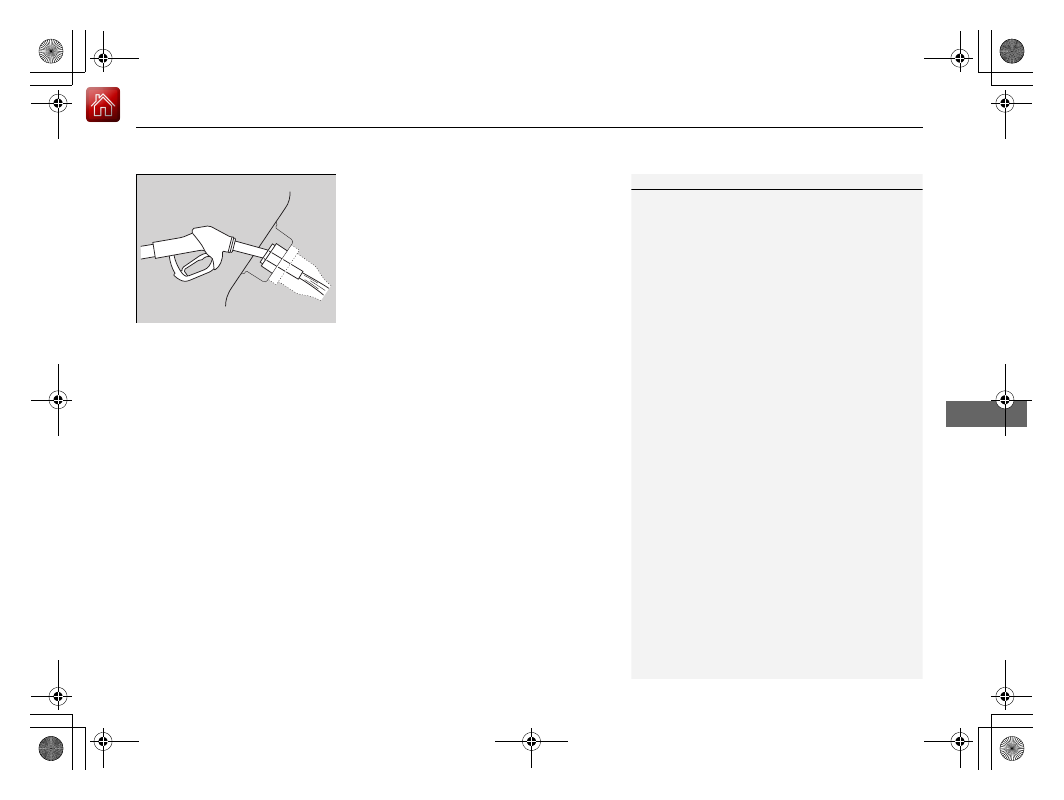
5. Place the end of the filler nozzle on the 

lower part of filler opening, then insert it 
slowly and fully.

u

Make sure that the end of the filler 
nozzle goes down along with the filler 
pipe.

u

Keep the filler nozzle level.

u

When the tank is full, the filler nozzle will 
click off automatically.

u

After filling, wait about five seconds 
before removing the filler nozzle.

6. Shut the fuel fill door by hand.

1

How to Refuel

If the filler nozzle keeps turning off when the tank is 
not full, there may be a problem with the pump’s fuel 
vapor recovery system. Try filling at another pump. If 
this does not fix the problem, consult a dealer.

Do not continue to add fuel after the filler nozzle has 
automatically stopped. Additional fuel can exceed 
the full tank capacity.

The filler nozzle automatically stops to leave space in 
the fuel tank so that fuel does not overflow as a result 
of changes in air temperature.

If you have to refuel your vehicle from a portable 
container, use the funnel provided with your vehicle.

Refueling From a Portable Fuel Container 

P. 625

19 ACURA RDX-31TJB6000.book  517 ページ  2018年4月26日 木曜日 午後4時51分

-------------------------------------------------------------------------------------------------------------------------------------------------------------

518

Driving

Fuel Economy and CO

2

 Emissions

Improving Fuel Economy and Reducing CO

2

 Emissions

Achieving fuel economy and reducing CO

2

 emissions is dependent on several 

factors, including driving conditions, load weight, idling time, driving habits, and 
vehicle condition. Depending on these and other factors, you may not achieve the 
rated fuel economy of this vehicle.

You can optimize your fuel economy with proper maintenance of your vehicle. 
Always maintain your vehicle in accordance with the messages displayed on the 
multi-information display.
• Use the recommended viscosity engine oil.

Recommended Engine Oil P. 535

• Maintain the specified tire pressure.
• Do not load the vehicle with excess cargo.
• Keep your vehicle clean. A buildup of snow or mud on your vehicle’s underside 

adds weight and increases wind resistance.

Maintenance and Fuel Economy

1

Improving Fuel Economy and Reducing CO

2

 Emissions

Direct calculation is the recommended method to 
determine actual fuel consumed while driving.

In Canada, posted fuel economy numbers are 
established following a simulated test. For more 
information on how this test is performed, please visit 
http://oee.nrcan.gc.ca/

Miles driven

Gallons of 

fuel

Miles per 

Gallon

100

Liter

Kilometers

L per 100 km

19 ACURA RDX-31TJB6000.book  518 ページ  2018年4月26日 木曜日 午後4時51分

-------------------------------------------------------------------------------------------------------------------------------------------------------------

519

Driving

Turbo Engine Vehicle

Handling Precautions

The turbocharger is a high-precision device to obtain greater horsepower by 
delivering a large volume of compressed air into the engine using a turbine driven by 
the engine’s exhaust gas pressure.

• When the engine is cold just after starting, avoid revving the engine or sudden 

acceleration.

• Always replace the engine oil and engine oil filter according to the Maintenance 

Minder. The turbine rotates at very high speeds over 100,000 rpm and its 
temperature reaches over 1,292°F (700°C). It is lubricated and cooled by engine 
oil. If you fail to replace the engine oil and filter at the scheduled distance or 
interval, deteriorated engine oil may cause failure such as sticking and abnormal 
noise of the turbine bearing.

1

Turbo Engine Vehicle

The scheduled maintenance intervals for replacing 
the filter is indicated on the multi-information 
display. Follow the information of when to replace 
them.

Maintenance Minder

TM

 P. 525

The temperature gauge pointer is at the 

 mark 

when you restart the engine after driving under high 
load conditions such as at high speed or in hilly 
terrain. This is normal. The gauge goes down after 
you idle or drive the vehicle for about one minute.

H

19 ACURA RDX-31TJB6000.book  519 ページ  2018年4月26日 木曜日 午後4時51分

-------------------------------------------------------------------------------------------------------------------------------------------------------------

521

Maintenance

This chapter discusses basic maintenance.

Before Performing Maintenance

Inspection and Maintenance ............ 522
Safety When Performing Maintenance..523
Parts and Fluids Used in Maintenance 

Service ........................................... 524

Maintenance Minder

TM

..................... 525

Maintenance Under the Hood

Maintenance Items Under the Hood.. 532
Opening the Hood ........................... 533
Engine Compartment Cover............. 534
Recommended Engine Oil ................ 535
Oil Check ......................................... 536
Adding Engine Oil ............................ 537

Changing the Engine Oil and Oil Filter... 538
Engine Coolant ................................ 540
Transmission Fluid............................ 542
Brake Fluid....................................... 543
Refilling Window Washer Fluid......... 544

Replacing Light Bulbs ....................... 545

Checking and Maintaining Wiper 

Blades .......................................... 549

Checking and Maintaining Tires

Checking Tires ................................. 554
Tire and Loading Information Label .. 555
Tire Labeling .................................... 555
DOT Tire Quality Grading (U.S. Vehicles).. 557

Wear Indicators ............................... 559
Tire Service Life................................ 559
Tire and Wheel Replacement ........... 560
Tire Rotation.................................... 561
Winter Tires ..................................... 562

Battery............................................... 563
Remote Transmitter Care

Replacing the Button Battery ........... 565

Climate Control System Maintenance ..567
Cleaning

Interior Care .................................... 569
Exterior Care.................................... 571

Accessories and Modifications ........ 574

19 ACURA RDX-31TJB6000.book  521 ページ  2018年4月26日 木曜日 午後4時51分

-------------------------------------------------------------------------------------------------------------------------------------------------------------

522

Main

tenan

ce

Before Performing Maintenance

Inspection and Maintenance

For your safety, perform all listed inspections and maintenance to keep your vehicle 
in good condition. If you become aware of any abnormality (noise, smell, insufficient 
brake fluid, oil residue on the ground, etc.), have your vehicle inspected by a dealer. 
(Note, however, that service at a dealer is not mandatory to keep your warranties in 
effect.) Refer to the separate maintenance booklet for detailed maintenance and 
inspection information.

Daily inspections

Perform inspections before long distance trips, when washing the vehicle, or when 
refueling.

Periodic inspections

• Check the brake fluid level monthly.

Checking the Brake Fluid P. 543

• Check the tire pressure monthly. Examine the tread for wear and foreign objects.

Checking and Maintaining Tires P. 554

• Check the operation of the exterior lights monthly.

Replacing Light Bulbs P. 545

• Check the condition of the wiper blades at least every six months.

Checking and Maintaining Wiper Blades P. 549

Types of Inspection and Maintenance

1

Inspection and Maintenance

Maintenance, replacement, or repair of 
emissions control devices and systems may be 
done by any automotive repair establishment or 
individuals using parts that are “certified” to 
EPA standards.

According to state and federal regulations, failure to 
perform maintenance on the maintenance main 
items marked with # will not void your emissions 
warranties. However, all maintenance services should 
be performed in accordance with the intervals 
indicated by the multi-information display.

Maintenance Service Items P. 529

If you want to perform complex maintenance tasks 
that require more skills and tools, you can purchase a 
subscription to the Service Express website at 
www.techinfo.honda.com.

Authorized Manuals P. 638

If you want to perform maintenance yourself, make 
sure that you have the necessary tools and skills first.
After performing maintenance, update the records in 
the separate maintenance booklet.

U.S. models

19 ACURA RDX-31TJB6000.book  522 ページ  2018年4月26日 木曜日 午後4時51分

-------------------------------------------------------------------------------------------------------------------------------------------------------------

523

uu

Before Performing Maintenance

u

Safety When Performing Maintenance

Main

tenan

ce

Safety When Performing Maintenance

Some of the most important safety precautions are given here.
However, we cannot warn you of every conceivable hazard that can arise in 
performing maintenance. Only you can decide whether you should perform a given 
task.

• To reduce the possibility of fire or explosion, keep cigarettes, sparks, and flames 

away from the battery and all fuel related parts.

• Never leave rags, towels, or other flammable objects under the hood.

u

Heat from the engine and exhaust can ignite them, causing a fire.

• To clean parts, use a commercially available degreaser or parts cleaner, not 

gasoline.

• Wear eye protection and protective clothing when working with the battery or 

compressed air.

• Engine exhaust contains carbon monoxide, which is poisonous and can kill you.

u

Only operate the engine if there is sufficient ventilation.

• The vehicle must be in a stationary condition.

u

Make sure your vehicle is parked on level ground, the parking brake is set, and 
the engine is off.

• Be aware that hot parts can burn you.

u

Make sure to let the engine and exhaust system cool thoroughly before 
touching vehicle parts.

• Be aware that moving parts can injure you.

u

Do not start the engine unless instructed, and keep your hands and limbs away 
from moving parts.

u

Do not open the hood while the Auto Idle Stop function is activated.

Maintenance Safety

Vehicle Safety

1

Safety When Performing Maintenance

3

WARNING

Improperly maintaining this vehicle or 
failing to correct a problem before driving 
can cause a crash in which you can be 
seriously hurt or killed.

Always follow the inspection and 
maintenance recommendations according 
to the schedules in this owner’s manual.

3

WARNING

Failure to properly follow maintenance 
instructions and precautions can cause you 
to be seriously hurt or killed.

Always follow the procedures and 
precautions in this owner’s manual.

19 ACURA RDX-31TJB6000.book  523 ページ  2018年4月26日 木曜日 午後4時51分

-------------------------------------------------------------------------------------------------------------------------------------------------------------

524

uu

Before Performing Maintenance

u

Parts and Fluids Used in Maintenance Service

Main

tenan

ce

Parts and Fluids Used in Maintenance Service

The use of Acura genuine parts and fluids is recommended when maintaining and 
servicing your vehicle. Acura genuine parts are manufactured according to the same 
high quality standards used in Acura vehicles.

1

Parts and Fluids Used in Maintenance Service

NOTICE

Do not press the engine cover forcibly. This may 
damage the engine cover and component parts.

19 ACURA RDX-31TJB6000.book  524 ページ  2018年4月26日 木曜日 午後4時51分

-------------------------------------------------------------------------------------------------------------------------------------------------------------

525

Main

tenan

ce

Maintenance Minder

TM

If the engine oil life is less than 15%, you will see the Maintenance Minder messages 
appear on the multi-information display every time you set the power mode to ON. 
The messages notify you when to change the engine oil, or when to bring your 
vehicle to a dealer for indicated maintenance services.

19 ACURA RDX-31TJB6000.book  525 ページ  2018年4月26日 木曜日 午後4時51分

-------------------------------------------------------------------------------------------------------------------------------------------------------------

526

uu

Maintenance Minder

TM

u

To Use Maintenance Minder

TM

Main

tenan

ce

To Use Maintenance Minder

TM

Maintenance items, which should be serviced at the same time that you replace the 
engine oil, appear on the multi-information display.
You can view them on the engine oil life screen at any time.
1. Set the power mode to ON.
2. Press the right selector wheel until the content is displayed.
3. Roll the right selector wheel until the Maintenance screen is displayed. The 

engine oil life appears on the multi-information display along with maintenance 
items due soon.

Displaying the Maintenance Minder Information

1

Displaying the Maintenance Minder Information

Based on the engine operating conditions, the 
remaining engine oil life is calculated and displayed 
as a percentage.

There is a list of maintenance main and sub items you 
can view on the multi-information display.

Maintenance Service Items P. 529

Displayed Engine Oil 

Life (%)

Calculated Engine Oil 

Life (%)

100

100 to 91

90

90 to 81

80

80 to 71

70

70 to 61

60

60 to 51

50

50 to 41

40

40 to 31

30

30 to 21

20

20 to 16

15

15 to 11

10

10 to 6

5

5 to 1

0

0

Right Selector Wheel

Remaining Engine Oil Life

19 ACURA RDX-31TJB6000.book  526 ページ  2018年4月26日 木曜日 午後4時51分

-------------------------------------------------------------------------------------------------------------------------------------------------------------

527

uu

Maintenance Minder

TM

u

To Use Maintenance Minder

TM

Continued

Main

tenan

ce

Maintenance Minder Messages on the Multi-Information 
Display (MID)

Maintenance Message

Oil Life Display

Explanation

Information

When you select the Maintenance 
screen, it displays codes for 
maintenance items due at the next 
engine oil change, along with the 
percentage of engine oil life 
remaining.

Maintenance Due Soon

15%

The remaining engine oil life is 15 to 6 
percent. Once you switch the display 
by rolling the right selector wheel, this 
message will go off.

The engine oil is approaching the end 
of its service life, and the maintenance 
items should be inspected and serviced 
soon.

19 ACURA RDX-31TJB6000.book  527 ページ  2018年4月26日 木曜日 午後4時51分

-------------------------------------------------------------------------------------------------------------------------------------------------------------

528

uu

Maintenance Minder

TM

u

To Use Maintenance Minder

TM

Main

tenan

ce

The maintenance minder indicator ( ) comes on along with the Maintenance message.

Maintenance Message

Oil Life Display

Explanation

Information

Maintenance Due Now

5%

The remaining engine oil life is 5 to 1 
percent. Roll the right selector wheel 
to switch to another display.

The engine oil has almost reached the 
end of its service life, and the 
maintenance items should be 
inspected and serviced as soon as 
possible.

Maintenance Past Due

Negative Distance

The remaining engine oil life has 
passed its service life, and a negative 
distance appears after driving over 10 
miles (U.S. models) or 10 km 
(Canadian models). Roll the right 
selector wheel to switch to another 
display.

The engine oil life has passed.
The maintenance items must be 
inspected and serviced immediately.

19 ACURA RDX-31TJB6000.book  528 ページ  2018年4月26日 木曜日 午後4時51分

-------------------------------------------------------------------------------------------------------------------------------------------------------------

529

uu

Maintenance Minder

TM

u

To Use Maintenance Minder

TM

Continued

Main

tenan

ce

Maintenance Service Items

1

Maintenance Service Items

Adjust the valves during services A, B, 1, 2, or 3 if 
they are noisy.

Maintenance Minder Message

Main 
Item

Sub 
Items

Maintenance Minder Indicator

System Message Indicator

U.S. models

*1: If a Maintenance Minder Indicator and message does not appear more than 12 months after the 

display is reset, change the engine oil every year.

# : See information on maintenance and emissions warranty.
*2: If you drive in dusty conditions, replace the air cleaner element every 15,000 miles (24,000 km).

CODE

Maintenance Main Items

A

Replace engine oil

*1

B

Replace engine oil

*1

 and oil filter

Inspect front and rear brakes

Check expiration date for Temporary Tire Repair Kit bottle (If 
equipped)

Inspect tie rod ends, steering gearbox, and boots

Inspect suspension components

Inspect driveshaft boots

Inspect brake hoses and lines (Including ABS/VSA)

Inspect all fluid levels and condition of fluids

Inspect exhaust system

#

Inspect fuel lines and connections

#

*3: If you drive primarily in urban areas that have high concentrations of soot in the air from industry and 

from diesel-powered vehicles, replace the dust and pollen filter every 15,000 miles (24,000 km).

*4: Driving in mountainous areas at very low vehicle speeds or trailer towing results in higher level of 

mechanical (Shear) stress to fluid. This requires differential fluid changes more frequently than 
recommended by the Maintenance Minder. If you regularly drive your vehicle under these conditions, have 
the differential fluid changed at 7,500 miles (12,000 km), then every 15,000 miles (24,000 km).

*5: If a Maintenance Minder Indicator does not appear more than 36 months after the display for item 7 is 

reset, change the brake fluid every 3 years.

CODE

Maintenance Sub Items

1

Rotate tires

2

Replace air cleaner element

*2

Replace dust and pollen filter

*3

Inspect drive belt

3

Replace transmission fluid and transfer

*


fluid

4

Replace spark plugs

Inspect valve clearance

5

Replace engine coolant

6

Replace rear differential fluid

*4

7

Replace brake fluid

*5

* Not available on all models

19 ACURA RDX-31TJB6000.book  529 ページ  2018年4月26日 木曜日 午後4時51分

-------------------------------------------------------------------------------------------------------------------------------------------------------------

530

uu

Maintenance Minder

TM

u

To Use Maintenance Minder

TM

Main

tenan

ce

1

Maintenance Service Items

Adjust the valves during services A, 0, 9, 1, 2, or 3 
if they are noisy.

Canadian models

*1: If a Maintenance Minder Indicator and message does not appear more than 12 months after the 

display is reset, change the engine oil every year.

*2: If you drive in dusty conditions, replace every 24,000 km (15,000 miles).
*3: If you drive primarily in urban areas that have high concentrations of soot in the air from industry and 

from diesel-powered vehicles, replace every 24,000 km (15,000 miles).

*4: Driving in mountainous areas at very low vehicle speeds or trailer towing results in higher level of 

mechanical (Shear) stress to fluid. This requires differential fluid changes more frequently than 
recommended by the Maintenance Minder.
If you regularly drive your vehicle under these conditions, have the differential fluid changed at 12,000 
km (7,500 miles), then every 24,000 km (15,000 miles).

*5: If a Maintenance Minder Indicator does not appear more than 36 months after the display for item 7 is 

reset, change the brake fluid every 3 years.

# : See information on maintenance and emissions warranty.

CODE

Maintenance Main Items

A

Replace engine oil

*1

0

Replace engine oil

*1

 and oil filter

CODE

Maintenance Sub Items

1

Rotate tires

2

Replace air cleaner element

*2

Replace dust and pollen filter

*3

Inspect drive belt

3

Replace transmission fluid and transfer fluid

4

Replace spark plugs

Inspect valve clearance

5

Replace engine coolant

6

Replace rear differential fluid

*4

7

Replace brake fluid

*5

9

Service front and rear brakes

Inspect these items:

Tie rod ends, steering gearbox, and boots

Suspension components

Driveshaft boots

Brake hoses and lines (including ABS/VSA)

All fluid levels and condition of fluids

Exhaust system

#

Fuel lines and connections

#

19 ACURA RDX-31TJB6000.book  530 ページ  2018年4月26日 木曜日 午後4時51分

-------------------------------------------------------------------------------------------------------------------------------------------------------------

531

uu

Maintenance Minder

TM

u

To Use Maintenance Minder

TM

Main

tenan

ce

Reset the maintenance minder information display if you have performed the 
maintenance service.

1. Set the power mode to ON.
2. Press the right selector wheel until the content is displayed.
3. Roll the right selector wheel until the Maintenance screen is displayed.
4. Press and hold the right selector wheel for about 10 seconds to enter the reset mode.
5. Roll the right selector wheel to select a maintenance item to reset, or to select All 

Due Items (You can also press the right selector wheel to the left to end the 
process).

6. Press the right selector wheel to reset the selected item.
7. Repeat from step 4 for other items you wish to reset.

Resetting the Display

1

Resetting the Display

NOTICE

Failure to reset the Maintenance Minder

TM

 display 

after a maintenance service results in the system 
showing incorrect maintenance intervals, which can 
lead to serious mechanical problems.

The dealer will reset the Maintenance Minder

TM


display after completing the required maintenance 
service. If someone other than a dealer performs 
maintenance service, reset the Maintenance 
Minder

TM

 display yourself.

You can reset the Maintenance Minder

TM

 display 

using the audio/information screen.

Customized Features P. 332

Right Selector Wheel

19 ACURA RDX-31TJB6000.book  531 ページ  2018年4月26日 木曜日 午後4時51分

-------------------------------------------------------------------------------------------------------------------------------------------------------------

532

Main

tenan

ce

Maintenance Under the Hood

Maintenance Items Under the Hood

Brake Fluid 
(Black Cap)

Engine Coolant 
Reserve Tank

Radiator Cap

Washer Fluid 
(Black Cap)

Engine Oil Dipstick 
(Orange)

Engine Oil Fill Cap

Battery

19 ACURA RDX-31TJB6000.book  532 ページ  2018年4月26日 木曜日 午後4時51分

-------------------------------------------------------------------------------------------------------------------------------------------------------------

533

uu

Maintenance Under the Hood

u

Opening the Hood

Main

tenan

ce

Opening the Hood

1. Park the vehicle on a level surface, and set 

the parking brake.

2. Pull the hood release handle under the 

driver’s side lower corner of the dashboard.

u

The hood will pop up slightly.

3. Push the hood latch lever (located under 

the front edge of the hood to the center) to 
the side and raise the hood. Once you have 
raised the hood slightly, you can release the 
lever.

4. Lift the hood up most of the way.

u

The hydraulic supports will lift it up the 
rest of the way and hold it up.

When closing, lower it to approximately 
12 inches (30 cm), then press down firmly with 
your hands.

1

Opening the Hood

NOTICE

Do not open the hood when the wiper arms are 
raised. The hood will strike the wipers, resulting in 
possible damage to the hood and/or the wipers.

NOTICE

Do not press the engine cover forcibly. This may 
damage the engine cover and component parts.

When closing the hood, check that the hood is 
securely latched.

If the hood latch lever moves stiffly, or if you can 
open the hood without lifting the lever, the latch 
mechanism should be cleaned and lubricated.

Do not open the hood while the Auto Idle Stop 
function is activated.

Hood Release Handle

Pull

Lever

19 ACURA RDX-31TJB6000.book  533 ページ  2018年4月26日 木曜日 午後4時51分

-------------------------------------------------------------------------------------------------------------------------------------------------------------


Content      ..     31      32      33      34     ..