Acura RDX (2019 year). Manual - part 14
 

  Index      Acura     Acura RDX (2019 year) - manual in english


Search            copyright infringement  


Content      ..     12      13      14      15     ..


Acura RDX (2019 year). Manual - part 14


213

uu

Adjusting the Seats

u

Head Restraints

Continued

Co
ntrols

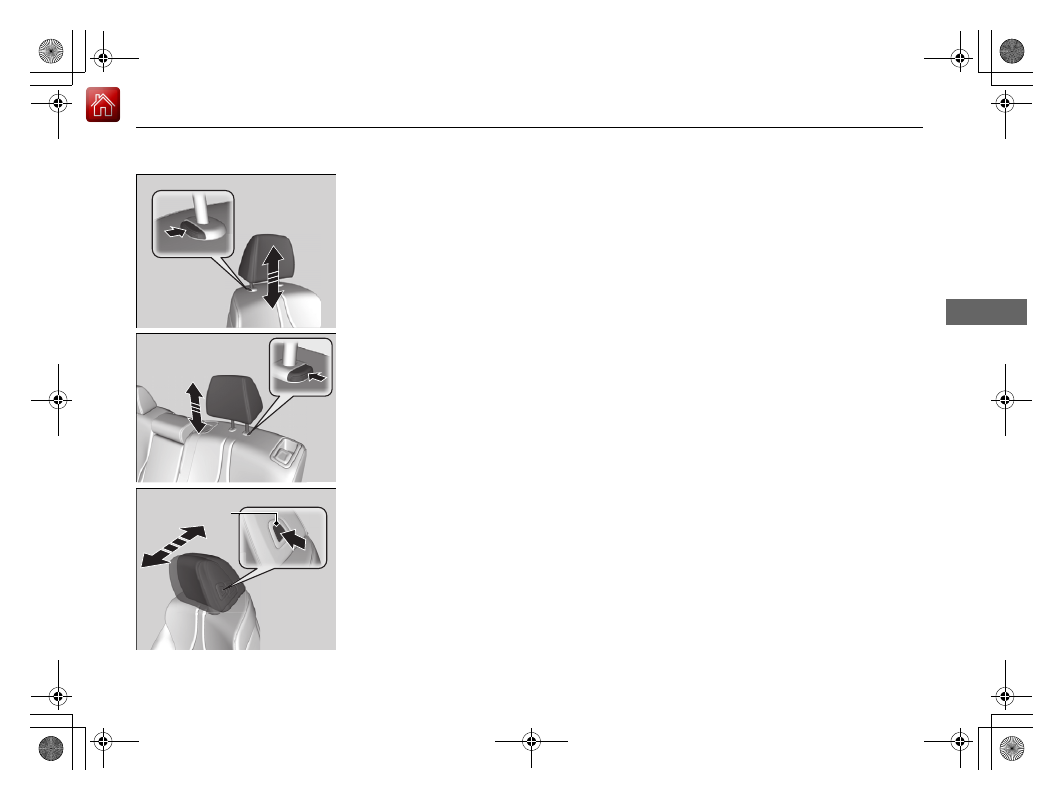
To raise the head restraint: Pull it upward.
To lower the head restraint: Push it down 
while pressing the release button.

To adjust the front head restraint 
forward: 
Push the back of it forward.
To return the front head restraint to the 
original position: 
Press the release button.

Front

Rear outer

Release Button

Front

19 ACURA RDX-31TJB6000.book  213 ページ  2018年4月26日 木曜日 午後4時51分

-------------------------------------------------------------------------------------------------------------------------------------------------------------

uu

Adjusting the Seats

u

Head Restraints

214

Co
ntrols

A passenger sitting in a center back seating 
position should adjust the height of their head 
restraint to an appropriate position before the 
vehicle begins moving.
To raise the head restraint:
Pull it upward.
To lower the head restraint:
Push it down while pressing the release 
button.

Head restraints can be removed for cleaning or repair.

To remove a head restraint:
Pull the restraint up as far as it will go. Then push the release button, and pull the 
restraint up and out.

To reinstall a head restraint:
Insert the legs back in place, then adjust the head restraint to an appropriate height 
while pressing the release button. Pull up on the restraint to make sure it is locked 
in position.

Changing the Rear Center Seat Head Restraint Position

Removing and Reinstalling the Head Restraints

1

Removing and Reinstalling the Head Restraints

3

WARNING

Failure to reinstall, or correctly reinstall, the 
head restraints can result in severe injury 
during a crash.

Always replace the head restraints before 
driving.

19 ACURA RDX-31TJB6000.book  214 ページ  2018年4月26日 木曜日 午後4時51分

-------------------------------------------------------------------------------------------------------------------------------------------------------------

215

uu

Adjusting the Seats

u

Maintain a Proper Sitting Position

Co
ntrols

Maintain a Proper Sitting Position

After all occupants have adjusted their seats and head restraints, and put on their 
seat belts, it is very important that they continue to sit upright, well back in their 
seats, with their feet on the floor, until the vehicle is safely parked and the engine is 
off.

Sitting improperly can increase the chance of injury during a crash. For example, if 
an occupant slouches, lies down, turns sideways, sits forward, leans forward or 
sideways, or puts one or both feet up, the chance of injury during a crash is greatly 
increased.

In addition, an occupant who is out of position in the front seat can be seriously or 
fatally injured in a crash by striking interior parts of the vehicle or being struck by an 
inflating front airbag.

1

Maintain a Proper Sitting Position

3

WARNING

Sitting improperly or out of position can 
result in serious injury or death in a crash.

Always sit upright, well back in the seat, 
with your feet on the floor.

19 ACURA RDX-31TJB6000.book  215 ページ  2018年4月26日 木曜日 午後4時51分

-------------------------------------------------------------------------------------------------------------------------------------------------------------

216

uu

Adjusting the Seats

u

Rear Seats

Co
ntrols

Rear Seats

Separately fold down the left and right halves of the rear seat to make room for 
cargo.

To fold down the seat

1. Lower the head restraints to their lowest position. Put the armrest back into the 

seat-back.

2. Pull the release lever.

2. Pull the release lever.

Folding Down the Rear Seats

1

Folding Down the Rear Seats

The rear seat-back(s) can be folded down to 
accommodate bulkier items in the cargo area.

When you fold down one side of the rear seats and 
use the non-recessed part of the cargo area, make 
sure to secure the cargo. Loose items can fly forward 
and cause injury if you have to brake hard.

Make sure that the folded seat-back does not press 
against the front passenger seat, as this can cause the 
weight sensors in the front passenger seat to work 
improperly.

Passenger Front Airbag Off Indicator P. 56

The front seat(s) must be far enough forward so they 
do not interfere with the rear seats as they fold 
down.

Make sure all items in the cargo area or items 
extending to the rear seats are properly 
secured. Loose items can fly forward if you have 
to brake hard.

Release 
Lever

Red Tab

From the rear door side

Lever

From the cargo area side

19 ACURA RDX-31TJB6000.book  216 ページ  2018年4月26日 木曜日 午後4時51分

-------------------------------------------------------------------------------------------------------------------------------------------------------------

217

uu

Adjusting the Seats

u

Rear Seats

Co
ntrols

To return the seat to the original 
position

Pull up the seat-back in the upright position.

1

To return the seat to the original position

Make sure the seat-back, head restraints and seat 
cushion are securely latched back into place before 
driving. Also, make sure all rear shoulder belts are 
positioned in front of the seat-back.

To lock a seat-back upright, push it backwards until it 
locks, so that the red tabs in the release lever go 
down.
When returning the seat-back to its original position, 
push it firmly back.

19 ACURA RDX-31TJB6000.book  217 ページ  2018年4月26日 木曜日 午後4時51分

-------------------------------------------------------------------------------------------------------------------------------------------------------------

218

uu

Adjusting the Seats

u

Armrest

Co
ntrols

Armrest

The console lid can be used as an armrest.
To adjust:
Pull the handle and slide the armrest to 
desired position.

Pull down the armrest in the center backrest.

Using the Front Seat Armrest

Using the Rear Seat Armrest

19 ACURA RDX-31TJB6000.book  218 ページ  2018年4月26日 木曜日 午後4時51分

-------------------------------------------------------------------------------------------------------------------------------------------------------------

219

Continued

Co
ntrols

Interior Lights/Interior Convenience Items

Interior Lights

ON

The interior lights come on regardless of 
whether the tailgate and doors are open or 
closed.

DOOR

The interior lights come on in the following 
situations:
• When the tailgate or any of the doors are 

opened.

• You unlock the driver’s door.
• When the power mode is set to VEHICLE 

OFF (LOCK).

OFF

The interior lights remain off regardless of 
whether the tailgate or any doors are open or 
closed.

Interior Light Buttons

1

Interior Light Buttons

When the DOOR button is pressed, the interior lights 
fade out and go off about 30 seconds after the doors 
are closed.
The lights go off after about 30 seconds in the 
following situations:

When you unlock the driver’s door but do not open 
it.

When you set the power mode to VEHICLE OFF 
(LOCK) but do not open a door.

You can change the interior lights dimming time.

Customized Features P. 332

The interior lights go off immediately in the following 
situations:

When you lock the driver’s door.

When you close the driver’s door in ACCESSORY 
mode.

When you set the power mode to ON.

To avoid draining the battery, do not leave the 
interior light on for an extended length of time when 
the engine is off.

If you leave any of the tailgate or doors open in 
VEHICLE OFF (LOCK) mode, the interior lights go off 
after about 15 minutes.

DOOR Button

OFF Button

ON Button

19 ACURA RDX-31TJB6000.book  219 ページ  2018年4月26日 木曜日 午後4時51分

-------------------------------------------------------------------------------------------------------------------------------------------------------------

uu

Interior Lights/Interior Convenience Items

u

Interior Lights

220

Co
ntrols

Front

The map lights can be turned on and off by 
pressing the 

 button.

Rear

The map lights can be turned on and off by 
pressing the 

 button when the DOOR 

button is pressed.

Map Lights

1

Map Lights

When the DOOR button is pressed and any door is 
open, the map light will not go off when you press 
the  

button.

19 ACURA RDX-31TJB6000.book  220 ページ  2018年4月26日 木曜日 午後4時51分

-------------------------------------------------------------------------------------------------------------------------------------------------------------

221

uu

Interior Lights/Interior Convenience Items

u

Interior Convenience Items

Continued

Co
ntrols

Interior Convenience Items

Press the button to open the glove box. You 
can lock the glove box with the built-in key.

Removable shelf

The shelf in the glove box is detachable. To 
remove it, disengage the tabs.

The removable shelf can be stored upside 
down in the glove box.

Glove Box

1

Glove Box

The glove box light comes on when the parking lights 
are on.

3

WARNING

An open glove box can cause serious injury 
to your passenger in a crash, even if the 
passenger is wearing the seat belt.

Always keep the glove box closed while 
driving.

Glove Box

To Lock

Shelf

Tabs

19 ACURA RDX-31TJB6000.book  221 ページ  2018年4月26日 木曜日 午後4時51分

-------------------------------------------------------------------------------------------------------------------------------------------------------------

222

uu

Interior Lights/Interior Convenience Items

u

Interior Convenience Items

Co
ntrols

Slide the armrest to the rearmost position. Pull 
the handle to open the console compartment.

Slide the lid using the release knob to open or 
close the console compartment.

Console Compartment

19 ACURA RDX-31TJB6000.book  222 ページ  2018年4月26日 木曜日 午後4時51分

-------------------------------------------------------------------------------------------------------------------------------------------------------------

Continued

223

uu

Interior Lights/Interior Convenience Items

u

Interior Convenience Items

Co
ntrols

Front seat beverage holders

Slide the lid to use the front seat beverage 
holders.

Rear seat beverage holders

Fold the armrest down to use the rear seat 
beverage holders.

Beverage Holders

1

Beverage Holders

NOTICE

Spilled liquids can damage the upholstery, carpeting, 
and electrical components in the interior.

Be careful when you are using the beverage holders. 
Hot liquid can scald you.

19 ACURA RDX-31TJB6000.book  223 ページ  2018年4月26日 木曜日 午後4時51分

-------------------------------------------------------------------------------------------------------------------------------------------------------------

224

uu

Interior Lights/Interior Convenience Items

u

Interior Convenience Items

Co
ntrols

Door side beverage holders

Are located on the both of the front and rear 
door side pockets.

Front

Rear

19 ACURA RDX-31TJB6000.book  224 ページ  2018年4月26日 木曜日 午後4時51分

-------------------------------------------------------------------------------------------------------------------------------------------------------------

Continued

225

uu

Interior Lights/Interior Convenience Items

u

Interior Convenience Items

Co
ntrols

The accessory power socket can be used when the power mode is in ACCESSORY or 
ON.

Accessory power socket (front panel)

Open the cover to use it.

There are coat hooks on the rear grab handle 
of both sides. Pull it down to use it.

Accessory Power Socket

1

Accessory Power Socket

NOTICE

Do not insert an automotive type cigarette lighter 
element.
This can overheat the power socket.

The accessory power socket is designed to supply 
power for 12-volt DC accessories that are rated 180 
watts (15 amps) or less.

To prevent battery drain, only use the power socket 
with the engine running.

Coat Hooks

1

Coat Hooks

The coat hooks are not designed for large or heavy 
items.

19 ACURA RDX-31TJB6000.book  225 ページ  2018年4月26日 木曜日 午後4時51分

-------------------------------------------------------------------------------------------------------------------------------------------------------------

uu

Interior Lights/Interior Convenience Items

u

Interior Convenience Items

226

Co
ntrols

The tie-down anchors on the cargo area floor 
can be used to install a net for securing items.

Pull the handle and remove the tabs to open 
the cargo floor lid.

Tie-down Anchors

1

Tie-down Anchors

Do not let anyone access items in the cargo area 
while driving. Loose items can cause injury if you have 
to brake hard.

Anchor

Anchor

Under-floor Storage Area

Tabs

Handle

19 ACURA RDX-31TJB6000.book  226 ページ  2018年4月26日 木曜日 午後4時51分

-------------------------------------------------------------------------------------------------------------------------------------------------------------

Continued

227

uu

Interior Lights/Interior Convenience Items

u

Interior Convenience Items

Co
ntrols

To open the sunglasses holder, press and 
release the indent. To close, press it again until 
it latches.

You can store eyeglasses and other small 
items in this holder.

The power mode must be in ON to use the 
heated steering wheel.

Press the button on the left side of the 
steering wheel.

When a comfortable temperature is reached, 
press the button again to turn it off.

The heated steering wheel is turned off every 
time you start the engine, even if you turned it 
on the last time you drove the vehicle.

Sunglasses Holder

1

Sunglasses Holder

Keep the holder closed while driving except when 
accessing stored items.

Press

Heated Steering Wheel

*

1

Heated Steering Wheel

*

Do not use the heated steering wheel continuously 
when the engine is off. Under such conditions, the 
battery may be weakened, making the engine 
difficult to start.

Heated Steering Wheel Button

Indicator

* Not available on all models

19 ACURA RDX-31TJB6000.book  227 ページ  2018年4月26日 木曜日 午後4時51分

-------------------------------------------------------------------------------------------------------------------------------------------------------------

uu

Interior Lights/Interior Convenience Items

u

Interior Convenience Items

228

Co
ntrols

The power mode must be in ON to use the 
seat heaters and ventilators

*

.

Press the seat heater or the seat ventilation

*


button:
Once - The HI setting (three indicators on)
Twice - The MID setting (two indicators on)
Three times - The LO setting (one indicator on)
Four times - The OFF setting (no indicators on)

Press the AUTO button:
The system automatically selects the setting 
most suitable to the ambient environment.

When the power mode is turned on after it is 
turned off, the previous setting of front seat 
heaters and ventilators

*

 are maintained.

Front Seat Heaters and Ventilation

*

1

Front Seat Heaters and Ventilation

*

Do not use the seat heaters and the seat ventilation 
even in LO when the engine is off. Under such 
conditions, the battery may be weakened, making 
the engine difficult to start.

After a certain period of time, the strength setting for 
the seat heaters will automatically be reduced by one 
level at a time until the seat heater shuts off. The 
elapsed time varies according to the interior 
environment.

3

WARNING

Heat induced burns are possible when 
using seat heaters. 

Persons with a diminished ability to sense 
temperature (e.g., persons with diabetes, 
lower-limb nerve damage, or paralysis) or 
with sensitive skin should not use seat 
heaters.

Models with seat ventilation

Models without seat ventilation

* Not available on all models

19 ACURA RDX-31TJB6000.book  228 ページ  2018年4月26日 木曜日 午後4時51分

-------------------------------------------------------------------------------------------------------------------------------------------------------------


Content      ..     12      13      14      15     ..