Acura RL. Manual - part 660
 

  Index      Acura     Acura RL - service repair manual 2005-2008 year


Search            


Content   ..  658  659  660  661   ..


Acura RL. Manual - part 660


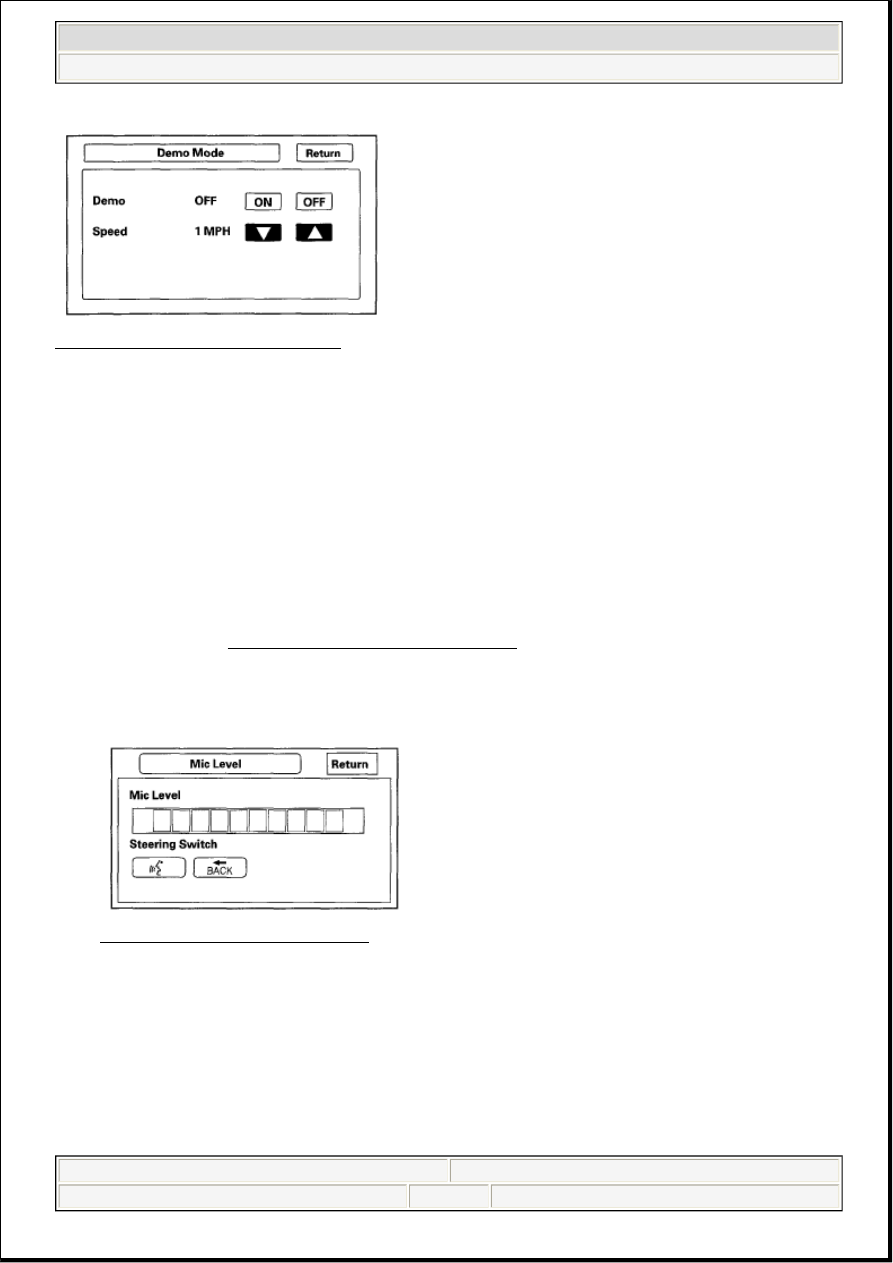
Fig. 83: Screen Display - Demo Mode 
Courtesy of AMERICAN HONDA MOTOR CO., INC. 

Mic Level 

This diagnostic allows you to independently test the microphone and the NAVI TALK and BACK buttons. 
They are used to activate the voice control system. The microphone is located near the map light in the roof 
console. It is directional, and works best with the voice coming from the drivers seat. 

Press the TALK button on the steering wheel, and in a normal voice say "testing." The TALK 
indicator on the screen should momentarily turn green, and the text "Now Recording..." should appear 
in yellow. If the Mic Level indicator should on the screen does not briefly turn green, then check the 
wiring from the steering wheel talk button to the navigation unit. If there is no "Mic Level" movement 
when you speak, then you should check the wires running from the microphone in the roof console to 
the HFL unit and the navigation unit. If the wires are OK, the microphone must be faulty; replace the 
roof console (see ROOF CONSOLE REPLACEMENT ).  

Press the BACK button on the steering wheel. The Cancel indicator on the screen should momentarily 
turn green. If it does not briefly turn green, then check the wiring from the steering wheel BACK 
button to the navigation unit. 

Fig. 84: Screen Display - Mic Level 
Courtesy of AMERICAN HONDA MOTOR CO., INC. 

SAVE USERS MEMORY 

When replacing the navigation unit, this function allows the dealer to transfer the client's personal data to 
the new navigation unit. 

This is similar to saving and entering the client's audio presets when replacing an audio core. The transferred 
information includes their Setup settings, and personal addresses. The dealer inserts a PC card (like the PC 
card in the HDS), and then selects the "Save users Memory" function. The two functions in this diagnostic 


2007 Acura RL 

2005-08 ACCESSORIES AND EQUIPMENT Navigation System - RL


me 


Friday, June 05, 2009 3:28:16 PM

Page 99 

© 2005 Mitchell Repair Information Company, LLC. 

screen are Export and Import. Export saves the client's data to the PC card, and Import moves the PC card 
files to the new core. 

Seethe FAQs below for information regarding PC cards, and the use of this function. 

Fig. 85: Screen Display - Save Users Memory 
Courtesy of AMERICAN HONDA MOTOR CO., INC. 

Export 

Select this button to move the client's data from the original navi ECU to the PC card. Select "YES" on the 
"Export User Data" Confirmation screen. The process takes only a couple of seconds. The system stores two 
small files on the card. 

Fig. 86: Screen Display - Save Users Memory 
Courtesy of AMERICAN HONDA MOTOR CO., INC. 

Import 

After installing the client's original DVD in the new core, allow the system to boot up. Insert the PC card in 
the new core and enter the navigation diagnostic mode. 


2007 Acura RL 

2005-08 ACCESSORIES AND EQUIPMENT Navigation System - RL


me 


Friday, June 05, 2009 3:28:16 PM

Page 100  © 2005 Mitchell Repair Information Company, LLC. 

Fig. 87: Screen Display - Save Users Memory
Courtesy of AMERICAN HONDA MOTOR CO., INC.
 

Select "YES" on the "Import Confirmation" screen. 

Import moves the two files stored by the Export process from the PC card to the new navi ECU. When the 
transfer is finished (a few seconds) the system will automatically reboot. After the system reboots, remove 
the PC card from the PC slot. 

If the Import button is grayed out, follow the troubleshooting in the FAQs below. The client's files can only 
be transferred to a new core if the "Model" and the "Program Flash" shown on the "Version" screen are the 
same. So files cannot be transferred from Civic to Accord, or from a Civic with version 1.07.00 to a Civic 
with version 1.32.00. 

PC Card FAQs  

PC CARD FAQS CHART 

Question

Answer

Where do we buy the flash 
memory or adaptors, and what 
do we ask for?

You need a "PCMCIA type II" adaptor and a flash memory chip (see 
below for memory chip types). They can be purchased at a computer, 
or office supply store. The card will have the same size and shape as 
the PC card in the HDS. Adaptors that accept multiple flash types are 
not recommended.

What memory flash chips will 
work with what adaptors?

The flash memory devices that have been tested include Compact 
Flash (CF), and ATA style (like the card in the HDS). Other card types 
and flash memory chips may work, but have not been tested.

What capacity card do 1 need 
for this function?

A memory chip with capacity of 64 MB to 2 GB will work. The two 
files moved to the card during "export" are less than a Megabyte in 
size. An adaptor and flash memory can be obtained for less than 50 
dollars.

Should the dealer have a 
dedicated card for the Export 
and Import navigation 
function?

Yes, treat the card as a dedicated "special tool" that should be used 
anytime your '07 or later client needs their navi personal files 
transferred to a new ECU core.

What device can 1 use to 
maintain the card, and delete 
files?

Any computer store sells USB style PC card readers that accept the 
card, and allow you to perform file maintenance on your card. Most 
laptops will also accept the card.

Can we move the client's data 
to different models (like 
moving Civic navi data to a 
Pilot)?

No, the files are model specific and will only load into a navi ECU 
with the same part number.

Can we move the client's data 
to the same vehicle with a 
different software version 
(Like moving version 4.51)?

The client's files can only be transferred to a new core, if the "Model" 
and the "Program Flash" shown on the "Version" screen are the same. 
Files cannot be transferred from Civic to Civic Hybrid (different model 
code), or '07 Civic to '08 Civic (different versions).

The "Export" button is 
"grayed out" Why?

A PC card with its media memory chip is not inserted properly.  

Check the card's edge connector, and the pins inside the 
navigation unit (with a flashlight) for damage.  


2007 Acura RL 

2005-08 ACCESSORIES AND EQUIPMENT Navigation System - RL


me 


Friday, June 05, 2009 3:28:16 PM

Page 101  © 2005 Mitchell Repair Information Company, LLC. 

The "Import" button is 
"grayed out". Why is this?

A PC card with it's media memory chip is not inserted.  

The model code of the files stored during export do not match 
the model code of the new navi ECU.  

The version of the files from the original navi ECU are not the 
same as the version in the new ECU.  

Will other files on the card 
like images or music files 
prevent the Export/Import 
function from working?

No, the system simply adds two small files that are recognized by the 
new core when performing the Import function. However, if the card is 
full, the "Export" function won't work correctly.

Do I have to delete the files 
on the card after each transfer 
of the client's data?

After the transfer of client data to the new core, the files remain on the 
card. Since this is confidential information, we recommend that you 
delete these files after each use. Please note that each time you export 
navi files of the same model and version, the files are overwritten. 
Over time the card will accumulate two files for each version of the 8 
or so Honda navi models.

What format should be used if 
the card needs reformatting?

It is unlikely that the card will ever need formatting, however the FAT 
file system should be used.

I can't enter the navi 
diagnostic mode to do the 
Export/Import function. How 
can I transfer the client's data?

Some internal navi ECU failures may make it impossible to use the 
Export/Import function.

Why wont the Export or 
Import functions work? 
What do 1 check as part of 
troubleshooting?

The card may not be fully inserted into the slot. Eject the card, 
and inspect for warping or damage to the edge connector. Never 
use excessive force to insert a card. This can result in damage to 
the pins in the rear of the slot.  

The card may not contain files that are recognized by the new 
core. Navi data can only be transferred between cores with the 
same "Model code", and with the same navi "Program flash" 
version.  

The flash memory chip type may not be accepted by the system. 
Only Compact Flash and ATA cards have been tested.  

The card's PCMCIA adaptor may be preventing a known good 
card from playing. Avoid multi slot type PCMCIA adaptors that 
accept several different flash memory types.  

The card may be full and as a result the files are stored, but 
without any data. Export and import appear to function, but 
move nothing. Delete unused files from the card.  

There may not be any files on the card. If the card has a "write 
protection" switch, make sure it is turned off before attempting 
to use the Export function.  

Although flash memory chips are reliable, occasionally they 
develop bad sectors or other formatting errors that prevents them 
from accepting files. The card should be reformatted using the 
FAT format.  

The card may have been formatted using the format "NTFS". 
Only the "FAT" format is accepted by the system.  

Hard Disc Drive (HDD) cards may not work properly in the 


2007 Acura RL 

2005-08 ACCESSORIES AND EQUIPMENT Navigation System - RL


me 


Friday, June 05, 2009 3:28:16 PM

Page 102  © 2005 Mitchell Repair Information Company, LLC. 


Content   ..  658  659  660  661   ..