Acura RL. Manual - part 641
 

  Index      Acura     Acura RL - service repair manual 2005-2008 year


Search            


Content   ..  639  640  641  642   ..


Acura RL. Manual - part 641


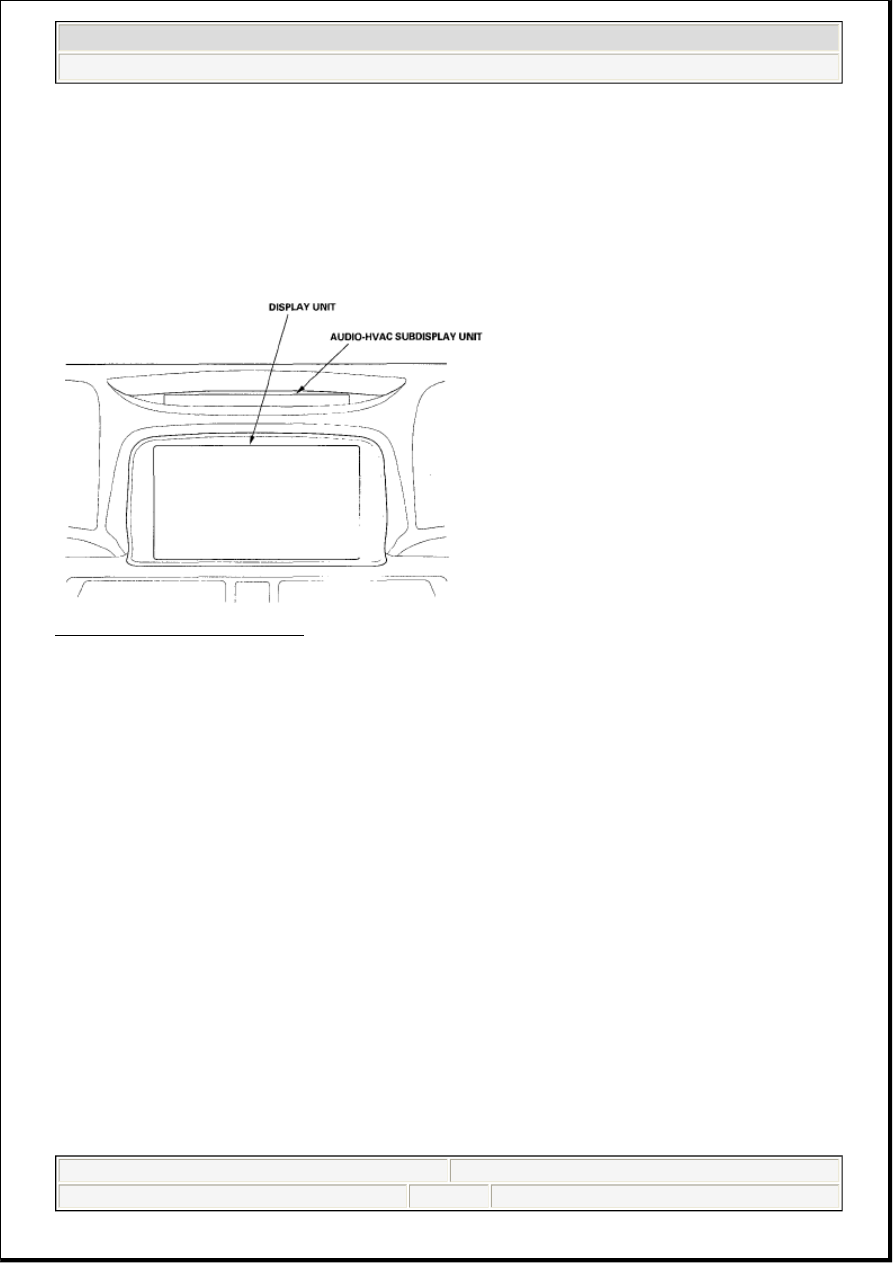
Display Unit 

The display unit uses a liquid crystal display (LCD). The LCD is a 8-inch-diagonal, thin film transistor 
(TFT), stripe type with 336,960 picture elements. The color film and fluorescent light are laid out on the 
back of the liquid crystal film. 

Fig. 11: Identifying Display Unit 
Courtesy of AMERICAN HONDA MOTOR CO., INC. 

Microphone (MIC) 

Receives voice commands and transmits them to the navigation unit or HandsFreeLink unit for 
interpretation. 

TALK Button 

Activates the voice control system in the navigation unit to accept voice commands. 

BACK Button 

Returns the display to the previous screen (similar function as the CANCEL button). 

NOTE:

If the navigation volume is turned OFF, this feature is disabled.


2007 Acura RL 

2005-08 ACCESSORIES AND EQUIPMENT Navigation System - RL


me 


Friday, June 05, 2009 3:28:15 PM

Page 23 

© 2005 Mitchell Repair Information Company, LLC. 

Fig. 12: Identifying Back And Talk Button 
Courtesy of AMERICAN HONDA MOTOR CO., INC. 

Glossary 

The following is a glossary of terms pertaining to the Voice Recognition Navigation System. 

ITEM DEFINITION CHART 

Item

Definition

AcuraLink

This device receives information from the XM satellites and passes XM audio 
information to the audio unit. In addition, traffic information is sent to the navigation 
unit.

Address Book

The HFL system can import a copy of the phone book from and approved HFL 
compatible phone and can display the imported phone book on the navigation screen 
as the address book. See the Owner's Manual for more information.

B-CAN

Body CAN Bus (see CAN below)

Breadcrumbs 
(white dots)

Off road tracking dots that can be followed on the map to retrace your route back to a 
mapped (digitized) road. This function can be turned on/off in Setup screen 1.

CAN

Controller Area Network. This communication network allows processors in the 
vehicle to send/receive information. The fuel pulses used by the MID trip computer 
are received from the PCM using the F-CAN (Fast Controller Area Network) bus.

CPU

Central Processing Unit. The main device within the navigation unit that coordinates 
the rest of the electronic functions.

CSS

Countershaft (Output) Speed Sensor. This sensor reads the output shaft speed at the 
transmission and provides a speed pulse to the PCM.

Database

This consists of the Map data, and the POI (Points Of Interest) data stored on the 
DVD.

DBW

Drive By Wire. Allows electrical control of the throttle without the need of a 


2007 Acura RL 

2005-08 ACCESSORIES AND EQUIPMENT Navigation System - RL


me 


Friday, June 05, 2009 3:28:15 PM

Page 24 

© 2005 Mitchell Repair Information Company, LLC. 

mechanical linkage.

DCA

Detailed Coverage Area. Main metropolitan areas in the Lower 48 states, and Canada 
are mapped to this level. See the Navigation Owner's manual for a list of these areas.

DTC

Diagnostic Trouble Codes. Use the PGM Tester, or HDS tablet to obtain, and 
troubleshoot the cause of these codes.

Dead 
Reckoning

The use of the speed signal, and yaw rate sensor to position the vehicle on the map 
even when tall buildings, or driving in a tunnel obscures the GPS signal.

Digitized Road

A road that appears on the navigation screen. The road name will appear at the 
bottom of the navigation screen. If the user drives "off road" the navigation system 
will display "Not on a digitized road", and after 1/2 mile, the "breadcrumbs" will 
appear.

Disclaimer 
Screen

Screen containing cautionary information. It is meant to be read carefully, and 
acknowledged by the client when using the navigation system.

DVD or DVD-
ROM

Digital Versatile Disk. The navigation program and database resides on this disk. See 
the Navigation Owner's Manual for information on how to order a replacement or an 
update DVD.

ECM

Engine Control Module. Typically referred to as the ECM.

FAQ

Frequency Asked Questions. Seethe Navigation Owner's Manual for a list of the 
client FAQs, and troubleshooting information.

F-CAN

Fast CAN Bus (see CAN above)

GA-NET

The GA-Net allows the audio unit to communicate with all the audio and navigation 
components in a vehicle. If there is an open in the GA-Net, components or the entire 
audio and navigation system may appear inoperative.

GPS

Global Positioning System. A network of 24 satellites in orbit around the earth. The 
navigation system can simultaneously receive signals from up to 12 satellites to 
accurately position the vehicle on the map.

GPS

Global Positioning System. A network of 24 satellites in orbit around the earth. The 
navigation system can simultaneously receive signals from up to 12 satellites to 
accurately position the vehicle on the map.

HDS

Honda Diagnostic System. A hand held tablet PC used for diagnosing vehicle 
problems. This device can be used to obtain DTC codes for diagnosis of the 
navigation system and CAN related problems.

HIP 
(AcuraLink)

This device receives information from the XM satellites and passes XM audio 
information to the audio unit. In addition, traffic information is sent to the navigation 
unit.

HFL

HandsFreeLink uses Bluetooth technology as a wireless link between it and a 
Bluetooth compatible cell phone. See the vehicle Owner's manual or Quick Start 
Guide for more information.

H/U

Head Unit. The navigation system display assembly in the dash.

Initialization

This refers to the period needed to re-acquire the GPS satellite orbital information 
whenever the navigation system power has been disconnected. This can take from 10 
to 45 minutes.

Interface Dial

This control device consists of a rotating knob and the buttons surrounding it. This 
device allows control of the navigation, audio, and climate functions displayed on the 
screen.

LCD

Liquid Crystal Display (the navigation screen)

Map Matching The received GPS information allows the navigation system to position the vehicle 

on the map. Map matching has occurred if the map screen is displaying the current 


2007 Acura RL 

2005-08 ACCESSORIES AND EQUIPMENT Navigation System - RL


me 


Friday, June 05, 2009 3:28:15 PM

Page 25 

© 2005 Mitchell Repair Information Company, LLC. 

street name in the bottom-shaded area.

Mic

Abbreviation for the microphone used for receiving voice commands. It is located 
near the map light in the ceiling.

MID

Multi-Information Display

MP3 music 
files

MP3 is an audio coding formal. MP3 is a popular audio compression format on the 
Internet and computers. CDs and PC cards mid three files can be played on some 
vehicle audio system.

MW

Maneuver Window. While on-route to a destination, this window displays 
information about the next maneuver.

Navi

Abbreviation for the Navigation System.

Off Road 
Tracking

See Off Road Tracking (Breadcrumbs) .

Off Route

This occurs when the user leaves mapped roads. Off road tracking dots 
("breadcrumbs") are displayed if the option is enabled in Setup. The user can use 
them to return to a mapped road. The bottom of the navigation screen will say "Not 
on a digitized road"

Outlying Areas

These are rural areas that typically have only their main roads mapped. All other 
roads are shown in light brown for reference only, since they have not been verified.

Paired

Linking your cell phone to the HFL

PC Card Slot

The PC Card (PCMCIA, type II) slot is for factory use only. Make sure that the 
sliding door is closed at all items, if opened, an error message is displayed on the 
screen.

PCM

Powertrain Control Module. This unit supplies the navigation system speed signal, 
and charge signal via the F-CAN network.

PCMCIA

A computer industry defined term referring to the PC Card slot standard.

PIN

Personal Identification Number, a random 4 digit number created by the client to 
protect personal information.

POI

Point Of Interest. These are the businesses, schools, etc. found under the "places" 
option on the main menu.

Polygon

Colored areas on the map screen denoting parks, schools, etc. See the Navigation 
System Manual "Driving to Your Destination" for a list of the assigned colors.

QWERTY

Keyboard layout resembling the typewriter keys. The keyboard layout can be 
changed to an alphabetical layout in the Setup mode.

SCS connector The 2-pin connector used to put the navigation system into the diagnostic mode.

Security Code

Code needed to activate the navigation system. You can obtain the security code 
from the "iN" by entering the navigation unit serial number. You can find the serial 
number on the diagnostic screens (Unit Check, Navi ECU), or on the underside of the 
control unit.

Tuning

A continual update of internal navigation system scaling factors. See the individual 
sensor tuning discussions under either "SYSTEM DESCRIPTION" or "SYSTEM 
DIAGNOSTIC MODE
".

Unverified 
Streets

These streets have not been verified for turn restrictions, one-way, etc. They are 
shown in light brown on the map. You can enter address destinations in these areas, 
but depending on your "Unverified Routing" choice in setup, voice guidance may 
end at the last verified street closest to your destination.

Verified Streets

These streets consist of the detailed metropolitan coverage areas, and all other inter-
town connection roads. These roads are shown in black on the map.


2007 Acura RL 

2005-08 ACCESSORIES AND EQUIPMENT Navigation System - RL


me 


Friday, June 05, 2009 3:28:15 PM

Page 26 

© 2005 Mitchell Repair Information Company, LLC. 


Content   ..  639  640  641  642   ..