Kia Forte (2024 year). Manual in english - page 10
 

  Index      Kia     Kia Forte (2024 year). Manual in english


Search            copyright infringement  


Content      ..     8      9      10      11     ..


Kia Forte (2024 year). Manual in english - page 10


Driving assistance system

32

6

Blind-Spot Collision Warning (BCW)

started, or the front view camera is 
initialized.

• Lane Keeping Assist will not operate 

when:

- The turn signal or hazard warning 

flasher is turned on

- The vehicle is not driven in the cen

-

ter of the lane when Lane Keeping 
Assist is turned on or right after 
changing a lane

- ESC (Electronic Stability Control) or 

VSM (Vehicle Stability Manage

-

ment) is activated

- The vehicle is driven on a sharp 

curve

- Vehicle speed is below 35 mph (55

km/h) or above 130 mph (210 km/
h)

- The vehicle makes sharp lane

changes

- The vehicle is suddenly stopped

Blind-Spot Collision Warning 
(BCW) (if equipped)

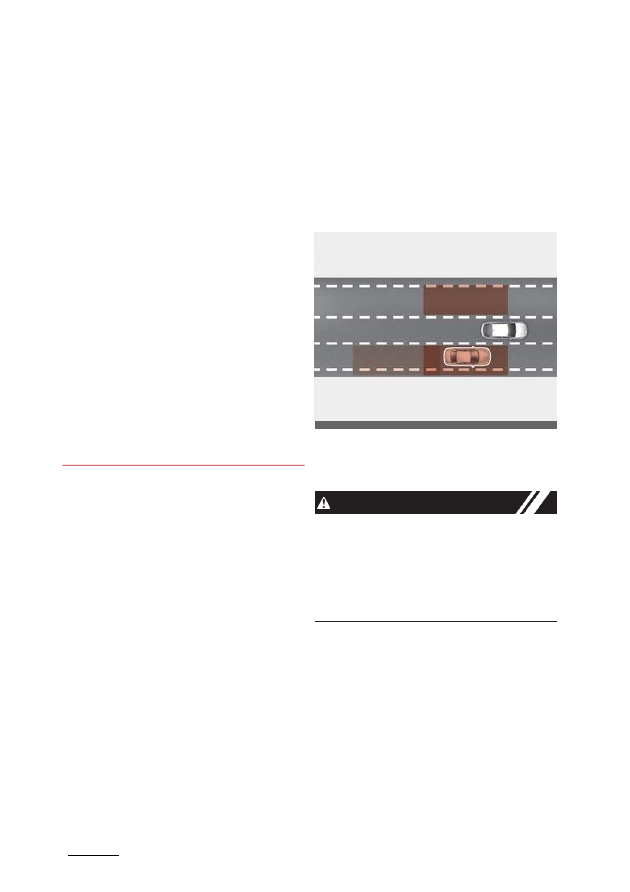
Blind-Spot Collision Warning is designed 
to help detect and monitor approaching 
vehicles in the

driver’s blind spot area 

and warn the driver of a possible colli

-

sion with a warning message and audi

-

ble warning.

Blind-Spot Collision Warning helps

detect and informs the driver that a

vehicle is in the blind spot.

CAUTION

The detecting range may vary depend

-

ing on the speed of your vehicle. Even if 
there is a vehicle in the blind spot area, 
Blind-Spot Collision Warning may not 
warn you when you pass by at high 
speed.

OBDM052411N

33

6

6

Driving assistance system

Blind-Spot Collision Warning (BCW)

Blind-Spot Collision Warning helps 
detect and informs the driver that a
vehicle is approaching at high speed 
from the blind spot area.

CAUTION

Warning Timing may vary depending on
the speed of the vehicle approaching at
high speed.

Detecting sensor

[1]: Rear corner radar
Refer to the picture above for the detailed 
location of the detecting sensor.

CAUTION

• Never disassemble the rear corner 

radar or radar assembly, or cause any 
damage to it.

• If the rear corner radar or near the 

radar has been damaged or impacted 
in any way, even though the warning 
message does not appear on the clus

-

ter, Blind-Spot Collision Warning may 
not operate properly. In this case,
have your vehicle inspected by an 
authorized Kia dealer.

• If the rear corner radar has been 

replaced or repaired, have your vehi

-

cle inspected by an authorized Kia 
dealer.

• The genuine Kia rear bumpers which 

the Rear corner radar sensors are 
mounted are parts with quality and 
performance ensured. If arbitrarily 
applying paint on or changing the 
bumper, the Blind-Spot Collision-
Avoidance Assist may not function 
properly. Use only Kia Genuine Parts 
or those of an equivalent standard 
with proven quality and performance 
to repair or replace the bumper.

• Do not apply license plate frame or 

object, such as a bumper sticker, film 
or a bumper guard near the rear cor

-

ner radar.

• Blind-Spot Collision Warning may not 

work properly if the bumper has been 
replaced, or the surroundings of the 
rear corner radar have been damaged 
or paint has been applied.

• If a trailer, carrier, etc. is installed, it 

may adversely affect the performance 
of the rear corner radar or Blind-Spot
Collision Warning may not operate.

OBDM052412N

OBDM052367N

Driving assistance system

34

6

Blind-Spot Collision Warning (BCW)

Blind-Spot Collision Warning set

-

ting

Blind-Spot Safety

With the ignition switch or ENGINE 
START/STOP button in the ON
position, select or deselect 'User 
Settings (LCD display) or Setup

Vehicle (Infotain

-

ment System

screen)→ Driver Assis

-

tance

→ Blind-

Spot Safety' to set whether to use each
function.

If

‘Warning Only’ is selected, Blind-Spot 

Collision Warning will warn the driver 
with a warning message or an audible 
warning depending on the collision risk 
levels.

If

‘Off’ is selected, Blind-Spot Collision 

Warning will turn off.

When the engine is restarted with Blind-
Spot Collision Warning off, the

‘Blind-

Spot Safety System

is Off’ message will 

appear on the cluster.

If you change the setting from

‘Off’ to 

‘Warning Only’, the warning light on the 
side view mirror will blink for three sec

-

onds.

In addition, if the engine is turned on, 
when Blind-Spot Collision Warning is set 
to

‘Warning Only’, the warning light on 

the side view mirror will blink for three 
seconds.

W ARNING

• If 'Warning Only' is selected, steering 

is not assisted.

• If ‘Off’ is selected, the driver should 

always be aware of the surroundings 
and drive safely.

Turning Blind-Spot Collision 
Warning On/Off

The indicator on the button will illumi

-

nate when Blind-Spot Safety button is 
pressed with the ignition switch or 
ENGINE START/STOP button in the
ON position. If you press the button
again, the button indicator and the
function will be turned off. If the ignition
switch or ENGINE START/STOP button
is turned

OBDM041252L

OMQ4050293L

OBDM051062

35

With the ignition switch or ENGINE 
START/STOP button in the ON position, 
select

‘Driver Assistance → Warning Vol

-

ume’ from the 'User Settings (LCD dis

-

play) or Setup

→ Vehicle (Infotainment 

System screen)' to change the Warning 
Volume to

‘High’, ‘Medium’, ‘Low’ for 

Blind-Spot Collision Warning.

If you change the Warning Volume, the 
Warning Volume of other Driver Assis

-

tance systems may change.

6

Driving assistance system

Blind-Spot Collision Warning (BCW)

OFF and ON, the function returns to the 
previous state. When the function is not 
being used, turn the function off by 
pressing the button.

NOTICE

If the engine is restarted, Blind-Spot Col

-

lision Warning will maintain the last set

-

ting.

Warning Timing

With the ignition switch or ENGINE 
START/STOP button in the ON position, 
select

‘Driver Assistance → Warning 

Timing’ from the 'User Settings (LCD dis

-

play) or Setup

→ Vehicle (Infotainment 

System screen)' to change the initial 
warning activation time for Blind-Spot 
Collision Warning.

When the vehicle is first delivered, Warn

-

ing Timing is set to

‘Normal’. If you 

change the Warning Timing, the Warn

-

ing Timing of other Driver Assistance 
systems may change.

Warning Volume

CAUTION

• The setting of the Warning Timing 

and Warning Volume applies to all 
functions of Blind-Spot Collision 
Warning.

• Even though ‘Normal’ is selected for 

Warning Timing, if a vehicle 
approaches at high speed, the warn

-

ing may seem late.

• Select ‘Late’ for Warning Timing when

traffic is light and when driving speed
is slow.

OMQ4AH050334

OBD041619L

Driving assistance system

36

6

Blind-Spot Collision Warning (BCW)

Blind-Spot Collision Warning 

Vehicle detection

• To warn the driver a vehicle is 

detected, the warning light on the side 
view mirror and will illuminate

• Blind-Spot Collision Warning will oper

-

ate when your vehicle speed is above 
12 mph (20 km/h) and the speed of the
vehicle in the blind spot area is above
7 mph (10 km/h).

Collision Warning

A.

: Warning sound

• Collision Warning will operate when 

the turn signal is turned on in the 
direction of the detected vehicle.

• To warn the driver of a collision, the 

warning light on the side view mirror 
will blink.

• When the turn signal is turned off or 

you move away from the lane, the 
Collision Warning will be canceled and 
Blind-Spot Collision Warning will return
to vehicle detection state.

W ARNING

• The detecting range of the rear corner 

radar is determined by the standard 
road width, therefore, on a narrow 
road, Blind-Spot Collision Warning 
may detect a vehicles in the next lane 
and warn you. In contrast, on a wide 
road, Blind-Spot Collision Warning 
may not be able to detect a vehicle 
driving in the next lane and may not 
warn you.

• When the hazard warning light is on,

the Collision Warning by the turn sig

-

nal will not operate.

Take the following precautions when
using Blind-Spot Collision Warning:

OBD051385L

ODEEV078092NR

ODEEV078093NR

37

6

6

Driving assistance system

Blind-Spot Collision Warning (BCW)

• For your safety, change the Settings 

after parking the vehicle at a safe 
location.

• If any other function’s warning mes

-

sage is displayed or audible warning 
is generated, Blind-Spot Collision 
Warning’s warning message may not 
be displayed and audible warning 
may not be generated.

• You may not hear the warning sound

of Blind-Spot Collision Warning if the
surrounding is noisy. Blind-Spot Colli

-

sion Warning may warn the driver late
or may not warn the driver depending
on the road and driving conditions.

• Driver should maintain control of the 

vehicle at all times. Do not depend on 
Blind-Spot Collision Warning. Maintain 
a safe braking distance, and if neces

-

sary, depress the brake pedal to 
reduce driving speed or to stop the 
vehicle.

Blind-Spot Collision Warning mal

-

function and limitations

Blind-Spot Collision Warning mal

-

function

When Blind-Spot Collision Warning is not
working properly, the

‘Check Blind-Spot

Safety

system’ warning message will

appear on the cluster, and the function 
will turn off automatically, or the func

-

tion

will be limited. In this case, have your
vehicle inspected by an authorized Kia
dealer.

When the side view mirror warning light 
is not working properly, the

‘Check side 

view mirror warning

light’ warning mes

-

sage will appear on the cluster. In this 
case, have your vehicle inspected by an 
authorized Kia dealer.

Blind-Spot Collision Warning dis

-

abled

When the rear bumper around the rear 
corner radar or sensor is covered with 
foreign material, such as snow or rain, or 
installing a trailer or carrier, it can reduce 
the detecting performance and tempo

-

OBD041239L

OBD041240L

OMQ4050230L

Driving assistance system

38

6

Blind-Spot Collision Warning (BCW)

rarily limit or disable Blind-Spot Collision 
Warning.

If this occurs, the

‘Blind-Spot Safety sys

-

tem disabled. Radar

blocked’ warning 

message will appear on the cluster.

Blind-Spot Collision Warning will operate 
properly when such foreign material or 
trailer, etc. is removed, and then the 
engine is restarted.

If Blind-Spot Collision Warning does not 
operate properly after it is removed, 
have your vehicle inspected by an 
authorized Kia dealer.

W ARNING

• Even though the warning message 

does not appear on the cluster, Blind-
Spot Collision Warning may not prop

-

erly operate.

• Blind-Spot Collision Warning may not 

properly operate in an area (for exam

-

ple, open terrain), where any objects 
are not detected right after the engine 
is turned on, or when the detecting 
sensor is blocked with foreign mate

-

rial right after the engine is turned on.

CAUTION

Turn off Blind-Spot Collision Warning to 
install a trailer, carrier, etc., or remove the
trailer, carrier, etc. to use Blind-Spot 
Collision Warning.

Limitations of Blind-Spot Colli

-

sion Warning

Blind-Spot Collision Warning may not 
operate properly or it may operate unex

-

pectedly under the following circum

-

stances:
• There is inclement weather, such as 

heavy snow, heavy rain, etc.

• The rear corner radar is covered with 

snow, rain, dirt, etc.

• The temperature around the rear cor

-

ner radar is high or low

• Driving on a highway (or motorway) 

ramp

• The road pavement (or the peripheral 

ground) abnormally contains metallic 
components (for example, possibly 
due to subway construction).

• There is a fixed object near the vehi

-

cle, such as sound barriers, guardrails, 
central dividers, entry barriers, street 
lamps, signs, tunnels, walls, etc. 
(including double structures)

• Driving in vast areas where there are 

few vehicles or structures (for exam

-

ple, desert, meadow, suburb, 
etc.)Driving through a narrow road 
where trees or grass are overgrown

• Driving on a wet road surface, such as 

a puddle on the road

• The other vehicle drives very close 

behind your vehicle, or the other vehi

-

cle passes by your vehicle in close 
proximity

• The speed of the other vehicle is very

fast that it passes by your vehicle in a
short time

• Your vehicle passes by the other vehi

-

cle

• Your vehicle changes lanes
• Your vehicle has started at the same 

time as the vehicle next to you and 
has accelerated

• The vehicle in the next lane moves 

two lanes away from you, or when the 
vehicle two lanes away moves to the 
next lane from you

• A trailer or carrier is installed around 

the rear corner radar

39

6

6

Driving assistance system

Blind-Spot Collision Warning (BCW)

• The bumper around the rear corner 

radar is covered with objects, such as 
a bumper sticker, bumper guard, bike 
rack, etc.

• The bumper around the rear corner 

radar is impacted, damaged or the 
radar is out of position

• Your vehicle height is abnormally low

or high due to heavy loads, abnormal
tire pressure, etc.

Blind-Spot Collision Warning may not 
operate properly or it may operate unex

-

pectedly when the following objects are 
detected:
• A motorcycle or bicycle
• A vehicle such as a flat trailer
• A big vehicle such as a bus or truck

A moving obstacle such as a pedes

-

trian, animal, shopping cart or a baby 
stroller

• A vehicle with low height such as a

sports car

W ARNING

• Driving on a curved road

Blind-Spot Collision Warning may not 
operate properly when driving on a
curved road. The function may not 
detect the vehicle in the next lane.

Always pay attention to road and driving 
conditions while driving.

Blind-Spot Collision Warning may not
operate properly when driving on the
curved road. The function may recog

-

nize the vehicle in the same lane.

Always pay attention to road and driving
conditions while driving.
• Driving where the road is merging/

dividing

Blind-Spot Collision Warning may not 
operate properly when driving where the 
road merges or divides. The function 
may not detect the vehicle in the next 
lane.

Always pay attention to road and driving 
conditions while driving.

ODL3A052387

ODL3A052388

ODL3A052389

Driving assistance system

40

6

Blind-Spot Collision Warning (BCW)

• Driving on a sloped road

Blind-Spot Collision Warning may not 
operate properly when driving on a
sloped road. The function may not 
detect the vehicle in the next lane or 
may incorrectly detect the ground or 
structure.

Always pay attention to road and driving 
conditions while driving.
• Driving where the heights of the

lanes are different

Blind-Spot Collision Warning may not 
operate properly when driving where the 
heights of the lanes are different. The 
function may not detect the vehicle on a
road with different lane heights (under

-

pass joining section, grade separated 
intersections, etc.).

Always pay attention to road and driving 
conditions while driving.

W ARNING

Blind-Spot Collision Warning may not
operate properly if interfered with by
strong electromagnetic waves.

Blind-Spot Collision Warning may not 
operate for 3 seconds after the vehicle is 
started, or the rear corner radars are ini

-

tialized.

This device complies with Part 15
of the FCC rules.

Operation is subject to the following
three conditions:

1. This device may not cause harmful

interference, and

2. This device must accept any interfer

-

ence received, including interference
that may cause undesired operation.

3. Changes or modifications not 

expressly approved by the party 
responsible for compliance could void 
the user's authority to operate the 
device.

Radio frequency radiation expo

-

sure information:

This equipment complies with FCC radi

-

ation exposure limits set forth for an 
uncontrolled environment.

This equipment should be installed and 
operated with minimum distance of 8 in 
(20 cm) between the radiator and your 
body.

This transmitter must not be co-located 
or operating in conjunction with any other
antenna or transmitter.

OBDM052016N

OBDM052398N

41

6

Driving assistance system

Blind-Spot Collision-Avoidance Assist (BCA)

Blind-Spot Collision-Avoid

-

ance Assist (BCA) (if 
equipped)

Blind-Spot Collision-Avoidance Assist is 
designed to help detect and monitor 
approaching vehicles in the

driver’s blind

spot area and warn the driver of a
possible collision with a warning mes

-

sage and audible warning.

In addition, if there is a risk of collision 
when changing lanes or driving forward 
out of a parking space, Blind-Spot Colli

-

sion-Avoidance Assist can help avoid 
collision by applying the differential 
braking.

Blind-Spot Collision-Avoidance Assist 
helps detect and informs the driver that a
vehicle is in the blind spot.

CAUTION

The detecting range may vary depend

-

ing on the speed of your vehicle. Even if 
there is a vehicle in the blind spot area, 
Blind-Spot Collision-Avoidance Assist 
may not warn you when you pass by at 
high speeds.

Blind-Spot Collision-Avoidance Assist 
helps detect and informs the driver that a
vehicle is approaching at high speed 
from the blind spot area.

CAUTION

Warning Timing may vary depending on
the speed of the vehicle approaching at
high speed.

6

When you are driving forward out of a
parking space, if Blind-Spot Collision-
Avoidance Assist judges that there is a
collision risk with an approaching vehicle 
in the blind spot, it can help avoid colli

-

sions by applying the brake.

OBDM052411N

OBDM052412N

ODL3A052334

Driving assistance system

42

6

Blind-Spot Collision-Avoidance Assist (BCA)

When changing lanes by detecting the 
lane ahead, if Blind-Spot Collision-Avoid

-

ance Assist judges that there is a colli

-

sion risk with an approaching vehicle in 
the blind spot, it can help avoid collisions 
by applying the differential brake.

Detecting sensor

[1] : Front view camera, [2] : Rear corner 
radar

Refer to the picture above for the 
detailed location of the detecting sen

-

sors.

CAUTION

Take the following precautions to main

-

tain optimal performance of the detect

-

ing sensor:
• Never disassemble the rear corner 

radar or radar assembly, or cause any 
damage to it.

• If the rear corner radar or near the 

radar has been damaged or impacted 
in any way, even though the warning 
message does not appear on the clus

-

ter, Blind-Spot Collision-Avoidance 
Assist may not operate properly. In this
case, have your vehicle inspected by
an authorized Kia dealer.

• If the rear corner radars have been 

replaced or repaired, have your vehi

-

cle inspected by an authorized Kia 
dealer.

CAUTION

• The genuine Kia rear bumpers which 

the Rear corner radar sensors are 
mounted are parts with quality and 
performance ensured. If arbitrarily 
applying paint on or changing the 
bumper, the Blind-Spot Collision-
Avoidance Assist may not function 
properly. Use only Kia Genuine Parts 
or those of an equivalent standard 
with proven quality and performance 
to repair or replace the bumper.

• Do not apply license plate frame or 

objects, such as a bumper sticker, film 
or a bumper guard near the rear cor

-

ner radar.

OBDM052386N

OBDM052015N

OBDM052387N

43

6

6

Driving assistance system

Blind-Spot Collision-Avoidance Assist (BCA)

• Blind-Spot Collision-Avoidance Assist 

may not work properly if the bumper 
has been replaced, or the surround

-

ings of the rear corner radar have 
been damaged or paint has been 
applied.

• If a trailer, carrier, etc. is installed, it 

may adversely affect the performance 
of the rear corner radar or Blind-Spot 
Collision-Avoidance Assist may not 
operate.

For more details on the precautions of 
the front view camera, refer to "Forward 
Collision-Avoidance Assist (FCA) (Sen

-

sor fusion) (if equipped)" on page 6-15.

Blind-Spot Collision-Avoidance 
Assist setting

Blind-Spot Safety

With the ignition switch or ENGINE 
START/STOP button in the ON
position, select 'Driver Assistance

Blind-Spot Safety' from the 'User
Settings (LCD dis

-

play) or Setup

Vehicle (Infotainment System screen)'
menu to set whether to use each
function.
• If ‘Active Assist’ is selected, Blind-Spot 

Collision-Avoidance Assist will warn 
the driver with a warning message, an 
audible warning and braking assist

will be applied depending on the colli

-

sion risk levels.

• If ‘Warning Only’ is selected, Blind-

Spot Collision-Avoidance Assist will 
warn the driver with a warning mes

-

sage or an audible warning depend

-

ing on the collision risk levels. Braking 
will not be assisted.

• If ‘Off’ is selected, Blind-Spot Colli

-

sion-Avoidance Assist will turn off.

Blind-Spot Safety button

If you press the Blind-Spot Safety button 
while

‘Warning Only’ or ‘Active Assist’ 

selected the indicator on the button 
extinguishes and the function deacti

-

vates, and if you press the Blind-Spot 
Safety button while the function is off, 
indicator on the button illuminates and the
function will operate as before it was 
turned off.

OBD041252L

OBDM051062

Driving assistance system

44

6

Blind-Spot Collision-Avoidance Assist (BCA)

When the engine is restarted with the 
function off, the

‘Blind-Spot Safety Sys

-

tem is

Off’ message will appear on the 

cluster.

If you change the setting from

‘Off’ to 

‘Active Assist’ or ‘Warning Only’, the 
warning light on the side view mirror will 
blink for approximately 3 seconds.

In addition, if the engine is turned on, 
when the function is set to

‘Active Assist’ 

or

‘Warning Only’, the warning light on 

the side view mirror will blink for approx

-

imately 3 seconds.

W ARNING

• If ‘Warning Only’ is selected, braking 

is not assisted.

• If ‘Off’ is selected, the driver should 

always be aware of the surroundings 
and drive safely.

NOTICE

If the engine is restarted, Blind-Spot Col

-

lision-Avoidance Assist will maintain the 
last setting.

Warning Timing

With the ignition switch or ENGINE 
START/STOP button in the ON position, 
select 'Driver Assistance

→ Warning 

Timing' from the 'User Settings (LCD dis

-

play) or Setup

→ Vehicle (Infotainment 

System screen)' menu to change the ini

-

tial warning activation time for Blind- Spot
Collision-Avoidance Assist.

When the vehicle is first delivered, Warn

-

ing Timing is set to

‘Normal’. If you 

change the Warning Timing, the Warn

-

ing Timing of other Driver Assistance 
systems may change.

Warning Volume

With the ignition switch or ENGINE 
START/STOP button in the ON position, 
select 'Driver Assistance

→ Warning Vol

-

OMQ4050293L

OMQ4AH050334

OBD041619L

45

6

6

Driving assistance system

Blind-Spot Collision-Avoidance Assist (BCA)

ume' from the 'User Settings (LCD dis

-

play) or Setup

→ Vehicle (Infotainment 

System screen)' menu to change the 
Warning Volume to 'High', 'Medium' or 
'Low' for Blind-Spot Collision-Avoidance 
Assist.

If you change the Warning Volume, the 
Warning Volume of other Driver Assis

-

tance systems may change.

CAUTION

• The setting of the Warning Timing 

and Warning Volume applies to all 
functions of Blind-Spot Collision-
Avoidance Assist.

• Even though ‘Normal’ is selected for 

Warning Timing, if a vehicle 
approaches at high speed, the warn

-

ing may seem late.

• Select ‘Late’ for Warning Timing when

traffic is light and when driving speed
is slow.

Blind-Spot Collision-Avoidance 
Assist operation

Warning and control 

Vehicle detection

• To warn the driver a vehicle is 

detected, the warning light on the side 
view mirror will illuminate.

• Blind-Spot Collision-Avoidance Assist 

will operate when your vehicle speed 
is above 12 mph (20 km/h) and the 
speed of the vehicle in the blind spot 
area is above 7 mph (10 km/h).

Collision warning

• Collision warning will operate when 

the turn signal is turned on in the 
direction of the detected vehicle.

• If ‘Warning Only’ is selected from the 

settings menu, the collision warning 
will operate when your vehicle 
approaches the lane the blind spot 
vehicle is detected.

• To warn the driver of a collision, the 

warning light on the side view mirror 
will blink.

• When the turn signal is turned off or 

you move away from the lane, the col

-

lision warning will be canceled and
the function will return to vehicle 
detection state.

W ARNING

• The detecting range of the rear corner 

radar is determined by a standard 
road width, therefore, on a narrow 
road, Blind-Spot Collision-Avoidance 
Assist may detect a vehicles in the 
second lane from your vehicle and 
warn you.

• In contrast, on a wide road, Blind-Spot 

Collision-Avoidance Assist may not be 
able to detect a vehicle driving in the 
next lane and may not warn you.

• When the hazard warning light is on,

the collision warning by the turn sig

-

nal will not operate.

NOTICE

If the driver's seat is on the left side, the 
collision warning may occur when you

OBD051385L

Driving assistance system

46

6

Blind-Spot Collision-Avoidance Assist (BCA)

turn left. Maintain a proper distance with 
the vehicles in the left lane. If the driver's 
seat is on the right side, the collision 
warning may occur when you turn right. 
Maintain a proper distance with the 
vehicles in the right lane.

Collision-Avoidance Assist (while 
driving)

• To warn the driver of a collision, the 

warning light on the side view mirror 
will blink and a warning message will 
appear on the cluster.

• Blind-Spot Collision-Avoidance Assist 

will operate when your vehicle speed
is between 40~120 mph (60~200 km/ 
h) and both lane markings of the driv

-

ing lane are detected.

• Emergency braking may activate to 

help prevent a collision with a vehicle 
in the blind spot area.

W ARNING

• Collision-Avoidance Assist will be can

-

celed under the following circum

-

stances:

- Your vehicle enters the next lane by 

a certain distance

- Your vehicle is away from the colli

-

sion risk

- The steering wheel is sharply 

steered

- The brake pedal is depressed
- Forward Collision-Avoidance Assist 

is operating

• After Blind-Spot Collision-Avoidance 

Assist operation or changing lane, you 
must drive to the center of the lane. 
Blind-Spot Collision-Avoidance Assist 
will not operate if the vehicle is not 
driven in the center of the lane.

Collision-Avoidance Assist (while 
departing)

• To warn the driver of a collision, the 

warning light on the side view mirror 
will blink and a warning message will 
appear on the cluster.

• Blind-Spot Collision-Avoidance Assist 

will operate when your vehicle speed 
is below 2 mph (3 km/h) and the 
speed of the vehicle in the blind spot 
area is above 3 mph (5 km/h).

• Emergency braking may activate to 

help prevent a collision with a vehicle 
in the blind spot area.

OBD041237L

OBD041238L

47

6

6

Driving assistance system

Blind-Spot Collision-Avoidance Assist (BCA)

Stopping vehicle and ending 
brake control

• When the vehicle is stopped due to 

emergency braking, the

‘Drive care

-

fully’ warning message will appear on 
the cluster.

• For your safety, the driver should 

depress the brake pedal immediately 
and check the surroundings.

• Brake control will end after the vehicle 

is stopped by emergency braking for 
approximately 2 seconds.

W ARNING

• For your safety, change the settings 

after parking the vehicle at a safe 
location.

• If any other function’s warning mes

-

sage is displayed or audible warning 
is generated, Blind-Spot Collision-
Avoidance

Assist’s warning message 

may not be displayed and audible 
warning may not be generated.

• You may not hear the warning sound 

of Blind-Spot Collision-Avoidance 
Assist if the surrounding is noisy.

• Blind-Spot Collision-Avoidance Assist

may not operate if the driver applies
the brake pedal to avoid collision.

• When Blind-Spot Collision-Avoidance

Assist is operating, braking control by

the function will automatically cancel 
when the driver excessively depresses 
the accelerator pedal or sharply steers 
the vehicle.

• If changing the gear quickly during 

reversing the vehicle, Blind-Spot Colli

-

sion-Avoidance Assist may not work
or may operate unnecessarily.

• During Blind-Spot Collision-Avoidance 

Assist operation, the vehicle may stop 
suddenly injuring passengers and 
shifting loose objects. Always have the 
seat belt on and keep loose objects 
secured.

• Even if there is a problem with Blind-

Spot Collision-Avoidance Assist, the 
vehicle’s basic braking performance 
will operate properly.

• Blind-Spot Collision-Avoidance Assist 

does not operate in all situations or 
cannot avoid all collisions.

• Blind-Spot Collision-Avoidance Assist 

may warn the driver late or may not 
warn the driver depending on the road
and driving conditions.

• Driver should maintain control of the 

vehicle at all times. Do not depend on 
Blind-Spot Collision-Avoidance Assist. 
Maintain a safe braking distance, and 
if necessary, depress the brake pedal 
to reduce driving speed or to stop the 
vehicle.

• Never test Blind-Spot Collision-Avoid

-

ance Assist on people, animal, objects, 
etc. It may cause serious injury or 
death.

W ARNING

The brake control may not operate 
properly depending on the status of ESC 
(Electronic Stability Control).

There will only be a warning when:

OBD041233L

Driving assistance system

48

6

Blind-Spot Collision-Avoidance Assist (BCA)

• The ESC (Electronic Stability

Control) warning light is on.

• ESC (Electronic Stability Control)

is engaged in a different function.

Blind-Spot Collision-Avoidance 
Assist malfunction and limitations

Blind-Spot Collision-Avoidance 
Assist malfunction

When Blind-Spot Collision-Avoidance 
Assist is not working properly, the 
'Check Blind-Spot Safety system' warn

-

ing message will appear (turns off after

a certain time), and

warning light

will illuminate on the cluster. In this case, 
have your vehicle inspected by an 
authorized Kia dealer.

When the warning light on the side view 
mirror is not working properly, the 'Check
side view mirror warning light' warning
message will appear (turns off

after a certain time), and

warning

light will illuminate on the cluster. In this
case, have your vehicle inspected by an
authorized Kia dealer.

Blind-Spot Collision-Avoidance 
Assist disabled

When the rear bumper around the rear 
corner radar or sensor is covered with 
foreign material, such as snow or rain, or 
installing a trailer or carrier, it can reduce 
the detecting performance and tempo

-

rarily limit or disable Blind-Spot Colli

-

sion-Avoidance Assist.

If this occurs, the

‘Blind-Spot Safety sys

-

tem disabled. Radar

blocked’ warning 

message will appear on the cluster.

Blind-Spot Collision-Avoidance Assist 
will operate properly when such foreign 
material or trailer, etc. is removed, and 
then the engine is restarted.

If Blind-Spot Collision-Avoidance Assist 
does not operate properly after it is 
removed, have your vehicle inspected 
by an authorized Kia dealer.

OBD041239L

OBD041240L

OMQ4050230L

49

6

6

Driving assistance system

Blind-Spot Collision-Avoidance Assist (BCA)

W ARNING

• Even though the warning message 

does not appear on the cluster, Blind-
Spot Collision-Avoidance Assist may 
not properly operate.

• Blind-Spot Collision-Avoidance Assist 

may not properly operate in an area 
(for example, open terrain), where any 
objects are not detected right after the
engine is turned on, or when the 
detecting sensor is blocked with for

-

eign material right after the engine is 
turned on.

CAUTION

Turn off Blind-Spot Collision-Avoidance 
Assist to install a trailer, carrier, etc., or 
remove the trailer, carrier, etc. to use 
Blind-Spot Collision-Avoidance Assist.

Limitations of Blind-Spot Colli

-

sion-Avoidance Assist

Blind-Spot Collision-Avoidance Assist 
may not operate properly or it may 
operate unexpectedly under the follow

-

ing circumstances:
• There is inclement weather, such as 

heavy snow, heavy rain, etc.

• The rear corner radar is covered with 

snow, rain, dirt, etc.

• The temperature around the rear cor

-

ner radar is high or low

• Driving on a highway (or motorway) 

ramp

• The road pavement (or the peripheral 

ground) abnormally contains metallic 
components (for example, possibly 
due to subway construction).

• There is a fixed object near the vehi

-

cle, such as sound barriers, guardrails, 
central dividers, entry barriers, street

lamps, signs, tunnels, walls, etc.
(including double structures)

• Driving in vast areas where there are

few vehicles or structures (for exam

-

ple, desert, meadow, suburb, etc.)

• Driving through a narrow road where

trees or grass are overgrown

• Driving on a wet road surface, such as

a puddle on the road

• The other vehicle drives very close 

behind your vehicle, or the other vehi

-

cle passes by your vehicle in close 
proximity

• The speed of the other vehicle is very

fast that it passes by your vehicle in a
short time

• Your vehicle passes by the other vehi

-

cle

• Your vehicle change lane
• Your vehicle has started at the same 

time as the vehicle next to you and 
has accelerated

• The vehicle in the next lane moves 

two lanes away from you, or when the 
vehicle two lanes away moves to the 
next lane from you

• A trailer or carrier is installed around 

the rear corner radar

• The bumper around the rear corner 

radar is covered with objects, such as 
a bumper sticker, bumper guard, bike 
rack, etc.

• The bumper around the rear corner 

radar is impacted, damaged or the 
radar is out of position

• Your vehicle height is abnormally low

or high due to heavy loads, abnormal
tire pressure, etc.

Blind-Spot Collision-Avoidance Assist 
may not operate properly or it may 
operate unexpectedly when the follow

-

ing objects are detected:

Driving assistance system

50

6

Blind-Spot Collision-Avoidance Assist (BCA)

• A motorcycle or bicycle
• A vehicle such as a flat trailer
• A big vehicle such as a bus or truck

A moving obstacle such as a pedes

-

trian, animal, shopping cart or a baby 
stroller

• A vehicle with low height such as a

sports car

Braking control may not work in the fol

-

lowing circumstances:
• The vehicle severely vibrates when 

driving on a bumpy, uneven or con

-

crete road

• Driving on a slippery surface due to 

snow, water puddle, ice, etc.

• The tire pressure is low or a tire is 

damaged

• The brake is reworked
• The vehicle makes abrupt lane 

changes

NOTICE

For more details on the limitations of the 
front view camera, refer to "Forward Col

-

lision-Avoidance Assist (FCA) (Sensor 
fusion) (if equipped)" on page 6-15.

W ARNING

• Driving on a curved road

Blind-Spot Collision-Avoidance Assist 
may not operate properly when driving 
on a curved road. The function may not 
detect the vehicle in the next lane.

Always pay attention to road and driving 
conditions while driving.

Blind-Spot Collision-Avoidance Assist 
may not operate properly when driving 
on the curved road. The function may 
recognize the vehicle in the same lane.

Always pay attention to road and driving 
conditions while driving.

ODL3A052387

ODL3A052388

51

6

6

Driving assistance system

Blind-Spot Collision-Avoidance Assist (BCA)

• Driving where the road is merging/

dividing

Blind-Spot Collision-Avoidance Assist 
may not operate properly when driving 
where the road merges or divides. The 
function may not detect the vehicle in 
the next lane. Always pay attention to 
road and driving conditions while driv

-

ing.
• Driving on an inclined road

Blind-Spot Collision-Avoidance Assist 
may not operate properly when driving on
a slope. The function may not detect the
vehicle in the next lane or may incor

-

rectly detect the ground or structure.

Always pay attention to road and driving 
conditions while driving.

• Driving where the heights of the

lanes are different

Blind-Spot Collision-Avoidance assist 
may not operate properly when driving 
where the heights of the lanes are differ

-

ent. The function may not detect the 
vehicle on a road with different lane 
heights (underpass joining section,
grade separated intersections, etc.).

Always pay attention to road and driving 
conditions while driving.

W ARNING

• When you are towing a trailer or 

another vehicle, make sure that you 
turn off Blind-Spot Collision-Avoid

-

ance Assist.

• Blind-Spot Collision-Avoidance Assist 

may not operate properly if interfered 
with by strong electromagnetic
waves.

• Blind-Spot Collision-Avoidance Assist

may not operate for 15 seconds after
the vehicle is started, or the rear cor

-

ner radars are initialized.

ODL3A052389

OBDM052016N

OBDM052398N

Driving assistance system

52

6

Manual Speed Limit Assist (MSLA)

This device complies with Part 15
of the FCC rules.

Operation is subject to the following
three conditions:

1. This device may not cause harmful

interference, and

2. This device must accept any interfer

-

ence received, including interference
that may cause undesired operation.

3. Changes or modifications not 

expressly approved by the party 
responsible for compliance could void 
the user's authority to operate the 
device.

Radio frequency radiation expo

-

sure information:

This equipment complies with FCC radi

-

ation exposure limits set forth for an 
uncontrolled environment.

This equipment should be installed and 
operated with minimum distance of 8 in 
(20 cm) between the radiator and your 
body.

This transmitter must not be co-located 
or operating in conjunction with any other
antenna or transmitter.

Manual Speed Limit Assist 
(MSLA)

(1)Speed Limit indicator

(2) Set speed
You can set the speed limit when you do 
not want to drive over a specific speed.

If you drive over the preset speed limit, 
Manual Speed Limit Assist will operate 
(set speed limit will blink and chime will 
sound) until the vehicle speed returns 
within the speed limit.

Manual Speed Limit Assist opera

-

tion

Setting the speed limit

1. Press and hold the Driving Assist but

-

ton on the steering wheel, at the

OBDM052077N

OBDM051369

53

6

6

Driving assistance system

Manual Speed Limit Assist (MSLA)

desired speed. The Speed Limit indi

-

cator will Illuminate on the cluster.

2. Push the + switch up or - switch down, 

and release it at the desired speed.

Push the + switch up or - switch down 
and hold it. The speed will increase or 
decrease to the nearest multiple of five
(multiple of ten in km/h) at first, and
then increase or decrease by 5 mph
(10 km/h).

3. The set speed limit will be displayed on

the cluster. If you would like to drive
over the preset speed limit, depress
the accelerator pedal beyond the
pressure point to activate the kick

-

down function.

The set speed limit will blink and 
chime will sound until you return the 
vehicle speed within the speed limit.

NOTICE

When the accelerator pedal is not 
depressed beyond the pressure point, 
vehicle speed will maintain within the 
speed limit.

OBD051021

OBD051020

OBDM052388N

Driving assistance system

54

6

Manual Speed Limit Assist (MSLA)

Temporarily pausing Manual 
Speed Limit Assist

Press the

switch to temporarily 

pause the set speed limit. The set speed 
limit will turn off but the Speed Limit 
indicator will stay on.

Resuming Manual Speed Limit 
Assist

To resume Manual Speed Limit Assist 
after the function was canceled, operate 
the +, - or

switch.

If you push the + switch up or - switch 
down, set speed will be set to the current 
speed on the cluster. If the current speed 
of the vehicle is less than 20 mph (30 
km/h), the set speed will set as 20 mph 
(30 km/h). If you press the

switch,

set speed will resume to the preset 
speed.

Turning off Manual Speed Limit 
Assist

Press the Driving Assist button to turn 
Manual Speed Limit Assist off. The 
Speed Limit indicator will go off. Always 
press the Driving Assist button to turn 
Manual Speed Limit Assist off when not 
in use.

W ARNING

Take the following precautions when 
using Manual Speed Limit Assist:
• Always set the vehicle speed to the 

speed limit in your country.

• Keep Manual Speed Limit Assist off 

when the function is not in use, to 
avoid inadvertently setting a speed. 
Check that the Speed Limit indicator 
is off.

• Manual Speed Limit Assist does not 

substitute for proper and safe driving. It
is the responsibility of the driver to 
always drive safely and should always 
be aware of unexpected and sudden 
situations from occurring. Pay atten

-

tion to the road conditions at all times.

OBD051370

OBD051021

OBDM051369

55

6

6

Driving assistance system

Driver Attention Warning (DAW)

Driver Attention Warning 
(DAW ) (if equipped)

Driver Attention Warning can help deter

-

mine the

driver’s attention level by ana

-

lyzing driving pattern and driving time 
while the vehicle is driven. The function 
will recommend a break when the driver's
attention level falls below a cer

-

tain level

to help drive safely.

Leading Vehicle Departure Alert

Leading Vehicle Departure Alert will 
inform the driver when a detected vehi

-

cle in front departs from a stop.

Detecting sensor

[1]: Front view camera
The front view camera is used as a
detecting sensor to help detect driving 
patterns and front vehicle departure 
while vehicle is being driven.

Refer to the picture above for the detailed 
location of the detecting sensor.

CAUTION

Always keep the front view camera in 
good condition to maintain optimal per

-

formance of Driver Attention Warning.

For more details on the precautions of 
the front view camera, refer to "Forward

Collision-Avoidance Assist (FCA) (Sen

-

sor fusion) (if equipped)" on page 6-15.

Driver Attention Warning setting

Driver Attention Warning

• With the ignition switch or ENGINE 

START/STOP button in the ON posi

-

tion, select 'Driver Assistance

→ Driver 

Attention Warning' from the 'User Set

-

tings (LCD display) or Setup 

→ Vehicle 

(Infotainment System screen)' menu
to set whether to use each function.

• If 'Inattentive Driving Warning' is 

selected, Driver Attention Warning will 
inform the driver the driver's attention 
level and will recommend taking a
break when the level falls below a cer

-

tain level.

NOTICE

If the engine is restarted, Inattentive 
Driving Warning will maintain the last 
setting.

OBDM052015N

OBD041253L

Driving assistance system

56

6

Driver Attention Warning (DAW)

Leading Vehicle Departure Alert

If 'Leading Vehicle Departure

Alert’ is 

selected, the function will inform the 
driver when a detected vehicle in front 
departs from a stop.

Warning Timing

With the ignition switch or ENGINE 
START/STOP button in the ON position, 
select 'Driver Assistance

→ Warning 

Timing' from the 'User Settings (LCD dis

-

play) or Setup

→ Vehicle (Infotainment 

System screen)' menu to change the ini

-

tial warning activation time for Driver 
Attention Warning. When the vehicle is 
first delivered, Warning Timing is set to 
‘Normal’. If you change the Warning 
Timing, the Warning Timing of other 
Driver Assistance systems may change.

Make sure to check the Warning Timing 
before changing it.

NOTICE

If the engine is restarted, Warning Tim

-

ing will maintain the last setting.

Driver Attention Warning opera

-

tion

Display and warning

The basic function of Driver Attention 
Warning is to inform the driver the 
'Attention Level' and to warn the driver 
'Consider taking a break'.

Attention Level

Off

OBD041254L

OMQ4AH050334

OMQ4050113L

57

6

6

Driving assistance system

Driver Attention Warning (DAW)

Standby

Attentive driving

Inattentive driving

• The driver can monitor his/her driving 

conditions on the cluster.

- When the 'Inattentive Driving Warn

-

ing' is deselected from the settings 
menu, 'System Off' is displayed.

- The function will operate when 

vehicle speed is between 0~130 
mph (0~210 km/h).

- When vehicle speed is not within 

the operating speed, the message 
'Standby' will be displayed.

• The driver's attention level is dis

-

played on the scale of 1 to 5. The 
lower the level is, the more inattentive 
the driver is.

• The level decreases when the driver 

does not take a break for a certain 
period of time.

Taking a break

• The 'Consider taking a break' mes

-

sage will appear on the cluster and an 
audible warning will sound to suggest 
that the driver take a break, when the 
driver's attention level is below 1.

• Driver Attention Warning will not sug

-

gest a break when the total driving 
time is shorter than 10 minutes or 10 
minutes has not passed after the last 
break was suggested.

OBDM051322

OBDM041255

OBDM041256

OBD041241L

Driving assistance system

58

6

Driver Attention Warning (DAW)

W ARNING

For your safety, only change the settings 
after parking the vehicle at a safe loca

-

tion.

CAUTION

• Driver Attention Warning may suggest 

a break depending on the driver's 
driving pattern or habits, even if the 
driver doesn't feel fatigue.

• Driver Attention Warning is a supple

-

mental function and may not be able 
to determine whether the driver is 
inattentive.

• The driver who feels fatigued should

take a break at a safe location, even
though there is no break suggestion
by Driver Attention Warning.

NOTICE

• For more details on setting the func

-

tions in the infotainment system, refer 
to "Instrument cluster" on page 4-52.

• Driver Attention Warning will reset the 

last break time to 0:00 in the follow

-

ing situations:

- The engine is turned off
- The driver unfastens the seat belt 

and opens the driver's door.

- The vehicle is stopped for more 

than 10 minutes.

• When the driver resets Driver Atten

-

tion Warning, the last break time is set 
to 0:00 and the driver's attention level 
is set to High.

Leading Vehicle Departure Alert

When a detected vehicle in front departs 
from a stop, Leading Vehicle Departure 
Alert will inform the driver by displaying 
the 'Leading vehicle is driving away' 
message on the cluster and an audible 
warning will sound.

W ARNING

• If any other function’s warning mes

-

sage is displayed or audible warning 
is generated, Leading Vehicle Depar

-

ture Alert Warning message may not 
be displayed and audible warning 
may not be generated.

• The driver should hold the responsi

-

bility to safely drive and control the 
vehicle.

CAUTION

• Leading Vehicle Departure Warning is 

a supplemental function and may not 
warn the driver whenever the front 
vehicle departs from a stop.

• Always check the front of the vehicle 

and road conditions before departure.

OBD041242L

59

6

6

Driving assistance system

Driver Attention Warning (DAW)

Driver Attention Warning mal

-

function and limitations

Driver Attention Warning mal

-

function

When Driver Attention Warning is not 
working properly, the 'Check Driver 
Attention Warning (DAW) system' warn

-

ing message will appear on the cluster

(turns off after a certain time) and

warning light will illuminate. In this case, 
have your vehicle inspected by an 
authorized Kia dealer.

Limitations of Driver Attention 
Warning

Driver Attention Warning may not work 
properly in the following situations:
• The vehicle is driven violently
• The vehicle intentionally crosses over 

lanes frequently

• The vehicle is controlled by Driver 

Assistance system, such as Lane 
Keeping Assist.

Leading Vehicle Departure Alert

• When the vehicle cuts in

If a vehicle cuts in front of your vehicle, 
Leading Vehicle Departure Alert may not 
operate properly.
• When the vehicle ahead sharply 

steers

OMQ4050118L

ODL3A052395

ODL3A052396

ODL3A052397

Driving assistance system

60

6

Driver Attention Warning (DAW)

If the vehicle in front makes a sharp turn, 
such as to turn left or right or make a U-
turn, etc., Leading Vehicle Departure 
Alert may not operate properly.
• When the vehicle ahead abruptly 

departs

If the vehicle in front abruptly departs, 
Leading Vehicle Departure Alert may not 
operate properly.
• When a pedestrian or cyclist is 

between you and the vehicle ahead

If there is a pedestrian or cyclist in 
between you and the vehicle in front, 
Leading Vehicle Departure Alert may not 
operate properly.

• When in a parking lot

If a vehicle parked in front drives away 
from you, Leading Vehicle Departure 
Alert may warn you that the parked 
vehicle is driving away.
• When driving at a tollgate or intersec

-

tion, etc.

If you pass a tollgate or intersection with 
lots of vehicles or you drive where lanes 
are merged or divided frequently, Lead

-

ing Vehicle Departure Alert may not 
operate properly.

NOTICE

For more details on the precautions of 
the front view camera, refer to "Forward 
Collision-Avoidance Assist (FCA) (Sen

-

sor fusion) (if equipped)" on page 6-15.

ODL3A052398

OHM051401

ODL3A052399

ODL3A052400

61

6

6

Driving assistance system

Cruise Control (CC)

Cruise Control (CC) (if 
equipped)

(1) Cruise indicator

(2) Set speed
Cruise Control will allow you to drive at 
speeds above 20 mph (30 km/h) without 
depressing the accelerator pedal.

Cruise Control operation 

Setting set speed

1. Accelerate to the desired speed, 

which must be more than 20 mph (30 
km/h).

2. Press the Driving Assist button at the 

desired speed. The set speed and 
Cruise (

) indicator will illu

-

minate on the cluster.

3. Release the accelerator pedal.

Set speed will maintain the set speed 
even when the accelerator pedal is 
not depressed.

NOTICE

On a steep slope, the vehicle may 
slightly slow down or speed up while 
driving uphill or downhill.

Increasing set speed

• Push the + switch up and release it 

immediately. The set speed will 
increase by 1 mph (1 km/h) each time 
the switch is operated in this manner.

• Push the + switch up and hold it while 

monitoring the set speed on the clus

-

ter. The set speed will increase to the 
nearest multiple of five (multiple of ten
in km/h) at first, and then increase by 5
mph (10 km/h) each time the switch is
operated in this manner.

Release the switch when the desired 
speed is shown and the vehicle will 
accelerate to that speed.

OBDM052384N

OBDM051369

OBD051371

Driving assistance system

62

6

Cruise Control (CC)

Decreasing set speed

• Push the - switch down and release it 

immediately. The set speed will 
decrease by 1 mph (1 km/h) each time 
the switch is operated in this manner.

• Push the - switch down and hold it 

while monitoring the set speed on the 
cluster. The set speed will decrease to 
the nearest multiple of five (multiple of
ten in km/h) at first, and then decrease
by 5 mph (10 km/h) each time the
switch is operated in this manner.

Release the switch at set speed you 
want to maintain.

Temporarily pausing Cruise Con

-

trol

Cruise Control will be paused when:

Depressing the brake pedal.

• Pressing the

button.

• Shifting the gear to N (Neutral).
• Decreasing set speed to less than 

approximately 20 mph (30 km/h).

• ESC (Electronic Stability Control)

is operating.

• The set speed is above 120 mph (190 

km/h)

The set speed will turn off but the Cruise (

) indicator will stay on.

Resuming Cruise Control

OBD051372

OBD051027

OBD051373

Operate the +, - switch or

button.

If you push the + switch up or - switch 
down, set speed will be set to the current 
speed on the cluster.

If you press the

button, vehicle 

speed will resume to the preset speed.

63

6

6

Driving assistance system

Cruise Control (CC)

Vehicle speed must be above 20 mph 
(30 km/h) for the function to resume.

Turning off Cruise Control

Press the Driving Assist button to turn 
Cruise Control off. The Cruise indicator 
will go off.

Always press the Driving Assist button to 
turn Cruise Control off when not in use.

NOTICE

Take the following precautions when 
using Cruise Control:
• Always set the set speed under the 

speed limit in your country.

• Keep Cruise Control off when the 

function is not in use, to avoid inad

-

vertently setting a speed. Check that 
the Cruise (

) indicator is 

off.

• Cruise Control does not substitute for 

proper and safe driving. It is the 
responsibility of the driver to always 
drive safely and should always be 
aware of unexpected and sudden sit

-

uations from occurring.

• Always drive cautiously to prevent 

unexpected and sudden situations 
from occurring. Pay attention to the 
road conditions at all times.

• Do not use Cruise Control when it may 

be unsafe to keep the vehicle at a
constant speed:

- When driving in heavy traffic, or 

when traffic conditions make it dif

-

ficult to drive at a constant speed

- When driving on rainy, icy, or snow-

covered roads

- When driving on hilly or windy 

roads

- When driving in windy areas
- When driving with limited view 

(possibly due to bad weather, such 
as fog, snow, rain and sandstorm)

• Do not use Cruise Control when tow

-

ing a trailer.

CAUTION

During cruise-speed driving with the 
manual transmission vehicle, do not shift 
into neutral without depressing the clutch
pedal, since the engine will be over-
revved. If this happens, depress the 
clutch pedal or press the Driving Assist 
button to turn Cruise Control off.

OBDM051369


Content      ..     8      9      10      11     ..