FANUC Robotics SYSTEM R-30iA and R-30iB Controller. KAREL Reference Manual - page 12
A. KAREL LANGUAGE ALPHABETICAL DESCRIPTION
MARRC75KR07091E Rev D
dp_japanese
dp_french
dp_german
dp_spanish
• The default language should be used unless more than one language is required.
• add_option should be the following:
dp_dram Dictionary will be loaded to DRAM memory and retained until the next INIT START.
• status explains the status of the attempted operation. If not equal to 0, then an error occurred
adding the dictionary file.
See Also: READ_DICT, WRITE_DICT, REMOVE_DICT Built-In Procedures, Chapter 10
DICTIONARIES AND FORMS
Example: Refer to the following sections for detailed program examples:
Section B.12 , "Displaying a List From a Dictionary File" (DCLST_EX.KL)
Section B.12 , "Dictionary Files" (DCALPHEG.UTX)
A.2.11
ADD_INTPC Built-In Procedure
Purpose: To add an INTEGER value (type 16 - 10 HEX) into a KAREL byte data buffer.
Syntax : ADD_INTPC(dat_buffer, dat_index, number, status)
Input/Output Parameters :
[in] dat_buffer :ARRAY OF BYTE
[in,out] dat_index :INTEGER
[in] number :INTEGER
[out] status :INTEGER
%ENVIRONMENT Group :PC
Details:
• dat_buffer - an array of up to 244 bytes.
• dat_index - the starting byte number to place the integer value.
A-26
MARRC75KR07091E Rev D
A. KAREL LANGUAGE ALPHABETICAL DESCRIPTION
• number - the integer value to place into the buffer.
• status - the status of the attempted operation. If not 0, then an error occurred and data was
not put into the buffer.
The KAREL built-ins ADD_BYNAMEPC, ADD_INTPC, ADD_REALPC, and ADD_STRINGPC
can be used to format a KAREL byte buffer in the following way: INTEGER data is added to the
buffer as follows (buffer bytes are displayed in HEX):
beginning index = dat_index
2 bytes - variable type
4 bytes - the number
2 bytes of zero (0) - end of buffer marker
The following is an example of an INTEGER placed into a KAREL array of bytes starting at index = 1:
0 10 0 0 0 5 0 0
where:
0 10 = INTEGER variable type
0 0 0 5 = integer number 5
0 0 = end of data in the buffer
On return from the built-in, index = 7.
See Also: ADD_BYNAMEPC, ADD_INTPC, ADD_REALPC, ADD_STRINGPC
Example: Refer to the TESTDATA example in the built-in function SEND_DATAPC.
A.2.12
ADD_REALPC Built-In Procedure
Purpose: To add a REAL value (type 17 - 11 HEX) into a KAREL byte data buffer.
Syntax : ADD_REALPC(dat_buffer, dat_index, number, status)
Input/Output Parameters :
[in] dat_buffer :ARRAY OF BYTE
[in,out] dat_index :INTEGER
A-27
A. KAREL LANGUAGE ALPHABETICAL DESCRIPTION
MARRC75KR07091E Rev D
[in] number :REAL
[out] status :INTEGER
%ENVIRONMENT Group :PC
Details:
• dat_buffer - an array of up to 244 bytes.
• dat_index - the starting byte number to place the real value.
• number - the real value to place into the buffer.
• status - the status of the attempted operation. If not 0, then an error occurred and data was
not placed into the buffer.
The KAREL built-ins ADD_BYNAMEPC, ADD_INTPC, ADD_REALPC, and ADD_STRINGPC
can be used to format a KAREL byte buffer in the following way:
REAL data is added to the buffer as follows (buffer bytes are displayed in HEX):
beginning index = dat_index
2 bytes - variable type
4 bytes - the number
2 bytes of zero (0) - end of buffer marker
The following is an example of an REAL placed into a KAREL array of bytes starting at index = 1:
0 11 43 AC CC CD 0 0
where:
0 11 = REAL variable type
43 AC CC CD = real number 345.600006
0 0 = end of data in the buffer
On return from the built-in, index = 7.
See Also: ADD_BYNAMEPC, ADD_INTPC, ADD_REALPC, ADD_STRINGPC
Example: Refer to the TESTDATA example in the built-in function SEND_DATAPC.
A-28
MARRC75KR07091E Rev D
A. KAREL LANGUAGE ALPHABETICAL DESCRIPTION
A.2.13
ADD_STRINGPC Built-In Procedure
Purpose: To add a string value (type 209 - D1 HEX) into a KAREL byte data buffer.
Syntax : ADD_STRINGPC(dat_buffer, dat_index, item, status)
Input/Output Parameters :
[in] dat_buffer :ARRAY OF BYTE
[in,out] dat_index :INTEGER
[in] item :string
[out] status :INTEGER
%ENVIRONMENT Group :PC
Details:
• dat_buffer - an array of up to 244 bytes.
• dat_index - the starting byte number to place the string value.
• item - the string value to place into the buffer.
• status - the status of the attempted operation. If not 0, then an error occurred and data was
not placed into the buffer.
The KAREL built-ins ADD_BYNAMEPC, ADD_INTPC, ADD_REALPC, and ADD_STRINGPC
can be used to format a KAREL byte buffer in the following way:
STRING data is added to the buffer as follows:
beginning index = dat_index
2 bytes - variable type
1 byte - length of text string
text bytes
2 bytes of zero (0) - end of buffer marker
The following is an example of an STRING placed into a KAREL array of bytes starting at index = 1:
0 D1 7 4D 48 53 48 45 4C 4C 0 0 0
where:
A-29
A. KAREL LANGUAGE ALPHABETICAL DESCRIPTION
MARRC75KR07091E Rev D
0 D1 = STRING variable type
7 = there are 7 characters in string ’MHSHELL’
4D 48 53 48 45 4C 4C 0 = ’MHSHELL’ with end of string 0
0 0 = end of data in the buffer
On return from the built-in, index = 12.
See Also: ADD_BYNAMEPC, ADD_INTPC, ADD_REALPC, ADD_STRINGPC
Example: Refer to the TESTDATA example in the built-in function SEND_DATAPC.
A.2.14
%ALPHABETIZE Translator Directive
Purpose: Specifies that static variables will be created in alphabetical order when p-code is loaded.
Syntax : %ALPHABETIZE
Details:
• Static variables can be declared in any order in a KAREL program and %ALPHABETIZE
will cause them to be displayed in alphabetical order in the DATA menu or KCL> SHOW
VARS listing.
Example: Refer to the following sections for detailed program examples:
Section B.2 , "Copying Path Variables" (CPY_PTH.KL)
Section B.5 ,"Using Register Built-ins" (REG_EX.KL)
Section B.6 , "Path Variables and Condition Handlers Program" (PTH_MOVE.KL)
Section B.10 , "Using Dynamic Display Built-ins" (DYN_DISP.KL)
Section B.12 , "Displaying a List From a Dictionary File" (DCLST_EX.KL)
A.2.15
APPEND_NODE Built-In Procedure
Purpose: Adds an uninitialized node to the end of the PATH argument
Syntax : APPEND_NODE(path_var, status)
Input/Output Parameters :
A-30
MARRC75KR07091E Rev D
A. KAREL LANGUAGE ALPHABETICAL DESCRIPTION
[in] path_ var :PATH
[out] status :INTEGER
%ENVIRONMENT Group :PBCORE
Details:
• path_var is the path variable to which the node is appended.
• The appended PATH node is uninitialized. The node can be assigned values by directly
referencing its NODEDATA structure.
• status explains the status of the attempted operation. If not equal to 0, then an error occurred.
See Also: DELETE_NODE, INSERT_NODE Built-In Procedures
Example: Refer to Section B.2 , "Copying Path Variables" (CPY_PTH.KL), for a detailed program
example.
A.2.16
APPEND_QUEUE Built-In Procedure
Purpose: Appends an entry to a queue if the queue is not full
Syntax : APPEND_QUEUE(value, queue, queue_data, sequence_no, status)
Input/Output Parameters :
[in] value :INTEGER
[in,out] queue :QUEUE_TYPE
[in,out] queue_data :ARRAY OF INTEGER
[out] sequence_no :INTEGER
[out] status :INTEGER
%ENVIRONMENT Group :PBQMGR
Details:
• value specifies the value to be appended to the queue.
• queue specifies the queue variable for the queue.
• queue_data specifies the array used to hold the data in the queue. The length of this array
determines the maximum number of entries in the queue.
A-31
A. KAREL LANGUAGE ALPHABETICAL DESCRIPTION
MARRC75KR07091E Rev D
• sequence_no is returned with the sequence number of the entry just appended.
• status is returned with the zero if an entry can be appended to the queue. Otherwise it is returned
with 61001, ‘‘Queue is full.’’
See Also: DELETE_QUEUE, INSERT_QUEUE Built-In Procedures. Refer to Section 15.8 , "Using
Queues for Task Communication," for more information and an example.
A.2.17
APPROACH Built-In Function
Purpose: Returns a unit VECTOR representing the z-axis of a POSITION argument
Syntax : APPROACH(posn)
Function Return Type :VECTOR
Input/Output Parameters :
[in] posn :POSITION
%ENVIRONMENT Group :VECTR
Details:
• Returns a VECTOR consisting of the approach vector (positive z-axis) of the argument posn .
Example: This program allows you to create a position that is 500 mm away from another position
along the z-axis.
APPROACH Function
PROGRAM p_approach
VAR
start_pos
: POSITION
app_vector : VECTOR
BEGIN
app_vector = APPROACH (start_pos)
--sets app_vector equal to the
--z-axis of start_pos
start_pos.location = start_pos.location + app_vector *500
--creates start_pos + 500 mm
--in z direction
END p_approach
Note Approach has been left in for older versions of KAREL. You should now directly access the
vectors of a POSITION (i.e., posn. approach.)
A-32
MARRC75KR07091E Rev D
A. KAREL LANGUAGE ALPHABETICAL DESCRIPTION
A.2.18
ARRAY Data Type
Purpose: Defines a variable, function return type, or routine parameter as ARRAY data type
Syntax : ARRAY<[size{,size}]> OF data_type
where:
size : an INTEGER literal or constant
data_type : any type except PATH
Details:
•
size indicates the number of elements in an ARRAY variable.
•
size must be in the range 1 through 32767 and must be specified in a normal ARRAY variable
declaration. The amount of available memory in your controller might restrict the maximum
size of an ARRAY.
•
Individual elements are referenced by the ARRAY name and the subscript size . For example,
table[1] refers to the first element in the ARRAY table.
•
An entire ARRAY can be used only in assignment statements or as an argument in routine calls.
In an assignment statement, both ARRAY variables must be of the same size and data_type . If
size is different, the program will be translated successfully but will be aborted during execution,
with error 12304, "Array Length Mismatch."
•
size is not specified when declaring ARRAY routine parameters; an ARRAY of any size can be
passed as an ARRAY parameter to a routine.
•
size is not used when declaring an ARRAY return type for a function. However, the returned
ARRAY must be of the same size as the ARRAY to which it is assigned in the function call.
•
Each element is of the same type designated by data_type .
•
Valid ARRAY operators correspond to the valid operators of the individual elements in the
ARRAY.
•
Individual elements of an array can be read or written only in the format that corresponds to the
data type of the ARRAY.
•
Arrays of multiple dimensions can be defined. Refer to Chapter 2 for more information.
•
Variable-sized arrays can be defined. Refer to Chapter 2 for more information.
See Also: ARRAY_LEN Built-In Function, Chapter 5 ROUTINES , for information on passing
ARRAY variables as arguments in routine calls Chapter 7 FILE INPUT/OUTPUT OPERATIONS
Example: Refer to the following sections for detailed program examples:
Section B.2 , "Copying Path Variables" (CPY_PTH.KL)
A-33
A. KAREL LANGUAGE ALPHABETICAL DESCRIPTION
MARRC75KR07091E Rev D
Section B.8 , "Generating and Moving Along a Hexagon Path" (GEN_HEX.KL)
Section B.9 , "Using the File and Device Built-ins" (FILE_EX.KL)
Section B.12 , "Displaying a List From a Dictionary File" (DCLST_EX.KL)
Section B.14 , "Applying Offsets to a Copied Teach Pendant Program" (CPY_TP.KL)
A.2.19
ARRAY_LEN Built-In Function
Purpose: Returns the number of elements contained in the specified array argument
Syntax : ARRAY_LEN(ary_var)
Function Return Type :INTEGER
Input/Output Parameters :
[in] ary_var :ARRAY
%ENVIRONMENT Group :SYSTEM
• The returned value is the number of elements declared for ary_var , not the number of elements
that have been initialized in ary_var .
Example: Refer to Section B.7 , "Listing Files and Programs and Manipulating Strings"
(LIST_EX.KL), for a detailed program example.
A.2.20
ASIN Built-In Function
Purpose: Returns arcsine (sin-1) in degrees of the specified argument
Syntax : ASIN(x)
Function Return Type :REAL
Input/Output Parameters :
[in] x :REAL
%ENVIRONMENT Group :SYSTEM
Details:
• Returns the arcsine of x.
A-34
MARRC75KR07091E Rev D
A. KAREL LANGUAGE ALPHABETICAL DESCRIPTION
• x must be between -1 and 1, otherwise the program will abort with an error.
Example: The following example sets ans_r to the arcsine of -1 and writes this value to the screen.
The output for the following example is -90 degrees.
ASIN Built-In Function
ROUTINE take_asin
VAR
ans_r: REAL
BEGIN
ans_r = ASIN (-1)
WRITE (’asin -1 ’, ans_r, CR)
END take_asin
The second example causes the program to abort since the input value is less than -1 and not within
the valid range.
ASIN Built-In Function
ROUTINE take_asin
VAR
ans_r: REAL
BEGIN
ans_r = ASIN (-1.5) -- causes program to abort
WRITE (’asin -1.5 ’, ans_r, CR)
END take_asin
A.2.21
Assignment Action
Purpose: Sets the value of a variable to the result of an evaluated expression
Syntax : variable {[subscript{,subscript}]| . field} = expn
where:
variable : any KAREL variable
subscript : an INTEGER expression
expn : a valid KAREL expression
field : any field from a structured variable
Details:
A-35
A. KAREL LANGUAGE ALPHABETICAL DESCRIPTION
MARRC75KR07091E Rev D
• variable can be any user-defined variable, system variable with write access, or output port
array with write access.
• subscript is used to access elements of an array.
• field is used to access fields in a structure.
• expn must be of the same type as the variable or element of variable .
• An exception is that an INTEGER expression can be assigned to a REAL. Any positional types
can be assigned to each other.
• Only system variables with write access (listed as RW in Table 11-3, “System Variables
Summary”) can be used on the left side of an assignment statement. System variables with read
only (RO) or read write (RW) access can be used on the right side.
• Input port arrays cannot be used on the left side of an assignment statement.
See Also: Chapter 3 USE OF OPERATORS , for detailed information about expressions and their
evaluation Chapter 6 CONDITION HANDLERS , for more information about using assignment
actions.
Example: The following example uses the assignment action to turn DOUT[1] off and set port_var
equal to DOUT[2] when EVENT[1] turns on.
Assignment Action
CONDITION[1]:
WHEN EVENT[1] DO
DOUT[1] = OFF
port_var = DOUT[2]
ENDCONDITION
A.2.22
Assignment Statement
Purpose: Sets the value of a variable to the result of an evaluated expression
Syntax : variable {[subscript{,subscript}]| . field} = expn
where:
variable : any KAREL variable
subscript : an INTEGER expression
expn : a valid KAREL expression
field : any field from a structured variable
A-36
MARRC75KR07091E Rev D
A. KAREL LANGUAGE ALPHABETICAL DESCRIPTION
Details:
•
variable can be any user-defined variable, system variable with write access, or output port
array with write access.
•
subscript is used to access elements of an array.
•
field is used to access fields in a structure.
•
expn must be of the same type as the variable or element of variable .
•
An exception is that an INTEGER expression can be assigned to a REAL. Any positional types
can be assigned to each other. INTEGER, SHORT, and BYTE can be assigned to each other.
•
If variable is of type ARRAY, and no subscript is supplied, the expression must be an ARRAY of
the same type and size. A type mismatch will be detected during translation. A size mismatch
will be detected during execution and causes the program to abort with error 12304, "Array
Length Mismatch."
•
If variable is a user-defined structure, and no field is supplied, the expression must be a structure
of the same type.
•
Only system variables with write access (listed as RW in Table 11-3, ‘‘System Variables
Summary’’) can be used on the left side of an assignment statement. System variables with read
only (RO) or read write (RW) access can be used on the right side.
If read only system variables are passed as parameters to a routine, they are passed by value,
so any attempt to modify them (with an assignment statement) through the parameter in the
routine has no effect.
•
Input port arrays cannot be used on the left side of an assignment statement.
See Also: Chapter 3 USE OF OPERATORS , for detailed information about expressions and
their evaluation, Chapter 2 LANGUAGE ELEMENTS . Refer to Appendix B, "KAREL Example
Programs," for more detailed program examples.
Example: The following example assigns an INTEGER literal to an INTEGER variable and then
increments that variable by a literal and value.
Assignment Statement
int_var = 5
int_var = 5 + int_var
Example: The next example multiplies the system variable $SPEED by a REAL value. It is then
used to assign the ARRAY variable array_1 , element loop_count to the new value of the system
variable $SPEED.
Assignment Statement
$SPEED = $SPEED * .25
array_1[loop_count] = $SPEED
A-37
A. KAREL LANGUAGE ALPHABETICAL DESCRIPTION
MARRC75KR07091E Rev D
Example: The last example assigns all the elements of the ARRAY array_1 to those of ARRAY
array_2 , and all the fields of structure struc_var_1 to those of struc_var_2 .
Assignment Statement
array_2 = array_1
struc_var_2 = struc_var_1
A.2.23
ATAN2 Built-In Function
Purpose: Returns a REAL angle, measured counterclockwise in degrees, from the positive x-axis to
a line connecting the origin and a point whose x- and y- coordinates are specified as the x- and y-
arguments
Syntax : ATAN2(x1, y1)
Function Return Type :REAL
Input/Output Parameters :
[in] x1 :REAL
[in] y1 :REAL
%ENVIRONMENT Group :SYSTEM
Details:
• x1 and y1 specify the x and y coordinates of the point.
• If x1 and y1 are both zero, the interpreter will abort the program.
Example: The following example uses the values 100, 200, and 300 respectively for x, y, and z to
compute the orientation component direction . The position, p1 is then defined to be a position with
direction as its orientation component.
ATAN2
Built-In Function
PROGRAM p_atan2
VAR
p1 : POSITION
x, y, z, direction : REAL
BEGIN
x = 100
-- use appropriate values
y = 200
--
for x,y,z on
z = 300
--
your robot
direction = ATAN2(x, y)
p1 = POS(x, y, z, 0, 0, direction, ’n’) --r orientation component
A-38
MARRC75KR07091E Rev D
A. KAREL LANGUAGE ALPHABETICAL DESCRIPTION
--of POS equals angle
END p_atan2
--returned by ATAN2(100,200)
A.2.24
ATTACH Statement
Purpose: Gives the KAREL program control of motion for the robot arm and auxiliary and extended
axes
Syntax : ATTACH
Details:
• Used with the RELEASE statement. If motion control is not currently released from program
control, the ATTACH statement has no effect.
• If the teach pendant is still enabled, execution of the KAREL program is delayed until the teach
pendant is disabled. The task status will show a hold of "attach done."
• Stopped motions can only be resumed following execution of the ATTACH statement.
See Also: RELEASE Statement, Appendix E , “Syntax Diagrams,’’ for additional syntax information.
Example: Refer to Section B.1 , "Setting Up Digital Output Ports for Monitoring" (DOUT_EX.KL)
for a detailed program example.
A.2.25
ATT_WINDOW_D Built-In Procedure
Purpose: Attach a window to the screen on a display device
Syntax : ATT_WINDOW_D(window_name, disp_dev_nam, row, col, screen_name, status)
Input/Output Parameters :
[in] window_name :STRING
[in] disp_dev_nam :STRING
[in] row :INTEGER
[in] col :INTEGER
[out] screen_name :STRING
[out] status :INTEGER
A-39
A. KAREL LANGUAGE ALPHABETICAL DESCRIPTION
MARRC75KR07091E Rev D
%ENVIRONMENT Group :PBCORE
Details:
• Causes data in the specified window to be displayed or attached to the screen currently active on
the specified display device.
• window_name must be a previously defined window.
• disp_dev_nam must be one of the display devices already defined:
’CRT’ CRT Device
’TP’ Teach Pendant Device
• row and col indicate the position in the screen. Row 1 indicates the top row; col 1 indicates
the left-most column. The entire window must be visible in the screen where positioned. For
example, if the screen is 24 rows by 80 columns (as defined by its associated display device) and
the window is 2 rows by 80 columns, row must be in the range 1-23; col must be 1.
• The name of the active screen is returned in screen_name . This can be used to detach the
window later.
• It is an error if the window is already attached to the screen.
• status explains the status of the attempted operation. If not equal to 0, then an error occurred.
A.2.26
ATT_WINDOW_S Built-In Procedure
Purpose: Attach a window to a screen
Syntax : ATT_WINDOW_S(window_name, screen_name, row, col, status)
Input/Output Parameters :
[in] window_name :STRING
[in] screen_name :STRING
[in] row :INTEGER
[in] col :INTEGER
[out] status :INTEGER
%ENVIRONMENT Group :PBCORE
Details:
A-40
MARRC75KR07091E Rev D
A. KAREL LANGUAGE ALPHABETICAL DESCRIPTION
• Causes data in the specified window to be displayed or attached to the specified screen at a
specified row and column.
• window_name and screen_name must be previously defined window and screen names.
• row and col indicate the position in the screen. Row 1 indicates the top row; col 1 indicates the
left-most column. The entire window must be visible in the screen as positioned. For example, if
the screen is 24 rows by 80 columns (as defined by its associated display device) and the window
is 2 rows by 80 columns, row must be in the range 1-23; col must be 1.
• If the screen is currently active, the data will immediately be displayed on the device. Otherwise,
there is no change in the displayed data.
• It is an error if the window is already attached to the screen.
• status explains the status of the attempted operation. If not equal to 0, then an error occurred.
See Also: Section 7.10 , "User Interface Tips," DET_WINDOW Built-In
Example: Refer to Section B.12 , "Displaying a List From a Dictionary File" (DCLST_EX.KL), for a
detailed program example.
A.2.27
AVL_POS_NUM Built-In Procedure
Purpose: Returns the first available position number in a teach pendant program
Syntax : AVL_POS_NUM(open_id, pos_num, status)
Input/Output Parameters :
[in] open_id :INTEGER
[out] pos_num : INTEGER
[out] status : INTEGER
%ENVIRONMENT Group :TPE
Details:
• open_id specifies the opened teach pendant program. A program must be opened before calling
this built-in.
• pos_num is set to the first available position number.
• status explains the status of the attempted operation. If not equal to 0, then an error has occurred.
Example: Refer to Section B.14 , "Applying Offsets to a Copied Teach Pendant Program"
(CPY_TP.KL), for a detailed program example.
A-41
A. KAREL LANGUAGE ALPHABETICAL DESCRIPTION
MARRC75KR07091E Rev D
A.3
- B - KAREL LANGUAGE DESCRIPTION
A.3.1
BOOLEAN Data Type
Purpose: Defines a variable, function return type, or routine parameter as a BOOLEAN data type
Syntax : BOOLEAN
Details:
• The BOOLEAN data type represents the BOOLEAN predefined constants TRUE, FALSE,
ON, and OFF.
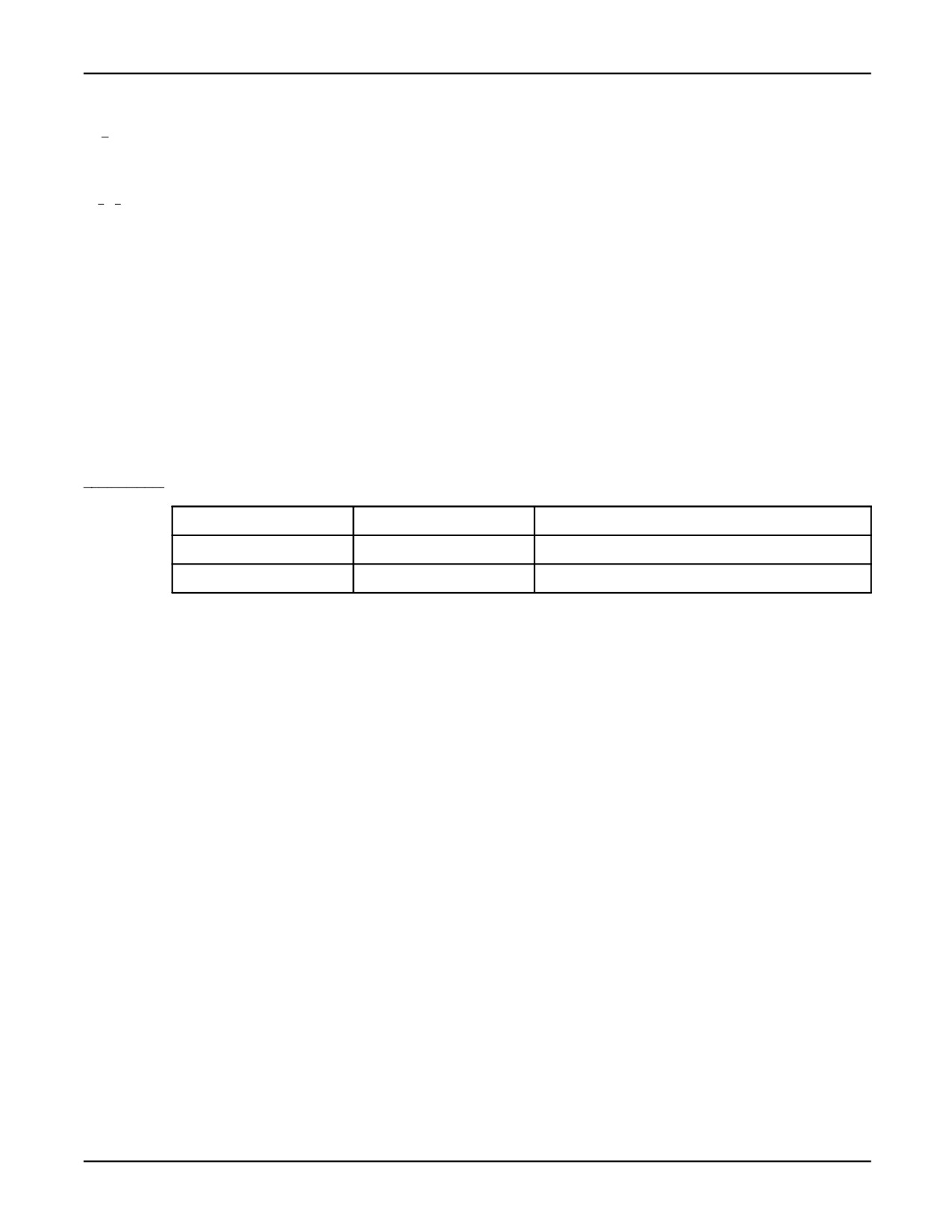
Table A-10 lists some examples of valid and invalid BOOLEAN values used to represent the
Boolean predefined constants.
Table
A-10.
Valid and Invalid BOOLEAN Values
VALID
INVALID
REASON
TRUE
T
Must use entire word
ON
1
Cannot use INTEGER values
• TRUE and FALSE typically represent logical flags, and ON and OFF typically represent signal
states. TRUE and ON are equivalent, as are FALSE and OFF.
• Valid BOOLEAN operators are
— AND, OR, and NOT
— Relational operators (>, >=, =, <>, <, and <=)
• The following have BOOLEAN values:
— BOOLEAN constants, whether predefined or user-defined (for example, ON is a predefined
constant)
— BOOLEAN variables and BOOLEAN fields in a structure
— ARRAY OF BOOLEAN elements
— Values returned by BOOLEAN functions, whether user-defined or built-in (for example,
IN_RANGE(pos_var))
— Values resulting from expressions that use relational or BOOLEAN operators (for example,
x > 5.0)
— Values of digital ports (for example, DIN[2])
• Only BOOLEAN expressions can be assigned to BOOLEAN variables, returned from BOOLEAN
function routines, or passed as arguments to BOOLEAN parameters.
A-42
MARRC75KR07091E Rev D
A. KAREL LANGUAGE ALPHABETICAL DESCRIPTION
Example: Refer to the following sections for detailed program examples:
Section B.2 , "Copying Path Variables" (CPY_PTH.KL)
Section B.3 , "Saving Data to the Default Device" (SAVE_VR.KL)
Section B.5 , "Using Register Built-ins" (REG_EX.KL)
Section B.7 , "Listing Files and Programs and Manipulating Strings" (LIST_EX.KL)
Section B.9 , "Using the File and Device Built-ins" (FILE_EX.KL)
Section B.10 , "Using Dynamic Display Built-ins" (DYN_DISP.KL)
Section B.12 , "Displaying a List From a Dictionary File" (DCLST_EX.KL)
Section B.14 , "Applying Offsets to a Copied Teach Pendant Program" (CPY_TP.KL)
Section B.1 , "Setting Up Digital Output Ports for Monitoring" (DOUT_EX.KL)
A.3.2
BYNAME Built-In Function
Purpose: Allows a KAREL program to pass a variable, whose name is contained in a STRING, as a
parameter to a KAREL routine. This means the programmer does not have to determine the variable
name during program creation and translation.
Syntax : BYNAME (prog_name, var_name, entry)
Input/Output Parameters :
[in] prog_name :STRING
[in] var_name :STRING
[in,out] entry :INTEGER
%ENVIRONMENT Group :system
Details:
• This built-in can be used only to pass a parameter to a KAREL routine.
• entry returns the entry number in the variable data table where var_name is located. This variable
does not need to be initialized and should not be modified.
• prog_name specifies the name of the program that contains the specified variable. If prog_name
is equal to ’’ (double quotes), then the routine defaults to the task name being executed.
A-43
A. KAREL LANGUAGE ALPHABETICAL DESCRIPTION
MARRC75KR07091E Rev D
• var_name must refer to a static, program variable.
• If var_name does not contain a valid variable name or if the variable is not of the type expected as
a routine parameter, the program is aborted.
• System variables cannot be passed using BYNAME.
• The PATH data type cannot be passed using BYNAME. However, a user-defined type that is a
PATH can be used instead.
Example: Refer to Section B.2 , "Copying Path Variables" (CPY_PTH.KL), for a detailed program
example.
A.3.3
BYTE Data Type
Purpose: Defines a variable as a BYTE data type
Syntax : BYTE
Details:
• BYTE has a range of (0 n 255). No uninitialized checking is done on bytes.
• BYTEs are allowed only within an array or within a structure.
• BYTEs can be assigned to SHORTs and INTEGERs, and SHORTs and INTEGERs can be
assigned to BYTEs. An assigned value outside the BYTE range will be detected during execution
and cause the program to abort.
Example: The following example defines an array of BYTE and a structure containing BYTEs.
BYTE Data Type
PROGRAM byte_ex
%NOLOCKGROUP
TYPE
mystruct = STRUCTURE
param1: BYTE
param2: BYTE
param3: SHORT
ENDSTRUCTURE
VAR
array_byte: ARRAY[10] OF BYTE
myvar: mystruct
BEGIN
array_byte[1] = 254
myvar.param1 = array_byte[1]
END byte_ex
A-44
MARRC75KR07091E Rev D
A. KAREL LANGUAGE ALPHABETICAL DESCRIPTION
A.3.4
BYTES_AHEAD Built-In Procedure
Purpose: Returns the number of bytes of input data presently in the read-ahead buffer for a KAREL
file. Allows KAREL programs to check instantly if data has been received from a serial port and
is available to be read by the program. BYTES_AHEAD is also supported on socket messaging
and pipes.
Syntax : BYTES_AHEAD(file_id, n_bytes, status)
Input/Output Parameters :
[in] file_id :FILE
[out] n_bytes :INTEGER
[out] status :INTEGER
%ENVIRONMENT Group :FLBT
Details:
• file_id specifies the file that was opened.
• The file_id must be opened with the ATR_READAHD attribute set greater than zero.
• n_byte is the number of bytes in the read_ahead buffer.
• status explains the status of the attempted operation. If not equal to 0, then an error occurred.
• A non-zero status will be returned for non-serial devices such as files.
See Also: Section 7.3.1 , “File Attributes”
Example: The following example will clear Port 2 (FLPY:) from any bytes still remaining to be read.
BYTES_AHEAD Built-In Procedure
ROUTINE purge_port
VAR
s1
: STRING[1]
n_try
: INTEGER
n_bytes
: INTEGER
stat
: INTEGER
BEGIN
stat=SET_PORT_ATR (port_2, ATR_READAHD, 1) -- sets FLPY: to have a read
-- ahead buffer of 128 bytes
OPEN FILE fi(’RO’, ’rdahd.tst’)
REPEAT
BYTES_AHEAD (fi, n_bytes, stat)
--Get number of bytes ready
--to be read
A-45
A. KAREL LANGUAGE ALPHABETICAL DESCRIPTION
MARRC75KR07091E Rev D
if (n_bytes = 0) then
--if there are no bytes then set stat
stat = 282
endif
if (n_bytes >= 1_) then
--there are bytes to be read
read fi(s1::1)
--read in one byte at a time
stat=io_status (fi)
--get the status of the read operation
endif
UNTIL stat <> 0
--continue until no more bytes are left
END purge_port
BEGIN
-- main program text here
END bytes_ahd
A.3.5
BYTES_LEFT Built-In Function
Purpose: Returns the number of bytes remaining in the current input data record
Syntax : BYTES_LEFT(file_id)
Function Return Type :INTEGER
Input/Output Parameters :
[in] file_id :FILE
%ENVIRONMENT Group :FLBT
Details:
• file_id specifies the file that was opened.
• If no read or write operations have been done or the last operation was a READ file_id (CR), a
zero is returned.
• If file_id does not correspond to an opened file or one of the pre-defined ‘‘files’’ opened to the
respective CRT/KB, teach pendant, and vision windows, the program is aborted.
Note An infeed character (LF) is created when the ENTER key is pressed, and is counted by
BYTES_LEFT.
• This function will return a non-zero value only when data is input from a keyboard (teach pendant
or CRT/KB), not from files or ports.
A-46
MARRC75KR07091E Rev D
A. KAREL LANGUAGE ALPHABETICAL DESCRIPTION
Warning
This function is used exclusively for reading from a window to
determine if more data has been entered. Do not use this function
with any other file device. Otherwise, you could injure personnel or
damage equipment.
See Also: Section 7.10.1 , "User Menu on the Teach Pendant," Section 7.10.2 , "User Menu on the
CRT/KB"
Example: The following example reads the first number, qd_field , and then uses BYTES_LEFT to
determine if the user entered any additional numbers. If so, these numbers are then read.
BYTES_LEFT Built-In Function
PROGRAM p_bytesleft
%NOLOCKGROUP
%ENVIRONMENT flbt
CONST
default_1 = 0
default_2 = -1
VAR rqd_field, opt_field_1, opt_field_2: INTEGER
BEGIN
WRITE(’Enter integer field(s): ’)
READ(rqd_field)
IF BYTES_LEFT(TPDISPLAY) > 0 THEN
READ(opt_field_1)
ELSE
opt_field_1 = default_1
ENDIF
IF BYTES_LEFT(TPDISPLAY) > 0 THEN
READ(opt_field_2)
ELSE
opt_field_2 = default_2
ENDIF
END p_bytesleft
A.4
- C - KAREL LANGUAGE DESCRIPTION
A.4.1
CALL_PROG Built-In Procedure
Purpose: Allows a KAREL program to call an external KAREL or teach pendant program. This
means that the programmer does not have to determine the program to be called until run time.
Syntax : CALL_PROG(prog_name, prog_index)
A-47
A. KAREL LANGUAGE ALPHABETICAL DESCRIPTION
MARRC75KR07091E Rev D
Input/Output Parameters :
[in] prog_name :STRING
[in,out] prog_index :INTEGER
%ENVIRONMENT Group :PBCORE
Details:
• prog_name is the name of the program to be executed, in the current calling task.
• prog_index returns the entry number in the program table where prog_name is located. This
variable does not need to be initialized and should not be modified.
• CALL_PROG cannot be used to run internal or external routines.
See Also: CURR_PROG and CALL_PROGLIN Built-In Functions
Example: Refer to Section B.2 , "Copying Path Variables" (CPY_PTH.KL), for a detailed program
example.
A.4.2
CALL_PROGLIN Built-In Procedure
Purpose: Allows a KAREL program to call an external KAREL or teach pendant program, beginning
at a specified line. This means that the programmer does not need to know, at creation and translation,
what program will be called. The programmer can decide this at run time.
Syntax : CALL_PROGLIN(prog_name, prog_line, prog_index, pause_entry)
Input/Output Parameters :
[in] prog_name :STRING
[in] prog_line :INTEGER
[in,out] prog_index :INTEGER
[in] pause_entry :BOOLEAN
%ENVIRONMENT Group :BYNAM
Details:
• prog_name is the name of the program to be executed, in the current calling task.
• prog_line specifies the line at which to begin execution for a teach pendant program. 0 or 1 is
used for the beginning of the program.
A-48
MARRC75KR07091E Rev D
A. KAREL LANGUAGE ALPHABETICAL DESCRIPTION
• KAREL programs always execute at the beginning of the program.
• prog_index returns the entry number in the program table where prog_name is located. This
variable does not need to be initialized and should not be modified.
• pause_entry specifies whether to pause program execution upon entry of the program.
• CALL_PROGLIN cannot be used to run internal or external routines.
See Also: CURR_PROG and CALL_PROG Built-In Function
Example: Refer to Section B.5 ,"Using Register Built-ins" (REG_EX.KL), for a detailed program
example.
A.4.3
CANCEL Action
Purpose: Terminates any motion in progress
Syntax : CANCEL <GROUP[n{,n}]>
Details:
• Cancels a motion currently in progress or pending (but not stopped) for one or more groups.
• CANCEL does not cancel motions that are already stopped. To cancel a motion that is already
stopped, use the CNCL_STP_MTN built-in routine.
• If the group clause is not present, all groups for which the task has control (when the condition is
defined) will be canceled. In particular, if the program containing the condition handler definition
contains the %NOLOCKGROUP directive, the CANCEL action will not cancel motion in any
group.
• If a motion that is canceled and is part of a SIMULTANEOUS or COORDINATED motion with
other groups, the motions for all groups are canceled.
• The robot and auxiliary or extended axes decelerate smoothly to a stop. The remainder of the
motion is canceled.
• Canceled motions are treated as completed and cannot be resumed.
• The CANCEL action in a global condition handler cancels any pending motions.
A.4.4
CANCEL Statement
Purpose: Terminates any motion in progress.
Syntax : CANCEL <GROUP[n{,n}]>
Details:
A-49
A. KAREL LANGUAGE ALPHABETICAL DESCRIPTION
MARRC75KR07091E Rev D
• Cancels a motion currently in progress or pending (but not stopped) for one or more groups.
• CANCEL does not cancel motions that are already stopped. To cancel a motion that is already
stopped, use the CNCL_STP_MTN built-in routine.
• If the group clause is not present, all groups for which the task has control will be canceled.
In particular, if the program using the CANCEL statement contains the %NOLOCKGROUP
directive, the CANCEL statement will not cancel motion in any group.
• If a motion that is canceled is part of a SIMULTANEOUS or COORDINATED motion with other
groups, the motions for all groups are canceled.
• The robot and auxiliary axes decelerate smoothly to a stop. The remainder of the motion is
canceled.
• Canceled motions are treated as completed and cannot be resumed.
• CANCEL does not affect stopped motions. Stopped motions can be resumed.
• If an interrupt routine executes a CANCEL statement and the interrupted statement was a motion
statement, when the interrupted program resumes, execution normally resumes with the statement
following the motion statement.
• CANCEL might not work as expected if it is used in a routine called by a condition handler. The
motion might already be put on the stopped motion queue before the routine is called. Use a
CANCEL action directly in the condition handler to be sure the motion is canceled.
• Motion cannot be cancelled for a different task.
See Also: Appendix E , ‘‘Syntax Diagrams,’’ for additional syntax information
A.4.5
CANCEL FILE Statement
Purpose: Cancels a READ or WRITE statement that is in progress.
Syntax : CANCEL FILE [file_var]
where:
file_var :a FILE variable
Details:
• Used to cancel input or output on a specified file
• The built-in function IO_STATUS can be used to determine if a CANCEL FILE operation was
successful or, if it failed to determine the reason for the failure.
See Also: IO_STATUS Built-In Function, Chapter 7 FILE INPUT/OUTPUT OPERATIONS ,
Appendix E , ‘‘Syntax Diagrams,’’ for additional syntax information
A-50
MARRC75KR07091E Rev D
A. KAREL LANGUAGE ALPHABETICAL DESCRIPTION
Example: The following example reads an integer, but cancels the read if the F1
key is pressed.
CANCEL FILE Statement
PROGRAM can_file_ex
%ENVIRONMENT FLBT
%ENVIRONMENT UIF
%NOLOCKGROUP
VAR
int_var: INTEGER
ROUTINE cancel_read
BEGIN
CANCEL FILE TPDISPLAY
END cancel_read
BEGIN
CONDITION[1]:
WHEN TPIN[ky_f1]+ DO
cancel_read
ENABLE CONDITION[1]
ENDCONDITION
ENABLE CONDITION[1]
REPEAT
-- Read an integer, but cancel if
F1
pressed
CLR_IO_STAT(TPDISPLAY)
WRITE(CR, ’Enter an integer: ’)
READ(int_var)
UNTIL FALSE
end can_file_ex
A.4.6
CHECK_DICT Built-In Procedure
Purpose: Checks the specified dictionary for a specified element
Syntax : CHECK_DICT(dict_name, element_no, status)
Input/Output Parameters :
[in] dict_name :STRING
[in] element_no :STRING
[out] status :INTEGER
%ENVIRONMENT Group :UIF
A-51
A. KAREL LANGUAGE ALPHABETICAL DESCRIPTION
MARRC75KR07091E Rev D
Details:
• dict_name is the name of the dictionary to check.
• element_no is the element number within the dictionary.
• status explains the status of the attempted operation. If not equal to 0, then the element could not
be found.
See Also: ADD_DICT, READ_DICT, WRITE_DICT, REMOVE_DICT Built-In Procedures. Refer
to the program example for the DISCTRL_LIST Built-In Procedure and Chapter 10 DICTIONARIES
AND FORMS
Example: Refer to Section B.12 , "Displaying a List From a Dictionary File" (DCLST_EX.KL), for a
detailed program example.
A.4.7
CHECK_EPOS Built-In Procedure
Purpose: Checks that the specified position is valid and that no motion errors will be generated
when moving to this position
Syntax : CHECK_EPOS (eposn, uframe, utool, status <, group_no>)
Input/Output Parameters :
[in] eposn :XYZWPREXT
[in] uframe :POSITION
[in] utool :POSITION
[out] status :INTEGER
[in] group_no :INTEGER
%ENVIRONMENT Group :PBCORE
Details:
• eposn is the XYZWPREXT position to be checked.
• uframe specifies the uframe position to use with eposn.
• utool specifies the utool position to use with eposn.
• status explains the status of the check. If the position is reachable, the status will be 0.
• group_no is optional, but if specified will be the group number for eposn . If not specified the
default group of the program is used.
A-52
MARRC75KR07091E Rev D
A. KAREL LANGUAGE ALPHABETICAL DESCRIPTION
See Also: GET_POS_FRM
Example: Refer to Section B.8 (GEN_HEX.KL)
A.4.8
CHECK_NAME Built-In Procedure
Purpose: Checks a specified file or program name for illegal characters.
Syntax : CHECK_NAME (name_spec, status)
Input/Output Parameters :
[in] name_spec :STRING
[out] status :INTEGER
%ENVIRONMENT Group :FDEV
Details:
• Name_spec specifies the string to check for illegal characters. The string can be the file name or
program name. It should not include the extension of the file or the program. This built-in does
not handle special system names such as *SYSTEM*.
A.4.9
CHR Built-In Function
Purpose: Returns the character that corresponds to a numeric code
Syntax : CHR (code)
Function Return Type :STRING
Input/Output Parameters :
[in] code :INTEGER
%ENVIRONMENT Group :SYSTEM
Details:
• code represents the numeric code of the character for either the ASCII, Graphic, or Multinational
character set.
• Returns a single character string that is assigned the value of code .
A-53
A. KAREL LANGUAGE ALPHABETICAL DESCRIPTION
MARRC75KR07091E Rev D
See Also: Appendix D ,“ASCII Character Codes”
Example: Refer to the following sections for detailed program examples:
Section B.4 ,"Standard Routines" (ROUT_EX.KL)
Section B.5 ,"Using Register Built-ins" (REG_EX.KL)
Section B.6 , "Path Variables and Condition Handlers Program" (PTH_MOVE.KL)
Section B.13 , "Using the DISCTRL_ALPHA Built-in" (DCALP_EX.KL)
Section B.14 , "Applying Offsets to a Copied Teach Pendant Program" (CPY_TP.KL)
Section B.1 , "Setting Up Digital Output Ports for Monitoring" (DOUT_EX.KL)
A.4.10
CLEAR Built-In Procedure
Purpose: Clears the specified program and/or variables from memory
Syntax : CLEAR(file_spec, status)
Input/Output Parameters :
[in] file_spec :STRING
[out] status :INTEGER
%ENVIRONMENT Group :PBCORE
Details:
• file_spec specifies the program name and type of data to clear. The following types are valid:
no ext :KAREL or Teach Pendant program and variables.TP :Teach Pendant program.PC :KAREL
program.VR :KAREL variables
• status explains the status of the attempted operation. If not equal to 0, then an error occurred.
Example: The following example clears a KAREL program, clears the variables for a program,
and clears a teach pendant program.
CLEAR Built-In Procedure
-- Clear KAREL program
CLEAR(’test1.pc’, status)
-- Clear KAREL variables
CLEAR(’testvars.vr’, status)
A-54
MARRC75KR07091E Rev D
A. KAREL LANGUAGE ALPHABETICAL DESCRIPTION
-- Clear Teach Pendant program
CLEAR(’prg1.tp’, status)
A.4.11
CLEAR_SEMA Built-In Procedure
Purpose: Clear the indicated semaphore by setting the count to zero
Syntax : CLEAR_SEMA(semaphore_no)
Input/Output Parameters :
[in] semaphore_no :INTEGER
%ENVIRONMENT Group :MULTI
Details:
• The semaphore indicated by semaphore_no is cleared.
• semaphore_no must be in the range of 1 to the number of semaphores defined on the controller.
• All semaphores are cleared at COLD start. It is good practice to clear a semaphore prior to
using it. Before several tasks begin sharing a semaphore, one and only one of these task, should
clear the semaphore.
See Also: POST_SEMA, PEND_SEMA Built-In Procedures, SEMA_COUNT Built-In Function,
examples in Chapter 14, "Multi-Tasking"
A.4.12
CLOSE FILE Statement
Purpose: Breaks the association between a FILE variable and a data file or communication port
Syntax : CLOSE FILE file_var
where:
file_var :a FILE variable
Details:
• file_var must be a static variable that was used in the OPEN FILE statement.
• Any buffered data associated with the file_var is written to the file or port.
• The built-in function IO_STATUS will always return zero.
A-55
A. KAREL LANGUAGE ALPHABETICAL DESCRIPTION
MARRC75KR07091E Rev D
See Also: IO_STATUS Built-In Function, Chapter 7 FILE INPUT/OUTPUT OPERATIONS ,
Appendix E , ‘‘Syntax Diagrams,’’ for additional syntax information
Example: Refer to Section B.12 , "Displaying a List From a Dictionary File" (DCLST_EX.KL), for a
detailed program example.
A.4.13
CLOSE HAND Statement
Purpose: Causes the specified hand to close
Syntax : CLOSE HAND hand_num
where:
hand_num :an INTEGER expression
Details:
• The actual effect of the statement depends on how the HAND signals are set up in I/O system.
• The valid range of values for hand_num is 1-2. Otherwise, the program is aborted with an error.
• The statement has no effect if the value of hand_num is in range but the hand is not connected.
• The program is aborted with an error if the value of hand_num is in range but the HAND signal
represented by that value has not been assigned.
See Also: Chapter 14 INPUT/OUTPUT SYSTEM , for more information on hand signals, Appendix E
, ‘‘Syntax Diagrams,’’ for additional syntax information
Example: The following example moves the robot to the first position and closes the hand specified
by hand_num .
CLOSE HAND Statement
SET_POS_REG(1, p1, status)
move_pr - Call TP program to do move
CLOSE HAND hand_num
A.4.14
CLOSE_TPE Built-In Procedure
Purpose: Closes the specified teach pendant program
Syntax : CLOSE_TPE(open_id, status)
Input/Output Parameters :
A-56