FANUC Series 30i/300i/300is-MODEL A. Machining Center System. User's manual - page 305
 

  Index      Manuals     FANUC Series 30i/300i/300is-MODEL A. Machining Center System. User's manual (B-63944EN/03)


Search            copyright infringement  


Content      ..     303      304      305      306     ..


FANUC Series 30i/300i/300is-MODEL A. Machining Center System. User's manual - page 305


 APPENDIX 

B-63944EN/03


- 2396 - 

I. PC TOOL FOR MEMORY CARD 

PROGRAM OPERATION/EDITING 

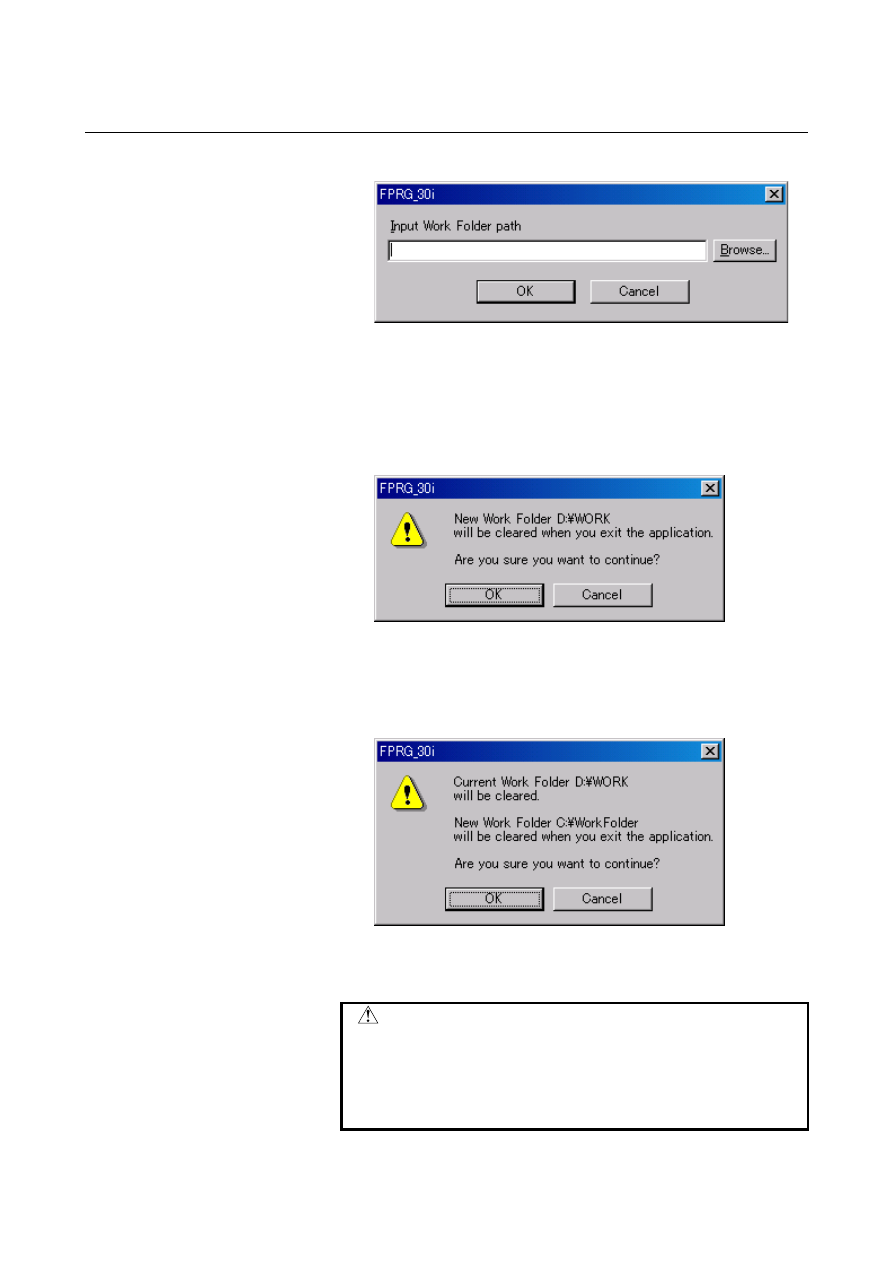
[Change Work Folder] 


Work folder is used for temporarily keeping the dropped out files. 

If work folder has no enough free space, Drop-out will not be 
executed. To avoid this, you can check this option and change 
the work folder to an area where there is enough free space. With 
default setting, work folder [temp] will be created on the same 
place of this PC tool "FPRG_30i.exe". 


If you changed the default work folder, the following warning 
message is popped up. 


If the [OK] button is pushed, the operation advances. 


If the [Cancel] button is pushed, the operation is abandoned. 


If the work folder has been changed before, the following 
warning message is popped up. 


If the [OK] button is pushed, the operation advances. 

          If the [Cancel] button is pushed, the operation is abandoned.


 WARNING 

1  At this PC tool terminated, all files in the work 

folder are deleted. 

2  During this PC tool executing, do not access the 

files in the work folder. If the access is done, there 
is no assurance of normal operation. 


B-63944EN/03

 APPENDIX 


- 2397 - 

I.PC TOOL FOR MEMORY CARD

PROGRAM OPERATION/EDITING

Help menu


[About...] 

Version number of this PC tool is displayed. 


  - Mouse Operation 

[Drop-in and Drop-out]


Drop-in from Explorer


NC program can be added by dropping files including the NC 
files into the List view window of this PC tool from Explorer 


NC program name and update time is the same as the Dropped-in 
files. 


If "Oxxxxxxxx" or "<xxxx>" exists at the top of files, These 
"Oxxxxxxxx" and    "<xxxx>" become NC program name. If not 
exist, each file name becomes NC program name.


Examples 

Name of external file


Top of external file 

Name of internal file

Program number


O1234 N10G00 O1234  1234 
O123N10G00 N10G00 

O123N10G00 

Not an O number program 

test.txt O1234N10G00 

O1234  1234 

test.txt <O1234> 

O1234  1234 

test.txt 

<O1234N10> 

O1234N10 

Not an O number program 

O1234 

<O1234N10> 

O1234N10 

Not an O number program 

O001234 N10G00  O1234 

1234 

O001234N10G00 N10G00 

O001234N10G00 

Not an O number program 

test.txt O001234 

O1234  1234 

test.txt <O001234> 

O1234  1234 

test.txt <O001234N10G00> 

O001234N10G00 

Not an O number program 


 APPENDIX 

B-63944EN/03


- 2398 - 

I. PC TOOL FOR MEMORY CARD 

PROGRAM OPERATION/EDITING 

NOTE 

1  For naming program file, please refer to the 

following chapter "Naming rules of Program file". 

2  For usable characters in Program file, please refer 

to the following chapter "Rules of characters in 
Program file". 

3  The updating time of program file is available from 

1997 to 2037. 


This PC tool can check contents of dropped-in program file 
according to "Rules of characters in Program file". However, this 
PC tool does not check grammar of NC program. 


The program file can only have one NC program. Therefore, the 
NC program output from CNC cannot be dropped in directly. 


O1 
G91 X10. Y10. 
M30 
 
O10 
G91 X10. Y10. 
M30 


O1 
G91 X10. Y10. 
M30 

O1 
G91 X10. Y10. 
M30 

Available for Drop-in 

Example of Program 

<O1> 
G91 X10. Y10. 
M30 

Unavailable for Drop-in


NOTE 

1  If the same named program file exists, another 

same named program file cannot be dropped in. 

2  If free space on the memory card program file is 

lacking, new program file cannot be dropped in. 

3  If the NC program name is not compliant with 

"Naming rules of Program file", the program file can 
not be dropped in. 


If the File name acts as Program number, "O" is displayed on the 
first row of list view. 


B-63944EN/03

 APPENDIX 


- 2399 - 

I.PC TOOL FOR MEMORY CARD

PROGRAM OPERATION/EDITING


Drop-out from List view window


Drop-out from list view of this PC tool to Explorer is available. 


NOTE 


Do not drop out to Work folder. If dropped out to 
Work folder, this PC tool cannot continue to 
function normally. 


  - Pop-up menu 

Pop-up menu is displayed by clicking the right mouse button. 


Focus on Tree view


Clicking "New Folder", a new folder is created on selected 
folder.  


Clicking "Delete", the selected folder is deleted. 


Clicking "Rename", the selected folder is renamed. 


If clicking on root folder, "Delete" and "Rename" are not activated. 


Focus on List view


Clicking "Delete", the selected folder or program file is deleted. 

  Clicking "Rename", the selected folder or program file is 

renamed. 


 APPENDIX 

B-63944EN/03


- 2400 - 

I. PC TOOL FOR MEMORY CARD 

PROGRAM OPERATION/EDITING 

  - Display of free space on the memory card program file ("FANUCPRG.BIN") 

Number of used folder, size of used space, number of unused folder, 
and size of free space are displayed on status bar in the lower portion 
of the screen. 


When a new memory card program file is created, two reserved folder 
are also created. Therefore, the number of used folder is two. However 
it does not show that number of unused folder is reduced. 
 
The display of status bar is renewed at creating or deleting a folder, 
dropping-in from Explorer, and deleting a program file. 


  - Sorting list view of the memory card program file 

When a column is being clicked, the list view of the memory card 
program file is being sorted by the column key in ascending or 
descending order. 
The initial display is sorted by NAME key in ascending order.


Clicking


B-63944EN/03

 APPENDIX 


- 2401 - 

I.PC TOOL FOR MEMORY CARD

PROGRAM OPERATION/EDITING

I.2 

NAMING RULES 


Overview 

Naming rules of folder and program file are described as follows.


I.2.1 

Naming Rules of Program File 

 
Here are Naming rules of Program file: 


Program file name can have a maximum of 32 characters. 


Program file name can have following characters. 


Alphabet(Upper and lower case letter), numeric character, 
"-"(minus), "+"(plus), "_"(under bar), "."(dot) 


"." and ".." can not be used since these are reserved for system 
use. 


  - The File name acts as Program number 

When the File name is "O"+ 1-99999999, the file name acts as 
Program number.   
 
Example) 

"O123"   

Program number 123 

"O1" 

  Program 

number 

"O3000"   

Program number 3000 

"O99999999"  Program number 99999999 
"O0123"   

Program number 123 


The file name does not act as Program number, and can be dropped in: 

"ABC"   

Top of character is not upper case letter of "O". 

"o123"   

Top of character is not upper case letter of "O". 

"O0123XY"  Characters following the "O" contains alphabet. 


The file name does not act as Program number, and cannot be dropped 
in: 

"O123456789" Numeric characters exceed 8 digits.   


NOTE 

1  Program file name cannot be repeated in a Folder.


2  If program file name starts with "O" and the next 

eight characters are all numeric characters, the "0" 
(zero) after the "O" will be deleted. 

 APPENDIX 

B-63944EN/03


- 2402 - 

I. PC TOOL FOR MEMORY CARD 

PROGRAM OPERATION/EDITING 

I.2.2 

Naming Rules Of Folder 

 
Here are Naming rules of Folder: 


Folder name can have a maximum of 32 characters. 


Folder name can have following characters. 


Alphabet(Upper and lower case letter), numeric character,   
"-"(minus), "+"(plus), "_"(under bar), "." (dot) 


"." and ".." can not be used since these are reserved for system 
use. 


NOTE 


Folder name cannot be repeated in a Folder. 


B-63944EN/03

 APPENDIX 


- 2403 - 

I.PC TOOL FOR MEMORY CARD

PROGRAM OPERATION/EDITING

I.3 

RULES OF CHARACTERS IN PROGRAM FILE 


Overview 

Words in parentheses "( )" in Program file are treated as comments. 
The mark of comment start "(" is named "Control-out". 
The mark of comment end ")" is named "Control-in". 
"Control-out" and "Control-in" must make a pair. The order is 1st - 
"Control-out" and 2nd -"Control-in". And nested parentheses is not 
available. 
 

NOTE 

1  When a program file is dropped in, space code 

(0x20 SPC) , tab code (0x09 HT) , carriage return 
code(0x0d CR) and percent code(0x25 %) is 
deleted. If "%" is found in Control-in, characters 
between "%" and next "LF" (0x0a) is deleted. 

2  The front of program number ":" is changed to 

"O"(O as in Oscar) while the program file dropped 
in. 

3  The program file can only have one NC program. 


Content      ..     303      304      305      306     ..