FANUC Series 30i/300i/300is-MODEL A. Machining Center System. User's manual - page 238
 

  Index      Manuals     FANUC Series 30i/300i/300is-MODEL A. Machining Center System. User's manual (B-63944EN/03)


Search            copyright infringement  


Content      ..     236      237      238      239     ..


FANUC Series 30i/300i/300is-MODEL A. Machining Center System. User's manual - page 238


12.SETTING AND DISPLAYING DATA

 OPERATION 

B-63944EN/03


- 1860 - 

12.4.30.1 

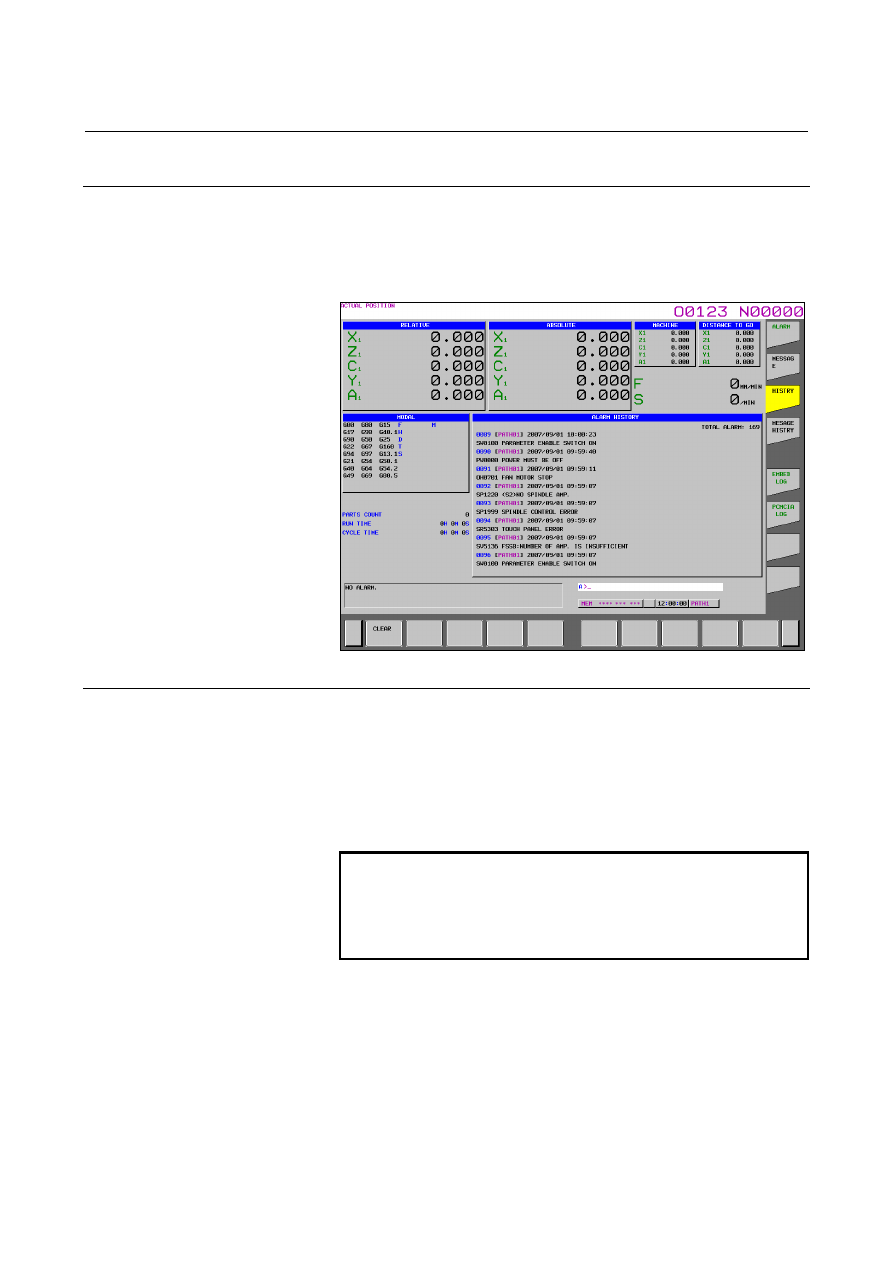
Alarm history 

 
From all history data recorded, only alarm history is extracted and 
displayed on the screen. Note that when the amount of history data 
exceeds the storage capacity, history data is automatically erased in 
order from the oldest history data. 


Fig. 12.4.30.1 (a) Alarm history screen 


Screen display 

Issued alarms are displayed sequentially from the latest alarm. 
The following information is displayed for each alarm: 


Path name (only when multipath operation is performed) 


Time and date of alarm occurrence 


Type and number of the alarm 

 Alarm 

message 


NOTE 


To record also external alarm and macro alarm 
messages as history data, set bit 3 (EAH) of 
parameter No. 3112 to 1, and at the same time set 
bit 7 (HAL) of parameter No. 3196 to 0. 

 
When a name such as a path name, axis name, or spindle name has 
been changed after the issuance of an alarm, a newly assigned name is 
displayed on the alarm history screen. 
When modal O data that is a program name is output, only the first 
five characters are output. 
 

B-63944EN/03

 OPERATION 

12.SETTING AND DISPLAYING DATA


- 1861 - 

Procedure 

Press function key 

  to display a screen of parameters and 

so on. 

Press vertical soft key [HISTRY] to display the alarm history 
screen. 

The screen display can be changed to the previous page and the 
next page by using page keys 


 and 


.


Erasing history data from the alarm history screen 

Procedure 

Display the alarm history screen. 

2  Press horizontal soft key [CLEAR]. All history data is then 

erased. 


NOTE 


When history data is erased, not only alarm history 
data but also other history data such as external 
operator message history data and operation 
history data is erased. It is impossible to erase only 
a specific history. 


Display of external alarms and macro alarms 

When an external alarm or macro alarm is issued, it becomes possible 
to record its message as well as the alarm number in the alarm history 
if the parameter shown below is set. As the message of an external 
alarm or macro alarm, the first 32 characters for the external alarm or 
the first 26 characters for the macro alarm are recorded. 


#7 #6 #5 #4 #3 #2 #1 #0 

3112 


EAH 


 [Data 

type] 

Bit 
 

        # 3 

EAH

  Messages of the external alarm/macro alarm in alarm or operation 

history: 
0: Not 

recorded 

1: Recorded 
 

NOTE 


This parameter is valid when bit 7 (HAL) of 
parameter No. 3196 is set to 0. 


12.SETTING AND DISPLAYING DATA

 OPERATION 

B-63944EN/03


- 1862 - 


#7 #6 #5 #4 #3 #2 #1 #0 

3196 


HAL 


 [Data 

type] 

Bit 
 

        # 7 

HAL

  When an alarm is issued, additional information (modal data, absolute 

coordinates, and machine coordinates present at the issuance of the 
alarm) is: 
0:  Recorded in the operation history and alarm history. 
1:  Not recorded in the operation history and alarm history. 
 

NOTE 

1  History data such as alarm history data, operation 

history data, external operator message history 
data, and data modification history data is stored in 
the same storage area. Therefore, alarm history 
data may be erased when the storage capacity is 
exceeded by other history data. 

2  The maximum number of history data items that 

can be stored is as follows, where the history data 
is assumed to include alarm data only: 
When bit 7 (HAL) of parameter No. 3196 is set to 1, 
up to about 4000 history data items can be stored. 
When bit 7 (HAL) of parameter No. 3196 is set to 0, 
modal information and coordinates observed when 
an alarm is issued are also recorded, so the 
maximum number of history data items that can be 
stored varies from system to system. (Example: 
For a 5-axis system, up to about 280 data items 
can be stored; for a 10-axis system, up to about 
200 data items can be stored.) 
When bit 3 (EAH) of parameter No. 3112 is set to 
1, however, macro and external alarm messages 
are also stored, so the number of data items that 
can be stored further decreases. 

B-63944EN/03

 OPERATION 

12.SETTING AND DISPLAYING DATA


- 1863 - 

12.4.30.2 

External operator message history 

 
From all history data recorded, only external operator message history 
and macro message history are extracted and displayed on the screen. 
When the amount of history data exceeds the storage capacity, history 
data is automatically erased in order from the oldest history data. 


Fig. 12.4.30.2 (a) External operator message history screen 


Screen display 


Procedure 

Press function key 

2  Press vertical soft key [MESAGE HISTRY] to display the 

external operator message history screen. 

The screen display can be changed to the previous page and the 
next page by using page keys 


 and 


.


NOTE 

1  History data such as external operator message 

history data, operation history data, alarm history 
data, and data modification history data is stored in 
the same storage area. Therefore, external 
operator message history data may be erased 
when the storage capacity is exceeded by other 
history data. 

2  The maximum number of history data items that 

can be stored is about 150 if the history data 
includes external operator message data only. 


12.SETTING AND DISPLAYING DATA

 OPERATION 

B-63944EN/03


- 1864 - 


Erasing history data from the external operator message history screen 


Procedure 

Display the external operator message history screen. 

2  Press horizontal soft key [CLEAR]. All history data is then 

erased. 


NOTE 


When history data is erased, not only external 
operator message history data but also other 
history data such as operation history data and 
alarm history data is erased. It is impossible to 
erase only a specific history. 


Parameter setting 


#7 #6 #5 #4 #3 #2 #1 #0 

3112 


OMH 


 [Data 

type] 

Bit 
 

        # 2 

OMH

  The external operator message history screen is: 

0: Not 

displayed. 

1: Displayed. 


#7 #6 #5 #4 #3 #2 #1 #0 

3196 


HOM


 [Data 

type] 

Bit 
 

        # 6 

HOM

  A history of external operator messages and macro messages is: 

0: Recorded. 
1: Not 

recorded. 


B-63944EN/03

 OPERATION 

12.SETTING AND DISPLAYING DATA


- 1865 - 

12.4.30.3 

Operation history 

 
This function displays a history of the operator's key operations and 
signal operations made when a failure occurred or an alarm was issued, 
and also information about alarms. 
The following data is recorded: 
 
a Operation 

history 

    MDI key operations made by the operator 

    I/O signal (X,Y,G,F) on/off switching 

b Alarm 

history 

  Alarms issued 

  Modal information in a block executed and coordinates 

observed when an alarm was issued 
(Not displayed on the screen) 

Data modification history 

    Modification of tool offset data 

(When bit 0 (HTO) of parameter No. 3196 is set to 1) 

  Modification of workpiece offset data/extended workpiece 

offset data/workpiece shift (T series) 
(When bit 1 (HWO) of parameter No. 3196 is set to 1) 

  Modification of parameters 

(When bit 2 (HPM) of parameter No. 3196 is set to 1) 

    Modification of custom macro common variable data 

(When bit 3 (HMV) of parameter No. 3196 is set to 1) 

External operator message history and macro message history 
(When bit 6 (HOM) of parameter No. 3196 is set to 0) 

Time stamp (time and date) 

 
With some exceptions, history data of the operation history and alarm 
history can be viewed on the operation history screen. (The data 
modification history, external operator message history, and alarm 
messages are not displayed.) 
All recorded history data can be output to external input/output 
devices. 
 

NOTE 


Up to about 8000 items of history data can be 
recorded if the data includes history data of MDI 
key operations only. However, because history data 
varies in size, the maximum number of history data 
items that can be recorded is not fixed. 


12.SETTING AND DISPLAYING DATA

 OPERATION 

B-63944EN/03


- 1866 - 


Parameter setting 


#7 #6 #5 #4 #3 #2 #1 #0 

3106 


OPH 


 [Data 

type] 

Bit 
 

        # 4 

OPH

  The operation history screen is: 

0: Not 

displayed. 

1: Displayed. 
 

3122 


Time interval used to record time data in operation history 


[Input type]  Parameter input 


[Data type]  Word path 


[Unit of data]  min 

  [Valid data range]  0 to 1440 

When history data is recorded within a set time period, the time for 
each set time period is recorded in the history data. 
When 0 is set, the specification of a time period of 10 minutes is 
assumed. 
If no data is recorded within a set time period, the time for that period 
is not recorded. 
 

NOTE 


The same value must be set in this parameter for 
all paths. 


#7 #6 #5 #4 #3 #2 #1 #0 

3195 


EKE 

HDE 

HKE 


[Input type]  Parameter input 


[Data type]  Common to the bit system 


        # 5 

HKE

  A key operation history is: 

0: Recorded. 
1: Not 

recorded. 


        # 6 

HDE

  A DI/DO history is: 

0: Recorded. 
1: Not 

recorded. 


        # 7 

EKE

  Soft key [ALL CLEAR] for clearing all history data is: 

0: Not 

displayed. 

1: Displayed. 
 

B-63944EN/03

 OPERATION 

12.SETTING AND DISPLAYING DATA


- 1867 - 


#7 #6 #5 #4 #3 #2 #1 #0 

3196  HAL  HOM


HMV  HPM HWO HTO 


 [Data 

type] 

Bit 
 

        # 0 

HTO

  A modification history of tool offset data is: 

0: Not 

recorded. 

1: Recorded. 
 

        # 1 

HWO

  A modification history of workpiece offset data/extended workpiece 

offset data/workpiece shift (T series) is: 
0: Not 

recorded. 

1: Recorded. 
 

        # 2 

HPM

  A modification history of parameters is: 

0: Not 

recorded. 

1: Recorded. 
 

        # 3 

HMV

  A modification history of custom macro common variables is: 

0: Not 

recorded. 

1: Recorded. 
 

        # 6 

HOM

  A history of external operator messages and macro messages is: 

0: Recorded. 
1: Not 

recorded. 


        # 7 

HAL

  When an alarm is issued, additional information (modal data, absolute 

coordinates, and machine coordinates present at the issuance of the 
alarm) is: 
0:  Recorded in the operation history and alarm history. 
1:  Not recorded in the operation history and alarm history. 
To record as many alarm history items as possible, rather than detailed 
alarm information, set 1. The numbers of ten G code modal groups to 
be recorded are set in parameter Nos. 12990 to 12999. 
 

12990  (1st) G code modal group to be recorded in the history when an alarm is issued


[Input type]  Parameter input 


[Data type]  Byte path 

  [Valid data range]  1 to the maximum number of G code groups 

Set the number of a G code modal group to be recorded in the alarm 
history and operation history when an alarm is issued. 

If a value beyond the valid data range is set, the status of group 
01 is recorded. 


Content      ..     236      237      238      239     ..