FANUC Series 30i/300i/300is-MODEL A. Machining Center System. User's manual - page 151
 

  Index      Manuals     FANUC Series 30i/300i/300is-MODEL A. Machining Center System. User's manual (B-63944EN/03)


Search            copyright infringement  


Content      ..     149      150      151      152     ..


FANUC Series 30i/300i/300is-MODEL A. Machining Center System. User's manual - page 151


4.AUTOMATIC OPERATION

 OPERATION 

B-63944EN/03


- 1164 - 

 - Reverse execution 

 end of reverse execution 

 forward reexecution 

When a block to be executed is no longer present during reverse 
execution (when reverse execution has been performed up to the block 
where forward execution started, or when forward execution has not 
yet been performed), the reverse execution end state is entered, and 
operation stops. 
Even when a cycle start operation is performed while the 
“REVERSE” switch on the machine operator’s panel is held on, 
operation is not performed, and the reverse execution end state is 
maintained.  Forward reexecution (or forward execution) is started 
by setting the “REVERSE” switch on the machine operator’s panel to 
off then performing a cycle start operation. 


End of reverse execution
"REVERSE" switch = 
OFF 
Cycle start 
 

Cycle start (start of forward execution)
 

Start of forward reexecution 

Forward 
Reverse 
Forward 
reexecution

Start of reverse execution


Fig. 4.10 (i)     


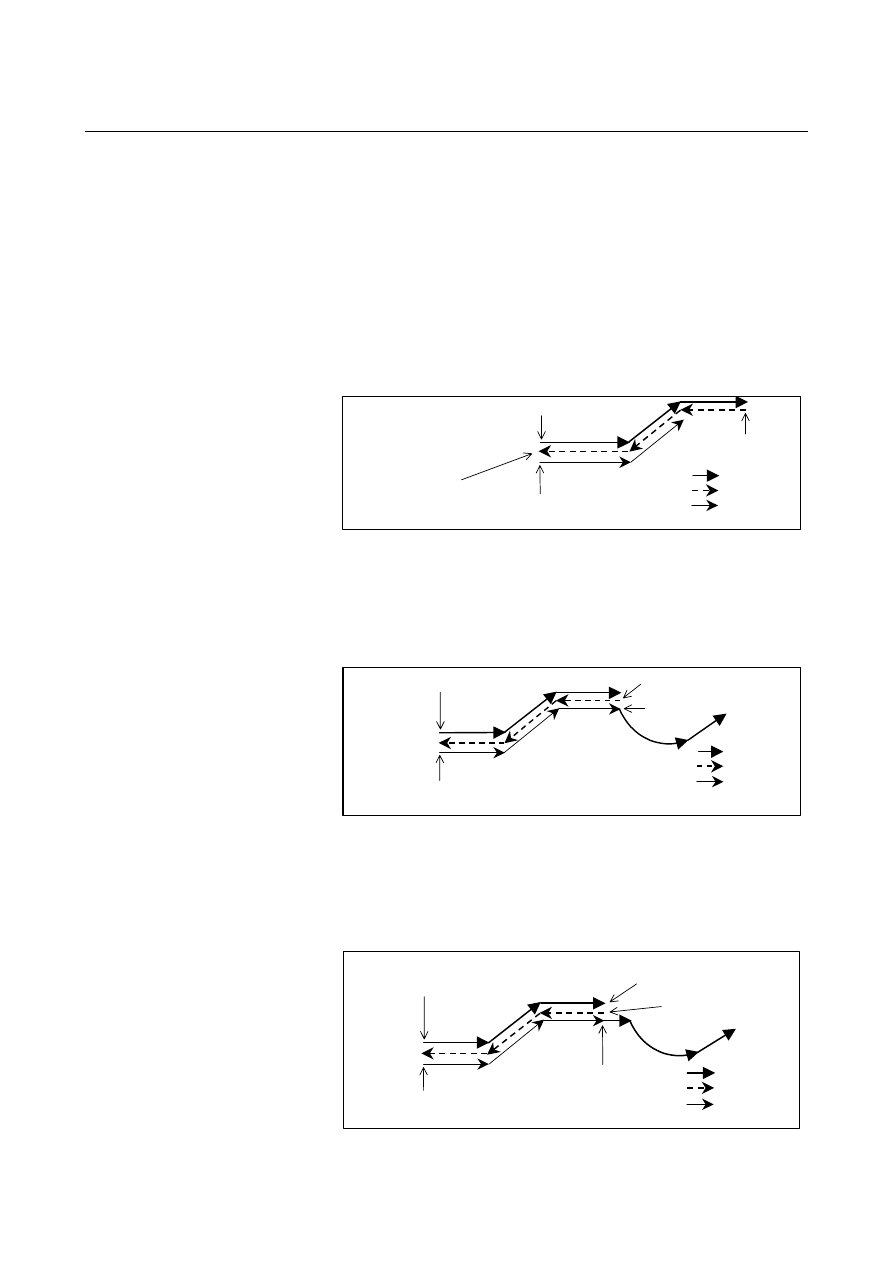
 - Forward reexecution 

 forward execution 

After forward reexecution is performed up to the block at which 
reverse execution started, forward execution starts automatically, and 
commands are read from the program again and executed.  No 
particular operation is required. 

Cycle start (start of forward execution)


Start of forward reexecution
 

Forward 
Reverse 
Forward 
reexecution
 

Start of reverse execution

Restart of forward execution


Fig. 4.10 (j)     

 
If reverse execution was performed after feed hold stop, forward 
reexecution ends when the feed hold stop position is reached, then 
forward execution is performed.    Also if single block operation was 
performed, forward reexecution ends at the single block stop position. 


Cycle start (start of forward execution)

Start of forward reexecution

Forward 
Reverse 
Forward 
reexecution

Feed hold stop 
"REVERSE" switch = OFF, cycle start 

Start of reverse execution

Restart of forward execution 


Fig. 4.10 (k)     


B-63944EN/03

 OPERATION 

4.AUTOMATIC OPERATION


- 1165 - 

Explanation 
  - Reverse execution and forward execution 

Usually in automatic operation, a program is executed in the 
programmed order.  This is called forward execution.  This function 
allows a program executed by forward execution to be executed in the 
reverse direction.  This is called reverse execution.  Reverse 
execution allows the tool to retrace the path along which the tool has 
moved during forward execution. 
Reverse execution of a program can be performed only for blocks that 
have been executed by forward execution. 
Furthermore, in single block operation, reverse execution can also be 
performed on a block-by-block basis . 
 

 - Forward reexecution 

Blocks that have been executed by reverse execution can be 
reexecuted in the forward direction up to the block from which reverse 
execution started.  This is called forward reexecution.  Forward 
reexecution allows the tool to retrace the same tool path as in forward 
execution until the position at which reverse execution started is 
reached. 
After the block from which reverse execution started is reached, the 
program is executed again in the programmed order (forward 
execution). 
Furthermore, in single block operation, forward reexecution can also 
be performed on a block-by-block basis. 
 

  - End of reverse execution 

When a block to be executed is no longer present during reverse 
execution (when stored blocks have all been executed during reverse 
execution, or when forward execution has not yet been performed), 
operation stops.    This is called the end of reverse execution. 
 

 - Status indication 

During reverse execution, characters "RVRS" blink on the screen.  
During forward reexecution, characters "RTRY" blink to indicate that 
forward reexecution is in progress.    The "RTRY" indication is kept 
blinking until the block at which reverse execution started is reached 
and normal operation starts (until forward execution is restarted). 
When a block to be executed is no longer present during reverse 
execution, or if an attempt is made to perform reverse execution for a 
block that cannot be executed by reverse execution, characters 
"RVED" blink, notifying the user that reverse execution can no longer 
be performed. 
 

  - Number of blocks that can be executed by reverse execution 

Up to about 100 blocks can be executed by reverse execution.  
Depending on the specified program, the maximum number of 
executable blocks may decrease. 
 

4.AUTOMATIC OPERATION

 OPERATION 

B-63944EN/03


- 1166 - 

 - Reset 

A reset operation (the reset button on the MDI panel, the external reset 
signal, or the reset & rewind signal) clears the blocks stored for 
reverse execution. 
 

 - Feedrate 

A feedrate to be applied during reverse execution can be specified in 
parameter No. 1414.  If this parameter is set to 0, the feedrate in 
reverse execution is assumed to be the same as that in forward 
execution.    Rapid traverse, however, is performed always at the rapid 
traverse rate, regardless of the setting of this parameter. 
The feedrate in forward reexecution is always the same as that in 
forward execution. 
In reverse execution or forward reexecution, feedrate override, rapid 
traverse override, and dry run are allowed. 
 

  - Start of reverse execution or forward reexecution after the end of a block 

In a block for rapid traverse (G00), linear interpolation (G01), circular 
interpolation (G02, G03), dwelling (G04), skip cutting (G31), or an 
auxiliary function in an automatic operation mode (memory operation, 
part program operation, or MDI operation), reverse execution or 
forward reexecution can be started.    However, reverse execution and 
forward reexecution do not start as soon as the reverse execution 
signal status is changed.    When the block has ended, that is, after a 
movement, dwelling, or an auxiliary function is completed, reverse 
execution or forward reexecution starts. 
 

  - Start of reverse execution or forward reexecution after feed hold stop 

When a feed hold stop operation is performed during execution of 
rapid traverse (G00), linear interpolation (G01), circular interpolation 
(G02, G03), or skip cutting (G31), then the reverse execution signal 
status is changed and operation is restarted, reverse execution or 
forward reexecution can be started immediately from the stop position.   
This cannot be performed when dwelling (G04) or an auxiliary 
function is being executed. 

Start of 
reverse 
execution 

Start of feed hold 
"REVERSE" switch = ON 
Cycle start 

Start of feed hold 
"REVERSE" switch = OFF 
Cycle start 

End of reverse execution, start of forward reexecution 


Fig. 4.10 (l)     


When reverse execution is started after feed hold stop operation, the 
part from the start point of that block to the feed hold stop position is 
stored as one block.  Therefore, when forward reexecution is 
performed with the single block switch set to 1, a single block stop 
takes place as soon as the position at which reverse execution started 
is reached. 

B-63944EN/03

 OPERATION 

4.AUTOMATIC OPERATION


- 1167 - 


  - Start of reverse execution or forward reexecution after single block stop 

After a single block stop takes place, reverse execution or forward 
reexecution can be started immediately when the reverse execution 
signal status is changed and restart operation is performed. 
 

Limitation 
  - Blocks that cannot be executed by reverse execution 

In the modes listed below, reverse execution cannot be performed. 
When one of these commands appears during reverse execution, 
reverse execution ends immediately and "RVED" is displayed. 


Involutes interpolation (G02.2, G03.2) 


Exponential interpolation (G02.3, G03.3) 

 Three-dimensional 

circular 

interpolation (G02.4, G03.4) 


NURBS interpolation (G06.2) 


Cylindrical interpolation (G07.1,G107) 


Polar coordinate interpolation (G12.1, G13.1,G112,G113) 


Polar coordinate command (G16) 


Functions related thread cutting (G33,G34,G35,G36) 

  3-dimensional cutter compensation (G41.2, G41.3, G42.2, 

G42.3) 


Tool length compensation in tool axis direction (G43.1) 


Tool center point control (G43.4, G43.5) 


Polygon turning (G50.2, G51.2) 


Tool axis direction control (G53.1) 


Single direction positioning (G60) 


Tapping mode (G63) 


Tapping cycle (G84,G74) 


Rigid tapping cycle (G84,G74,G84.2,G84.3) 


Fine boring ccyle (G76) 


Back boring ccyle (G87) 


It is impossible to perform reverse execution for blocks specifying the 
commands listed below.  If one of these commands appears during 
reverse execution, reverse execution ends immediately and "RVED" is 
displayed. 
Some of these commands turn a mode on and off.    It is possible to 
start reverse execution and perform forward reexecution in a mode set 
by such a command.    However, if a block that turns the mode on or 
off is reached during reverse execution, the reverse execution ends at 
that block, and "RVED" is displayed. 


Functions related AI contour control (G05,G05.1,G08) 


HRV3 on/off (G05.4) 


Hypothetical axis interpolation (G07) 


Inch/metric conversion (G20, G21) 


Stored stroke check on/off (G22, G23) 


Functions related referece position return (G27, G28, G29, G30) 


Floating referece position return (G30.1) 


3-dimensional coordinate system conversion (G68, G69)   


Feature coordinate system (G68.2)   

4.AUTOMATIC OPERATION

 OPERATION 

B-63944EN/03


- 1168 - 


Figure copying (G72.1,G72.2) 

 Chopping 

(G81.1) 


Index table indexing 


Cs contouring control 

 Spindle 

positioning 


-  Manual intervention 

To execute a program in the reverse direction after a feed hold stop or 
single block stop, when manual intervention is performed after the 
stop, make a return to the original position and then turn on the 
reverse signal.    Movement by manual intervention is ignored during 
reverse execution and forward reexecution. 
 

  - Single block stop position 

A block that is internally generated by the control unit is also treated 
as one block during reverse execution. 


Path after compensation 

Programmed path 

2

3

4

5


Fig. 4.10 (m)    Path when cutter compensation is applied 

 
In the above example, the program specifies two blocks, but in actual 
operation, move commands for five blocks are generated. 
In such a case, positions at which a single block stop takes place may 
differ between forward execution and reverse execution. 
 

 - Positioning (G00)  

When non-linear type positioning is performed (bit 1 (LRP) of 
parameter No. 1401 is set to 0), the tool path in reverse execution and 
that in forward execution do not match.  The tool path in forward 
reexecution is the same as that in forward execution. 
When linear type positioning is performed (bit 1 (LRP) of parameter 
No. 1401 is set to 1), the tool path in reverse execution is the same as 
that in forward execution. 

Forward 
Reverse 
Forward reexecution

Non-linear type positioning

(LRP = 0) 

Linear type positioning 

(LRP = 1) 

X

Y


Fig. 4.10 (n)     

B-63944EN/03

 OPERATION 

4.AUTOMATIC OPERATION


- 1169 - 


  - Dwell command (G04)   

During reverse execution or forward reexecution, the dwell command 
(G04) is executed in the same way as in normal operation. 
 

  - Programmable data input (G10)   

Tool compensation values, parameters, pitch error data, workpiece 
origin offsets, and tool life management values set or modified by 
programmable data input (G10) are ignored during reverse execution 
and forward reexecution. 
 

  - Skip function (G31) and automatic tool length compensation (G37)   

The skip signal and the automatic tool length measurement signal are 
ignored during reverse execution and forward reexecution.  During 
reverse execution and forward reexecution, the tool moves along the 
path that the tool has actually passed during forward execution. 


Forward        Reverse 
reexecution   execution

Forward execution
(Actual path) 

Skip signal ON (G31) 
or automatic tool length measurement signal ON (G37)

Signal not applied (G31)
(Programmed path) 


Fig. 4.10 (o)     


  - Setup of a coordinate system (G92, G54 to G59, G54.1P_, G52, and G92.1) 

When setup of a coordinate system (G92, G54 to G59, G54.1P_, and 
G52) is specified during reverse execution, the indicated current 
position may differ from the position indicated during forward 
execution.    However, the actual machine position does not differ. 
 

 - Mirror image 

When a block to which a mirror image is applied by programmable 
mirror image (G50.1, G51.1) is executed during reverse execution, the 
tool moves along the actual path resulting from the application of a 
mirror image in the reverse direction. 
When a mirror image is applied to a block by setting or a machine 
signal, the block with the mirror image not applied is stored.    Mirror 
image application by setting or a machine signal is enabled also 
during reverse execution and forward reexecution.    Therefore, during 
reverse execution and forward reexecution, the mirror image by 
setting data or machine signal must be turned on and off so that this 
on/off status and the on/off status during forward execution match. 
 

4.AUTOMATIC OPERATION

 OPERATION 

B-63944EN/03


- 1170 - 

 - Changing offsets 

Even when cutter compensation data or tool length offsets are changed 
during reverse execution or forward reexecution, the change in 
compensation or offset data does not become valid until forward 
reexecution ends and normal operation starts.  Until then, the tool 
moves with the offset data that was applied when the block was 
executed for the first time during forward execution. 
 

  - Interrupt type custom macro 

(1)  Do not initiate any interrupt during reverse execution. 
(2)  Do not execute an interrupted block and the interrupt program in 

reverse execution. 


  - Tool management function 

The tool life is not counted during reverse execution and forward 
reexecution. 
 

  - Inverse time feed (G93) 

If a nonzero value is set as the feedrate to be applied during reverse 
execution in parameter No. 1414, a block that moves the tool by 
inverse time feed during forward execution is executed at the 
parameter-set feedrate (feed per minute) during reverse execution. 
If the feedrate during reverse execution (parameter No. 1414) is not 
set (= 0), the same feedrate as applied during forward execution is 
used. 
 

  - Maximum spindle speed clamp (G92Sxxxx) 

Clamping at a maximum spindle speed specified during reverse 
execution becomes valid.  This means that if G92Sxxxx appears 
during reverse execution, the spindle speed is clamped at Sxxxx in the 
subsequent reverse execution.  As a result, the clamp speed may 
differ between reverse execution and forward execution even when the 
same block is executed.    The spindle speed is clamped when the G96 
mode is set. 
 

 - Auxiliary functions 

M, S, T, and the second auxiliary function (B function) are output 
directly also during reverse execution and forward reexecution. 
When specified together with a move command in the same block, M, 
S, T, and the second auxiliary function (B function) are output with 
the move command at the same time during forward execution, 
reverse execution, and forward reexecution.  Therefore, the output 
positions of M, S, T, and the second auxiliary function (B function) 
during reverse execution differ from those during forward execution 
and forward reexecution. 
 

  - Custom macro operation 

Custom macro operations are ignored during reverse execution and 
forward reexecution. 
 

B-63944EN/03

 OPERATION 

4.AUTOMATIC OPERATION


- 1171 - 

  - Tool retract and recover function 

For retract operation and repositioning operation by the tool retract 
and recover function, reverse execution cannot be performed.  
Retract operation and repositioning operation are ignored during 
reverse execution and forward reexecution. 
 

  - AI contour control 

During reverse execution and forward reexecution, the feedrate clamp 
function by acceleration under AI contour control is disabled. 
 

 - Display 

During reverse execution and forward reexecution, the modal display 
and the display of the currently executed program are not updated; 
information obtained at the start of reverse execution is maintained. 
 

Warning 

 WARNING 

1  Auxiliary functions are output directly even during reverse 

execution and forward reexecution.  Accordingly, the 
execution status of an auxiliary function during forward 
execution may be reversed during reverse execution. 

Example: 


When forward rotation of the spindle (M03) and stop (M05) 
are specified 
When N3 is executed during reverse execution, M05 is 
output.    So, when N2 and N1 are executed during reverse 
execution, operation is performed with the spindle stopped. 
When N1 is executed during forward reexecution, M03 is 
output.    So, when N1 and N2 are executed during forward 
reexecution, operation is performed with the spindle rotating 
in the forward direction. 


M03 (forward spindle 
rotation) 


Forward spindle rotation

Forward 
Reverse 
Forward  
reexecution 

Start of reverse execution 

Restart of forward 
execution 

M05 (spindle stopped)


Spindle stopped

N1 

N2 

N3 


2   To perform reverse execution after a feed hold stop or single 

block stop operation, be sure to restore the original position if 
manual intervention has been performed after the stop , then 
set the "REVERSE" switch to on.    Movements made by 
manual intervention are ignored during reverse execution and 
forward reexecution.    (The same operation as in the manual 
absolute off state takes place.) 


Content      ..     149      150      151      152     ..