FANUC Series 30i/300i/300is-MODEL A. Machining Center System. User's manual - page 130
 

  Index      Manuals     FANUC Series 30i/300i/300is-MODEL A. Machining Center System. User's manual (B-63944EN/03)


Search            copyright infringement  


Content      ..     128      129      130      131     ..


FANUC Series 30i/300i/300is-MODEL A. Machining Center System. User's manual - page 130


1.GENERAL

 OPERATION 

B-63944EN/03


- 996 - 

1.7.3 

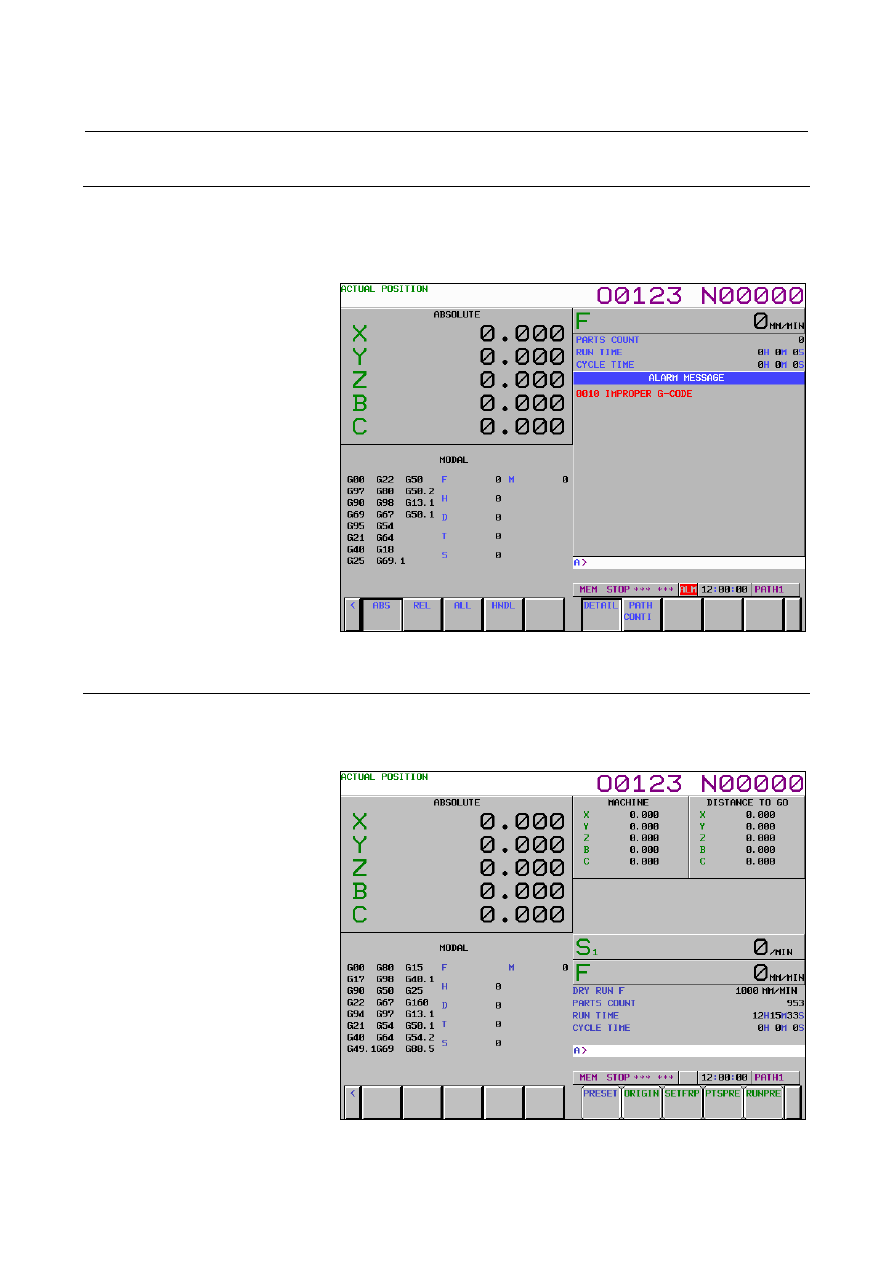
Alarm Display 

 
When a trouble occurs during operation, error code and alarm message 
are displayed on the screen. (See Section III-7.1.) 
See APPENDIX G for the list of error codes and their meanings. 


Fig. 1.7.3 (a)     


1.7.4 

Parts Count Display, Run Time Display 

 
The position display screen displays a run time, cycle time, and parts 
count.  (See Section lll-12.3.3.) 


Fig. 1.7.4 (a)     


B-63944EN/03

 OPERATION 

1.GENERAL


- 997 - 

1.8 

ADJUSTMENT OF THE BRIGHTNESS OF THE 
MONOCHROME LCD 


The brightness of the monochrome LCD can be adjusted.   


 - Procedure 

To adjust the brightness of the monochrome LCD, follow the 
procedure below on the SETTING (HANDY) screen. 

Press function key 

Press soft key [SETING] to display the SETTING DATA screen.   
Press 

  multiple times until the SETTING (HANDY) 

screen appears.   


Fig. 1.8 (a)    Adjustment of the brightness of the SETTING screen   


Move the cursor to the CONTRAST item.   

4  When soft key [(OPRT)] is pressed, soft keys [ON:1] and 

[OFF:0] are displayed.   


Each time soft key [ON:1] is pressed, the brightness of the screen 
is increased. 


Each time soft key [OFF:0] is pressed, the brightness of the 
screen is decreased. 


NOTE 

1  The new brightness of the screen is saved across 

power-off. 

2  This setting item appears only when the 

monochrome LCD is connected.   


2.OPERATIONAL DEVICES

 OPERATION 

B-63944EN/03


- 998 - 

OPERATIONAL DEVICES 

 
As operational devices, setting and display devices attached to the 
CNC, and machine operator's panels are available. 
For machine operator's panels, refer to the relevant manual of the 
machine tool builder. 
 
Chapter 2, "OPERATIONAL DEVICES", consists of the following 
sections: 
 
2.1  SETTING AND DISPLAY UNITS..........................................999 
2.2 OPERATIONAL DEVICES ...................................................1006 
2.3  FUNCTION KEYS AND SOFT KEYS .................................1009 
2.4  EXTERNAL I/O DEVICES....................................................1025 
2.5 POWER ON/OFF....................................................................1027 
 

B-63944EN/03

 OPERATION 

2.OPERATIONAL DEVICES


- 999 - 

2.1 

SETTING AND DISPLAY UNITS 

 
The setting and display units are shown in Subsections 2.1.1 to 2.1.8 
of Part III. 
 
7.2" LCD CNC Display Panel .................................................. III-2.1.1 
8.4" LCD CNC Display Panel .................................................. III-2.1.2 
10.4" LCD CNC Display Panel ................................................ III-2.1.3 
12.1" LCD CNC Display Panel ................................................ III-2.1.4 
15" LCD CNC Display Panel ................................................... III-2.1.5 
Standard MDI Unit (ONG Key) ............................................... III-2.1.6 
Standard MDI Unit (QWERTY Key) ....................................... III-2.1.7 
Small MDI Unit (ONG Key) .................................................... III-2.1.8 
 

2.OPERATIONAL DEVICES

 OPERATION 

B-63944EN/03


- 1000 - 

2.1.1 

7.2" LCD CNC Display Panel 


2.1.2 

8.4" LCD CNC Display Panel 


B-63944EN/03

 OPERATION 

2.OPERATIONAL DEVICES


- 1001 - 

2.1.3 

10.4" LCD CNC Display Panel 


2.1.4 

12.1" LCD CNC Display Panel 


2.OPERATIONAL DEVICES

 OPERATION 

B-63944EN/03


- 1002 - 

2.1.5 

15" LCD CNC Display Panel 


B-63944EN/03

 OPERATION 

2.OPERATIONAL DEVICES


- 1003 - 

2.1.6 

Standard MDI Unit (ONG Key) 


Unit with machining center system 

Reset key

Help key

Address/numeric keys

Edit keys

Cancel (CAN) key

Input key

Shift key

Page change keys
(Page key)

Cursor keys

Function keys

AUX key

Uppercase/lowercase
switch key

CTRL key

ALT key

TAB key


Unit with lathe system 


Reset key 

Help key 

Address/numeric keys 

Edit keys 

Cancel (CAN) key 

Input key 

Shift key 

Page change keys 
(Page key) 

Cursor keys 

Function keys 

AUX key 

Uppercase/lowercase 
switch key 

CTRL key 

ALT key 

TAB key 


Content      ..     128      129      130      131     ..